Copy & Paste - in Windows Recovery Console

How to Copy & Paste in Recovery Console on Windows 7 or Vista

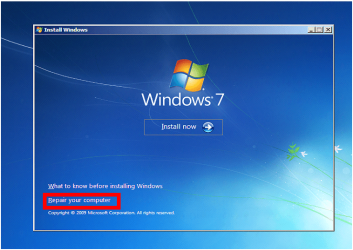
1) Boot from your Windows installation DVD/USB or System Repair Disc.

2) Click Repair my Computer

Capture1.PNG

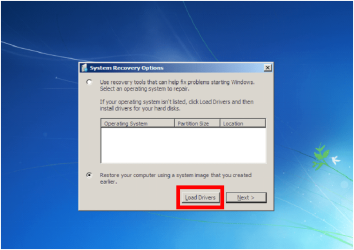
3) Click Load Drivers.
Capture2.PNG
4) Click OK
Capture3.PNG
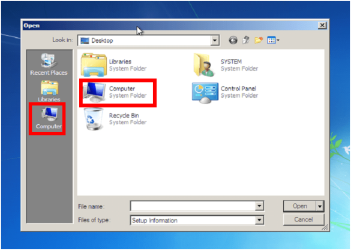
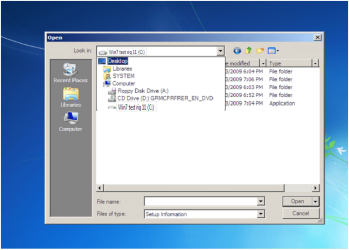
5) Click Computer.
Capture4.PNG
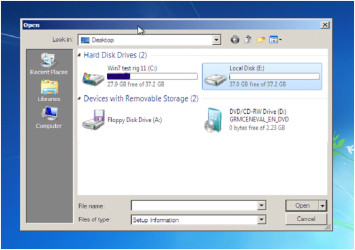
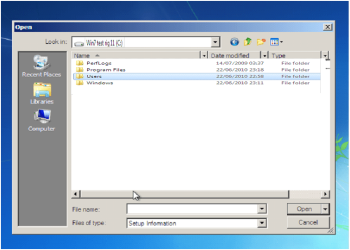
6) Choose the HD to copy from.
Capture5.PNG
7) Choose the Data you want to copy
Capture6.PNG
Capture7.PNG
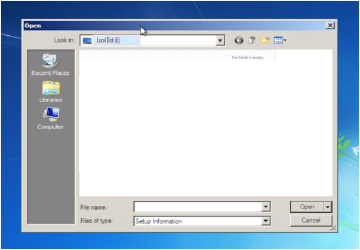
8) Choose the HD to paste to.
Capture8.PNG
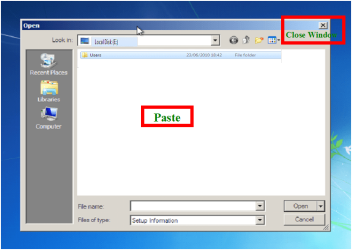
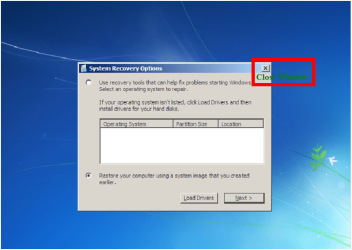
9) Close Window.
Capture9.PNG
10) Click Cancel.
Capture10.PNG
11) Close Window.
Capture11.PNG
12) Continue with Repair.


Note your PC's Hardrive must be readable.


Last edited by a moderator:
Thank You, Greg. I see now.
Rich
 

My Computer My Computer

At a glance

Microsoft Windows 7 Home Premium 64-bit 7601 ...Intel(R) Core(TM) i7-4790K CPU @ 4.00GHzG-Skill 24ooMhz (2x8GB)16.00 GBNVIDIA GeForce GTX 1070
Computer type
PC/Desktop
Computer Manufacturer/Model Number
Custom Built
OS
Microsoft Windows 7 Home Premium 64-bit 7601 Multiprocessor Free Service Pack 1
CPU
Intel(R) Core(TM) i7-4790K CPU @ 4.00GHz
Motherboard
MSI Z97 MPOWER MAX AC (MS-7888)
Memory
G-Skill 24ooMhz (2x8GB)16.00 GB
Graphics Card(s)
NVIDIA GeForce GTX 1070
Sound Card
(1) USB Audio Class 1.0 and 2.0 Device Driver (2) NVIDIA H
Monitor(s) Displays
Acer 28" 4K Monitor
Screen Resolution
2560 x 1440 x 32 bits (4294967296 colors) @ 59 Hz
Hard Drives
(1) Crucial_CT500MX200SSD1 ATA Device (2) Crucial_CT500MX200SSD1 ATA Device (3) Crucial_CT512MX100SSD1 ATA Device (4) PLEXTOR PX-256M5Pro ATA Device (5) Samsung SSD 840 EVO 500GB ATA Device (6) Generic- USB3.0 CRW-CF/MD USB Device (7) Gen
PSU
Corsair RM1000i 1000w PSU
Case
Corsair Graphite Series 780T
Cooling
Swiftech H220 and additional Swiftech 120mm radiator
Keyboard
Logitech G910
Mouse
G602
Internet Speed
150 Mb/ps
Antivirus
Malwarebytes & MSE
Browser
Google Chrome
Other Info
All Liquid cooling radiators are stradled by 120mm fans in a Push/Pull config.
I get an error when I try to paste anything. Any ideas?
 

My Computer My Computer

At a glance

Windows 7 Ultimate x64
OS
Windows 7 Ultimate x64
This can be used to copy to a USB stick too right? Connected to a USB 2 port to assure there are drivers for it.

If that's correct, maybe update the Tutorial to include that information? Maybe also how to do the copy/paste. Don't think all users are familiar with the right-click context menu.
 

My Computer My Computer

At a glance

Windows 7 Pro 32Intel(R) Core(TM) i5 CPU M 540 @ 2.53GHz4,00 GB (Usable 2,98)NVIDIA NVS 5100M
Computer type
Laptop
Computer Manufacturer/Model Number
HP Elitebook 8540p
OS
Windows 7 Pro 32
CPU
Intel(R) Core(TM) i5 CPU M 540 @ 2.53GHz
Motherboard
Hewlett-Packard 1521
Memory
4,00 GB (Usable 2,98)
Graphics Card(s)
NVIDIA NVS 5100M
Sound Card
NVIDIA High Definition Audio
Screen Resolution
1600x900
Hard Drives
INTEL SSDSA2CW120G3
Antivirus
F-Secure Internet Security
Browser
IE, Firefox, Opera
Other Info
Sandboxie,
SRP (Software Restriction Policy),
EMET (Enhanced Mitigation Experience Toolkit),
WFC (Windows Firewall Control by BiniSoft),
Malwarebytes Premium
recovery of windows mail emails

Thank you very much for this detailed tutorial. My computer crashed and I was really worried that I lost all my data till I came across this forum and I have now recovered almost all my data that I thought was lost for ever! You are a life saver!!!:)

I have only one question though. I am however not able to find the folders with my emails. I had emails stored there over the last 4 years and some of them are fairly important ones. Would you be able to tell me how to find the folder with the windows mail (or is it windows live mail?) that I had used in windows 7 instead of the outlook express that I had used in my previous computer.

I know that this thread is a few years old and I am not sure you would see this, but if you do, any advice would be most welcome.
Thank you !!
 

My Computer My Computer

At a glance

windows 7
Computer type
PC/Desktop
OS
windows 7
Where Does Windows Live Mail Store My Mail? | PCWorld

You might want to look over the other preparatory steps for http://www.sevenforums.com/tutorials/219487-clean-reinstall-factory-oem-windows-7-a.html#post1839164 which remember everything that must be saved before the reinstall, based on tens of thousands of installs we've helped with (including the one eager beaver who forgot the company's Quickbooks data in Public Documents!) ;)

Then sticking with those steps closely will assure you get and keep a perfect install for as long as you do.
 
Thanks gregrocker. but I think you misunderstood my question. The copy and paste to recover my data has worked, but I am unable to find the folder with the emails in. After that I will do a full re-install.
 

My Computer My Computer

At a glance

windows 7
Computer type
PC/Desktop
OS
windows 7
My computer crashed, checked hard disk is bad. Replaced a new harddisk, but system recovery options don't show C drive at all. What should I do from steps 6 onwards? what files to be copied from where to where?
fyi - i have to use windows recovery cd to boot my computer. I have windows 7 installation files ( not windows installation dvd or image ) in a dvd. I believe that if I am able to see the c drive then i can copy the windows installation files and install windows 7. But how to make the C drive is shown / available? Please help. Thanks,
 

My Computer My Computer

At a glance

64bit windows 7i7
Computer type
Laptop
Computer Manufacturer/Model Number
hp
OS
64bit windows 7
CPU
i7
Hard Drives
New
You said you replaced the hard drive but now are trying to copy files following this tutorial which is meant to rescue files from an unbootable install. Is that what you're trying to do, copy files from the old failed hard drive to the new one? If so and the old drive doesn't show up then it's likely because it has failed.

Have you run the maker's HD Diagnostic extended CD scan, followed by a full Disk Check from the System Recovery Options Command Line? This is how to confirm that a drive is dead, or see if it can be repaired enough to rescue files.

Then follow these steps to Clean Reinstall Windows 7.
 
Thanks for your reply. I tried all options, every time my old HDD is not found. So I bought a new one.
To answer your question, no. I am not trying to copy anything from my old hdd which is not at all readable. I didn't know that this instructions are for copying from old hdd to new one.

Now I have new HDD and I have all windows installation files in DVD /flash drive, but how to install the same into new HDD? Computer boots only through bootable cd only.
My question: Do I have to use windows installation dvd to install the operating system into my new HDD? If yes, can you let me know the steps?

Please let me know. Thanks
 

My Computer My Computer

At a glance

64bit windows 7i7
Computer type
Laptop
Computer Manufacturer/Model Number
hp
OS
64bit windows 7
CPU
i7
Hard Drives
New
Good to see your piece. Thanks for providing this to forum. I have the situation. You can review my posted thread. My laptop is Lenovo Z580

Win 7: Black screen on boot up, before login screen?


I am looking your approach to backup my files. Here are some questions, I have . I need your guidance.

How do I able to backup OEM Hidden partition using your approach? :geek:

I have three(3) user logins in this laptop such as Admin, Local user1, Local user 2.

What are the additional steps required to preserve the data within these logins/users?

I have installed various tools/software in this laptop.

Will I able to restore (bring back) all installed items (Software/tools/Registry entries etc) during this process?

My HDD capacity is 750 GB. What kind of media to use for backing up my data using your approach?

Will Read/write CD work?

How do I restore back after setting to factory default?

How do I bring back all the windows 7 updates todate?


Thanks for helping.
 

My Computer My Computer

At a glance

Win 7 64 bit, 6.1.7601 Service Pack 1 Build 76011 Processor(s) Installed. [01]: Intel64 Famil...8,056 MBIntel HD 4000
Computer type
Laptop
Computer Manufacturer/Model Number
Lenovo IdeaPad Z580, x64-based PC
OS
Win 7 64 bit, 6.1.7601 Service Pack 1 Build 7601
CPU
1 Processor(s) Installed. [01]: Intel64 Family 6 Model 58 St
Memory
8,056 MB
Graphics Card(s)
Intel HD 4000
Antivirus
Windows Security Essential
Browser
FireFox, Chrome
Thank you

I wanted to thank you for posting this information. I have been fretting for days doing research. I am far from being a computer pro, but I can make my way well enough. I have a Sony Vaio VPCCW21FX laptop. It is running Windows 7 64-Bit Home premium. I installed Windows 10 but there were some software conflicts. One of which was my touchpad (scrolling) stopped working. Before I installed 10 I created a restore point. Anywho, after I discovered the conflicts with no resolutions offered by Sony, I decided to return to Window 7. I went through the start menu on W10 and went through the steps to return. I have not been able to access anything since. I pulled the hard drive and plugged it into my desktop. It seems fine. Unfortunately I saved all of my pictures and a lot of my music on my desktop so they are not on the HDD. Otherwise I wouldn't be freaking out. I don’t know much about computers. Only what I have gleaned from the internet. Which as you know can be dangerous. lol

F10 Takes me to recovery tools. It tells me that windows cannot automatically repair this computer and asks whether I want to or not to send the info to them. I did so.

On both it sent me then to System recovery tools. I tried Start up repair, System restore, System image recovery, Windows memory diagnostics, all to no avail. I went into command prompt but I don't know enough commands to really get anywhere. It will boot up so I ran a CPU and HDD test. There were no errors found on either. I tried the rescue data option but that is only offering me the option of saving what is on my HDD, which is a moot point as I can do that directly to my desktop.

F8 Took me to Advanced boot options. Which were as follows, Repair, Safemode, safe mode with networking, safe mode with command prompt, enable boot logging, enable low res video, last known good configuration, directory services, debugging mode, disable automatic restart on system failure, disable driver signature enforcement, start windows normally. I tried all three safe mode options. At one point I was able to get to the safe mode login screen. The cursor is flashing in the space to type in the password but then my mouse and keyboard didn't function on that screen. I tried a wireless Tivo dongle with the keyboard remote, Nope. I looked at a plug in keyboard I have for a 400 capacity DVD player, Nope. I tried the USB keyboard from my desktop, Nope. I then tried Last known good configuration, Debugging mode and start windows normally. None of which worked. The other options I am not familiar with so I didn’t want to mess anything up by trying them and doing something wrong.

I created a repair disc from my desktop and when I used it IT WORKED!!!

I just went through your steps one by one and have found and copied my precious pictures. Thank you, thank you, thank you!!! :D
 

My Computer My Computer

At a glance

Windows 7 64-bit Home Premium on bothIntel(R) Core (TM) i3 and the Sony is an i56 GB and 8 GB
Computer type
PC/Desktop
Computer Manufacturer/Model Number
Gateway DX4831 and Sony VPCCW21FX
OS
Windows 7 64-bit Home Premium on both
CPU
Intel(R) Core (TM) i3 and the Sony is an i5
Memory
6 GB and 8 GB
Antivirus
Kaspersky on both
Browser
Google Chrome on both
Windows Recovery Mode

As I am making copies while in Windows Recovery (which seems to be working fine except I am experiencing a bit of a stall waiting for My Documents to paste) I am noticing that my original main drive (C:) is now listed as (D:) and the Installation DVD in the optical drive is listed as (C:).

Could this have anything to do with why my computer won't start on it's own?

My hard drive passed the SeaTools Long Test and the files I am copying appear to be in good shape.

Just a thought before I do a complete reinstallation of Windows...
 

My Computer My Computer

At a glance

Microsoft Windows 7 Home Premium 64-bit 7601 ...Intel(R) Core(TM)2 Quad CPU Q8400 @ 2.66GHz8.00 GBNVIDIA GeForce GT 330M
Computer type
PC/Desktop
Computer Manufacturer/Model Number
Sony
OS
Microsoft Windows 7 Home Premium 64-bit 7601 Multiprocessor Free Service Pack 1
CPU
Intel(R) Core(TM)2 Quad CPU Q8400 @ 2.66GHz
Motherboard
Sony Corporation VAIO
Memory
8.00 GB
Graphics Card(s)
NVIDIA GeForce GT 330M
Sound Card
(1) Bluetooth Hands-free Audio (2) Realtek High Definition
Monitor(s) Displays
Digital Flat Panel (1920X1080 60Hz)
Screen Resolution
1920 x 1080 x 32 bits (4294967296 colors) @ 59 Hz
Hard Drives
ST31000528AS ATA Device
Keyboard
MS USB Dual Receiver Wireless Keyboard and Mouse
Mouse
MS USB Dual Receiver Wireless Keyboard and Mouse
Antivirus
ms security essentials, mbam 3.0 premium
Browser
Chrome
Back
Top