
Windows 7 Forums


Windows 7: Outlook 2010 - Import Windows Contacts


Outlook 2010 - Import Windows Contacts

How to Import Windows Contacts into Outlook 2010
Published 26 Jun 2010
Published by

Featured Tutorial

Dual Boot - Windows 7 and Linux

How to Correctly Setup a Dual Boot with Windows 7 and LinuxMint13

Online Scanners - Scan Suspicious Files on your PC

How to Scan Suspicious Files using Online Scanners

Clean Up Factory Bloatware


Make Windows 7 bootable after motherboard swap

Paragon P2P Adjust OS - Make Windows 7 bootable after motherboard swap

Screen Capture and Video Editing in High Quality


How to Import Windows Contacts into Outlook 2010

In order to add your current contacts from Windows 7 into your Outlook 2010 program you will need to perform the following steps:


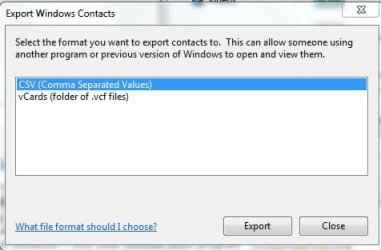
1.) Enter you Contact Folder and Select Export. Select CVS (Comma Separated Values). Store the file on your Desktop or somewhere easy to locate.
Outlook 2010 - Import Windows Contacts-outlook-2010-1.jpg
2.) Open Outlook 2010 and head to your Contacts section.

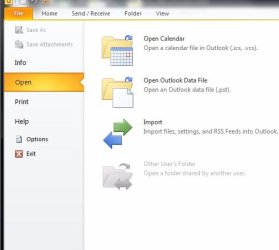
3.) Click File > Select Open > Select Import.
Outlook 2010 - Import Windows Contacts-outlook-2010-2.jpg
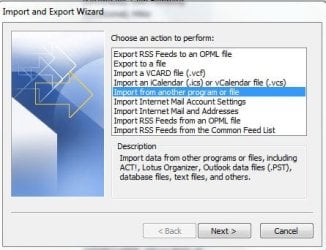
4.) Choose the fifth option down entitled "Import from another program or file"
and Select Next.
Outlook 2010 - Import Windows Contacts-outlook-2010-3.jpg
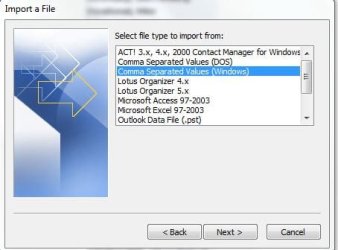
5.) Choose the third option on the list entitled " Comma Separated Values (Windows) and Select Next.
Outlook 2010 - Import Windows Contacts-outlook-2010-4.jpg
6.) Now locate the file you saved with your Contacts in it by using Browse option on the top-right. Select Next.
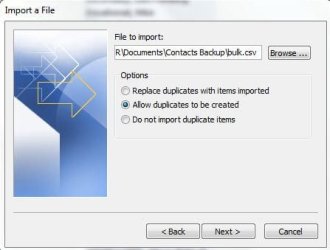
Outlook 2010 - Import Windows Contacts-outlook-2010-5.jpg
7.) It will ask you to choose the destination folder. Select Contacts (which on my PC was the second on the list) and Select Next.
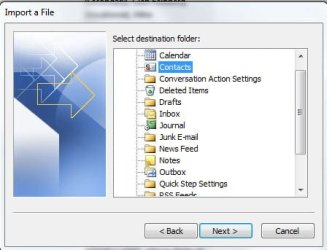
Outlook 2010 - Import Windows Contacts-outlook-2010-6.jpg
You are now done! This can obviously be used to import all sort of things such as Calendars, Tasks, etc.

If you found this helpful, please provide me with Positive Reputation on the top-right of this Tutorial. Thank you! - BOM


Need more help? Try searching our extensive help and support site.
Loading
23 Aug 2011   #1
BrianR


I am using windows 7 home and succesfully imported my contacts into the contacts folder in the users folder. My contacts appear with first name followed by family name and I cannot find any option to reverse this order ie surname first. Can anyone advise? thanks

My System SpecsSystem Spec

23 Aug 2011   #2
Golden


G'day Brian - welcome to SevenForums.

With Outlook open, click on File, then Options. On the panel that opens, click Contacts, and then change the selection as shown in the attached image.

Regards,
Golden
Attached Thumbnails
Outlook 2010 - Import Windows Contacts-capture.png  
My System SpecsSystem Spec
21 Mar 2012   #3
BugOutMachine


Thanks for adding information Golden!
My System SpecsSystem Spec
.


Comment

 Outlook 2010 - Import Windows Contacts problems?


Tutorial Tools


Similar help and support threads for: Outlook 2010 - Import Windows Contacts
Windows 7 Tutorial Category
Outlook Express to Live Mail import problem: split contacts Browsers & Mail
Import contacts into Windows Contacts folder Microsoft Office
Outlook 2010 import Browsers & Mail
Import Windows Contacts to Outlook Browsers & Mail
import contacts in outlook 07 Microsoft Office


All times are GMT -5. The time now is 03:34 AM.


Windows 7 Forums is an independent web site and has not been authorized,
sponsored, or otherwise approved by Microsoft Corporation.
"Windows 7" and related materials are trademarks of Microsoft Corp.
© Designer Media Ltd