
How to Open a Command Prompt in Windows 7
Information
This will show you how to open only a non-elevated a command prompt without administrator rights instead of an elevated command prompt with administrator rights (Run as administrator) in Windows 7.
Warning
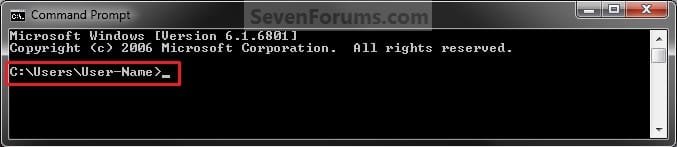
EXAMPLE: Command Prompt
NOTE: Notice how the command prompt opens to C:\Users\(user name) and not C:\Windows\System32 as a elevated command prompt with administrator rights.
OPTION ONE
Open a Command Prompt from Start Menu
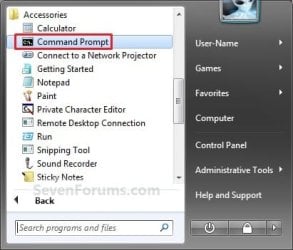
1. Open the Start Menu, click on All Programs, Accessories, and on Command Prompt. (aee screenshot below)
OR
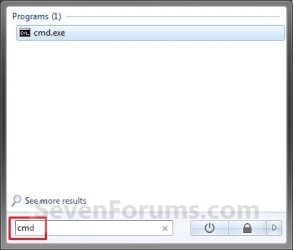
2. Open the Start Menu, type cmd in the search box and press Enter. (see screenshot below)
OPTION TWO
Open a Command Prompt from the Context Menu of a Folder or Drive
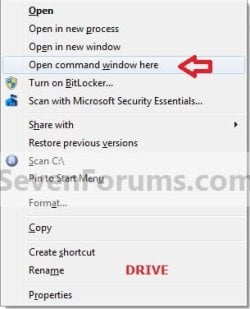
1. Press and hold Shift, then right click on a folder or drive that you want to open the command prompt at that location for, and click on Open Command Prompt Here.

OPTION THREE
Open a Command Prompt from Task Manager
1. Open Task Manager (CTRL+SHIFT+ESC).
2. Click on File (menu bar), then press and hold the CTRL key while clicking on New Task (Run...). (see screenshot below)

That's it,
Shawn
Related Tutorials
- How to Open a Command Prompt at Startup in Windows 7
- How to Open a Elevated Command Prompt in Windows 7
- How to Enable Copy to Clipboard from the Windows 7 Command Prompt
- How to Use "Open Command Window Here" in Windows 7
- How to Add or Remove "Open Command Window Here" from the Context Menu
- Add or Remove "Open Command Window Here as Administrator" to the Context Menu
- How to Personalize the Command Prompt Window
- How to Enable or Disable the Command Prompt in Vista and Windows 7
- How to Turn On or Off Command Prompt QuickEdit Mode in Windows
Last edited:


