
An MTU limit that is set too high can cause fragmented packets and packet loss on your connection. This tutorial will explain how to test if your MTU limit is sending fragmented packets and will explain how to find what value you should be using.
1) Open an elevated command prompt and type:
netsh interface ipv4 show subinterfaces
and hit Enter.
You should get a list of all your network adapters installed on your PC. The MTU value is listed on the left.
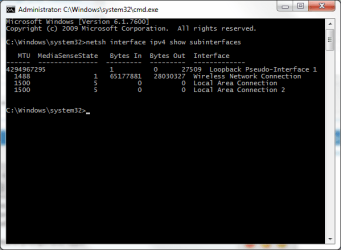
All PPP connections (Point-to-Point Protocol) have a default MTU size of 1500 bytes and VPN connections have a defualt size of 1400. 28 bytes of this number is reserved for IP/ICMP overhead, so the effective MTU size here is 1472 (1500-28).
To work out if this MTU is too high for your connection, you need to ping with this amount of bytes. The best way to start is start with the default MTU and work your way down.
2) In an elevated command prompt, type the following to ping with an MTU size
ping google.com -f -l 1472
The -f marks packets that should not be fragmented in the ping. -l 1472 sets the size of the packet.
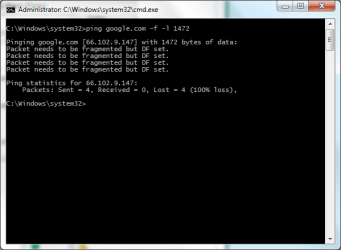
If you get successful replies, then your current MTU is fine for your connection. If you receive error messages like in the above image, then your packets are getting fragmented.
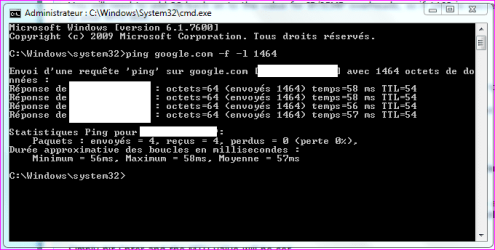
Keep trying to ping until you get 4 successful replies. Keep decreasing the MTU by 10, so if 1472 fails, try 1462.
You shouldn't go below 1400.
When you find a value that is successful, start to increase that value by 1, so if 1462 is successful, for example, try again with 1463 etc until you get errors again.
3) When you find a successful value, you can then set a new MTU limit with this value.
You will need to add 28 back on to the value for IP/ICMP overheads, so if 1462 is successful, then 1490 is your MTU limit.
To set your new limit, in an elevated command prompt use the following command
For a wired connection use:
netsh interface ipv4 set subinterface "Local Area Connection" mtu=1490 store=persistent
(You can change the interface name to whatever you're using. If you're connected via "Local Area Connection 2" then use this instead and so on)
For a wireless connection use:
netsh interface ipv4 set subinterface "Wireless Network Connection" mtu=1490 store=persistent
Change the MTU value to whatever value you found yourself. Remember you need to add 28 on to the value you were using in your pings. So if you were using a value of 1460 to ping, add 28 on, and the MTU value to set in the above commands will be 1488.
Simply hit Enter and the MTU value will be set.
Restart your PC for the changes to be effective.
If your router also has an MTU value that can be set, such as Netgear routers can have an MTU value set in the WAN settings, then you can add your value here as well.
I've done these steps myself, and it did infact help connections in some online games where I was getting packet loss. After doing these, I now get 0% packet loss. Web browsing is also a lot smoother on my wireless network with this tweak.
1) Open an elevated command prompt and type:
netsh interface ipv4 show subinterfaces
and hit Enter.
You should get a list of all your network adapters installed on your PC. The MTU value is listed on the left.
All PPP connections (Point-to-Point Protocol) have a default MTU size of 1500 bytes and VPN connections have a defualt size of 1400. 28 bytes of this number is reserved for IP/ICMP overhead, so the effective MTU size here is 1472 (1500-28).
To work out if this MTU is too high for your connection, you need to ping with this amount of bytes. The best way to start is start with the default MTU and work your way down.
2) In an elevated command prompt, type the following to ping with an MTU size
ping google.com -f -l 1472
The -f marks packets that should not be fragmented in the ping. -l 1472 sets the size of the packet.
If you get successful replies, then your current MTU is fine for your connection. If you receive error messages like in the above image, then your packets are getting fragmented.
Keep trying to ping until you get 4 successful replies. Keep decreasing the MTU by 10, so if 1472 fails, try 1462.
You shouldn't go below 1400.
When you find a value that is successful, start to increase that value by 1, so if 1462 is successful, for example, try again with 1463 etc until you get errors again.
3) When you find a successful value, you can then set a new MTU limit with this value.
You will need to add 28 back on to the value for IP/ICMP overheads, so if 1462 is successful, then 1490 is your MTU limit.
To set your new limit, in an elevated command prompt use the following command
For a wired connection use:
netsh interface ipv4 set subinterface "Local Area Connection" mtu=1490 store=persistent
(You can change the interface name to whatever you're using. If you're connected via "Local Area Connection 2" then use this instead and so on)
For a wireless connection use:
netsh interface ipv4 set subinterface "Wireless Network Connection" mtu=1490 store=persistent
Change the MTU value to whatever value you found yourself. Remember you need to add 28 on to the value you were using in your pings. So if you were using a value of 1460 to ping, add 28 on, and the MTU value to set in the above commands will be 1488.
Simply hit Enter and the MTU value will be set.
Restart your PC for the changes to be effective.
If your router also has an MTU value that can be set, such as Netgear routers can have an MTU value set in the WAN settings, then you can add your value here as well.
I've done these steps myself, and it did infact help connections in some online games where I was getting packet loss. After doing these, I now get 0% packet loss. Web browsing is also a lot smoother on my wireless network with this tweak.
Last edited:



 +Rep
+Rep
