
How to Create a Task that will Shut Down the PC Automatically
This will show a very easy way to create a task in the Task Scheduler that will shut down the PC whenever you like. This will work for Windows 7 and Windows Vista.
Let's get started!
1) In the Windows start menu search box type "Task Scheduler" (without the quotes) right click the entry and select "Run as Administrator" then enter your user credentials for the UAC prompt and click "Yes" to open the Task Scheduler.
click an image to enlarge
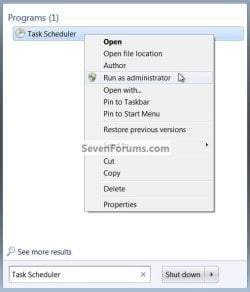
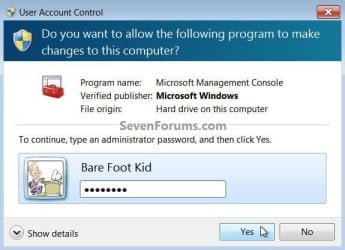
2) In the left pane of Task Scheduler, click on Task Scheduler Library, then in the "Actions" menu in the right pane click on Create Task.
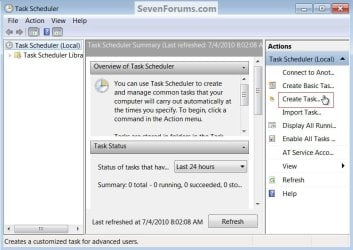
3) In the Create Task window under the General tab, set a name and description for the task then dot "Run whether user is logged on or not" then put a check/tick at "Run with highest privileges", be sure to set the "Configure for:" for your flavor of Windows, then continue on to #4 below.
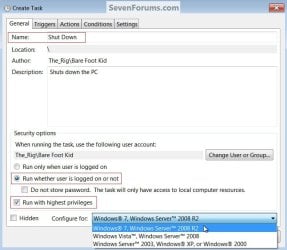
4) Now at the Actions tab at the lower left click "New", in the "New Action" dialog box leave "Action" set at "Start a program" at "Program/script:" type shutdown.exe then at "Add arguments" type /s /f (take note of the space between the /s and /f) then click OK.
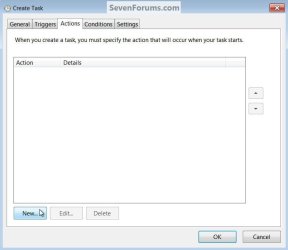

5) Now at the Triggers tab at the lower left click "New" in the "New Trigger" dialog box set the parameters that you want for the task, as everyone's needs will be different, I just highlighted a few of the ones that need to be set to give some ideas.
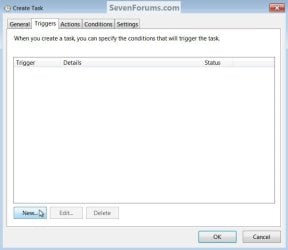
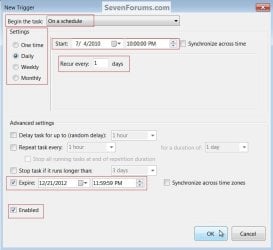
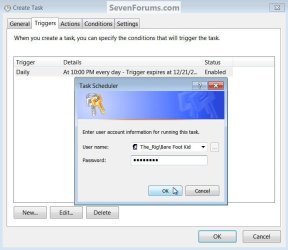
6) After you have the Triggers set click "OK", you will then be prompted to enter your user credentials one last time and then click "OK" to finish creating the task. That's it the task has been created, at "File" click "Exit" to close the Task Scheduler.

Note
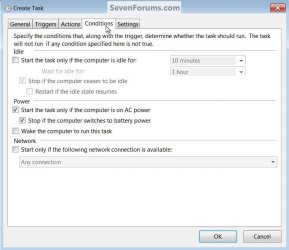
Be sure to have a look at the "Conditions" tab if you need to add any parameters that must be met before the task is able to run.
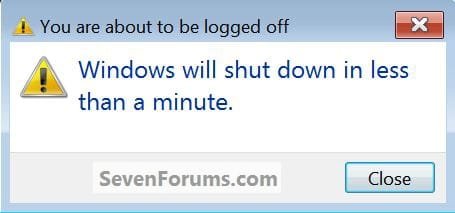
Should the PC be in use at the scheduled shutdown time you will get a dialog box stating that you are about to be logged off.
Enjoy!

Related Tutorials
- http://www.sevenforums.com/tutorials/61294-shut-down-computer-shortcut-create.html
- http://www.sevenforums.com/tutorials/717-shut-down-speed-up.html
- http://www.sevenforums.com/tutorials/67503-task-create-run-program-startup-log.html
- http://www.sevenforums.com/tutorials/12444-task-scheduler-create-new-task.html
- http://www.sevenforums.com/tutorials/76344-task-scheduler-put-computer-into-standby-mode.html
- How to Create a Task to Wake up the Computer to Run in Vista and Windows 7
- How to Display a Message Reminder in Windows with Task Scheduler
Attachments
Last edited by a moderator:


