| | Welcome to Windows 7 Forums. Our forum is dedicated to helping you find solutions with any problems, errors or issues you are experiencing with Windows 7. The Windows 7 forum also covers news and updates and has an extensive Windows 7 tutorial section that covers a wide range of tips and tricks. | Windows 7 - Open with - Clean Up and Remove Programs
Open with - Clean Up and Remove Programs How to Clean Up and Remove Programs from the "Open with" Context Menu
Published by Brink
07-07-2010
| Open with - Clean Up and Remove Programs How to Clean Up and Remove Programs from the "Open with" Context Menu  Information This will show you how to enable and disable programs that are listed in the Open with right click context menu in Windows 7 and Vista.
If you disable a program, it will be removed from the Open with context menu.
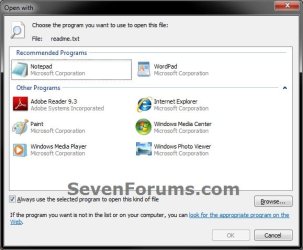
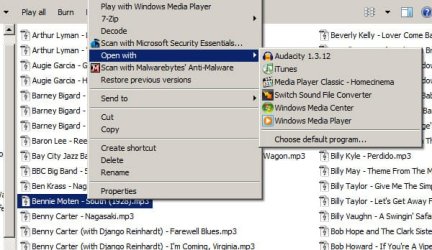
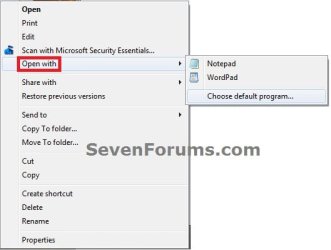
If you enable or re-enable a program, it will be added back to the Open with context menu. EXAMPLE: Open with NOTE: This is when you right click on a file and select Open with (left screenshot), or select Open with and click on Choose default program (right screenshot).   Here's How:1. If you have not already, you will need to download, extract all files, and run the free OpenWithView program. NOTE: OpenWithView is a standalone exe program, so it does not install on your computer. You would just run it instead. 2. To Disable and Remove a Program from "Open with" Context MenuA) In OpenWithView, select and right click on one or more listed Application Name (program) that you want to remove from "Open with". NOTE: You can select more than one Application Name by pressing and holding the CTRL key while selecting the programs, then release the CTRL key when ready to right click on one of the highlighted (selected) programs.
B) Click on Disable Selected Items. NOTE: You will notice that under the Disabled column, it will now change to Yes to confirm that it has been disabled. 3. To Enable and Add Back a Disabled Program to "Open with" Context MenuA) In OpenWithView, select and right click on one or more listed Application Name (program) that you want to re-enable and add back to "Open with". NOTE: You can select more than one Application Name by pressing and holding the CTRL key while selecting the programs, then release the CTRL key when ready to right click on one of the highlighted (selected) programs.
B) Click on Enable Selected Items. NOTE: You will notice that under the Disabled column, it will now change to No to confirm that it has been enabled again. 4. When finished, you can close OpenWithView. That's it,
Shawn |  Published by | | Administrator Join Date: Oct 2008 Location: Texas Posts: 34,824 | |
 Tutorial Tools | | | | | | | | | |
07-07-2010
|
#1 | | Windows 7 Ultimate, Ubuntu 10.04 LTS - the Lucid Lynx |
Good Tutorial .. Thanks Shawn !!
| My System Specs | | System Manufacturer/Model Number Custom Build OS Windows 7 Ultimate, Ubuntu 10.04 LTS - the Lucid Lynx Motherboard Asus A8N-VM Memory 2 GB Graphics Card Nvidia GeForce 6150 Sound Card Sound Blaster Audigy 24-Bit Monitor(s) Displays Samsung SyncMaster 2253LW 21.6" Widescreen LCD Monitor Hard Drives 320 GB - Internal
1 TB WD External |
07-07-2010
|
#3 | | Windows 7 Ultimate x64 SP1 |
You're most welcome guys. Thank you. | My System Specs | | System Manufacturer/Model Number Self built custom OS Windows 7 Ultimate x64 SP1 CPU Intel i7-980X 3.3 Ghz (3.48 Ghz OC'd) Motherboard ASUS P6X58D Premium Memory 12 GB (2GBx6) DDR3 PC3-16000 2000 MHz Kingston HyperX Graphics Card Sapphire HD5870 Eyefinity 6 2GB Sound Card Realtek HD Audio ALC889 Integrated Chip Monitor(s) Displays 3x 27" Asus VE278Q Screen Resolution 1920x1080 Keyboard Logitech Cordless Desktop MX 5500 Revolution Mouse Logitech Cordless Desktop MX 5500 Revolution PSU OCZ Series Gold OCZZ1000M 1000W Case Corsair Obsidian 800D Cooling Thermalright Ultra 120 Extreme Copper CPU heat sink w/120 MM Hard Drives 160GB OCZ RevoDrive X2
** 2 x 1TB Samsung HDD HD154UI SATA Internet Speed 50 Mb/s Download and 2 Mb/s Upload Other Info Microsoft LifeCam Cinema
** Lite-On iHBS212 12x BD Writer
** Samsung CLX-3175FW Printer
** Netgear WNDR3800 Router
** Motorola SBG6580 Cable Modem
** 2x APC Back-UPS XS 1500 |
08-31-2010
|
#4 | | Windows 7 SP1, Home Premium, 64-bit |
Shawn:
I'm having trouble with this.
I want to control what is shown in the "open with" menu when I right click an mp3, a WAV, or a JPG--and possibly other file types.
I have used Open With View.
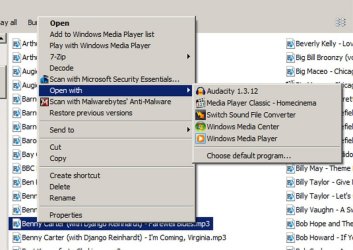
Below are 2 pictures. The first shows the choices I am offered under "open with" when I right click an mp3. Notice there are 6 choices. I want only 2: Audacity and Media Player Classic. I don't want to see the other 4.
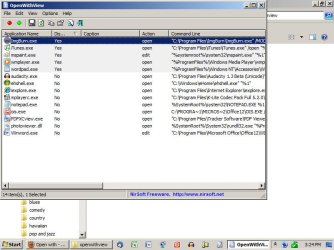
The second picture shows what I see in the Open With View program. Note that I-tunes is supposedly disabled. Yet it still shows, as seen in the first picture. Same situation with Windows Media Player--it's disabled, but is still shown on the "open with" context menu.
The other apps I want to remove from the list (Switch and Windows Media Center) don't even appear in the list of applications shown in the Open With View menu.
So, I am obviously not understanding something. How do I remove those 4 unwanted items?
Thanks for any help. | My System Specs | | System Manufacturer/Model Number Ignatz Special; 4 speed manual gearbox; factory air conditioning; one of one OS Windows 7 SP1, Home Premium, 64-bit CPU Intel Sandy Bridge i5-2500, not overclocked Motherboard Gigabyte H67A-UD3H-B3, full ATX Memory 4 GB Crucial DDR3-1333 Graphics Card none; graphics are integrated on CPU Sound Card onboard: Realtek ALC892; external: USB Behringer UF0-202 Monitor(s) Displays NEC 90GX2-BK 19" LCD Screen Resolution 800 x 640 Keyboard HP PS 2 Mouse Logitech or Microsoft optical wired; either USB or PS 2 PSU Seasonic SS-560KM, modular Case Compucase LX-6A19, ATX mid-tower Cooling CPU: Scythe Big Shuriken; Case: Scythe Slipstream 800 & 500 Hard Drives System: Intel 320 Series SSD, 80 GB;
Data: Samsung Spinpoint 103SJ, 1 TB;
Backup: WD Caviar Green WD15EADS-00P8B0, 1.5TB Other Info Power consumption of this system, including monitor: 68 watts at idle; 144 watts at full load |
08-31-2010
|
#5 | | Windows 7 Ultimate x64 SP1 |
Hello Ignatzatsonic,
You might also check at the registry location below for each file extenstion to delete the program that you do not want in "Open With" for that file extension. How to Remove Programs from the "Open With" List HKEY_CURRENT_USER\Software\Microsoft\Windows\CurrentVersion\ Explorer\FileExts\.extension\OpenWithList
Hope this helps,
Shawn | My System Specs | | System Manufacturer/Model Number Self built custom OS Windows 7 Ultimate x64 SP1 CPU Intel i7-980X 3.3 Ghz (3.48 Ghz OC'd) Motherboard ASUS P6X58D Premium Memory 12 GB (2GBx6) DDR3 PC3-16000 2000 MHz Kingston HyperX Graphics Card Sapphire HD5870 Eyefinity 6 2GB Sound Card Realtek HD Audio ALC889 Integrated Chip Monitor(s) Displays 3x 27" Asus VE278Q Screen Resolution 1920x1080 Keyboard Logitech Cordless Desktop MX 5500 Revolution Mouse Logitech Cordless Desktop MX 5500 Revolution PSU OCZ Series Gold OCZZ1000M 1000W Case Corsair Obsidian 800D Cooling Thermalright Ultra 120 Extreme Copper CPU heat sink w/120 MM Hard Drives 160GB OCZ RevoDrive X2
** 2 x 1TB Samsung HDD HD154UI SATA Internet Speed 50 Mb/s Download and 2 Mb/s Upload Other Info Microsoft LifeCam Cinema
** Lite-On iHBS212 12x BD Writer
** Samsung CLX-3175FW Printer
** Netgear WNDR3800 Router
** Motorola SBG6580 Cable Modem
** 2x APC Back-UPS XS 1500 |
08-31-2010
|
#6 | | Windows 7 SP1, Home Premium, 64-bit |
Shawn:
Thanks for that. I will check it out and report back if I still fail. | My System Specs | | System Manufacturer/Model Number Ignatz Special; 4 speed manual gearbox; factory air conditioning; one of one OS Windows 7 SP1, Home Premium, 64-bit CPU Intel Sandy Bridge i5-2500, not overclocked Motherboard Gigabyte H67A-UD3H-B3, full ATX Memory 4 GB Crucial DDR3-1333 Graphics Card none; graphics are integrated on CPU Sound Card onboard: Realtek ALC892; external: USB Behringer UF0-202 Monitor(s) Displays NEC 90GX2-BK 19" LCD Screen Resolution 800 x 640 Keyboard HP PS 2 Mouse Logitech or Microsoft optical wired; either USB or PS 2 PSU Seasonic SS-560KM, modular Case Compucase LX-6A19, ATX mid-tower Cooling CPU: Scythe Big Shuriken; Case: Scythe Slipstream 800 & 500 Hard Drives System: Intel 320 Series SSD, 80 GB;
Data: Samsung Spinpoint 103SJ, 1 TB;
Backup: WD Caviar Green WD15EADS-00P8B0, 1.5TB Other Info Power consumption of this system, including monitor: 68 watts at idle; 144 watts at full load |
08-31-2010
|
#7 | | Windows 7 SP1, Home Premium, 64-bit |
Shawn:
No joy.
I went to your link and noticed it did not specify Win 7, so I then entered "Remove Programs from the "Open With" List" under advanced search at the MS Win 7 site.
That lead me here: Remove Right Click File Association
which gives the same location in the registry as you provided--so I guess your link is also valid for Win 7.
However..........
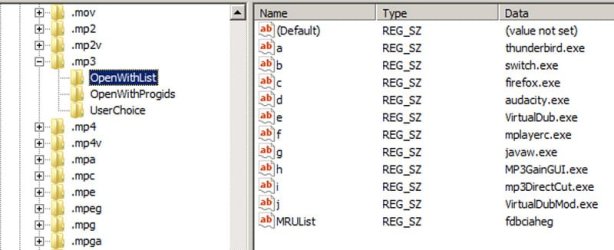
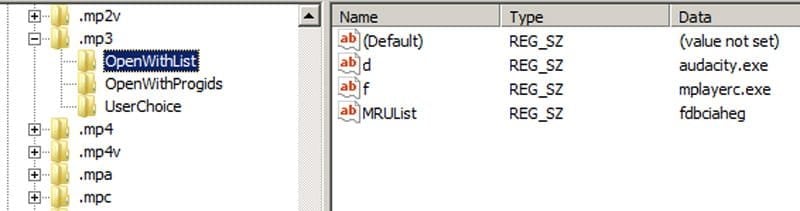
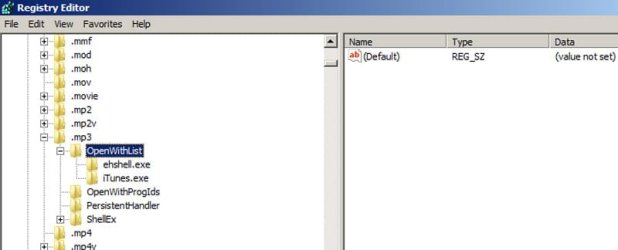
See the before and after pix below of the MP3 registry key at that registry location.
In the before pic you will see the numerous choices shown before I made an edit. Notice that several of the choices shown do NOT actually appear when I right click an mp3.
Also notice that I-Tunes, which does appear when I right click an mp3, does NOT appear on this list in the registry.
I made the edit anyway, removing everything but Audacity, mplayerc (Media Player Classic), default, and MRU list--as shown in the after pic.
The result---no change in the listed items when right clicking an mp3.
Next advice? Other similar locations in the registry? Removing either MRUlist or Default? | My System Specs | | System Manufacturer/Model Number Ignatz Special; 4 speed manual gearbox; factory air conditioning; one of one OS Windows 7 SP1, Home Premium, 64-bit CPU Intel Sandy Bridge i5-2500, not overclocked Motherboard Gigabyte H67A-UD3H-B3, full ATX Memory 4 GB Crucial DDR3-1333 Graphics Card none; graphics are integrated on CPU Sound Card onboard: Realtek ALC892; external: USB Behringer UF0-202 Monitor(s) Displays NEC 90GX2-BK 19" LCD Screen Resolution 800 x 640 Keyboard HP PS 2 Mouse Logitech or Microsoft optical wired; either USB or PS 2 PSU Seasonic SS-560KM, modular Case Compucase LX-6A19, ATX mid-tower Cooling CPU: Scythe Big Shuriken; Case: Scythe Slipstream 800 & 500 Hard Drives System: Intel 320 Series SSD, 80 GB;
Data: Samsung Spinpoint 103SJ, 1 TB;
Backup: WD Caviar Green WD15EADS-00P8B0, 1.5TB Other Info Power consumption of this system, including monitor: 68 watts at idle; 144 watts at full load |
08-31-2010
|
#8 | | Windows 7 SP1, Home Premium, 64-bit |
Hmmm.....curiouser and curiouser.
I then go here: Default File Type Associations - Restore
and restore the mp3 default file associations.
A right click on an mp3 now shows only 4 items:
Media Player Classic
Switch
Windows Media Center
Windows Media Player
Why in the world would Switch and Media Player Classic be mp3 defaults when they are not even part of Windows?
The registry now shows no "OpenWithList" at all at that location--so how do I now remove Switch, Media Center, and Media Player?
At least it got rid of some right click items. | My System Specs | | System Manufacturer/Model Number Ignatz Special; 4 speed manual gearbox; factory air conditioning; one of one OS Windows 7 SP1, Home Premium, 64-bit CPU Intel Sandy Bridge i5-2500, not overclocked Motherboard Gigabyte H67A-UD3H-B3, full ATX Memory 4 GB Crucial DDR3-1333 Graphics Card none; graphics are integrated on CPU Sound Card onboard: Realtek ALC892; external: USB Behringer UF0-202 Monitor(s) Displays NEC 90GX2-BK 19" LCD Screen Resolution 800 x 640 Keyboard HP PS 2 Mouse Logitech or Microsoft optical wired; either USB or PS 2 PSU Seasonic SS-560KM, modular Case Compucase LX-6A19, ATX mid-tower Cooling CPU: Scythe Big Shuriken; Case: Scythe Slipstream 800 & 500 Hard Drives System: Intel 320 Series SSD, 80 GB;
Data: Samsung Spinpoint 103SJ, 1 TB;
Backup: WD Caviar Green WD15EADS-00P8B0, 1.5TB Other Info Power consumption of this system, including monitor: 68 watts at idle; 144 watts at full load |
09-01-2010
|
#9 | | Windows 7 Ultimate x64 SP1 |
You might also check the location below to see what is listed. HKEY_CLASSES_ROOT\.extension\OpenWithList | My System Specs | | System Manufacturer/Model Number Self built custom OS Windows 7 Ultimate x64 SP1 CPU Intel i7-980X 3.3 Ghz (3.48 Ghz OC'd) Motherboard ASUS P6X58D Premium Memory 12 GB (2GBx6) DDR3 PC3-16000 2000 MHz Kingston HyperX Graphics Card Sapphire HD5870 Eyefinity 6 2GB Sound Card Realtek HD Audio ALC889 Integrated Chip Monitor(s) Displays 3x 27" Asus VE278Q Screen Resolution 1920x1080 Keyboard Logitech Cordless Desktop MX 5500 Revolution Mouse Logitech Cordless Desktop MX 5500 Revolution PSU OCZ Series Gold OCZZ1000M 1000W Case Corsair Obsidian 800D Cooling Thermalright Ultra 120 Extreme Copper CPU heat sink w/120 MM Hard Drives 160GB OCZ RevoDrive X2
** 2 x 1TB Samsung HDD HD154UI SATA Internet Speed 50 Mb/s Download and 2 Mb/s Upload Other Info Microsoft LifeCam Cinema
** Lite-On iHBS212 12x BD Writer
** Samsung CLX-3175FW Printer
** Netgear WNDR3800 Router
** Motorola SBG6580 Cable Modem
** 2x APC Back-UPS XS 1500 Open with - Clean Up and Remove Programs problems? All times are GMT -5. The time now is 09:51 PM. |  |