Windows 7 Forums


Windows 7: Check Disk (chkdsk) - Read Event Viewer Log

11 Jul 2010   #49
Brink

 
Check Disk (chkdsk) - Read Event Viewer Log

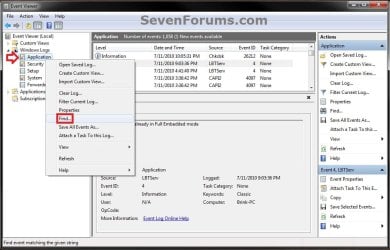
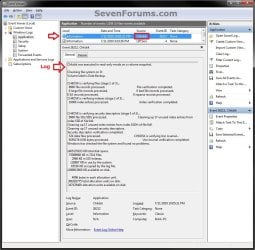
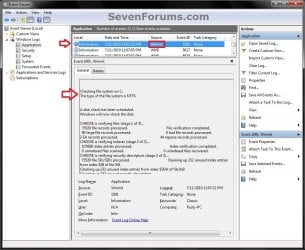
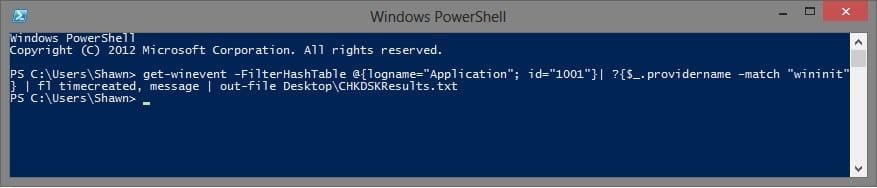
How to Read the Event Viewer Log for Check Disk (chkdsk) in Vista, Windows 7, and Windows 8

...


Last edited by Brink; 1 Week Ago at 01:01 PM..
My System SpecsSystem Spec

04 Dec 2012   #50
Brink


Quote   Quote: Originally Posted by sle3pingz View Post
yes i mean my HDD, safe right?

if clean or not, i scan with KIS 2013 Licensed can't?
Yes, you sure could.

Last edited by Brink; 04 Jan 2013 at 10:59 AM.. Reason: added quote
My System SpecsSystem Spec

04 Jan 2013   #51
itsmeena


Perfect tutorial thanks man

My System SpecsSystem Spec
04 Jan 2013   #52
Brink


Glad it could help itsmeena, and welcome to Seven Forums.
My System SpecsSystem Spec
09 May 2013   #53
Camillia


Thanks loads for your concise and clear tutorial. After trying to follow some guidance found on other websites and failing miserably, I found your easy steps and images. I have learned a lot just trying to make this post: how to download my system specs (the easy way, again, thanks to you and the person who developed the tool,and how to post an image from disk management which I tried to do right and will hopefully see here.

I have a win8 OS, I hope it is ok to post. I did the Chkdisk /f/r because of a couple critical errors I found on the event viewer one night which seemed to disappear the following morning. I could not find them event viewer. One I had saved to a file because I wanted to share it with Norton support. But it is no longer on the event viewer.

Searching the web I discovered that missing logs on the event viewer, could be a sign of HDD trouble, or malware. Doing a check disk was advised. I decided to do it because of the missing logs and other errors on the event viewer (boot degradation, and other stuff) which I can not pretend to understand. Funny, what prompts a novice to dive in over their heads. Otherwise my notebook runs fine, I think.

A question about the Disk Check results, the scan discovered and cleaned 1068 unused index entries. Because of the high number, should I be concerned? No bad sectors or bad files. Thanks for your work and help.
My System SpecsSystem Spec
.


09 May 2013   #54
Brink


Hello Camillia, and welcome to Seven Forums.

I don't see any screenshots in your post.

If everything is running fine now, then I wouldn't be to concerned about it.

Logs could have also been deleted if you ran Disk Cleanup or some other 3rd party disk cleaning program (ex: CCleaner).
My System SpecsSystem Spec
09 May 2013   #55
Camillia


Sorry, to make a second post just to include my attachments. I uploaded them for my previous (above) but they sat too long, over thirty minutes before clean up. This is what I believe happened after seeing the attachments did not work and rereading the tutorial how to post screenshots and files Here, are the attachments. Sorry, to disrupt the flow of the thread.
Check Disk (chkdsk) - Read Event Viewer Log-after-dskck.png

Check Disk Brink's Tutorial.txt
My System SpecsSystem Spec
09 May 2013   #56
Brink


From your chkdsk log, you are fine since it had 0 KB in bad sectors.
My System SpecsSystem Spec
09 May 2013   #57
Camillia


Hi Brink, Thank you for responding to my first post with the non working attachments. I was working on my second post (with working attachments) when you submitted your quick (impressive) reply.

I did not use a third party cleaner before loosing the files. But I did create and save two files from the event viewer without using any tool, like notepad. The two files are in my documents folder and they work like an actual event viewer. I can search other logs from the saved files. Perhaps these files, which I will delete, caused the missing logs from the event viewer program itself? I don't exactly remember how I created the files. I used the margin on the right side of the event viewer and pressed save selected events and copy. Maybe something else. Somehow, I managed to make a file but I do not believe the two I made are proper files because they appear as an active event viewer. I do not know how to relate this in tech terms, but maybe you can decipher.

Anyhow since you did not say that the 1068 unused index entries indicates a problem, I will not worry too much. It is exciting to learn about the hardware and OS. I will continue reading threads and trying things out. Let me know if what I shared about my event viewer files sheds any light on the missing event logs (one missing log is in my created file). Thank you for your tutorial, insight, and welcoming me to the forum.
My System SpecsSystem Spec
09 May 2013   #58
Brink


You're welcome Camillia.

The unused index entries are nothing to worry about. It's just part of it's maintenance to clean them up.
My System SpecsSystem Spec
Comment

 Check Disk (chkdsk) - Read Event Viewer Log problems?


Tutorial Tools


Similar help and support threads for: Check Disk (chkdsk) - Read Event Viewer Log
Windows 7 Tutorial Category
"Disk error" invisible except to event viewer, when imaging hard drive Hardware & Devices
Event viewer information survives low level format! Spooky - read on! Backup and Restore
WHEA-Logger event 18/19 errors in Event Viewer (W7 Home Premium) Hardware & Devices
Wake Source - Read Event Viewer Log Tutorials
Memory Diagnostics Tool - Read Event Viewer Log Tutorials


All times are GMT -5. The time now is 06:54 PM.


Windows 7 Forums is an independent web site and has not been authorized,
sponsored, or otherwise approved by Microsoft Corporation.
"Windows 7" and related materials are trademarks of Microsoft Corp.
© Designer Media Ltd