Screenshots and Files - Upload and Post in Seven Forums

How to Upload and Post a Screenshot and File in Seven Forums


This tutorial will show you how to upload and attach a screenshot, image, or a file in your post here at Seven Forums.

You will need to turn off enhanced attachment uploading at the bottom of your account's Settings > General Settings page, and Save changes before having the options displayed in this tutorial.
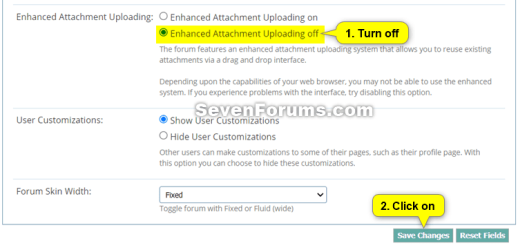
enhanced_attachment_uploading.png

If you are intending to upload large log or diagnostic files then please upload them to a reputable file sharing service such as OneDrive, Google Drive, Dropbox or Amazon Cloud Drive (US) (UK) and post a share link rather then uploading to the forum


You can only upload the file types below up to the size limit per single file.


File TypeMax File Size
7z4.00 MB
bat600.0 KB
docx2.00 MB
gif1.00 MB
ico1.00 MB
jpeg2.00 MB
jpg2.00 MB
log2.00 MB
pdf2.00 MB
png2.00 MB
psd2.00 MB
ps11.00 MB
rar4.00 MB
reg2.00 MB
txt2.00 MB
vbs2.00 MB
wav1.00 MB
xlsx1.00 MB
zip4.00 MB


Contents

  • Option One: To Insert a File or Image into a Post
  • Option Two: To Upload and Insert a File or Image into a "Go Advanced" Post


OPTION ONE

To Insert a File or Image into a Post


If you wanted to create a screenshot to upload, you can create one with Paint (mspaint.exe) or Snipping Tool to upload.


1 While editing your post, place the cursor where you would like to insert the file or image at, and click/tap on the image icon on the toolbar. (see screenshot below)
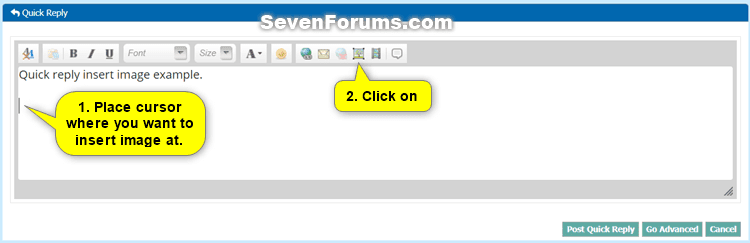
Quick_Reply-1.png

2 Do step 3 (computer) or step 4 (URL) below from where the image you want to upload is located.


3 To Insert File or Image from your Computer

A) Click/tap on the From Computer tab, and click/tap on the Choose Files button. (see screenshot below)
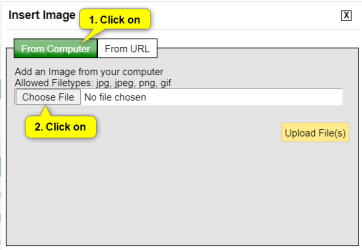
Quick_Reply-2.png

B) Navigate to and select one or more (limit 5 at once) file(s) and/or image(s) you want to insert into your post, and click/tap on the Open button. (see screenshot below)
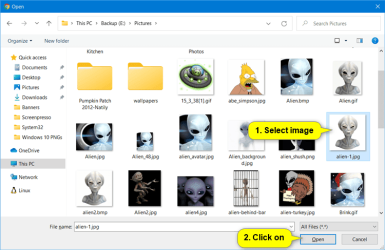
Quick_Reply-3.png

C) Click/tap on the Upload File(s) button, and go to step 5 below. (see screenshot below)
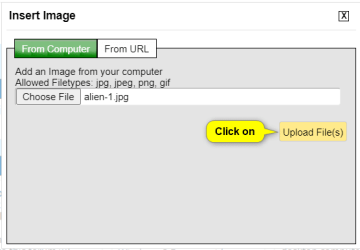
Quick_Reply-4.png


4 To Insert Image from URL

A) Click/tap on the From URL tab, and enter the URL address of the image. (see screenshot below)

B) Check the Retrieve remote file and reference locally box, click/tap on OK, and go to step 5 below. (see screenshot below)
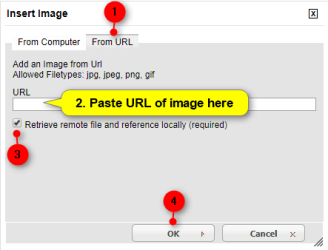
Quick_Reply-5.png


5 Your file(s) and/or image(s) will now be uploaded and inserted into your post. (see screenshot below)

If you like, you could double click/tap on an inserted image to adjust the Image Settings for it below. When finished, click/tap on OK to apply.
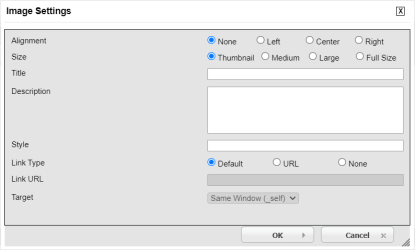
Quick_Reply-7.png

Quick_Reply-6.png

6 When finished with your post, click/tap on either the Post Quick Reply or Submit Reply button to post it. (see screenshot above)


OPTION TWO

To Upload and Insert a File or Image into a "Go Advanced" Post


If you wanted to create a screenshot to upload, you can create one with direct screenshot, Paint (mspaint.exe) or Snipping Tool ready to upload.


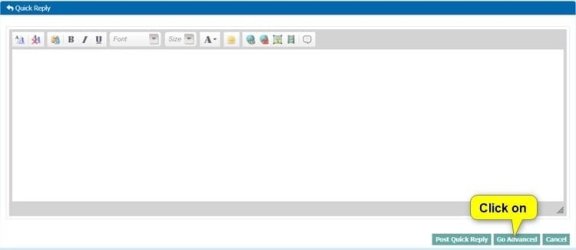
1 While editing your post, click/tap on the Go Advanced button. (see screenshot below)
Go_Advanced-1.jpg

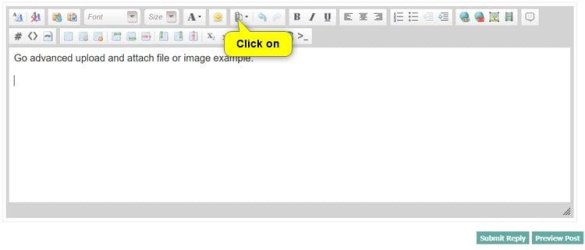
2 Click/tap on the paperclip icon on the toolbar. (see screenshot below)
Go_Advanced-3.jpg

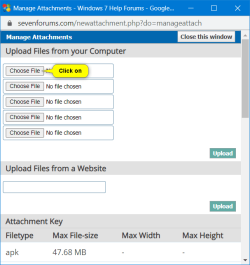
3 Click/tap on an empty Choose File button. (see screenshot below)
Go_Advanced-4.png

4 Navigate to and select the file or image you want to upload, and click/tap on the Open button. (see screenshot below)
Quick_Reply-3.png

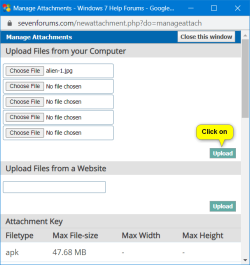
5 When finished choosing files to upload, click/tap on the Upload button. (see screenshot below)
Go_Advanced-5.png

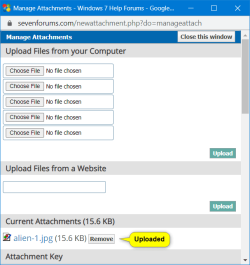
6 After your chosen files have been uploaded, you can close the Manage Attachments window. (see screenshot below)

If you would like to remove one of the uploaded Current Attachments, click/tap on the Remove button to the right of the file you would like to remove.

Go_Advanced-6.png

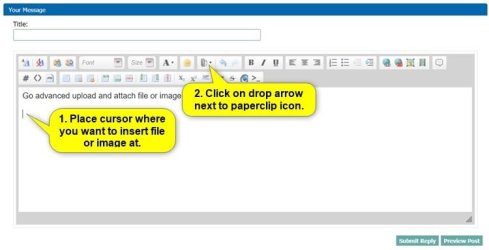
7 While back editing your post, place the cursor where you would like to insert the file or image at, and click/tap on the arrow to the right of the paperclip icon on the toolbar. (see screenshot below)
Go_Advanced-7.jpg

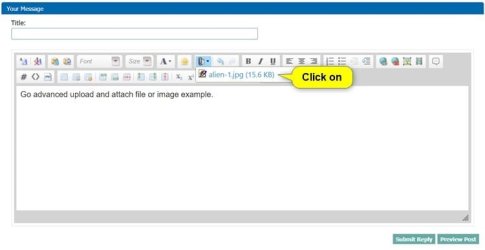
8 Click/tap on the uploaded file in the drop menu you want to insert at this location in your post. (see screenshot below)
Go_Advanced-8.jpg

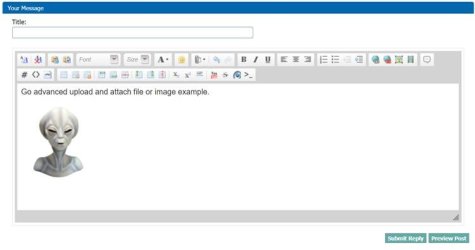
9 Your file(s) and/or image(s) will now be inserted into your post. (see screenshot below)

If you like, you could double click/tap on an inserted image to adjust the Image Settings for it below. When finished, click/tap on OK to apply.
Quick_Reply-7.png

Go_Advanced-9.jpg

10 When finished with your post, click/tap on either the Submit Reply button to post it. (see screenshot above)


That's it,
Shawn Brink


Last edited:
LOL, you're most welcome Alkie, and thank you. There will always be noobies out there that need some extra help though until they get the hang of it. :)
Very true, we all had to start somewhere but in my experience the majority don't even bother to try and find out for themselves and look for threads like yours, they can be a little lazy and just post the same question over and over again. :rolleyes:
 

My Computer

Computer Manufacturer/Model Number
Toshiba Satellite A300 1J1
OS
Windows 7 Ultimate
CPU
Intel Core 2 Duo 2ghz
Motherboard
Intel GM965
Memory
3GB DDR2
Graphics Card(s)
Mobile Intel 965 Express Chipset Family
Sound Card
Realtek High Definition Audio
Monitor(s) Displays
Generic
Screen Resolution
1280x800
Hard Drives
250GB
Thanx again Brink I'm an avid reader and your tutorial index is my is like having my own Win 7 library.
 

My Computer

Computer Manufacturer/Model Number
home
OS
win7 profesional 64bit
CPU
amd phenom
Motherboard
asus m3a78-cm
Memory
4g ddr2
Graphics Card(s)
ati radeon 3100 onboard
Hard Drives
intel ssds2a2m080 wd caviar 320g,win7
PSU
us robotics 450
Case
good question
Cooling
coolermaster heatsink, two silenex case fan
Keyboard
compaq
Mouse
kingston turborig trackball
Internet Speed
xplornet sattelite(you never know one min. to the next)
You're most welcome Sphred. Thank you. :)
 

My Computer

Computer type
PC/Desktop
Computer Manufacturer/Model Number
Self built custom
OS
64-bit Windows 11 Pro for Workstations
CPU
Intel i7-8700K OC'd to 5 GHz
Motherboard
ASUS ROG Maximus XI Formula Z390
Memory
64 GB (4x16GB) G.SKILL TridentZ RGB DDR4 3600 MHz
Graphics Card(s)
ASUS ROG-STRIX-GTX1080TI-O11G-GAMING
Sound Card
Integrated
Monitor(s) Displays
2 x Samsung Odyssey G7 27"
Screen Resolution
2560x1440
Hard Drives
1TB Samsung 990 PRO M.2,
4TB Samsung 990 PRO PRO M.2,
TerraMaster F8 SSD Plus NAS
PSU
Seasonic Prime Titanium 850W
Case
Thermaltake Core P3
Cooling
Corsair Hydro H115i
Keyboard
Logitech wireless K800
Mouse
Logitech MX Master 4
Internet Speed
2 Gb/s Download and 100 Mb/s Upload
Antivirus
Malwarebyte Anti-Malware Premium
Browser
Google Chrome
Other Info
Logitech Z625 speaker system,
Logitech BRIO 4K Pro webcam,
HP Color LaserJet Pro MFP M477fdn,
APC SMART-UPS RT 1000 XL - SURT1000XLI,
Galaxy S23 Plus phone
Thank You Brink. I'm glad I used my own advice and tried Search before I posted. :)
 

My Computer

Computer Manufacturer/Model Number
Acer Aspire 5532
OS
Windows 7 Home Premium 64 bit SP1
CPU
AMD Athlon 64 processor TF-20 1.6 GHz. 1 Core
Motherboard
MB.PGY02.001/MBPGY02001
Memory
3 GB (2.75 available)
Graphics Card(s)
ATI Radion HD 3200
Sound Card
Realtek High Definition Audio
Monitor(s) Displays
Generic PnP 15.6"
Screen Resolution
1366 x 768
Hard Drives
250 GB HDD (220 available)
PSU
?
Case
?
Cooling
Single cycling fan, on cooling stand
Keyboard
PNP Device ID ACPI\PNP0303\4&12734F14&0
Mouse
Microsoft Laser 7000
Internet Speed
Ultra high speed download 2500 kb/s upload 720 kb/s
Other Info
Norton Internet Security 2011
Sorry but this is the best I could do.
I used the tutorial for finding the missing info but still could not find it. Special Thanks to PooMan UK and DocBrown for their help in filling out these specs.
You're welcome David. :)
 

My Computer

Computer type
PC/Desktop
Computer Manufacturer/Model Number
Self built custom
OS
64-bit Windows 11 Pro for Workstations
CPU
Intel i7-8700K OC'd to 5 GHz
Motherboard
ASUS ROG Maximus XI Formula Z390
Memory
64 GB (4x16GB) G.SKILL TridentZ RGB DDR4 3600 MHz
Graphics Card(s)
ASUS ROG-STRIX-GTX1080TI-O11G-GAMING
Sound Card
Integrated
Monitor(s) Displays
2 x Samsung Odyssey G7 27"
Screen Resolution
2560x1440
Hard Drives
1TB Samsung 990 PRO M.2,
4TB Samsung 990 PRO PRO M.2,
TerraMaster F8 SSD Plus NAS
PSU
Seasonic Prime Titanium 850W
Case
Thermaltake Core P3
Cooling
Corsair Hydro H115i
Keyboard
Logitech wireless K800
Mouse
Logitech MX Master 4
Internet Speed
2 Gb/s Download and 100 Mb/s Upload
Antivirus
Malwarebyte Anti-Malware Premium
Browser
Google Chrome
Other Info
Logitech Z625 speaker system,
Logitech BRIO 4K Pro webcam,
HP Color LaserJet Pro MFP M477fdn,
APC SMART-UPS RT 1000 XL - SURT1000XLI,
Galaxy S23 Plus phone
Brink, greetings from one of the noobs!

Although I've only posted 14 times I've made about 1000 drive bys looking for solutions and reading tutorials.

I've never needed to upload screen shots or logs, but now I need to get some help from the experts on some whiggy Windows 7 problems I'm having on a brand new build. So in anticipation of uploading logs and screen shots I thought I better read up on how to do it.

I should've known following the yellow brick road would lead to a Brink tutorial. So, once again, thanks for some easy to understand guidance:geek:
 

My Computer

Computer Manufacturer/Model Number
Self Build #2 Workstation
OS
Windows 7 Enterprise 64bit
CPU
intel core i3 2100 3.1 GH
Motherboard
Gigabyte Z68AP-D3
Memory
Kingston DDR3 1333 8GB
Graphics Card(s)
nvidia Geforce 9500GT
Sound Card
On board Realtek HD Audio
Monitor(s) Displays
ViewSonic
Screen Resolution
1440x900
Hard Drives
1 Maxtor 250GB
1 Seagate 320 GB
1 WD 1TB
PSU
Thermaltake Pure Power 600W
Case
Antec Solo
Brink, greetings from one of the noobs!

Although I've only posted 14 times I've made about 1000 drive bys looking for solutions and reading tutorials.

I've never needed to upload screen shots or logs, but now I need to get some help from the experts on some whiggy Windows 7 problems I'm having on a brand new build. So in anticipation of uploading logs and screen shots I thought I better read up on how to do it.

I should've known following the yellow brick road would lead to a Brink tutorial. So, once again, thanks for some easy to understand guidance:geek:
Yes it's the main. by cons What's the history of that yellow bricks? :note:
 

My Computer

OS
Windows 7 pro 64 bit
Memory
2 Go
Graphics Card(s)
Nvidia
Mouse
Microsoft optical mouse
oldcoot

voluminous thanks to all who put the time and effort in to help others
 

My Computer

OS
windows 7 home premium
Hey thanks for this tut but how to upload a picture in the sig?
and by the way where are those people getting those sick sigs?
 

My Computer

Computer Manufacturer/Model Number
Intel 1525
OS
Windows 7 Ultimate x86
CPU
1.74 Dual Core
Memory
2.00 GB
Graphics Card(s)
256MB
Screen Resolution
1280 x 800
Hard Drives
150 GB
Internet Speed
10 MB/s
Hello there. You can request a signature here,and also check this video to see how can you upload a signature here on SF.
 

My Computer

Computer type
PC/Desktop
Computer Manufacturer/Model Number
Custom Build
OS
Windows 10 Pro x64
CPU
Intel Core i5 4440 @Stock
Motherboard
Gigabyte Z97 D3H
Memory
4 x 4GB HyperX Fury DDR3
Graphics Card(s)
Gigabyte GTX 1050Ti O4G
Sound Card
Integrated
Monitor(s) Displays
Dell P2417H
Screen Resolution
1920 x 1080
Hard Drives
Samsung EVO 850 120GB / Toshiba DT01ACA050 1TB 7200prm 32MB
PSU
Riotoro Onyx 750W
Case
NZXT H500 Black-Red
Cooling
Stock CPU + NZXT 120mm + 2x120mm red fans
Keyboard
Modecom Volcano Lanparty
Mouse
Asus ROG Gladius / DeepCool E-Pad Plus
Internet Speed
DOCSIS 50/3 Mbit
Browser
Google Chrome
Other Info
Asus K55VJ(i5 3210M, GT635M / 2GB, 8GB DDR3, 500GB HDD)
MO123 thanks' (a lot) :geek:
 

My Computer

Computer Manufacturer/Model Number
Advance
OS
windows 7 x86
CPU
notebook
Motherboard
notebook
Memory
1024 mb ram
Graphics Card(s)
none
Sound Card
-
Monitor(s) Displays
-
Screen Resolution
1280 x 800 px
Please, where are the steps how to post a simple question?

Newbie
 
Last edited by a moderator:

My Computer

OS
Windows 7 Home Pro 64bit.

My Computer

Computer type
PC/Desktop
Computer Manufacturer/Model Number
Self Built
OS
Win 10 Pro x64
CPU
Intel I5-2500K @3.3GHz
Motherboard
Asrock P67 Extreme4
Memory
16GB G.Skill Ripjaws X (4x4GB)
Graphics Card(s)
EVGA GeForce 750 Ti SC 2GB
Sound Card
ASUS Xonar DG 5.1 Channels 24-bit 96KHz PCI Interface Sound
Monitor(s) Displays
auria eq2367
Screen Resolution
1920 x 1080
Hard Drives
250GB Samsung 850 EVO SSD
1TB WD Blue
1TB Hitachi
PSU
SeaSonic X 650W 80 Plus Gold
Case
Corsair Obsidian 750D
Cooling
Corsair H60, Three 140mm case fans
Keyboard
Logitech Wireless Keyboard K520
Mouse
Logitech Wireless Mouse M310
Internet Speed
Wave Broadband ~ 100 dn 5 up
Antivirus
Windows Defender, Malwarebytes Premium
Browser
Edge, IE11, Chrome
Other Info
Laptop specs: HP g7-1365dx /
CPU: AMD A6-3420M APU with Radeon(tm) HD Graphics /
RAM: Crucial 8Gb (2x4Gb) /
SSD: Crucial M4-CT128M4SSD2 ATA Device/ FW 000F /
GFX: AMD Radeon HD 6520G /
OS: Windows 10 Pro x64
How to post

Please, where is a list of steps "how to post" on these forums? Almost 20 years of Windows experience isn't helping this

Newbie
 

My Computer

OS
Windows 7 Home Pro 64bit.
hi vinetreeron, welcome to sevenforums,

obviously, you already know how to post.

if you want to make a new thread, look at derekimo's link above, where it says "Windows 7 Forums - FAQ: Board FAQ" - that's a link.
 

My Computer

Computer Manufacturer/Model Number
mickey megabyte 1234
OS
ultimate 64 sp1
CPU
i5 2500K [email protected]
Motherboard
MSI P67A-GD53
Memory
8 gigs GSkill Ripjaws 1600
Graphics Card(s)
amd hd6950
Sound Card
creative x-fi gamer
Monitor(s) Displays
samsung 24"
Screen Resolution
1920x1080
Hard Drives
ocz vertex 2e 60 gig, samsung f3 1tb, buffalo 2tb ext
PSU
antec 550
Case
antec three hundred
Cooling
i'm a cooling fan
Keyboard
saitek eclipse ii
Mouse
logitech g3
Internet Speed
about 4 Mbps
Other Info
i love win7
For other questions post in other thread. Don't go in off topic.
 

My Computer

Computer type
PC/Desktop
Computer Manufacturer/Model Number
Custom Build
OS
Windows 10 Pro x64
CPU
Intel Core i5 4440 @Stock
Motherboard
Gigabyte Z97 D3H
Memory
4 x 4GB HyperX Fury DDR3
Graphics Card(s)
Gigabyte GTX 1050Ti O4G
Sound Card
Integrated
Monitor(s) Displays
Dell P2417H
Screen Resolution
1920 x 1080
Hard Drives
Samsung EVO 850 120GB / Toshiba DT01ACA050 1TB 7200prm 32MB
PSU
Riotoro Onyx 750W
Case
NZXT H500 Black-Red
Cooling
Stock CPU + NZXT 120mm + 2x120mm red fans
Keyboard
Modecom Volcano Lanparty
Mouse
Asus ROG Gladius / DeepCool E-Pad Plus
Internet Speed
DOCSIS 50/3 Mbit
Browser
Google Chrome
Other Info
Asus K55VJ(i5 3210M, GT635M / 2GB, 8GB DDR3, 500GB HDD)
Hi Shawn, I have only five upload slots as opposed to the ten your snips show. Is having ten an Admin privilege? Just curious. :)
Capture.PNG
 

My Computer

Computer type
PC/Desktop
Computer Manufacturer/Model Number
Home Built Desktop By DataTech
OS
Windows 7 Ultimate X64 SP1
CPU
Intel i5-2550K, Differing ~4.4-4.8GHz No built in GPU
Motherboard
ASUS P8Z68-V PRO/GEN3
Memory
16GB G.Skill Sniper 1866MHz @ 2133MHz 2x8GB
Graphics Card(s)
ASUS GTX650TIB-DC2OC-2GD5, (650TI Boost)
Sound Card
Onboard Realtek 5-1
Monitor(s) Displays
Samsung P2570HD
Screen Resolution
1920x1080
Hard Drives
Samsung 840 Pro 256GB SSD for OS, 500GB Seagate Constellation (Enterprise drive) for Data
PSU
Corsair HX650W
Case
Inwin Dragon Rider
Cooling
Hyper 212 EVO w/two Noctua fans, push-pull, @1300 RPM
Keyboard
E-Z Eyes, bright yellow keys with large characters
Mouse
steelseries SENSEI Laser Pro Gaming
Internet Speed
48-51Mbs Mbs down, 11 Mbs up Xfinity Cable
Antivirus
Norton Internet Security 2013
Browser
IE 10, Opera, Pale Moon if needed
Other Info
4 case fans, LG BluRay-RE, ASUS DVD-RW, Mr. Fusion power supply, 1.21 gigawatts.
Hello Gary,

Nar, just a old screenshot when we did have that many. Updated now though. :)
 

My Computer

Computer type
PC/Desktop
Computer Manufacturer/Model Number
Self built custom
OS
64-bit Windows 11 Pro for Workstations
CPU
Intel i7-8700K OC'd to 5 GHz
Motherboard
ASUS ROG Maximus XI Formula Z390
Memory
64 GB (4x16GB) G.SKILL TridentZ RGB DDR4 3600 MHz
Graphics Card(s)
ASUS ROG-STRIX-GTX1080TI-O11G-GAMING
Sound Card
Integrated
Monitor(s) Displays
2 x Samsung Odyssey G7 27"
Screen Resolution
2560x1440
Hard Drives
1TB Samsung 990 PRO M.2,
4TB Samsung 990 PRO PRO M.2,
TerraMaster F8 SSD Plus NAS
PSU
Seasonic Prime Titanium 850W
Case
Thermaltake Core P3
Cooling
Corsair Hydro H115i
Keyboard
Logitech wireless K800
Mouse
Logitech MX Master 4
Internet Speed
2 Gb/s Download and 100 Mb/s Upload
Antivirus
Malwarebyte Anti-Malware Premium
Browser
Google Chrome
Other Info
Logitech Z625 speaker system,
Logitech BRIO 4K Pro webcam,
HP Color LaserJet Pro MFP M477fdn,
APC SMART-UPS RT 1000 XL - SURT1000XLI,
Galaxy S23 Plus phone
Back
Top