Screenshots and Files - Upload and Post in Seven Forums

How to Upload and Post a Screenshot and File in Seven Forums


This tutorial will show you how to upload and attach a screenshot, image, or a file in your post here at Seven Forums.

You will need to turn off enhanced attachment uploading at the bottom of your account's Settings > General Settings page, and Save changes before having the options displayed in this tutorial.
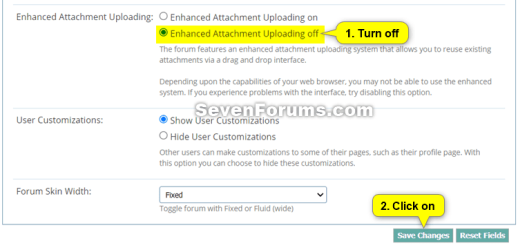
enhanced_attachment_uploading.png

If you are intending to upload large log or diagnostic files then please upload them to a reputable file sharing service such as OneDrive, Google Drive, Dropbox or Amazon Cloud Drive (US) (UK) and post a share link rather then uploading to the forum


You can only upload the file types below up to the size limit per single file.


File TypeMax File Size
7z4.00 MB
bat600.0 KB
docx2.00 MB
gif1.00 MB
ico1.00 MB
jpeg2.00 MB
jpg2.00 MB
log2.00 MB
pdf2.00 MB
png2.00 MB
psd2.00 MB
ps11.00 MB
rar4.00 MB
reg2.00 MB
txt2.00 MB
vbs2.00 MB
wav1.00 MB
xlsx1.00 MB
zip4.00 MB


Contents

  • Option One: To Insert a File or Image into a Post
  • Option Two: To Upload and Insert a File or Image into a "Go Advanced" Post


OPTION ONE

To Insert a File or Image into a Post


If you wanted to create a screenshot to upload, you can create one with Paint (mspaint.exe) or Snipping Tool to upload.


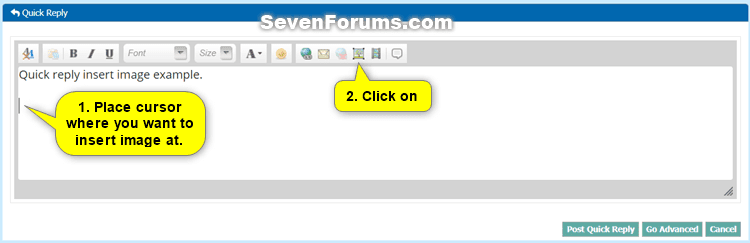
1 While editing your post, place the cursor where you would like to insert the file or image at, and click/tap on the image icon on the toolbar. (see screenshot below)
Quick_Reply-1.png

2 Do step 3 (computer) or step 4 (URL) below from where the image you want to upload is located.


3 To Insert File or Image from your Computer

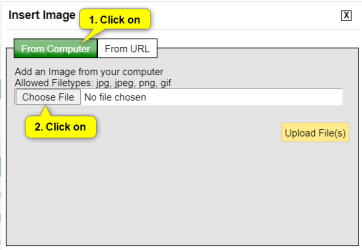
A) Click/tap on the From Computer tab, and click/tap on the Choose Files button. (see screenshot below)
Quick_Reply-2.png

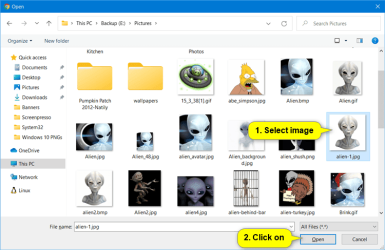
B) Navigate to and select one or more (limit 5 at once) file(s) and/or image(s) you want to insert into your post, and click/tap on the Open button. (see screenshot below)
Quick_Reply-3.png

C) Click/tap on the Upload File(s) button, and go to step 5 below. (see screenshot below)
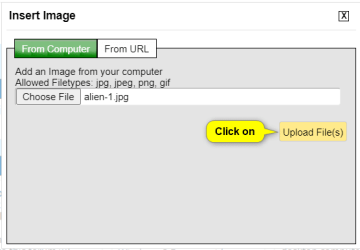
Quick_Reply-4.png


4 To Insert Image from URL

A) Click/tap on the From URL tab, and enter the URL address of the image. (see screenshot below)

B) Check the Retrieve remote file and reference locally box, click/tap on OK, and go to step 5 below. (see screenshot below)
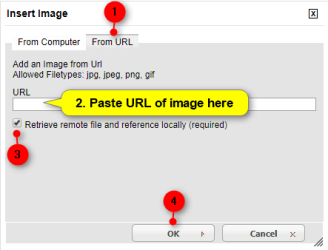
Quick_Reply-5.png


5 Your file(s) and/or image(s) will now be uploaded and inserted into your post. (see screenshot below)

If you like, you could double click/tap on an inserted image to adjust the Image Settings for it below. When finished, click/tap on OK to apply.
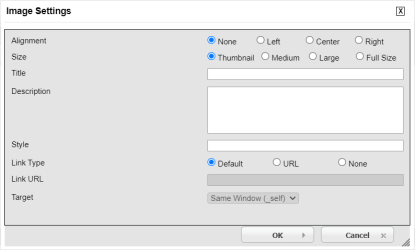
Quick_Reply-7.png

Quick_Reply-6.png

6 When finished with your post, click/tap on either the Post Quick Reply or Submit Reply button to post it. (see screenshot above)


OPTION TWO

To Upload and Insert a File or Image into a "Go Advanced" Post


If you wanted to create a screenshot to upload, you can create one with direct screenshot, Paint (mspaint.exe) or Snipping Tool ready to upload.


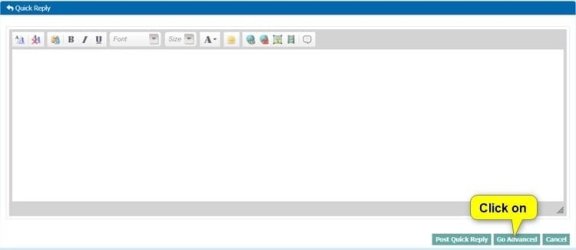
1 While editing your post, click/tap on the Go Advanced button. (see screenshot below)
Go_Advanced-1.jpg

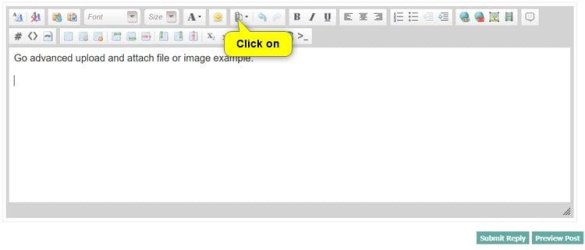
2 Click/tap on the paperclip icon on the toolbar. (see screenshot below)
Go_Advanced-3.jpg

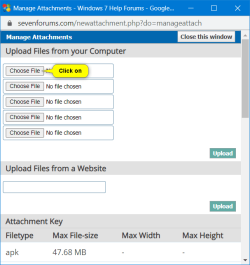
3 Click/tap on an empty Choose File button. (see screenshot below)
Go_Advanced-4.png

4 Navigate to and select the file or image you want to upload, and click/tap on the Open button. (see screenshot below)
Quick_Reply-3.png

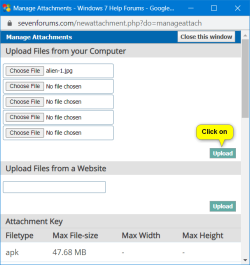
5 When finished choosing files to upload, click/tap on the Upload button. (see screenshot below)
Go_Advanced-5.png

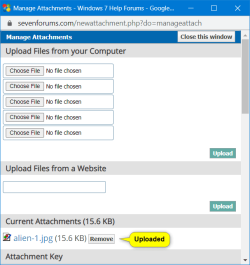
6 After your chosen files have been uploaded, you can close the Manage Attachments window. (see screenshot below)

If you would like to remove one of the uploaded Current Attachments, click/tap on the Remove button to the right of the file you would like to remove.

Go_Advanced-6.png

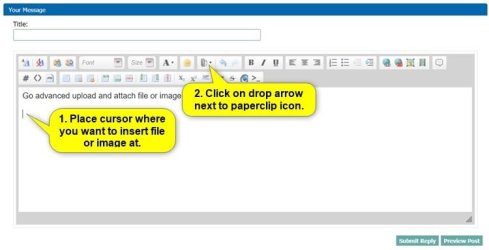
7 While back editing your post, place the cursor where you would like to insert the file or image at, and click/tap on the arrow to the right of the paperclip icon on the toolbar. (see screenshot below)
Go_Advanced-7.jpg

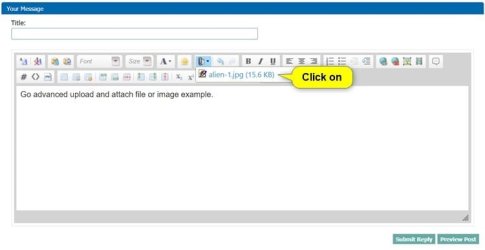
8 Click/tap on the uploaded file in the drop menu you want to insert at this location in your post. (see screenshot below)
Go_Advanced-8.jpg

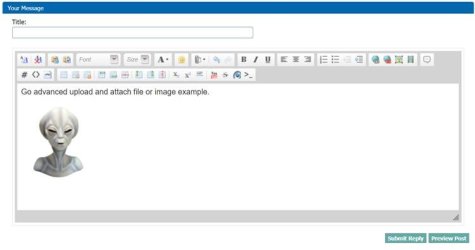
9 Your file(s) and/or image(s) will now be inserted into your post. (see screenshot below)

If you like, you could double click/tap on an inserted image to adjust the Image Settings for it below. When finished, click/tap on OK to apply.
Quick_Reply-7.png

Go_Advanced-9.jpg

10 When finished with your post, click/tap on either the Submit Reply button to post it. (see screenshot above)


That's it,
Shawn Brink


Last edited:
Hello Chris, and welcome to Seven Forums. :)
 

My Computer

Computer type
PC/Desktop
Computer Manufacturer/Model Number
Self built custom
OS
64-bit Windows 11 Pro for Workstations
CPU
Intel i7-8700K OC'd to 5 GHz
Motherboard
ASUS ROG Maximus XI Formula Z390
Memory
64 GB (4x16GB) G.SKILL TridentZ RGB DDR4 3600 MHz
Graphics Card(s)
ASUS ROG-STRIX-GTX1080TI-O11G-GAMING
Sound Card
Integrated
Monitor(s) Displays
2 x Samsung Odyssey G7 27"
Screen Resolution
2560x1440
Hard Drives
1TB Samsung 990 PRO M.2,
4TB Samsung 990 PRO PRO M.2,
TerraMaster F8 SSD Plus NAS
PSU
Seasonic Prime Titanium 850W
Case
Thermaltake Core P3
Cooling
Corsair Hydro H115i
Keyboard
Logitech wireless K800
Mouse
Logitech MX Master 4
Internet Speed
2 Gb/s Download and 100 Mb/s Upload
Antivirus
Malwarebyte Anti-Malware Premium
Browser
Google Chrome
Other Info
Logitech Z625 speaker system,
Logitech BRIO 4K Pro webcam,
HP Color LaserJet Pro MFP M477fdn,
APC SMART-UPS RT 1000 XL - SURT1000XLI,
Galaxy S23 Plus phone
You're welcome Eddy, and welcome to Seven Forums. :)
 

My Computer

Computer type
PC/Desktop
Computer Manufacturer/Model Number
Self built custom
OS
64-bit Windows 11 Pro for Workstations
CPU
Intel i7-8700K OC'd to 5 GHz
Motherboard
ASUS ROG Maximus XI Formula Z390
Memory
64 GB (4x16GB) G.SKILL TridentZ RGB DDR4 3600 MHz
Graphics Card(s)
ASUS ROG-STRIX-GTX1080TI-O11G-GAMING
Sound Card
Integrated
Monitor(s) Displays
2 x Samsung Odyssey G7 27"
Screen Resolution
2560x1440
Hard Drives
1TB Samsung 990 PRO M.2,
4TB Samsung 990 PRO PRO M.2,
TerraMaster F8 SSD Plus NAS
PSU
Seasonic Prime Titanium 850W
Case
Thermaltake Core P3
Cooling
Corsair Hydro H115i
Keyboard
Logitech wireless K800
Mouse
Logitech MX Master 4
Internet Speed
2 Gb/s Download and 100 Mb/s Upload
Antivirus
Malwarebyte Anti-Malware Premium
Browser
Google Chrome
Other Info
Logitech Z625 speaker system,
Logitech BRIO 4K Pro webcam,
HP Color LaserJet Pro MFP M477fdn,
APC SMART-UPS RT 1000 XL - SURT1000XLI,
Galaxy S23 Plus phone
Thx Brink for the tut.

I hope that my question is not too far off topic to be posting in this thread:

When replying to another member's post, if I stay in the edit mode* too long, my attached files/images go away (as in: they do not show in the preview of the post and they are not available for insertion into the post - although the text referencing them is still in the post from when they were originally inserted. And previewing the post does not return an error due to these missing files). I understand the need for running such a clean up routine on the server, I was just wondering if you knew the time limit before the cleanup occurs.

*to be clear, I'm talking about the Quick Reply editor or the Advanced editor - not the edit mode where I'm fixing a typo or the like in an existing post. However, my guess is that these files all end up in a temp folder until the post is made. Any file that has been in that folder too long is deleted. If that is what is happening, then I guess that the cleanup would impact all edits: Original posts, edits of existing posts and either editor for a reply.


Thx again for the tut and for all that you do as a forum admin.
 

My Computer

Computer type
Laptop
Computer Manufacturer/Model Number
Employer provided Dell Latitude
OS
W7 Pro SP1 64bit
CPU
i7
Memory
8GB
Graphics Card(s)
Intel HD Graphics
Hard Drives
crappy SSD
Antivirus
Employer mandated Symantec Endpoint Protection
Browser
Pale Moon 64bit, IE11 64bit & Chrome 64bit
Hello UsernameIssues,

I believe it's around 30 minutes before the time-out period, and you lose what you uploaded in a post. I usually find that typing what you want first, uploading and attaching images last, then submit the post. This way you can always edit it more if needed afterwards without losing them. :)
 

My Computer

Computer type
PC/Desktop
Computer Manufacturer/Model Number
Self built custom
OS
64-bit Windows 11 Pro for Workstations
CPU
Intel i7-8700K OC'd to 5 GHz
Motherboard
ASUS ROG Maximus XI Formula Z390
Memory
64 GB (4x16GB) G.SKILL TridentZ RGB DDR4 3600 MHz
Graphics Card(s)
ASUS ROG-STRIX-GTX1080TI-O11G-GAMING
Sound Card
Integrated
Monitor(s) Displays
2 x Samsung Odyssey G7 27"
Screen Resolution
2560x1440
Hard Drives
1TB Samsung 990 PRO M.2,
4TB Samsung 990 PRO PRO M.2,
TerraMaster F8 SSD Plus NAS
PSU
Seasonic Prime Titanium 850W
Case
Thermaltake Core P3
Cooling
Corsair Hydro H115i
Keyboard
Logitech wireless K800
Mouse
Logitech MX Master 4
Internet Speed
2 Gb/s Download and 100 Mb/s Upload
Antivirus
Malwarebyte Anti-Malware Premium
Browser
Google Chrome
Other Info
Logitech Z625 speaker system,
Logitech BRIO 4K Pro webcam,
HP Color LaserJet Pro MFP M477fdn,
APC SMART-UPS RT 1000 XL - SURT1000XLI,
Galaxy S23 Plus phone
Got it - thx
 

My Computer

Computer type
Laptop
Computer Manufacturer/Model Number
Employer provided Dell Latitude
OS
W7 Pro SP1 64bit
CPU
i7
Memory
8GB
Graphics Card(s)
Intel HD Graphics
Hard Drives
crappy SSD
Antivirus
Employer mandated Symantec Endpoint Protection
Browser
Pale Moon 64bit, IE11 64bit & Chrome 64bit
You're welcome. :)
 

My Computer

Computer type
PC/Desktop
Computer Manufacturer/Model Number
Self built custom
OS
64-bit Windows 11 Pro for Workstations
CPU
Intel i7-8700K OC'd to 5 GHz
Motherboard
ASUS ROG Maximus XI Formula Z390
Memory
64 GB (4x16GB) G.SKILL TridentZ RGB DDR4 3600 MHz
Graphics Card(s)
ASUS ROG-STRIX-GTX1080TI-O11G-GAMING
Sound Card
Integrated
Monitor(s) Displays
2 x Samsung Odyssey G7 27"
Screen Resolution
2560x1440
Hard Drives
1TB Samsung 990 PRO M.2,
4TB Samsung 990 PRO PRO M.2,
TerraMaster F8 SSD Plus NAS
PSU
Seasonic Prime Titanium 850W
Case
Thermaltake Core P3
Cooling
Corsair Hydro H115i
Keyboard
Logitech wireless K800
Mouse
Logitech MX Master 4
Internet Speed
2 Gb/s Download and 100 Mb/s Upload
Antivirus
Malwarebyte Anti-Malware Premium
Browser
Google Chrome
Other Info
Logitech Z625 speaker system,
Logitech BRIO 4K Pro webcam,
HP Color LaserJet Pro MFP M477fdn,
APC SMART-UPS RT 1000 XL - SURT1000XLI,
Galaxy S23 Plus phone
Yes but how do you select that portion of the screenshot that you want to save. It's just not working for me. Thanks.
 

My Computer

Computer Manufacturer/Model Number
ASUS G51VX
OS
Windows 7 Ultimate x64
CPU
2.00
Motherboard
60-NV3MB1200AO3 G60VX
Memory
4G
Graphics Card(s)
GTX260M
Sound Card
REALTEK
Monitor(s) Displays
GENERIC
Screen Resolution
1366
Hard Drives
320G WD
Internet Speed
1.5Mb/s
Other Info
I use two of these in my network.

My Computer

Computer type
PC/Desktop
Computer Manufacturer/Model Number
Self built custom
OS
64-bit Windows 11 Pro for Workstations
CPU
Intel i7-8700K OC'd to 5 GHz
Motherboard
ASUS ROG Maximus XI Formula Z390
Memory
64 GB (4x16GB) G.SKILL TridentZ RGB DDR4 3600 MHz
Graphics Card(s)
ASUS ROG-STRIX-GTX1080TI-O11G-GAMING
Sound Card
Integrated
Monitor(s) Displays
2 x Samsung Odyssey G7 27"
Screen Resolution
2560x1440
Hard Drives
1TB Samsung 990 PRO M.2,
4TB Samsung 990 PRO PRO M.2,
TerraMaster F8 SSD Plus NAS
PSU
Seasonic Prime Titanium 850W
Case
Thermaltake Core P3
Cooling
Corsair Hydro H115i
Keyboard
Logitech wireless K800
Mouse
Logitech MX Master 4
Internet Speed
2 Gb/s Download and 100 Mb/s Upload
Antivirus
Malwarebyte Anti-Malware Premium
Browser
Google Chrome
Other Info
Logitech Z625 speaker system,
Logitech BRIO 4K Pro webcam,
HP Color LaserJet Pro MFP M477fdn,
APC SMART-UPS RT 1000 XL - SURT1000XLI,
Galaxy S23 Plus phone
Thank you Brink.
 

My Computer

Computer Manufacturer/Model Number
Acer Aspire X3400G
OS
Windows 7 Home Premium Edition 64 Bit
CPU
AMD Athalon II X2 255,3100 Mhz 2 Core Logical Processor
Memory
4 GB DDR3
Graphics Card(s)
Nvidia GeForce 9200
Sound Card
Nvidia HD Audio
Monitor(s) Displays
Vizio 32" LCD 720P
Screen Resolution
1366x768x59 hertz
Hard Drives
1TB HDD
Case
Acer
Keyboard
Microsoft Wireless keyboard 3000 V2.0
Mouse
Logitech M215
Internet Speed
High Speed Charter 16MBPS
Last edited:

My Computer

Computer type
PC/Desktop
Computer Manufacturer/Model Number
Self built custom
OS
64-bit Windows 11 Pro for Workstations
CPU
Intel i7-8700K OC'd to 5 GHz
Motherboard
ASUS ROG Maximus XI Formula Z390
Memory
64 GB (4x16GB) G.SKILL TridentZ RGB DDR4 3600 MHz
Graphics Card(s)
ASUS ROG-STRIX-GTX1080TI-O11G-GAMING
Sound Card
Integrated
Monitor(s) Displays
2 x Samsung Odyssey G7 27"
Screen Resolution
2560x1440
Hard Drives
1TB Samsung 990 PRO M.2,
4TB Samsung 990 PRO PRO M.2,
TerraMaster F8 SSD Plus NAS
PSU
Seasonic Prime Titanium 850W
Case
Thermaltake Core P3
Cooling
Corsair Hydro H115i
Keyboard
Logitech wireless K800
Mouse
Logitech MX Master 4
Internet Speed
2 Gb/s Download and 100 Mb/s Upload
Antivirus
Malwarebyte Anti-Malware Premium
Browser
Google Chrome
Other Info
Logitech Z625 speaker system,
Logitech BRIO 4K Pro webcam,
HP Color LaserJet Pro MFP M477fdn,
APC SMART-UPS RT 1000 XL - SURT1000XLI,
Galaxy S23 Plus phone
Thanks Brink.
The way I found was slightly more complicated and needed more work.:p
 

My Computer

Computer Manufacturer/Model Number
Fujitsu America, Inc. / LifeBook Series (Build: 23CUR--MS--1)
OS
Windows 7 Home Premium x64
CPU
intel i3
Memory
4.00 Gb
You're most welcome Paoiue, and welcome to Seven Forums. :)
 

My Computer

Computer type
PC/Desktop
Computer Manufacturer/Model Number
Self built custom
OS
64-bit Windows 11 Pro for Workstations
CPU
Intel i7-8700K OC'd to 5 GHz
Motherboard
ASUS ROG Maximus XI Formula Z390
Memory
64 GB (4x16GB) G.SKILL TridentZ RGB DDR4 3600 MHz
Graphics Card(s)
ASUS ROG-STRIX-GTX1080TI-O11G-GAMING
Sound Card
Integrated
Monitor(s) Displays
2 x Samsung Odyssey G7 27"
Screen Resolution
2560x1440
Hard Drives
1TB Samsung 990 PRO M.2,
4TB Samsung 990 PRO PRO M.2,
TerraMaster F8 SSD Plus NAS
PSU
Seasonic Prime Titanium 850W
Case
Thermaltake Core P3
Cooling
Corsair Hydro H115i
Keyboard
Logitech wireless K800
Mouse
Logitech MX Master 4
Internet Speed
2 Gb/s Download and 100 Mb/s Upload
Antivirus
Malwarebyte Anti-Malware Premium
Browser
Google Chrome
Other Info
Logitech Z625 speaker system,
Logitech BRIO 4K Pro webcam,
HP Color LaserJet Pro MFP M477fdn,
APC SMART-UPS RT 1000 XL - SURT1000XLI,
Galaxy S23 Plus phone
Yep...I know I'm going to like Brink! Fabulous Tutorial! Easy to follow and clear and precise instructions! Thanks Brink!
 

My Computer

Computer Manufacturer/Model Number
Asus G75 VW
OS
Windows 7 home premium 64
Memory
DDR3 1600 MHz SDRAM, 4 x SO-DIMM
Graphics Card(s)
NVIDIA® GeForce® GTX 660M/670M with 2GB/3GB GDDR5 VRAM
Sound Card
High definition
Monitor(s) Displays
17.3" HD with EWV (1366 x 768) / FHD 3D LED Backlight
Screen Resolution
1920x1080
Hard Drives
yep got 1
PSU
PSU?
Case
Lawyer? ;)
Cooling
Raised back cooling filter.
Keyboard
yep got 1 of those too...but keypad(laptop)
Mouse
Keypad but I use a Logic laser mouse
Internet Speed
Speedy gonzales fast
Other Info
2.5" SATA Dual HDD
1TB 5400rpm
750GB 5400rpm/7200rpm
500GB 5400rpm/7200rpm
750GB 7200rpm SSH
256GB SSD
RAID0/1 Support


Optical Drive

Blu-Ray DVD Combo
Super-Multi DVD
Blue-ray reader


Card Reader

3 -in-1 card reader ( SD/ MS/ MMC)


Camera

HD Web Camera


Networking

Integrated 802.11 b/g/n
Built-in Bluetooth™ V4.0 (Optional)
10/100/1000 Ba
You're most welcome Angela. Thank you. :)
 

My Computer

Computer type
PC/Desktop
Computer Manufacturer/Model Number
Self built custom
OS
64-bit Windows 11 Pro for Workstations
CPU
Intel i7-8700K OC'd to 5 GHz
Motherboard
ASUS ROG Maximus XI Formula Z390
Memory
64 GB (4x16GB) G.SKILL TridentZ RGB DDR4 3600 MHz
Graphics Card(s)
ASUS ROG-STRIX-GTX1080TI-O11G-GAMING
Sound Card
Integrated
Monitor(s) Displays
2 x Samsung Odyssey G7 27"
Screen Resolution
2560x1440
Hard Drives
1TB Samsung 990 PRO M.2,
4TB Samsung 990 PRO PRO M.2,
TerraMaster F8 SSD Plus NAS
PSU
Seasonic Prime Titanium 850W
Case
Thermaltake Core P3
Cooling
Corsair Hydro H115i
Keyboard
Logitech wireless K800
Mouse
Logitech MX Master 4
Internet Speed
2 Gb/s Download and 100 Mb/s Upload
Antivirus
Malwarebyte Anti-Malware Premium
Browser
Google Chrome
Other Info
Logitech Z625 speaker system,
Logitech BRIO 4K Pro webcam,
HP Color LaserJet Pro MFP M477fdn,
APC SMART-UPS RT 1000 XL - SURT1000XLI,
Galaxy S23 Plus phone
Hey Brink,
Is there any chance that the limits on TXT and LOG files will be raised? Because large log files are making me have to ZIP my files :(
Time consuming. And one question, what's the problem with raising the file limits? Are the limits set because people are using this as a file uploading place? I hope not :)
 

My Computer

OS
N/A
Is there any chance that the limits on TXT and LOG files will be raised?

None at all, the file sizes are fine as they are and if the files are bigger it only takes seconds to zip and they will take even less server space.
 

My Computer

Computer type
PC/Desktop
OS
Windows 11 Workstation
BSOD

I have made a zip file and have tried to upload it to forum. But when I try to drag the file in, it wont let me. When I try to browse to select the file, I crash. Any suggestions? Thanks J
 

My Computer

OS
Windows 7 32 bit
Back
Top