Windows 7 Forums


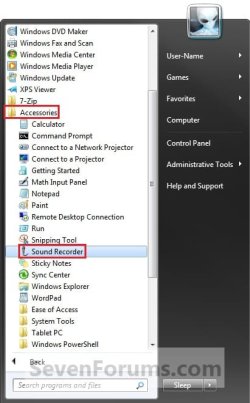
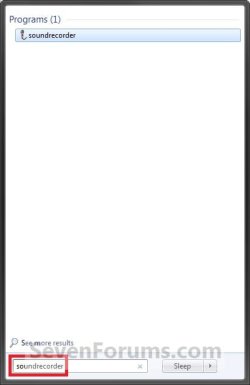
Windows 7: Sound Recorder - Open and Use

14 May 2009  
Brink

 
Sound Recorder - Open and Use

How to Open and Use Windows 7 Sound Recorder


Last edited by Brink; 28 Oct 2011 at 11:27 PM..
My System SpecsSystem Spec

26 Feb 2010  
Brink


You're welcome TearDroplet. I'm glad to hear that it works better for you with the other program. You might check through all of your separate sound and microphone levels to see if their may be a level setting that may be the culprit somewhere to help it sound better.
My System SpecsSystem Spec

22 Mar 2010  
goldendusty

 
vinyl conversion

does the Sound Recorder allow me to transfer vinyl records to my computer? I have a turntable, as well as USB cord.

My System SpecsSystem Spec
22 Mar 2010  
Brink


Hello Goldendusty, and welcome to Seven Forums.

If the turntable has a way of connecting to the audio input of your computer, then you should be able to. You may need to enable What U Hear recording as well though.

Hope this helps,
Shawn
My System SpecsSystem Spec
31 Mar 2010  
TrueVerbatim


Is it possible to use the recorder as a programmed login greeting?
My System SpecsSystem Spec
.


31 Mar 2010  
Brink


Hello TruVerbatim, and welcome to Seven Forums.

Sure, you could use Sound Recorder to record your greeting as a WAV file, then use the tutorial below to change Windows 7 startup sound to that wav file.

Startup Sound - Change in Windows 7

Hope this helps,
Shawn
My System SpecsSystem Spec
26 Oct 2010  
Marimba

 
answer from Creative ref "What U Hear"

With regards to your enquiry, please be informed that Sound Blaster X-Fi XtremeGamer (using PCI slot) and X-Fi Titanium series (using PCI Express slot) sound cards can support what u hear feature on Windows 7. You can refer to the links below for more specifications of the sound cards:

Sound Blaster X-Fi XtremeGamer
http://us.store.creative.com/Creative-Sound-Blaster-XFi-XtremeGamer-Sound/M/B000J1F1BI.htm

PCI Express Sound Blaster X-Fi Titanium
http://us.store.creative.com/PCI-Express-Sound-Blaster-XFi-Titanium/M/B001E25KDK.htm

PCI Express Sound Blaster X-Fi Titanium Fatal1ty Professional Series
http://us.store.creative.com/PCI-Express-Sound-Blaster-XFi-Titanium/M/B0018EFGTM.htm

X-Fi Titanium Fatal1ty Champion Series
http://us.store.creative.com/PCI-Express-Sound-Blaster-XFi-Titanium/M/B001BDPLJA.htm

Best Regards,

Alvin
Direct Sales
Creative Labs Americas

Last edited by Brink; 26 Oct 2010 at 12:34 PM..
My System SpecsSystem Spec
15 May 2012  
beestra1

 
Deleted Sound Recorder

Hello, I want to make recordings, but I accidently deleted my sound recorder. What do?
My System SpecsSystem Spec
15 May 2012  
Brink


Hello Beestra, and welcome to Seven Forums.

Here's a copy of SoundRecorder.exe from my system in the ZIP file below that you can use. You would just need to download the ZIP, extract (drag and drop) the EXE file from the ZIP to your desktop, unblock the EXE file, then copy the EXE into your C:\Windows\System32 folder.

Hope this helps,
Shawn
Attached Files
File Type: zip SoundRecorder.zip (69.4 KB, 43 views)
My System SpecsSystem Spec
11 Jan 2013  
classycat


Hi - I am new here and am vision impaired. I'm having trouble finding the "New" thread option. I just wanted to ask how long will the Windows 7 recorder record? Thanks and sorry I have posted this in the wrong area.
My System SpecsSystem Spec
11 Jan 2013  
Brink


Hello classycat, and welcome to Seven Forums.

Sound Recorder will record until either you hit the stop button, or until you run out of hard drive space.

Hope this helps,
Shawn
My System SpecsSystem Spec
Comment

 Sound Recorder - Open and Use problems?


Tutorial Tools


Similar help and support threads for: Sound Recorder - Open and Use
Windows 7 Tutorial Category
Sound Recorder Sound & Audio
Sound Recorder: I can't hear the sound Sound & Audio
looking for best open source desktop recorder! Software
Solved Sound recorder Sound & Audio
Sound Recorder Sound & Audio


All times are GMT -5. The time now is 07:17 PM.


Windows 7 Forums is an independent web site and has not been authorized,
sponsored, or otherwise approved by Microsoft Corporation.
"Windows 7" and related materials are trademarks of Microsoft Corp.
© Designer Media Ltd