Windows 7 Forums


Windows 7: Driver won't delete on restart

03 Nov 2010   #1

Windows 7 Professional 32bit
 
 
Driver won't delete on restart

Wondering if anybody can help me?

I am using Windows XP Mode within Windows 7 Professional. I have been trying to de-install and then reinstall some software (ProTools 7.3, though this is probably not relevant to my question).

When I go to reinstall the software, I get a message saying "A restart is needed before this installer can proceed because the DigiFilter driver is currently marked for deletion upon restart."

When I exit XP Mode (goes in to hibernation) and then completely shut down and restart under Windows 7, I still get this message upon trying to reinstall the software.

I have manually located the drivers and deleted them, but the message still continues.


Is anybody able to give me some guidance on how to stop this message coming up (I guess clearing the marked for deletion files)?


Many Thanks in advance.

Andrew.
My System SpecsSystem Spec

03 Nov 2010   #2

Win7 Ultimate SP1 x64 / Windows 8 Pro / Android
Mauritius


Attached Thumbnails
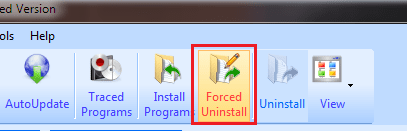
Driver won't delete on restart-capture.png  
My System SpecsSystem Spec
03 Nov 2010   #3


Check all the RunOnce entries in HKLM/Software and HKCU/Software. Chances are that's where you'll find your problem
My System SpecsSystem Spec
.


03 Nov 2010   #4

Windows 7 x64 Ultimate
A Finnish immigrant in Leipzig, Germany


I think your problem is the XP Mode's hibernation.

Two ways to restart XP Mode.
  1. Shut down and reboot
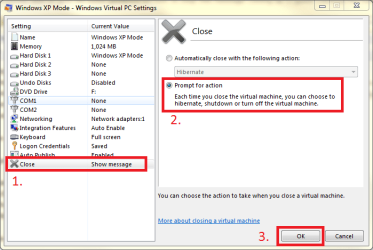
    • Go to XP Mode's settings
    • Choose Close from the right pane
    • Choose Prompt for action in the left pane

      Driver won't delete on restart-xpmode_shutdown.png
      .
    • Click OK to save settings, boot XP Mode
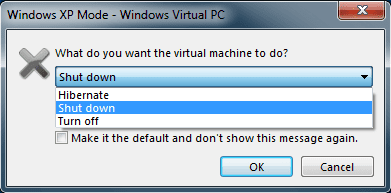
    • When closing the XP Mode windows, choose Shut down from drop down menu and click OK

      Driver won't delete on restart-xpmode_shutdown_2.png
      .
      NOTICE! Choose Turn Off only in emergency situations. It acts as holding the power button down for a few seconds in a real computer, powering off the machine without saving anything (hard reset)

  2. Restart
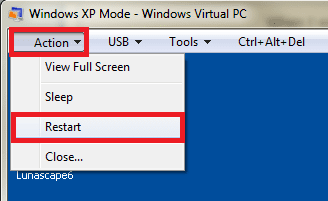
    • Open Action menu in XP Mode's main window
    • Choose Restart

      Driver won't delete on restart-xpmode_restart.png
From Action menu you can also choose sleep mode. In Virtual PC it is IMO totally useless feature; it does not free any resources on host, only difference for normal mode being grayed out and locked XP Mode desktop.

Choosing Close from Action menu is the same than clicking the Close button top right; if you have chosen automatic hibernation (or shut down), this menu option does that. If you have chosen Prompt for action, choosing this menu option opens the normal shut down dialog.

Kari
My System SpecsSystem Spec
03 Nov 2010   #5

Windows 7 Professional 32bit


Thank you so much for your reply. Kari, this worked perfectly. Appreciate your assistance! I had tried the CTRL-ALT-DEL combination manually, but that took me back to Windows 7. The CTRL-ALT-DEL menu at the top of XP Mode had the option I needed too.

Regards,

Andrew.
My System SpecsSystem Spec
04 Nov 2010   #6

Windows 7 x64 Ultimate
A Finnish immigrant in Leipzig, Germany


Good to know you got it working.
My System SpecsSystem Spec
Reply

 Driver won't delete on restart problems?


Thread Tools


Similar help and support threads for: Driver won't delete on restart
Thread Forum
Solved Window7 bootmgr is compressed. Press CTRL ALT DELETE to restart General Discussion
Solved Zynga Internet Shortcut wont delete, reappears on restart General Discussion
Win would not Log off or Restart via mouse or Ctrl +Alt + Delete. BSOD Help and Support
BOOTMGR is compressed - Ctrl+Alt+Delete to restart BSOD Help and Support
BOOTMGR is missing ctrl+delete to restart BSOD Help and Support


All times are GMT -5. The time now is 03:11 AM.


Seven Forums Android App Seven Forums IOS App Follow us on Facebook

Windows 7 Forums is an independent web site and has not been authorized,
sponsored, or otherwise approved by Microsoft Corporation.
"Windows 7" and related materials are trademarks of Microsoft Corp.
© Designer Media Ltd
  

1 2 3 4 5 6 7 8 9 10 11 12 13 14 15 16 17 18 19 20 21 22 23 24 25 26 27 28 29 30 31 32