6 months later,it suddenly wants a name and password. HUH?

Texarc

New member
I've been happily using legacy applications in my ASUS laptop/Win7 Ultimate 64-bit system's XP Virtual PC for some 5 months, and I've run into a TOTALFAIL problem.
WHen unhibernating the virtual XP machine, it gets a few seconds into the process, and then shows me what appears to be the screensaver's "give me a name and password" before it will proceed. I did NOT set up a screen saver inside the virtual machine. It appears to have something to do with loading the integration features as it is unhibernating.
After 2 1/2 hours talking to a MS tech support guy, his only solution is to uninstall (wiping out everything I've built up in the way of data and configurations) and reinstall.

Is there no way to find out what the virtual pc thinks is my username and password for unhibernating? it's NOT my username/login for the 64bit OS itself, and I have tried lots of permutations with no luck.
How can I avoid losing everything? I do backups routinely - and I have a backup of the OS drive from (Ithink) before this rude behavior started, but I'm not sure what specific file I need to restore to make it behave.

pullleezzzeeeeee, help?
I will gladly barter help with your archery form, answer the most important question about pharmacy and your health that you do not know to ask about, yet will possibly prolong your health and your life, ANYTHING that I can do to help you I will, but helpppppppp !


Last edited by a moderator:

My Computer

Computer Manufacturer/Model Number
Asus N71JQ
OS
Windows 7 Ultimate x64
CPU
i7 CPU Q 720 @ 1.60 gHz
Motherboard
ASUS
Memory
8 gigs
Graphics Card(s)
integrated
Sound Card
integrated
Monitor(s) Displays
17" laptop
Hard Drives
2 x 360 gig, but I'm about to change the boot to a 500 gig Seagate Momentus XT - HD + SSD hybrid which has a 4 gig SSD drive that the OS gets copied to each boot, but all writes end up on platters "the good old fashioned way", for safety. Also has a
Internet Speed
roadrunner, not that great :)
SIW2 may be able to help you get rid of the password. I'll send him a PM.

PS: Unfortunately SIW's mailbox was overflowing and my PM could not be sent. Sorry.
 

My Computer

Computer Manufacturer/Model Number
HP, Dell, Gateway, Toshiba - 4 laptops and 2 desktops
OS
Vista, Windows7, Mint Mate, Zorin, Windows 8
CPU
from 1.6GHz Duo to i7
Monitor(s) Displays
2x HP w2207
Hard Drives
5x HDD, 7x SSD, 12x Externals
Keyboard
with trackball - no mices
Mouse
Trackball mice
Internet Speed
DSL 6000
thanks for trying - he's prolly in high demand <G>
 

My Computer

Computer Manufacturer/Model Number
Asus N71JQ
OS
Windows 7 Ultimate x64
CPU
i7 CPU Q 720 @ 1.60 gHz
Motherboard
ASUS
Memory
8 gigs
Graphics Card(s)
integrated
Sound Card
integrated
Monitor(s) Displays
17" laptop
Hard Drives
2 x 360 gig, but I'm about to change the boot to a 500 gig Seagate Momentus XT - HD + SSD hybrid which has a 4 gig SSD drive that the OS gets copied to each boot, but all writes end up on platters "the good old fashioned way", for safety. Also has a
Internet Speed
roadrunner, not that great :)
The default username for XP Mode is XPMUser (notice the upper case / lower case letters). When integration features are enabled, you can log in only with a password, using accounts without a password is not allowed in XP Mode or any other Virtual PC virtual machine when integration is enabled.

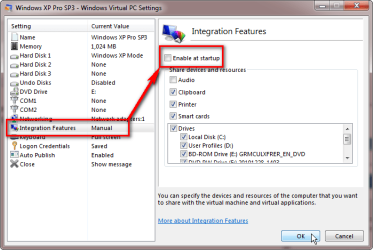
The password for XPMUser is that you set up when installing XP Mode. If you do not remember setting a password, then you might have success in logging in by first disabling automatic integration by unselecting it in XP Mode settings, then logging in with username XPMUser and no password.

XPM_manual_integration.png

Then create a password in XP Mode Control Panel > Users before re-enabling automatic integration.

Kari
 

My Computer

Computer type
Laptop
Computer Manufacturer/Model Number
HP ENVY 17-1150eg
OS
Windows 10 Pro x64 EN-GB
CPU
1.6 GHz Intel Core i7-720QM Processor
Memory
6 GB
Graphics Card(s)
ATI Mobility Radeon HD 5850 Graphics
Sound Card
Beats sound system with integrated subwoofer
Monitor(s) Displays
17" laptop display, 22" LED and 32" Full HD TV through HDMI
Screen Resolution
1600*900 (1), 1920*1080 (2&3)
Hard Drives
Internal: 2 x 500 GB SATA Hard Disk Drive 7200 rpm
External: 2TB for backups, 3TB USB3 network drive for media
Cooling
As Envy runs a bit warm, I have it on a Cooler Master pad
Keyboard
Logitech diNovo Media Desktop Laser (bluetooth)
Mouse
Logitech Performance Mouse MX
Internet Speed
50/10 Mbps VDSL
Antivirus
Windows Defender 4.3.9431.0
Browser
Maxthon 3.5.2., IE11
I notice that my image of the properties of the virtual machine, as you have pasted an image in your last message - I have
moz-screenshot.png
noticed that in my copy, the "logon credentials" is "NONE" - and I do not see a way to add one at this screen.
Based on a particular brief passage in one of the many documents MS has in the knowledgebase for virtual systems, I have gone into my users from the control panel and added a remote user with a specific credential for the identification of the virtual session:
WINDOWS CREDENTIALS: titled, VIRTUALXP-22741, with these parameters:
internet or network address: VIRTUALP-22741 , user name XPMUser, and a password, persistence set to Enterprise

I also set up one as a "generic credential", same thing, and a second generic one with "virtualapp/didlogical" as the internet or network address, user name of 02gfnpzphdrb, a password, and persistence to the Local Machine.

Is there another way to add a user to the virtual machine so that it won't go to that screensaver dialogue? I'm suspicious that this is dependent on it all.
 

My Computer

Computer Manufacturer/Model Number
Asus N71JQ
OS
Windows 7 Ultimate x64
CPU
i7 CPU Q 720 @ 1.60 gHz
Motherboard
ASUS
Memory
8 gigs
Graphics Card(s)
integrated
Sound Card
integrated
Monitor(s) Displays
17" laptop
Hard Drives
2 x 360 gig, but I'm about to change the boot to a 500 gig Seagate Momentus XT - HD + SSD hybrid which has a 4 gig SSD drive that the OS gets copied to each boot, but all writes end up on platters "the good old fashioned way", for safety. Also has a
Internet Speed
roadrunner, not that great :)
Here's how to add screenshots to your posts: http://www.sevenforums.com/tutorials/9733-screenshots-files-upload-post-seven-forums.html

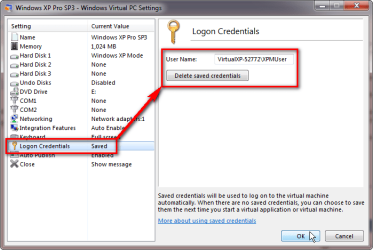
Your XP Mode settings showing no saved credentials is normal. If logon credentials are saved, you can only delete, not save them from settings:

XPM_delete_credentials.png

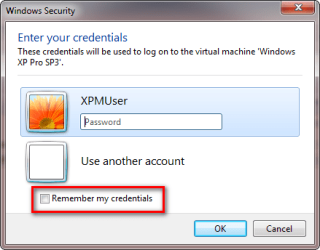
You can only save credentials when logging in to XP Mode when integration features are enabled, in which case there's an option to save logon credentials when starting XP Mode:

XPM_remember_credentials.png

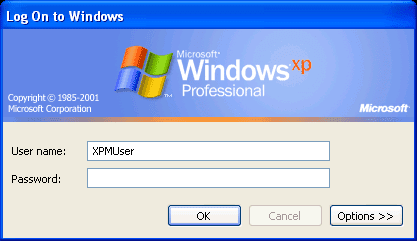
If automatic integration is disabled, you get a normal XP logon dialog which does not allow saving credentials:

XPM_credentials_no_integration.png

You can add users to XP Mode only from inside XP Mode; you can not add any users to XP Mode from your host's Control Panel > Users. That part of your post I can not understand, could you please post the link to this MS page that told you to do so.

XP Mode does not go to a screensaver dialog. Never. XP Mode screensaver is permanently disabled. If it were enabled it could cause problems when you launch a virtual XP Mode application from your Windows 7 Start Menu to run on Windows 7 desktop, then let it be unused long enough for XP Mode screensaver to start.

Your issue is either a forgotten or non existing password. Remember that to log in to XP Mode with an account which does not have a password is only possible when automatic integration is disabled.

Let's try something.

  1. Close XP Mode
  2. Check that your XP Mode is really shut down and not just hibernated (default closing action)
  3. Go to your user folder, double click folder Virtual Machines to open it
  4. Check the machine status of XP Mode:
    .
    XPM_Machine_Status.png
    .
  5. If machine status is Running, you have not closed it yet. Close it now
  6. If machine status is Powered down, continue from step 8
  7. If machine status is Hibernated, launch XP Mode again and this time shut it down. If you do not manage to shut down XP Mode, you can also shut it down manually by deleting the hibernation data which forces XP Mode to completely reboot next time it's launched. To delete hibernation data manually, do this:
    • Close XP Mode which by default causes it to hibernate
    • Copy and paste the text in the box below to Explorer addressbar and press Enter:
      Code:
      %userprofile%\AppData\Local\Microsoft\Windows Virtual PC\Virtual Machines
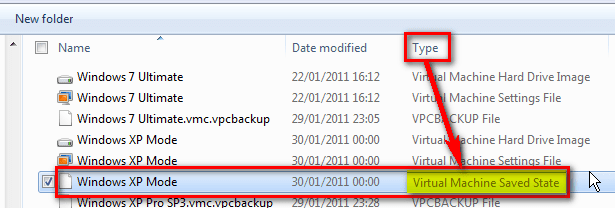
    • This opens your Virtual PC Virtual Machines folder. Now delete the file Windows XP Mode.vsv. The .vsv file contains all XP Mode hibernation data, it does not exist when XP Mode is shut down
    • If you do not see the extension .vsv, look under Type column; the .vsv file type is Virtual Machine Saved State. That's the file you need to delete:
      .
      XPM_Hibernation_data.png
      .
    • Please notice that when manually deleting the hibernation data, the machine status as told above in step 4 still shows Hibernated. You do not need to care about this; the machine status is only updated when you launch XP Mode next time
  8. Go to XP Mode settings and check that automatic integration is not selected. If it is selected, unselect it and click OK to save settings (check the image in my previous post)
  9. Launch XP Mode
  10. You are now shown the classical XP logon screen (see earlier in this post, third image from beginning). Username XPMUser should be there already, if not type it to User Name field. Try to remember if you set a password when you installed XP Mode and type it to Password field. If you think you have no password, leave the password field empty and click OK
  11. If the login is OK and you can enter XP Mode, go to XP Mode's Control Panel and add a password to XPMUser account, or create a new user account with password. After that, you can re-enable automatic integration from XP Mode's settings
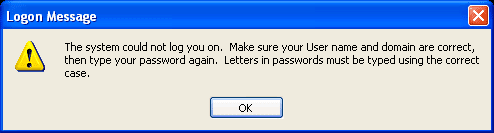
  12. If the account has a password but you entered it wrong, or if there is a password even you think there's not, you get an error message:
    .
    XPM_wrong_password.png
    .
  13. In this case you have only these options:
    • Try other passwords
    • Use password recovery tools to recover the forgotten password
    • Reinstall XP Mode

That's about it. Come back if the issue remains unsolved. Would also be nice to hear if you got it solved.

Kari
 
Last edited:

My Computer

Computer type
Laptop
Computer Manufacturer/Model Number
HP ENVY 17-1150eg
OS
Windows 10 Pro x64 EN-GB
CPU
1.6 GHz Intel Core i7-720QM Processor
Memory
6 GB
Graphics Card(s)
ATI Mobility Radeon HD 5850 Graphics
Sound Card
Beats sound system with integrated subwoofer
Monitor(s) Displays
17" laptop display, 22" LED and 32" Full HD TV through HDMI
Screen Resolution
1600*900 (1), 1920*1080 (2&3)
Hard Drives
Internal: 2 x 500 GB SATA Hard Disk Drive 7200 rpm
External: 2TB for backups, 3TB USB3 network drive for media
Cooling
As Envy runs a bit warm, I have it on a Cooler Master pad
Keyboard
Logitech diNovo Media Desktop Laser (bluetooth)
Mouse
Logitech Performance Mouse MX
Internet Speed
50/10 Mbps VDSL
Antivirus
Windows Defender 4.3.9431.0
Browser
Maxthon 3.5.2., IE11
Yep, I'm in trouble. already done most of the I have been getting to the point where it wants the name and password, and I have *no* idea what the password is. I cannot figure out why it suddenly started asking for one. To my knowledge I did not change anything, other than allowing Windows to perform updates automatically to my system. I had a large amount of data in the virtual machine, I have that file (16 gigs in size), and no way to access it.
I have uninstalled, and then reinstalled, the virtual PC, to start the process all over again and it's a horror show. The customized database I had built in the virtual machine is well, for all practical purposes, gone - in a file but inacessible. I am well and truly hosed. I do not know enough about "password cracking" to select a tool, buy it, and then make it work. And, the fact that a few hours ago, prior to your message, I did an uninstall and an install, kinda drew a squigly line in the sand that says, "screw me"<G>. I really appreciate your time and expertise.
If I could A) undo the reinstall or copy the original vmcx over the existing new one, then when it prompts me for the password slip in the right one or create a new one, that would be great. During the loading process it has repeatedly told me that if the virtual system is shut down and is brought up, it will ask for a name/pw, and SAVE that, but it never saves it - it lies<G>. So I suspect some code is bent inside.
I'm figuring I will redo the entire database again, only this time I am leaving *everything* on the actual C Drive, and mapping drive letters to it, making the pif files work on those folders, so when Windows decides to hose me again I'm hopefully NOT going to lose months of custom coding and database design.
BTW - Who am I? Professional Information on Ron .

What I have lost is the registration database for a tournament that is happening in about 2 weeks, and in 13 years I have *never* failed to deliver to the association's membership. It hurts so much that I'm about to fail. And I know that the more I try to fix it up on the ASUS, I am digging the hole deeper and deeper....making it less likely that I can recover everything. Incredibly unexpected. I did do a complete backup to a external drive of the entire PC (nearly 100 gigs), that took nearly 24 hours just a few days back, so in theory I could restore it and be back to where I was before this all hit the fan. But lacking that password, I'm in no better position....and the restore will take a good while regardless.
thanks again.
 

My Computer

Computer Manufacturer/Model Number
Asus N71JQ
OS
Windows 7 Ultimate x64
CPU
i7 CPU Q 720 @ 1.60 gHz
Motherboard
ASUS
Memory
8 gigs
Graphics Card(s)
integrated
Sound Card
integrated
Monitor(s) Displays
17" laptop
Hard Drives
2 x 360 gig, but I'm about to change the boot to a 500 gig Seagate Momentus XT - HD + SSD hybrid which has a 4 gig SSD drive that the OS gets copied to each boot, but all writes end up on platters "the good old fashioned way", for safety. Also has a
Internet Speed
roadrunner, not that great :)
OK Ron, let's not panic yet ;)

Come back in 20 minutes, I'll figure out how to save your database and post instructions.

Kari
 

My Computer

Computer type
Laptop
Computer Manufacturer/Model Number
HP ENVY 17-1150eg
OS
Windows 10 Pro x64 EN-GB
CPU
1.6 GHz Intel Core i7-720QM Processor
Memory
6 GB
Graphics Card(s)
ATI Mobility Radeon HD 5850 Graphics
Sound Card
Beats sound system with integrated subwoofer
Monitor(s) Displays
17" laptop display, 22" LED and 32" Full HD TV through HDMI
Screen Resolution
1600*900 (1), 1920*1080 (2&3)
Hard Drives
Internal: 2 x 500 GB SATA Hard Disk Drive 7200 rpm
External: 2TB for backups, 3TB USB3 network drive for media
Cooling
As Envy runs a bit warm, I have it on a Cooler Master pad
Keyboard
Logitech diNovo Media Desktop Laser (bluetooth)
Mouse
Logitech Performance Mouse MX
Internet Speed
50/10 Mbps VDSL
Antivirus
Windows Defender 4.3.9431.0
Browser
Maxthon 3.5.2., IE11
OK, here we go.

If you still have the original XP Mode vhd containing your database, do as told below. Follow the instructions exactly as written, in my opinion this is your best shot to recover the database and be able to continue working with it in XP Mode.

  1. Move the Windows XP Mode.vhd file which includes your database to a safe location, outside it's default location %userprofile%\AppData\Local\Microsoft\Windows Virtual PC\Virtual Machines. Rename it to something else, for instance XP Mode_Backup.vhd
  2. Uninstall XP Mode (Control Panel > Programs)
  3. Reinstall XP Mode. Please notice there's no need to reinstall Virtual PC, only XP Mode
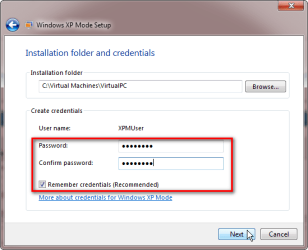
  4. When setting up XP Mode after reinstallation, be sure to add a password and write it down ;)
    .
    XPM_setup_set_password.png
    .
  5. When XP Mode is started first time, let it stay open and go to XP Mode settings
  6. Select Close, select Prompt for action, click OK to save settings
    .
    XPM_Close_1.png
    .
  7. Close XP Mode, select Shut down from closing dialog which you enabled in previous step, click OK to shut down
    .
    XPM_Close_2.png
    .
  8. Open XP Mode settings
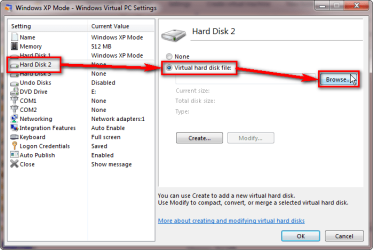
  9. Select Hard Disk 2, select Virtual Hard Disk file, click Browse (Notice: this can only be done when XP Mode is shut down instead of the default closing action Hibernate. That's why steps 6 and 7 were so important!)
    .
    XPM_Add_vhd_1.png
    .
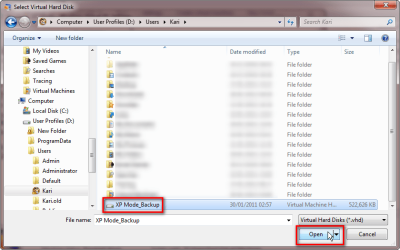
  10. Browse to location where you saved the backup vhd, select it and click Open
    .
    XPM_Add_vhd_2.png
    .
  11. Click OK to close settings
  12. Launch XP Mode
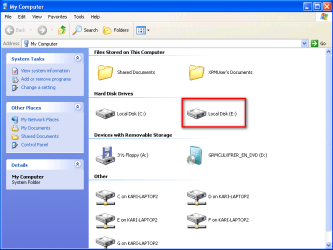
  13. Your backed up original vhd should now be seen as disk E: in XP Mode. Browse it, you should be able to find and recover all your personal files from the old XP Mode, including your database
    .
    XPM_Add_vhd_3.png

Kari


EDIT: Just a thought. You mentioned in your last post you want to next time map a drive on host where you would then save your database from XP Mode. Check this post out, it shows how I've done it, to relocate XP Mode's My Documents to a folder on host so I can access files saved in XP Mode directly from host even when XP Mode is not running or it becomes unresponsive.
 
Last edited:

My Computer

Computer type
Laptop
Computer Manufacturer/Model Number
HP ENVY 17-1150eg
OS
Windows 10 Pro x64 EN-GB
CPU
1.6 GHz Intel Core i7-720QM Processor
Memory
6 GB
Graphics Card(s)
ATI Mobility Radeon HD 5850 Graphics
Sound Card
Beats sound system with integrated subwoofer
Monitor(s) Displays
17" laptop display, 22" LED and 32" Full HD TV through HDMI
Screen Resolution
1600*900 (1), 1920*1080 (2&3)
Hard Drives
Internal: 2 x 500 GB SATA Hard Disk Drive 7200 rpm
External: 2TB for backups, 3TB USB3 network drive for media
Cooling
As Envy runs a bit warm, I have it on a Cooler Master pad
Keyboard
Logitech diNovo Media Desktop Laser (bluetooth)
Mouse
Logitech Performance Mouse MX
Internet Speed
50/10 Mbps VDSL
Antivirus
Windows Defender 4.3.9431.0
Browser
Maxthon 3.5.2., IE11
I will start this process tomorrow morning as soon as possible. I'm so worn out at this point, I'll likely make a dumb mistake.
Before I started doing anything with the MS techie, I copied the entire contents of the xp folder to a second hard drive as a backup.
So I should be able to follow your instructions to the letter.

Thank you, sincerely.
 

My Computer

Computer Manufacturer/Model Number
Asus N71JQ
OS
Windows 7 Ultimate x64
CPU
i7 CPU Q 720 @ 1.60 gHz
Motherboard
ASUS
Memory
8 gigs
Graphics Card(s)
integrated
Sound Card
integrated
Monitor(s) Displays
17" laptop
Hard Drives
2 x 360 gig, but I'm about to change the boot to a 500 gig Seagate Momentus XT - HD + SSD hybrid which has a 4 gig SSD drive that the OS gets copied to each boot, but all writes end up on platters "the good old fashioned way", for safety. Also has a
Internet Speed
roadrunner, not that great :)
Yeah, I know what you mean with being worn out. I also slept a few hours, for me it's now Sunday morning and my rigs are online again. Staying home but not necessary on Seven Forums all day, just come back to tell how it went and I'll check in every now and then to see if you got it.

After reading your bio I noticed I owe you an apology; I made the instructions as if I was making them for a newbie but I noticed you know your stuff pretty well. Noticed also you've been an exchange student in Sweden. Talar du fortfarande svenska? ;)

Kari
 

My Computer

Computer type
Laptop
Computer Manufacturer/Model Number
HP ENVY 17-1150eg
OS
Windows 10 Pro x64 EN-GB
CPU
1.6 GHz Intel Core i7-720QM Processor
Memory
6 GB
Graphics Card(s)
ATI Mobility Radeon HD 5850 Graphics
Sound Card
Beats sound system with integrated subwoofer
Monitor(s) Displays
17" laptop display, 22" LED and 32" Full HD TV through HDMI
Screen Resolution
1600*900 (1), 1920*1080 (2&3)
Hard Drives
Internal: 2 x 500 GB SATA Hard Disk Drive 7200 rpm
External: 2TB for backups, 3TB USB3 network drive for media
Cooling
As Envy runs a bit warm, I have it on a Cooler Master pad
Keyboard
Logitech diNovo Media Desktop Laser (bluetooth)
Mouse
Logitech Performance Mouse MX
Internet Speed
50/10 Mbps VDSL
Antivirus
Windows Defender 4.3.9431.0
Browser
Maxthon 3.5.2., IE11
Hey, remember that I was only 17 at the time, and the guy and girl that the parents had were my age - the main thing we did was teach each other the best ways to swear. :)
 

My Computer

Computer Manufacturer/Model Number
Asus N71JQ
OS
Windows 7 Ultimate x64
CPU
i7 CPU Q 720 @ 1.60 gHz
Motherboard
ASUS
Memory
8 gigs
Graphics Card(s)
integrated
Sound Card
integrated
Monitor(s) Displays
17" laptop
Hard Drives
2 x 360 gig, but I'm about to change the boot to a 500 gig Seagate Momentus XT - HD + SSD hybrid which has a 4 gig SSD drive that the OS gets copied to each boot, but all writes end up on platters "the good old fashioned way", for safety. Also has a
Internet Speed
roadrunner, not that great :)
I had been mapping a drive letter from within the xp virtual machine, to the "tsclient\c", so that I could write out of the virtual machine into the "real world" pc drive some important data that was then incorporated into a MS publisher document template via a macro, to create a "record certificate" for an archer that had set a national or world record. It occurs to me that I could probably do more maps, and then create shortcuts on the desktop, so that the entire set of data records existed on the "real" drive all the time. That would make it more readily available in the future, especially if something went south....
But your suggestion to make the second drive letter point to the old ("good") virtual database space, worked perfectly. First thing I did was to copy and paste ALL the folders to the new virtual machine, so I have essentially TWO copies of the important data....then I recreated some desktop shortcuts that established the right memory provisions and emulation rules. YAYYYYYYYYY!
I am back up and running, and have caught up on a lot of registrations I had fallen behind on! The tournament will be saved!

You have saved my sanity and I am very grateful! How may I repay my debt to you?
 

My Computer

Computer Manufacturer/Model Number
Asus N71JQ
OS
Windows 7 Ultimate x64
CPU
i7 CPU Q 720 @ 1.60 gHz
Motherboard
ASUS
Memory
8 gigs
Graphics Card(s)
integrated
Sound Card
integrated
Monitor(s) Displays
17" laptop
Hard Drives
2 x 360 gig, but I'm about to change the boot to a 500 gig Seagate Momentus XT - HD + SSD hybrid which has a 4 gig SSD drive that the OS gets copied to each boot, but all writes end up on platters "the good old fashioned way", for safety. Also has a
Internet Speed
roadrunner, not that great :)
Just wait, I'll send you my bill. :)

Quite simple solution, happy it worked to you.

Kari
 

My Computer

Computer type
Laptop
Computer Manufacturer/Model Number
HP ENVY 17-1150eg
OS
Windows 10 Pro x64 EN-GB
CPU
1.6 GHz Intel Core i7-720QM Processor
Memory
6 GB
Graphics Card(s)
ATI Mobility Radeon HD 5850 Graphics
Sound Card
Beats sound system with integrated subwoofer
Monitor(s) Displays
17" laptop display, 22" LED and 32" Full HD TV through HDMI
Screen Resolution
1600*900 (1), 1920*1080 (2&3)
Hard Drives
Internal: 2 x 500 GB SATA Hard Disk Drive 7200 rpm
External: 2TB for backups, 3TB USB3 network drive for media
Cooling
As Envy runs a bit warm, I have it on a Cooler Master pad
Keyboard
Logitech diNovo Media Desktop Laser (bluetooth)
Mouse
Logitech Performance Mouse MX
Internet Speed
50/10 Mbps VDSL
Antivirus
Windows Defender 4.3.9431.0
Browser
Maxthon 3.5.2., IE11
Still waiting for that "bill" :thumbsup: (and everything is still working wonderfully - wow, go figger!)
 

My Computer

Computer Manufacturer/Model Number
Asus N71JQ
OS
Windows 7 Ultimate x64
CPU
i7 CPU Q 720 @ 1.60 gHz
Motherboard
ASUS
Memory
8 gigs
Graphics Card(s)
integrated
Sound Card
integrated
Monitor(s) Displays
17" laptop
Hard Drives
2 x 360 gig, but I'm about to change the boot to a 500 gig Seagate Momentus XT - HD + SSD hybrid which has a 4 gig SSD drive that the OS gets copied to each boot, but all writes end up on platters "the good old fashioned way", for safety. Also has a
Internet Speed
roadrunner, not that great :)
Oh my God.
I come to this point, "
"11. If the login is OK and you can enter XP Mode, go to XP Mode's Control Panel and add a password to XPMUser account, or create a new user account with password. After that, you can re-enable automatic integration from XP Mode's settings"
Oh no. Because I get the loginprompt. I log in, everything looks fine until it says "Integration disbled". But I CAN logon to windows!!!
 

My Computer

OS
W7Pro x64
Back
Top