|
Welcome to Windows 7 Forums. Our forum is dedicated to helping you find solutions with any problems, errors or issues you are experiencing with Windows 7. The Windows 7 forum also covers news and updates and has an extensive Windows 7 tutorial section that covers a wide range of tips and tricks.
Windows 7 - vmware converter - create Virtual Machine from existing OS etc |
06-29-2011
|
#1 | | W7 X-64 RTM,SUSE 11.1, XP PRO SP3 as a VM, VMware ESXi |
vmware converter - create Virtual Machine from existing OS etc Hi all
If you want to convert an EXISTING system (or it's backup) into a VM that vmware player / workstation / server or esXi wil run download the FREE vmware converter from their site ( VMware Virtualization Software for Desktops, Servers & Virtual Machines for Public and Private Cloud Solutions).
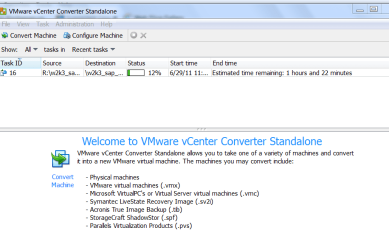
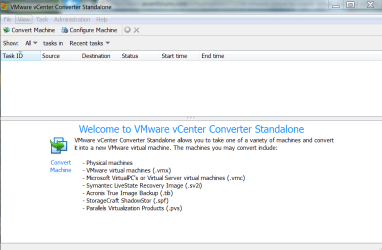
Machines can ve converted from the following
Screenshot enclosed.
Cheers
jimbo | My System Specs | | System Manufacturer/Model Number Custom built OS W7 X-64 RTM,SUSE 11.1, XP PRO SP3 as a VM, VMware ESXi CPU Q9400 QUAD Motherboard P5QL-CM Memory 8GB Graphics Card On Motherborad Sound Card Realtek HD audio Monitor(s) Displays Apple Cinema display Mouse Toshiba wireless laser Hard Drives 4 X 1TB SATA Internet Speed > 20MB up |
07-02-2011
|
#2 | | |
Does this mean that if I install Windows 7 on an XP machine so that it will dual boot into either Seven or XP, that I can then install VWWare and convert the XP Os into a VM and then delete or discontinue the dual boot?
I am on the verge of upgrading to Windows 7 on my old workhorse and I really would like to avoid having to reinstall and reconfigure everything | My System Specs | | System Manufacturer/Model Number custom OS Windows 7 Ultimate x64 CPU Intel Core i5 320ghz Memory 4gbDDR2 800mhz Graphics Card Nvidia Gforce 9800 Sound Card Creative Audigy 2 ZS Monitor(s) Displays NEC Screen Resolution 1280x1024 Hard Drives 500gb ATA
320gb ATA |
07-02-2011
|
#3 | | W7 X-64 RTM,SUSE 11.1, XP PRO SP3 as a VM, VMware ESXi |
Hi there
You can CLONE an entire PHYSICAL OS (process is known as P2V Physical to Virtual).
Note however that some programs that make direct calls to the real hardware won't run on the VM -- these are usually modern games and DVD playing.
Video via the Internet is perfectly ok on a VM now as is some limited 3-D support.
The main use is that if you have a load of apps like say Office on an XP machine you don't have to go to all the hassle of re-installing on the VM.
Also note you *May* have to re-activate -- although if you target the vm conversion on the SAME PHYSICAL machine generally no re-activation is required.
In VMWARE workstation you can then clone this vm again (V2V == Virtual to Virtual) which will probably run on a totally different machine without requesting activation either -- since the Virtual Hardware should be identical the activation process shouldn't come into play.
I've done zillions of these and only very rarely have I been asked to re-activate and it's been 100% successful.
Note when using vmware converter run in ADMINISTRATOR MODE when doing a P2V conversion or it will fail right at the END of the process !!!!.
BTW an EASIER way is to backup your XP system via acronis to a *.tib file, load up your Windows 7 OS and then convert the *.tib acronis backup to a VM using the vmware converter.
screen shot shows the types of files that can be converted to a VM.
Cheers
jimbo | My System Specs | | System Manufacturer/Model Number Custom built OS W7 X-64 RTM,SUSE 11.1, XP PRO SP3 as a VM, VMware ESXi CPU Q9400 QUAD Motherboard P5QL-CM Memory 8GB Graphics Card On Motherborad Sound Card Realtek HD audio Monitor(s) Displays Apple Cinema display Mouse Toshiba wireless laser Hard Drives 4 X 1TB SATA Internet Speed > 20MB up |
07-02-2011
|
#4 | | |
Tell me more about how to go about this using acronis (or can you provide a link?).
Do you make the acronis backup to an external harddrive or a DVD disk or what? How do you transfer it from one system to another? | My System Specs | | System Manufacturer/Model Number custom OS Windows 7 Ultimate x64 CPU Intel Core i5 320ghz Memory 4gbDDR2 800mhz Graphics Card Nvidia Gforce 9800 Sound Card Creative Audigy 2 ZS Monitor(s) Displays NEC Screen Resolution 1280x1024 Hard Drives 500gb ATA
320gb ATA |
07-02-2011
|
#5 | | Windows 7 Professional 64 Bit |

Quote: Originally Posted by DWFII Does this mean that if I install Windows 7 on an XP machine so that it will dual boot into either Seven or XP, that I can then install VWWare and convert the XP Os into a VM and then delete or discontinue the dual boot?
I am on the verge of upgrading to Windows 7 on my old workhorse and I really would like to avoid having to reinstall and reconfigure everything Have you tested your old workhorse to be sure it is capable of running Win 7? You may already know this, but just in case: Windows 7 Upgrade Advisor - Download - Microsoft Windows
Plus - Your old machine must have a CPU that will support virtualization.
If it passes, then you could perform a backup - as jimbo said - using Acronis True Image 2011 - Complete hard disk recovery solution, backup, drive copy, clone and image computer software
You can backup to any drive you instruct Acronis to do. It will create a the .tib file that should be convertible to the Virtual Disc image. | My System Specs | | System Manufacturer/Model Number Custom Build OS Windows 7 Professional 64 Bit CPU Intel QX9650 - Mild Overclock to 3.5Ghz Motherboard ASUS P5Q SE Plus Memory 16GB G.Skill F2-6400 at 840Mhz Graphics Card nVidia Ge Force 9600GT Sound Card On Board Monitor(s) Displays HP w2408h Screen Resolution 1920 x 1200 Keyboard Logitech Illuminated Mouse Logitech Wireless Trackball M570 PSU Antec Basiq BP500U Case CoolerMaster ATX ATC-210 Cooling Non-Stock Heatsink w/high speed CPU fan Hard Drives CRUCIAL M4 128Gb SSD, --
Two - WDC WD1001FALS-00J7B0 SATA's, -- One
WDC WD2001FASS-00U0B0 SATA |
07-03-2011
|
#6 | | W7 X-64 RTM,SUSE 11.1, XP PRO SP3 as a VM, VMware ESXi |

Quote: Originally Posted by TBoyd 
Quote: Originally Posted by DWFII Does this mean that if I install Windows 7 on an XP machine so that it will dual boot into either Seven or XP, that I can then install VWWare and convert the XP Os into a VM and then delete or discontinue the dual boot?
I am on the verge of upgrading to Windows 7 on my old workhorse and I really would like to avoid having to reinstall and reconfigure everything Have you tested your old workhorse to be sure it is capable of running Win 7? You may already know this, but just in case: Windows 7 Upgrade Advisor - Download - Microsoft Windows
Plus - Your old machine must have a CPU that will support virtualization.
If it passes, then you could perform a backup - as jimbo said - using Acronis True Image 2011 - Complete hard disk recovery solution, backup, drive copy, clone and image computer software
You can backup to any drive you instruct Acronis to do. It will create a the .tib file that should be convertible to the Virtual Disc image.
Hi there Please note that to run Vmware player or vmware workstation with a 32 bit GUEST OS YOU DO NOT NEED VIRTUALISATION IN THE CPU -- SO OLDER MACHINES CAN RUN VM'S ON VMWARE.
VMWARE has been creating vm software for years now long before "Virtualisation" was incorporated into modern CPU's -- I ran a lot of W98 and W2000 VM's on an old Pentium III machine.
The feature IS required to run a 64 bit GUEST OS and is OPTIONAL for running a 32 bit guest (unless you are using MS's XP MODE).
Of course if you have it -- do turn it on as it makes running the VM a lot more efficient -- up to 90% in some cases or even up to 95 % when using software like ESXI (another issue).
otherwise just back the vm up with acronis -- a trial I think is available and the image can be on any device the host can read whether locally attached or on a network.
A lot of people think there machine can't run a virtual machine because it doesn't have the Virtual machine feature in the BIOS. Not true for running 32 bit Guests.
Cheers
jimbo | My System Specs | | System Manufacturer/Model Number Custom built OS W7 X-64 RTM,SUSE 11.1, XP PRO SP3 as a VM, VMware ESXi CPU Q9400 QUAD Motherboard P5QL-CM Memory 8GB Graphics Card On Motherborad Sound Card Realtek HD audio Monitor(s) Displays Apple Cinema display Mouse Toshiba wireless laser Hard Drives 4 X 1TB SATA Internet Speed > 20MB up |
07-03-2011
|
#7 | | Windows 7 Professional 64 Bit |
Thanks for clearing that up, jimbo45. I stand corrected. | My System Specs | | System Manufacturer/Model Number Custom Build OS Windows 7 Professional 64 Bit CPU Intel QX9650 - Mild Overclock to 3.5Ghz Motherboard ASUS P5Q SE Plus Memory 16GB G.Skill F2-6400 at 840Mhz Graphics Card nVidia Ge Force 9600GT Sound Card On Board Monitor(s) Displays HP w2408h Screen Resolution 1920 x 1200 Keyboard Logitech Illuminated Mouse Logitech Wireless Trackball M570 PSU Antec Basiq BP500U Case CoolerMaster ATX ATC-210 Cooling Non-Stock Heatsink w/high speed CPU fan Hard Drives CRUCIAL M4 128Gb SSD, --
Two - WDC WD1001FALS-00J7B0 SATA's, -- One
WDC WD2001FASS-00U0B0 SATA All times are GMT -5. The time now is 03:52 AM. |  |