| Windows 7: sorry if this has been asked and answered |
09 Jul 2011
|
#1 | | |
sorry if this has been asked and answered ..but searching has not revealed any of the answers I am looking for so please bear with me. I am asking for some specific help here since most every guide I have found about creating vhds kind of just leaves off when it comes to how to run, load or use them once they are created.
I created a .vhd of my XP system using disk2vhd on an external usb drive. I then plugged the external drive into my Windows 7 laptop and created the .vmcx with virtual machine, but I got an error message about not being able to write to the hard disk after double clicking on the .vmcx, and searches about that error yielded various fixes to permissions that I tried which did not work, but again I am not sure I have all the information I need.
I did not try to mount the vhd thru disk management as I don't want to reboot the laptop into XP, I just want to load my XP vhd the same way I can load XP Mode on the laptop. The whole reason I created the vhd of my existing system was to be able to use that instead of Windows 7's Virtual XP, since naturally the vhd has all my programs already installed.
I am not even sure if that's how virtual machines work, or if one needs to actually mount the vhd thru disk management and then reboot the machine to use it, since if that is the case I won't even bother with it.
Again I apologize if this issue has been addressed, but I have searched for concise instructions from start to finish for using Virtual Machines on Windows 7 but all I have found are bits and pieces that I have had to put together and it's a bit like doing a jigsaw puzzle without knowing what the finished picture is supposed to look like. | My System Specs |
| |
10 Jul 2011
|
#2 | | Windows 7 x64 Ultimate A Finnish immigrant in Leipzig, Germany |
You need to install Microsoft Virtual PC (or third party alternatives) to be able to use your XP-vhd you have created with Disk2vhd.
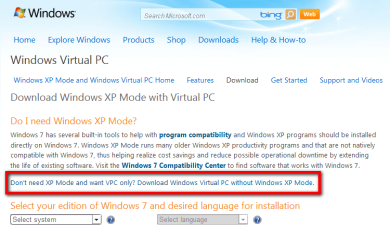
Here's how to do that with Virtual PC. - Download Virtual PC. If you do not need the free XP Mode, or if you are running 7 Home and therefore not entitled to use XP Mode, click the link on the download page (shown in the image below) to download standalone VPC:
. 
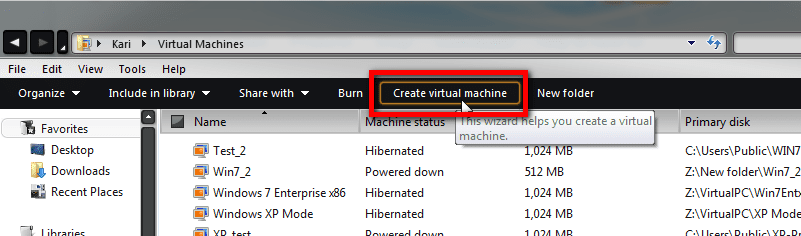
. - Install VPC. After installation you'll find a folder called Virtual Machines in your user folder (Username\Virtual Machines). Open it and click Create virtual machine link:
. 
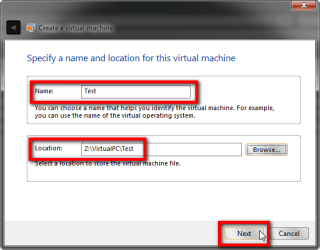
. - Choose a name for your new vm and a location where you want it stored:
. 
. - Choose how much RAM you want to assign to your new vm. Check that host computer network connections are chosen:
. 
. - Choose Use an existing virtual hard disk and browse to your vhd-image:
. 
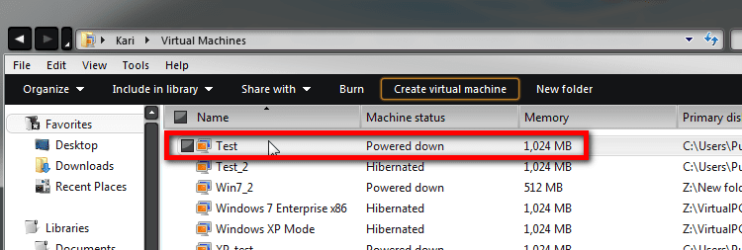
. - The new vm appears now on the list of virtual machines. Double click it to run it first time:
. 
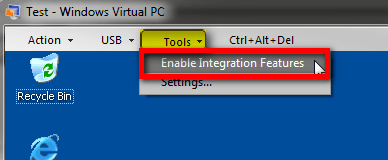
. - To allow full integration with the host system, enable Virtual PC Integration Features from Tools menu of your vm:
. 
That's it. Should work now.
Kari
Some important links:
- Windows Virtual PC - Create Virtual Machine
- Windows Virtual PC Integration Features - Install, Enable, and Disable | My System Specs | | Computer type Laptop System Manufacturer/Model Number HP ENVY 17-1150eg OS Windows 7 x64 Ultimate CPU 1.6 GHz Intel Core i7-720QM Processor Memory 6 GB Graphics Card ATI Mobility Radeon HD 5850 Graphics Sound Card Beats sound system with integrated subwoofer Monitor(s) Displays 17" laptop display, 22" LCD and 32" Full HD TV through HDMI Screen Resolution 1600*900, 1680*1050 and 1920*1080 Keyboard Logitech diNovo Media Desktop Laser (bluetooth) Mouse Logitech MX1000 Laser (Bluetooth) Hard Drives Internal: 2 x 500 GB SATA Hard Disk Drive 7200 rpm
External: 2TB for backups, 3TB USB3 network drive for media Internet Speed 50/10 Mbps VDSL Antivirus MSE, Windows Defender Browser Maxthon 3.5.2. Other Info Windows 7 Ultimate Retail Full in English, additional Guest-user accounts in Finnish, German and Swedish (Working languages English & Swedish, Family language German, my own language, mother tongue, Finnish. I really need Ultimate to get to use Language Packs!) |
11 Jul 2011
|
#3 | | |
Thanks, but as I said in my original post after I double clicked on the .vmcx I got an error saying "could not write to hard disk" and various searches for that error yielded different vague answers about fixing permissions, but I still could not get it to run. | My System Specs | | |
13 Jul 2011
|
#4 | | Windows 7 x64 Ultimate A Finnish immigrant in Leipzig, Germany |
I'm sorry to hear that. I've never had any problems with Disk2vhd-images.
You mentioned you have your vhd on an external disk. Have you checked the permissions of that disk / folder? That it's not "Read Only"?
Kari | My System Specs | | Computer type Laptop System Manufacturer/Model Number HP ENVY 17-1150eg OS Windows 7 x64 Ultimate CPU 1.6 GHz Intel Core i7-720QM Processor Memory 6 GB Graphics Card ATI Mobility Radeon HD 5850 Graphics Sound Card Beats sound system with integrated subwoofer Monitor(s) Displays 17" laptop display, 22" LCD and 32" Full HD TV through HDMI Screen Resolution 1600*900, 1680*1050 and 1920*1080 Keyboard Logitech diNovo Media Desktop Laser (bluetooth) Mouse Logitech MX1000 Laser (Bluetooth) Hard Drives Internal: 2 x 500 GB SATA Hard Disk Drive 7200 rpm
External: 2TB for backups, 3TB USB3 network drive for media Internet Speed 50/10 Mbps VDSL Antivirus MSE, Windows Defender Browser Maxthon 3.5.2. Other Info Windows 7 Ultimate Retail Full in English, additional Guest-user accounts in Finnish, German and Swedish (Working languages English & Swedish, Family language German, my own language, mother tongue, Finnish. I really need Ultimate to get to use Language Packs!) |
13 Jul 2011
|
#5 | | Windows 7 Pro x64 SP1 Rockville, Maryland USA |
FWIW, I have copied .vhd files from one machine to the other but never have tried to run one from an external device.
I would copy the .vhd file to a directory on your hard disk, most likely in the virtual machines directory under your username. Then run virtual pc and create a new virtual machine but tell it to use an existing virtual hard disk. Virtual pc will setup the necessary files to open and install the virtual hard disk integration utilities via the tools option.
You will have to mount the integration utilities which will reside in the virtual pc directory integration components, where the .iso for integration utilities as well as the precompact program to defrag your vhds..
Rich | My System Specs | | Computer type Laptop System Manufacturer/Model Number Toshiba Laptop Qosimo X870 OS Windows 7 Pro x64 SP1 CPU Intel Core I7 Motherboard Toshiba Memory 16 Gigs Graphics Card NVIDIA GeForce GTX 670M Monitor(s) Displays 17.7" laptop Screen Resolution 1600 x 900 Hard Drives 256 Gig SanDisk SSD for C
256 Gig Intel SSD for D Internet Speed 50/25 FIOS Antivirus Vipre (all you can eat for 10 machines) Browser IE and FF Other Info I have dos 6.22, wfwg 3.11, win98, 2000 and xp VHD's available for testing. MS's Virtual PC works great. |
13 Jul 2011
|
#7 | | Windows 7 Pro x64 SP1 Rockville, Maryland USA |

Quote: Originally Posted by brady Would move vmcx to local c: Care must be taken when moving the vmcx files as they have hard coded locations and such inside of them. Just a caution..
Rich | My System Specs | | Computer type Laptop System Manufacturer/Model Number Toshiba Laptop Qosimo X870 OS Windows 7 Pro x64 SP1 CPU Intel Core I7 Motherboard Toshiba Memory 16 Gigs Graphics Card NVIDIA GeForce GTX 670M Monitor(s) Displays 17.7" laptop Screen Resolution 1600 x 900 Hard Drives 256 Gig SanDisk SSD for C
256 Gig Intel SSD for D Internet Speed 50/25 FIOS Antivirus Vipre (all you can eat for 10 machines) Browser IE and FF Other Info I have dos 6.22, wfwg 3.11, win98, 2000 and xp VHD's available for testing. MS's Virtual PC works great. |
14 Jul 2011
|
#8 | | |
Thanks for the responses. Nothing I read suggested that virtual machines could not be run from external hard drives.
I don't have enough free space on my local hard drive to copy over the vhd. | My System Specs | | |
14 Jul 2011
|
#9 | | |
Maybe check the parent directory permissions to add the "everyone" group with modify or full control. You can check the advanced settings to ensure the child folders are inheriting it's permissions? | My System Specs | | |
14 Jul 2011
|
#10 | | Microsoft Windows 7 Home Premium 64-bit 7601 Multiprocessor Free Service Pack 1 Hertfordshire |
I have had a similar problem with a VHD of Win 7 in Virtualbox. I think it must be something to do with how the VHD is created that makes it internally read only. Mine was created from a Macrium Image. The way I got around it for VirtualBox was to use a third party utility to convert it to a VDI file. | My System Specs | | Computer type PC/Desktop System Manufacturer/Model Number Hewlett-Packard/G62-107SA Notebook OS Microsoft Windows 7 Home Premium 64-bit 7601 Multiprocessor Free Service Pack 1 CPU Intel(R) Core(TM) i3 CPU M 330 @ 2.13GHz Motherboard Hewlett-Packard 1425 Memory 8 GB DDR3 Graphics Card Intel(R) HD Graphics Sound Card Realtek High Definition Audio Monitor(s) Displays Builtin Screen Resolution 1366 x 768 x 32 bits (4294967296 colors) @ 60 Hz Mouse Microsoft Bluetooth Notebook Mouse 5000 Hard Drives 250 GB SATA Hard Disk Drive 7200 rpm
2TB Seagate GoFlex USB 2 Drive
1TB Iomega Prestige USB 2 Drive
1.5TB Iomega Prestige USB 2 Drive (Samsung)
1TB Iomega NAS. Internet Speed 60 Mbs download 3 Mbs upload Antivirus Norton 360 Browser Chrome sorry if this has been asked and answered problems? All times are GMT -5. The time now is 12:02 AM. | |