| Windows 7: How to Copy a Virtual XP machine |
05 Aug 2009
|
#1 | | |
How to Copy a Virtual XP machine I have tried to make a copy of a virtual XP machine for backup purposes, but the new Virtual machine will not open. Any Ideas on the correct procedure to make a copy of an existing virtual machine? | My System Specs |
| System Manufacturer/Model Number Dell OS Windows 7 RC Motherboard Intel Xeon 5400 Memory 8GB Graphics Card Nvidea 260 Monitor(s) Displays 2 Hard Drives 2 x 1 TB SATA |
05 Aug 2009
|
#2 | | Windows 7 x64 Ultimate A Finnish immigrant in Leipzig, Germany |
Hello, jpgailey, and welcome to SevenForums, The Ultimate Windows 7 site.
Every virtual hard drive (vhd) created with Virtual PC consists of three files if it is turned off, or of four files if it is hibernated or running. The file extensions for these files are: - .vhd = Virtual Machine virtual hard drive image
- .vmc = Virtual Machine settings file
- .vsv = Virtual Machine saved state file
- .vmcx = Virtual Machine description and registration settings
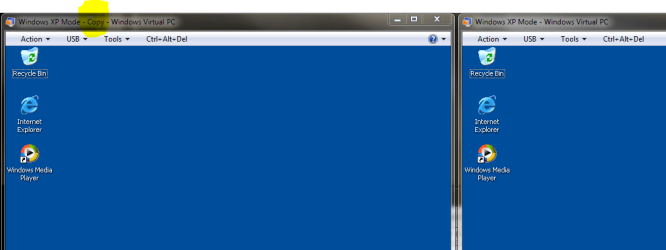
First three files are located in C:\Users\Your_Username\AppData\Local\Microsoft\Windows Virtual PC\Virtual Machines, the last one in C:\Users\Your_Username\Virtual Machines. The two latter files are created automatically; to make a copy of a Virtual Machine we only need .vhd and .vmc files. In this example we call the original virtual drive Windows XP Mode, and the copy we create Windows XP Mode- Copy. You can name all your virtual drives as you like, as long as you remember to modify the settings file as described here.
Copying Virtual XP or any other virtual hard disk created with Virtual PC is very easy and fast. Here's what you have to do: - Turn off your Virtual XP, do not hibernate it
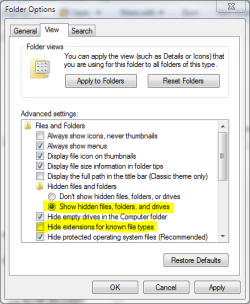
- Open Folder Options, choose Show hidden files, folders and drives. Uncheck Hide extensions for known file types
 - Goto C:\Users\Your_Username\AppData\Local\Microsoft\Windows Virtual PC\Virtual Machines
- Copy Windows XP Mode.vhd and Windows XP Mode.vmc files. To be sure you copy the right files you can open Folder Options and uncheck "Hide extensions for known file types" and click OK
- Paste files to the same folder. Windows adds word Copy to both filenames, so now you have two new files: Windows XP Mode - Copy.vhd and Windows XP Mode - Copy.vmc
- Open Windows XP Mode - Copy.vmc with Notepad. It is a xml-file, so you can edit it normally with Notepad
- Find the following string containing virtual drives name: <drive_type type="integer">1</drive_type>
 - Under the <drive_type...> change the vhd-file name to Windows XP Mode - Copy.vhd both in <absolute type="string"> and <relative type="string">
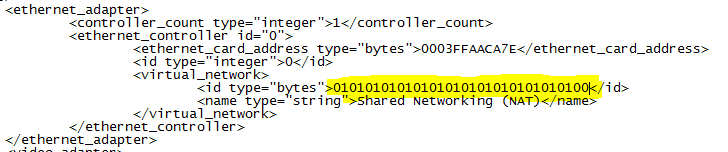
- Find the following place under <virtual_network> containing MAC-adress for Virtual XP's ethernet adapter: <id type="bytes">
 - To allow two copies of Virtual XP to connect to network simultaneously , we have to change the MAC-adress of the ethernet adapter to avoid MAC-adress conflict. Adress is given in hex, 0-9 and A-E. It is enough to change one bit. In this example we have changed the last bit from 1 to 0
- Save and close the file
- Go to C:\Users\Your_Username\Virtual Machines , copy Windows XP Mode.vmcx and paste it to same folder
- Open the file Windows XP Mode - Copy.vmcx with Notepad
- Change the vhd-file name to Windows XP Mode - Copy.vhd both in <primary_disk1 type="string"> and <vmc_path type="string">
 - Save and close the file
- Open Folder Options and choose Don't show hidden files, folders or drives. Check Hide extensions for known file types and click OK.
That's it. Now you can run two Virtual XP's simultaneously.
Have fun,
Kari
Last edited by Kari; 02 Dec 2009 at 11:37 AM..
Reason: posting back to back (double posting) is frowned upon
| My System Specs | | Computer type Laptop System Manufacturer/Model Number HP ENVY 17-1150eg OS Windows 7 x64 Ultimate CPU 1.6 GHz Intel Core i7-720QM Processor Memory 6 GB Graphics Card ATI Mobility Radeon HD 5850 Graphics Sound Card Beats sound system with integrated subwoofer Monitor(s) Displays 17" laptop display, 22" LCD and 32" Full HD TV through HDMI Screen Resolution 1600*900, 1680*1050 and 1920*1080 Keyboard Logitech diNovo Media Desktop Laser (bluetooth) Mouse Logitech MX1000 Laser (Bluetooth) Hard Drives Internal: 2 x 500 GB SATA Hard Disk Drive 7200 rpm
External: 2TB for backups, 3TB USB3 network drive for media Internet Speed 50/10 Mbps VDSL Antivirus MSE, Windows Defender Browser Maxthon 3.5.2. Other Info Windows 7 Ultimate Retail Full in English, additional Guest-user accounts in Finnish, German and Swedish (Working languages English & Swedish, Family language German, my own language, mother tongue, Finnish. I really need Ultimate to get to use Language Packs!) |
05 Aug 2009
|
#3 | | |
Here is how I do it
1). Shut down original machine
2). Copy the large virtual hard drive file to another location
3). Create a new VM and give it a new hard drive of any size
4). Copy the large virtual hard drive file from the backup location into the new folder
5). Go into the new VM and delete it's hard drive from the hard drive
6). Choose add hardware, add an existing hard drive and point at the file that you just copied over
7). Start the new VM. | My System Specs | | System Manufacturer/Model Number Self-Built in July 2009 OS Windows 7 Ultimate x64 CPU Intel Q9550 2.83Ghz OC'd to 3.40Ghz Motherboard Gigabyte GA-EP45-UD3R rev. 1.1, F12 BIOS Memory 8GB G.Skill PI DDR2-800, 4-4-4-12 timings Graphics Card EVGA 1280MB Nvidia GeForce GTX570 Sound Card Realtek ALC899A 8 channel onboard audio Monitor(s) Displays 23" Acer x233H Screen Resolution 1920x1080 Keyboard ABS M1 Mechanical Mouse Logitech G9 Laser Mouse PSU Corsair 620HX modular Case Antec P182 Cooling stock Hard Drives Intel X25-M 80GB Gen 2 SSD
Western Digital 1TB Caviar Black, 32MB cache. WD1001FALS Internet Speed 15/2 cable modem Other Info Windows and Linux enthusiast. Logitech G35 Headset. |
08 Aug 2009
|
#4 | | W7 X-64 RTM,SUSE 11.1, XP PRO SP3 as a VM, VMware ESXi Hafnarfjörður IS |
Hi there
If you use a product like vmware just power off the vm and then on the menu choose CLONE VM>
You can either make a "linked" clone or a full clone. the full clone is what you need as the "linked" clone will still require access to the state of the original vm.
(I think virtual box has this facility as well).
Another method is to install acronis true image on your VM and back it up.
Then create another vm. install acronis true image and restore your original vm.
Cheers
jimbo | My System Specs | | System Manufacturer/Model Number Custom built OS W7 X-64 RTM,SUSE 11.1, XP PRO SP3 as a VM, VMware ESXi CPU Q9400 QUAD Motherboard P5QL-CM Memory 8GB Graphics Card On Motherborad Sound Card Realtek HD audio Monitor(s) Displays Apple Cinema display Mouse Toshiba wireless laser Hard Drives 4 X 1TB SATA Internet Speed > 20MB up |
19 Aug 2009
|
#5 | | |
will this let you have more than 1 XP vm, if you copy the "xp mode" vm? | My System Specs | | System Manufacturer/Model Number custom built OS Windows 7 RC 64bit CPU amd Motherboard msi Memory 2gb Graphics Card nvidia Sound Card audigy 2 zs Monitor(s) Displays 21" lcd widescreen Keyboard old HP Mouse 5 button Hard Drives 300gb in 3 partitions (1 for winxp, 1 for win7-64, and 1 for data) Internet Speed cable Other Info xpmode installed and working :)
dualbooting with xp pro on same hdd |
19 Aug 2009
|
#6 | | Windows 7 x64 Ultimate A Finnish immigrant in Leipzig, Germany |

Quote: Originally Posted by s0me0ne will this let you have more than 1 XP vm, if you copy the "xp mode" vm? Yes. I have currently 3 separate, individual Virtual XP's for test purposes. Come back if you have any problems.
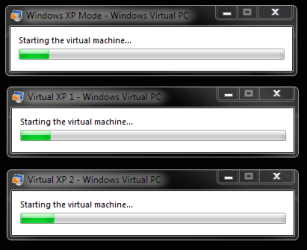
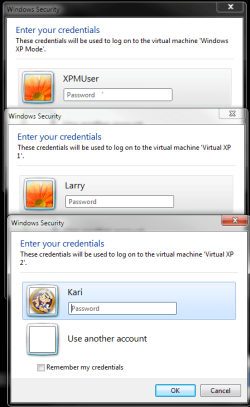
Three separate Virtual XP's starting, same time on same computer:
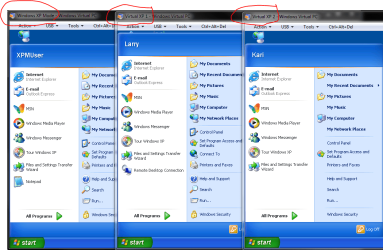
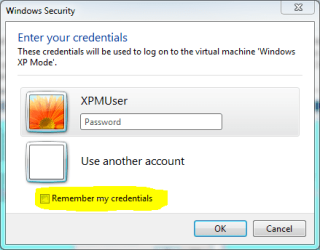
Three different users logging each on own XP:
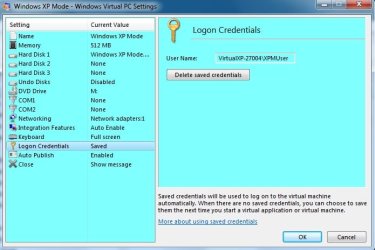
Three XP's running:
Kari | My System Specs | | Computer type Laptop System Manufacturer/Model Number HP ENVY 17-1150eg OS Windows 7 x64 Ultimate CPU 1.6 GHz Intel Core i7-720QM Processor Memory 6 GB Graphics Card ATI Mobility Radeon HD 5850 Graphics Sound Card Beats sound system with integrated subwoofer Monitor(s) Displays 17" laptop display, 22" LCD and 32" Full HD TV through HDMI Screen Resolution 1600*900, 1680*1050 and 1920*1080 Keyboard Logitech diNovo Media Desktop Laser (bluetooth) Mouse Logitech MX1000 Laser (Bluetooth) Hard Drives Internal: 2 x 500 GB SATA Hard Disk Drive 7200 rpm
External: 2TB for backups, 3TB USB3 network drive for media Internet Speed 50/10 Mbps VDSL Antivirus MSE, Windows Defender Browser Maxthon 3.5.2. Other Info Windows 7 Ultimate Retail Full in English, additional Guest-user accounts in Finnish, German and Swedish (Working languages English & Swedish, Family language German, my own language, mother tongue, Finnish. I really need Ultimate to get to use Language Packs!) |
19 Aug 2009
|
#7 | | |
Sweet. So copying XPMode wont mess things up? I was worried it might confuse Windows 7 since you could pull apps from 3 different xpmode vms | My System Specs | | System Manufacturer/Model Number custom built OS Windows 7 RC 64bit CPU amd Motherboard msi Memory 2gb Graphics Card nvidia Sound Card audigy 2 zs Monitor(s) Displays 21" lcd widescreen Keyboard old HP Mouse 5 button Hard Drives 300gb in 3 partitions (1 for winxp, 1 for win7-64, and 1 for data) Internet Speed cable Other Info xpmode installed and working :)
dualbooting with xp pro on same hdd |
19 Aug 2009
|
#8 | | Windows 7 x64 Ultimate A Finnish immigrant in Leipzig, Germany |
Guten abend, s0me0ne. Willkommen in das SevenForum.
Of course every virtual session uses a lot of your computers resources, other than that there are no problems.
Kari | My System Specs | | Computer type Laptop System Manufacturer/Model Number HP ENVY 17-1150eg OS Windows 7 x64 Ultimate CPU 1.6 GHz Intel Core i7-720QM Processor Memory 6 GB Graphics Card ATI Mobility Radeon HD 5850 Graphics Sound Card Beats sound system with integrated subwoofer Monitor(s) Displays 17" laptop display, 22" LCD and 32" Full HD TV through HDMI Screen Resolution 1600*900, 1680*1050 and 1920*1080 Keyboard Logitech diNovo Media Desktop Laser (bluetooth) Mouse Logitech MX1000 Laser (Bluetooth) Hard Drives Internal: 2 x 500 GB SATA Hard Disk Drive 7200 rpm
External: 2TB for backups, 3TB USB3 network drive for media Internet Speed 50/10 Mbps VDSL Antivirus MSE, Windows Defender Browser Maxthon 3.5.2. Other Info Windows 7 Ultimate Retail Full in English, additional Guest-user accounts in Finnish, German and Swedish (Working languages English & Swedish, Family language German, my own language, mother tongue, Finnish. I really need Ultimate to get to use Language Packs!) |
22 Nov 2009
|
#9 | | |
Kari,
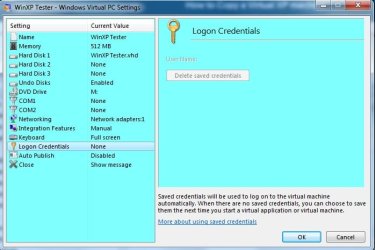
I was able to follow your directions, but the copy of the WinXP Mode has greyed out login credentials in the settigs. That makes me feel that it's not a fulluy independent virtual session. Is it necessary to duplicate the parent disk as well? My purpose is to test potential malware and be able to just delete one copy if need be and revert to a backup virtual XP. (I am aware of the undo disk feature, but I'd feel more comfortable simply having a full second clean copy.)
Thanks,
Mick | My System Specs | | OS Windows 7 Professional |
22 Nov 2009
|
#10 | | Windows 7 x64 Ultimate A Finnish immigrant in Leipzig, Germany |
Hi Mick, welcome to the Seven Forums.
I'm running three separate XP virtual machines for testing purposes and they are all working well, indepently. Any copy of XP Mode is always looking the base (or parent) drive in C:\Program Files\Windows XP Mode and it should remain there. It is not necessary to copy the base when copying the XP Mode.
A bit more "easy to read" tutorial is found here.
Kari | My System Specs | | Computer type Laptop System Manufacturer/Model Number HP ENVY 17-1150eg OS Windows 7 x64 Ultimate CPU 1.6 GHz Intel Core i7-720QM Processor Memory 6 GB Graphics Card ATI Mobility Radeon HD 5850 Graphics Sound Card Beats sound system with integrated subwoofer Monitor(s) Displays 17" laptop display, 22" LCD and 32" Full HD TV through HDMI Screen Resolution 1600*900, 1680*1050 and 1920*1080 Keyboard Logitech diNovo Media Desktop Laser (bluetooth) Mouse Logitech MX1000 Laser (Bluetooth) Hard Drives Internal: 2 x 500 GB SATA Hard Disk Drive 7200 rpm
External: 2TB for backups, 3TB USB3 network drive for media Internet Speed 50/10 Mbps VDSL Antivirus MSE, Windows Defender Browser Maxthon 3.5.2. Other Info Windows 7 Ultimate Retail Full in English, additional Guest-user accounts in Finnish, German and Swedish (Working languages English & Swedish, Family language German, my own language, mother tongue, Finnish. I really need Ultimate to get to use Language Packs!) How to Copy a Virtual XP machine problems? All times are GMT -5. The time now is 01:18 AM. | |