Windows 7 Forums


Windows 7: how to turn on hardware virtualization in my bios

11 Aug 2009  
ehab

windows 7 64 bit
1 posts
 
 
how to turn on hardware virtualization in my bios

my mobo is Gigabyte MA780UD3H and my cpu is amd 7750 BE
and i want to know instructions to enable virtualization in my bios .

My System SpecsSystem Spec

11 Aug 2009  
Dwarf

Windows 7 Ultimate x64 Service Pack 1
10,506 posts
Doncaster, UK


Hi ehab and welcome to Windows 7 Forums

Here you go.

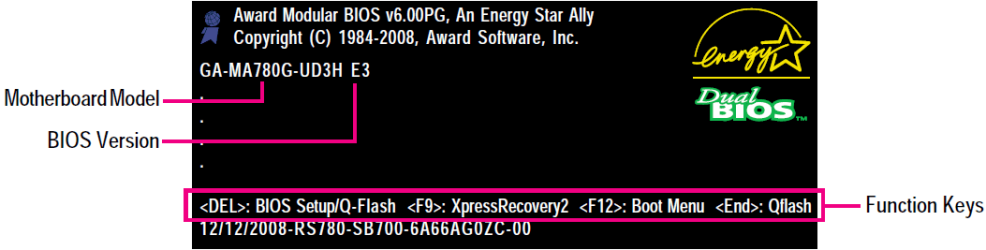
When you boot your system, press Delete to enter the BIOS.
how to turn on hardware virtualization in my bios-capture.png
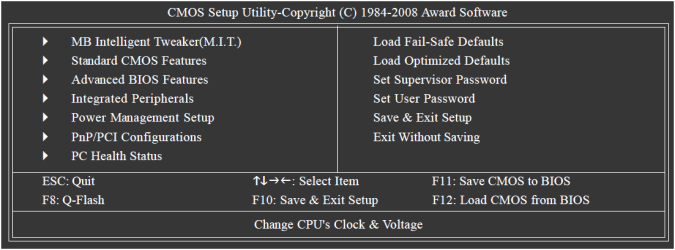
In the main menu, select Advanced BIOS Features.
how to turn on hardware virtualization in my bios-capture1.png
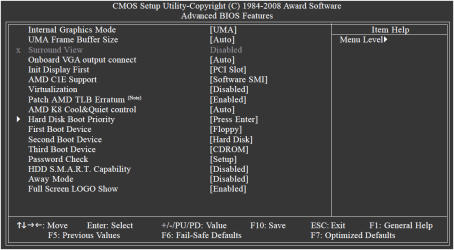
The option you require is Virtualization.
how to turn on hardware virtualization in my bios-capture2.png
Change the setting from the default to Enabled.
how to turn on hardware virtualization in my bios-capture3.png
My System SpecsSystem Spec
Reply

 how to turn on hardware virtualization in my bios problems?


Thread Tools


Similar help and support threads for: how to turn on hardware virtualization in my bios
Thread Forum
Enable Hardware Virtualization Virtualization
how to turn on hardware virtualization in my bios Virtualization
What do you do if you Have no Virtualization option in BIOS Virtualization
BIOS Intel Virtualization Performance & Maintenance
Help enabling virtualization in BIOS Virtualization


All times are GMT -5. The time now is 04:22 AM.


Windows 7 Forums is an independent web site and has not been authorized,
sponsored, or otherwise approved by Microsoft Corporation.
"Windows 7" and related materials are trademarks of Microsoft Corp.
© Designer Media Ltd