
| Windows 7: Windows XP Mode on real HDD |
23 Jan 2012
|
#1 | | |
Windows XP Mode on real HDD Hi All,
Is there a way to run Windows 7 XP Mode from real HDD? (Not virtual)
I tried copy all the contents of xp mode vhd to one of my partition, and boot it. But blue screen comes up before windows loading. Safe mode also didn't work.
I really confused, help me!!
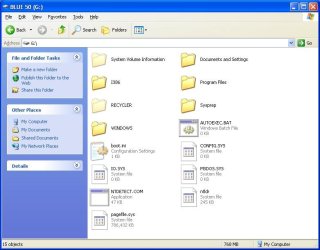
*Partition info: Primary, NTFS, 4k cluster | My System Specs |
| |
23 Jan 2012
|
#2 | | |
It seems what you are asking for is a dual boot.
The only way to achieve that is with a full copy of xp. | My System Specs | | System Manufacturer/Model Number Insane hobo technologies. ;-) OS Windows 7 x64 CPU Intel i7 2600k Motherboard Asrock z68 extreme 4 gen 3 Memory G.skill Ripjaw 16gigs @ 1866 Graphics Card Nvidia gtx580 (evga) Sound Card Integrated HD audio + hdmi Monitor(s) Displays 24" ASUS widescreen + 42" insignia Screen Resolution 1080p (1920x1080) Keyboard Microsoft wireless 3000 (v2) Mouse MS - wireless 5000 (bluetrack) PSU 1 kilowatt SLI/Crossfire rated Silverstone modular Case NZXT Phantom + additional 220 fan Cooling Zalmann Hard Drives 128 Samsung 830
256 Samsung 840
3 x 1tb storage drive (various)
1 western digital 1tb (eSATA)
1 Seagate 1tb (eSATA) Internet Speed depends on if you ask me or my provider. Other Info The above information is provided as is, and the author assumes no responsibility for issues it may cause with your sanity or fanboyism. |
23 Jan 2012
|
#3 | | Windows 7 Ultimate SP1 64-Bit Peterborough, England |
Welcome to Windows Seven Forums.
It can't be done and needs to be run from your VHD.
Why do you think you're asked to download Virtual PC as well?
As Maguscreed points out, if you want to use Windows XP alongside Windows 7 without using XP Mode you need to have a copy of Windows XP and dual boot it with Windows 7. Dual Boot Installation with Windows 7 and XP | My System Specs | | System Manufacturer/Model Number HP Pavilion Elite 495UK OS Windows 7 Ultimate SP1 64-Bit CPU Intel Core i7 870 @ 2.93GHz Motherboard MSI 2A9C (CPU1) Memory 8Gb Dual-Channel DDR3 @ 664MHz Graphics Card nVidia GeForce GTX 460 1024MB dedicated RAM Sound Card Realtek HD Audio Monitor(s) Displays HP2310i Screen Resolution 1920 x 1080 Keyboard Logitech K750 solar-powered keyboard Mouse Logitech Wireless M180 mouse PSU 460W Case HP Elite Cooling Air cooled Hard Drives 1x1954GB Hitachi HDS22020ALA 330 (RAID), 1x1954GB Hitachi External for backup and storage Internet Speed 2Mb Other Info Pure Avanti Flow Internet Radio with iPod Dock, 64Gb iPod, HP USB Speakers, Sony MDR-V500 Headphones, Sony Vaio F-Series Laptop |
23 Jan 2012
|
#4 | | |

Quote: Originally Posted by Maguscreed It seems what you are asking for is a dual boot.
The only way to achieve that is with a full copy of xp. I don't asked dual boot
My purpose is booting from my second hdd primary partition, installed with windows xp mode (cloned fom VirtualXP.vhd)
So it's not possible? 
Quote: Originally Posted by seavixen32 Welcome to Windows Seven Forums.
It can't be done and needs to be run from your VHD.
Why do you think you're asked to download Virtual PC as well?
As Maguscreed points out, if you want to use Windows XP alongside Windows 7 without using XP Mode you need to have a copy of Windows XP and dual boot it with Windows 7. Thank you seavixen32
Because its needed to run on Windows 7 right?
Why it wouldn't boot with real system? | My System Specs | | |
23 Jan 2012
|
#5 | | |

Quote: Originally Posted by gacyde My purpose is booting from my second hdd primary partition, installed with windows xp mode (cloned fom VirtualXP.vhd)
So it's not possible? What you are asking for is the same, you want a native xp environment. | My System Specs | | System Manufacturer/Model Number Insane hobo technologies. ;-) OS Windows 7 x64 CPU Intel i7 2600k Motherboard Asrock z68 extreme 4 gen 3 Memory G.skill Ripjaw 16gigs @ 1866 Graphics Card Nvidia gtx580 (evga) Sound Card Integrated HD audio + hdmi Monitor(s) Displays 24" ASUS widescreen + 42" insignia Screen Resolution 1080p (1920x1080) Keyboard Microsoft wireless 3000 (v2) Mouse MS - wireless 5000 (bluetrack) PSU 1 kilowatt SLI/Crossfire rated Silverstone modular Case NZXT Phantom + additional 220 fan Cooling Zalmann Hard Drives 128 Samsung 830
256 Samsung 840
3 x 1tb storage drive (various)
1 western digital 1tb (eSATA)
1 Seagate 1tb (eSATA) Internet Speed depends on if you ask me or my provider. Other Info The above information is provided as is, and the author assumes no responsibility for issues it may cause with your sanity or fanboyism. |
23 Jan 2012
|
#6 | | Windows 7 Ultimate SP1 64-Bit Peterborough, England |
XP Mode is designed to run under a virtual machine, which has to be installed first.
Nothing more, nothing less.
Which part of it won't run on a native hard drive don't you understand? | My System Specs | | System Manufacturer/Model Number HP Pavilion Elite 495UK OS Windows 7 Ultimate SP1 64-Bit CPU Intel Core i7 870 @ 2.93GHz Motherboard MSI 2A9C (CPU1) Memory 8Gb Dual-Channel DDR3 @ 664MHz Graphics Card nVidia GeForce GTX 460 1024MB dedicated RAM Sound Card Realtek HD Audio Monitor(s) Displays HP2310i Screen Resolution 1920 x 1080 Keyboard Logitech K750 solar-powered keyboard Mouse Logitech Wireless M180 mouse PSU 460W Case HP Elite Cooling Air cooled Hard Drives 1x1954GB Hitachi HDS22020ALA 330 (RAID), 1x1954GB Hitachi External for backup and storage Internet Speed 2Mb Other Info Pure Avanti Flow Internet Radio with iPod Dock, 64Gb iPod, HP USB Speakers, Sony MDR-V500 Headphones, Sony Vaio F-Series Laptop |
23 Jan 2012
|
#7 | | Windows 7 x64 Ultimate A Finnish immigrant in Leipzig, Germany |
Worth to mention is that the End User Licence of Microsoft Windows XP Mode only allows it to be run from a Microsoft Virtual PC virtual disk on Windows 7 systems running Professional, Ultimate or Enterprise editions.
Any other use is aganst the EULA.
Kari
Last edited by Kari; 23 Jan 2012 at 01:55 PM..
| My System Specs | | Computer type Laptop System Manufacturer/Model Number HP ENVY 17-1150eg OS Windows 7 x64 Ultimate CPU 1.6 GHz Intel Core i7-720QM Processor Memory 6 GB Graphics Card ATI Mobility Radeon HD 5850 Graphics Sound Card Beats sound system with integrated subwoofer Monitor(s) Displays 17" laptop display, 22" LCD and 32" Full HD TV through HDMI Screen Resolution 1600*900, 1680*1050 and 1920*1080 Keyboard Logitech diNovo Media Desktop Laser (bluetooth) Mouse Logitech MX1000 Laser (Bluetooth) Hard Drives Internal: 2 x 500 GB SATA Hard Disk Drive 7200 rpm
External: 2TB for backups, 3TB USB3 network drive for media Internet Speed 50/10 Mbps VDSL Antivirus MSE, Windows Defender Browser Maxthon 3.5.2. Other Info Windows 7 Ultimate Retail Full in English, additional Guest-user accounts in Finnish, German and Swedish (Working languages English & Swedish, Family language German, my own language, mother tongue, Finnish. I really need Ultimate to get to use Language Packs!) |
23 Jan 2012
|
#8 | | Windows 7 Ultimate SP1 64-Bit Peterborough, England |
Thanks Kari.
I'd say that nails it, once and for all. | My System Specs | | System Manufacturer/Model Number HP Pavilion Elite 495UK OS Windows 7 Ultimate SP1 64-Bit CPU Intel Core i7 870 @ 2.93GHz Motherboard MSI 2A9C (CPU1) Memory 8Gb Dual-Channel DDR3 @ 664MHz Graphics Card nVidia GeForce GTX 460 1024MB dedicated RAM Sound Card Realtek HD Audio Monitor(s) Displays HP2310i Screen Resolution 1920 x 1080 Keyboard Logitech K750 solar-powered keyboard Mouse Logitech Wireless M180 mouse PSU 460W Case HP Elite Cooling Air cooled Hard Drives 1x1954GB Hitachi HDS22020ALA 330 (RAID), 1x1954GB Hitachi External for backup and storage Internet Speed 2Mb Other Info Pure Avanti Flow Internet Radio with iPod Dock, 64Gb iPod, HP USB Speakers, Sony MDR-V500 Headphones, Sony Vaio F-Series Laptop Windows XP Mode on real HDD problems? All times are GMT -5. The time now is 09:49 AM. | |