| Windows 7: Vmware - Could not find component on update server. |
10 Feb 2012
|
#1 | | Windows 7 Ultimate 64bit France |
Vmware - Could not find component on update server. Hi forum.
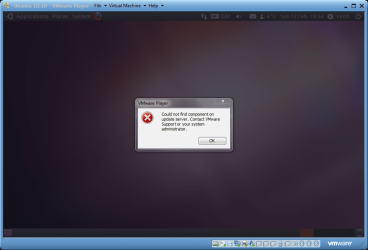
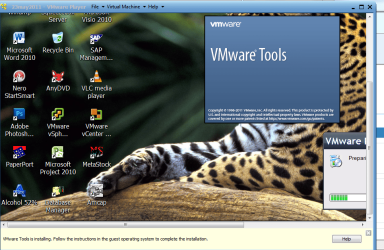
I've just uninstalled my Vmware player v3 and installed Vmware player 4.0.2. Now I can never install/update vmware tools in my vmware machine. If I click on the menu "Reinstall vmware tools" or click on the pop up at the bottom "update vmware tools" I only get this message " Could not find component on update server. Contact VMware Support or your system administrator."
I have tried reinstalled Vmware player 4.0.2 but still have this problem. I have no internet problem with my computer. Everything else works fine.
Thank you for your help! Edit: Built in Windows 7 firewall and no other security programs running in the background. | My System Specs |
| System Manufacturer/Model Number Thinkpad OS Windows 7 Ultimate 64bit Mouse Logitech MX518 Internet Speed 570kb/s :( |
10 Feb 2012
|
#2 | | Windows 7 Ultimate SP1 (x64) South Australia |
Hi,
I have exactly the same problem - I wondered if it's required (with version 4.0.2) to upgrade to get the VMWare tools?
Lets see if anyone else has the same issue.
Regards,
Golden | My System Specs | | Computer type PC/Desktop System Manufacturer/Model Number Golden Mk. I.3 OS Windows 7 Ultimate SP1 (x64) CPU Intel i7 860 @ 2.80 GHz Motherboard Gigabyte P55A-UD3R Rev.1. Award BIOS F13 Memory 16GB Corsair Vengance DDR3 @ 661 MHz Dual Channel (9-9-9-24) Graphics Card EVGA NVidia GTX 560 1024MB Sound Card Realtek Integrated Monitor(s) Displays Dual Samsung SyncMaster 2494HS Screen Resolution 1920*1080 and 1920*1080 Keyboard Logitech G110 Mouse Logitech MX518 PSU Thermaltake ToughPower QFan 750W Case Thermaltake Element S VK60001W2Z Cooling Corsair H60 Water Cooling, 2*230mm and 2*80mm case fans Hard Drives 1*OCZ Vertex 2 60GB SSD;
2*Samsung F3 SpinPoint 1TB in RAID0;
3*Samsung F1 SpinPoint 1TB in RAID5;
1*Western Digital 500GB External USB 3.0
1*Seagate 500GB External USB 2.0 Internet Speed Not fast enough!!! Antivirus MSE and Malwarebytes Pro Browser Chrome Version 25 Other Info Laptop: ASUS X54C, Intel Core i3-2330M @ 2.0Ghz, 4GB RAM, Intel HD on-board graphics, Windows 7 Professional SP1 (x64), LinuxMint 14 (x64), PepperMint 3 (x86) |
10 Feb 2012
|
#3 | | Windows 7 Ultimate 64bit France |

Quote: Originally Posted by Golden Hi,
I have exactly the same problem - I wondered if it's required (with version 4.0.2) to upgrade to get the VMWare tools?
Lets see if anyone else has the same issue.
Regards,
Golden Maybe you have run into this thread too.
And the first step: "fist download VMWare Tools for Linux from official website and once you complete the downloading then make click on the *.exe file"
But it seems that I can't find Vmware tools for linux from official website. | My System Specs | | System Manufacturer/Model Number Thinkpad OS Windows 7 Ultimate 64bit Mouse Logitech MX518 Internet Speed 570kb/s :( |
10 Feb 2012
|
#4 | | Windows 7 Ultimate SP1 (x64) South Australia |
Mmmm. I'm not sure.....I've asked Jimbo to have a look at this when he gest the time. He seems very knowlegable when it comes to VMWare, so lets see if he has any suggestions.
Regards,
Golden | My System Specs | | Computer type PC/Desktop System Manufacturer/Model Number Golden Mk. I.3 OS Windows 7 Ultimate SP1 (x64) CPU Intel i7 860 @ 2.80 GHz Motherboard Gigabyte P55A-UD3R Rev.1. Award BIOS F13 Memory 16GB Corsair Vengance DDR3 @ 661 MHz Dual Channel (9-9-9-24) Graphics Card EVGA NVidia GTX 560 1024MB Sound Card Realtek Integrated Monitor(s) Displays Dual Samsung SyncMaster 2494HS Screen Resolution 1920*1080 and 1920*1080 Keyboard Logitech G110 Mouse Logitech MX518 PSU Thermaltake ToughPower QFan 750W Case Thermaltake Element S VK60001W2Z Cooling Corsair H60 Water Cooling, 2*230mm and 2*80mm case fans Hard Drives 1*OCZ Vertex 2 60GB SSD;
2*Samsung F3 SpinPoint 1TB in RAID0;
3*Samsung F1 SpinPoint 1TB in RAID5;
1*Western Digital 500GB External USB 3.0
1*Seagate 500GB External USB 2.0 Internet Speed Not fast enough!!! Antivirus MSE and Malwarebytes Pro Browser Chrome Version 25 Other Info Laptop: ASUS X54C, Intel Core i3-2330M @ 2.0Ghz, 4GB RAM, Intel HD on-board graphics, Windows 7 Professional SP1 (x64), LinuxMint 14 (x64), PepperMint 3 (x86) |
10 Feb 2012
|
#5 | | |
As I described in a separate thread, I installed VM Playesr 3.1.5 with XP Mode. That is just two days ago.
When I opened VM Player, it prompted to download Vm Player 4.01 (not 4.02). Leave it for a few minutes. Then, it starts to download. I let the computer does the job. It automatically reboot the computer and uninstalled v. 3.1.5. The computer rebooted by iteself and started to install v. 4.01. Everything goes smoothly. A few minutes later, it will prompt to download VM tools ( I assume that thse are for v. 4.01). It downlaoded and insalled. Just be patient. Save your energy. Let the computer does the job. My VM Player runs excelelnt now (but with minor two errors which I am going to post soon). | My System Specs | | |
10 Feb 2012
|
#6 | | Win 7 Ultimate (64-bit), Win 7 Pro (32-bit) N. Calif |
Apparently it's a known issue but VWWare hasn't fixed it yet. The workaround, according to the VMWare Player forum, is to use an older version of VMWare Tools until VMWare gets around to uploading the files for the new version. | My System Specs | | System Manufacturer/Model Number Home Built, Dell Inspiron 1520 Laptop OS Win 7 Ultimate (64-bit), Win 7 Pro (32-bit) CPU 3.4Ghz 3770K i7, 2.4Ghz Core 2 Duo Motherboard Gigabyte Z77X-UD3H, Dell Memory 8G, 3G Graphics Card ATI Radeon HD 5770, Mobile Intel 965 Sound Card High Definition Audio (Built-in to mobo) Monitor(s) Displays Dell 2409W 24" Screen Resolution 1920x1080 Keyboard IBM Model M - used continuously since 1986 Mouse Microsoft PSU Antec Case Antec 100 Cooling CM 212+ Hard Drives 128G SSD OS; 1.5T & 2T Data on Desktop, 320G for laptop Internet Speed 1.5M down 1.2M up :-( Other Info Also have an Acer Aspire netbook, a home-built AMD Dual core (Minecraft server) and home-built Pent 4 all running Win 7. Also have various machines running XP, Win Server 2K, Win Server 2003, Linux and DOS. I think I have a problem... |
10 Feb 2012
|
#7 | | Windows 7 Ultimate 64bit France |
OMG, I have had enough problems with linux. I have tried so hard to make the shared folder to work with no success. Thought I might need a newer version of Vmware. Now this damn thing is causing problem too... | My System Specs | | System Manufacturer/Model Number Thinkpad OS Windows 7 Ultimate 64bit Mouse Logitech MX518 Internet Speed 570kb/s :( |
10 Feb 2012
|
#8 | | Windows 7 Ultimate SP1 (x64) South Australia |
| My System Specs | | Computer type PC/Desktop System Manufacturer/Model Number Golden Mk. I.3 OS Windows 7 Ultimate SP1 (x64) CPU Intel i7 860 @ 2.80 GHz Motherboard Gigabyte P55A-UD3R Rev.1. Award BIOS F13 Memory 16GB Corsair Vengance DDR3 @ 661 MHz Dual Channel (9-9-9-24) Graphics Card EVGA NVidia GTX 560 1024MB Sound Card Realtek Integrated Monitor(s) Displays Dual Samsung SyncMaster 2494HS Screen Resolution 1920*1080 and 1920*1080 Keyboard Logitech G110 Mouse Logitech MX518 PSU Thermaltake ToughPower QFan 750W Case Thermaltake Element S VK60001W2Z Cooling Corsair H60 Water Cooling, 2*230mm and 2*80mm case fans Hard Drives 1*OCZ Vertex 2 60GB SSD;
2*Samsung F3 SpinPoint 1TB in RAID0;
3*Samsung F1 SpinPoint 1TB in RAID5;
1*Western Digital 500GB External USB 3.0
1*Seagate 500GB External USB 2.0 Internet Speed Not fast enough!!! Antivirus MSE and Malwarebytes Pro Browser Chrome Version 25 Other Info Laptop: ASUS X54C, Intel Core i3-2330M @ 2.0Ghz, 4GB RAM, Intel HD on-board graphics, Windows 7 Professional SP1 (x64), LinuxMint 14 (x64), PepperMint 3 (x86) |
11 Feb 2012
|
#9 | | W7 X-64 RTM,SUSE 11.1, XP PRO SP3 as a VM, VMware ESXi Hafnarfjörður IS |
Hi there
You need to install vmware tools from the VMWARE menu screen -- I couldn't get it to work via the install button in the VM.
Power on your VM in WINDOWED mode -- then when it's up and running use the MENU VM===>install vmware tools.
This should work.
Cheers
jimbo | My System Specs | | System Manufacturer/Model Number Custom built OS W7 X-64 RTM,SUSE 11.1, XP PRO SP3 as a VM, VMware ESXi CPU Q9400 QUAD Motherboard P5QL-CM Memory 8GB Graphics Card On Motherborad Sound Card Realtek HD audio Monitor(s) Displays Apple Cinema display Mouse Toshiba wireless laser Hard Drives 4 X 1TB SATA Internet Speed > 20MB up |
12 Feb 2012
|
#10 | | Microsoft Windows 7 Home Premium 64-bit 7601 Multiprocessor Free Service Pack 1 Hertfordshire |

Quote: Originally Posted by jimbo45 Hi there
You need to install vmware tools from the VMWARE menu screen -- I couldn't get it to work via the install button in the VM.
Power on your VM in WINDOWED mode -- then when it's up and running use the MENU VM===>install vmware tools.
This should work.
Cheers
jimbo That doesn't work for me jimbo. | My System Specs | | Computer type PC/Desktop System Manufacturer/Model Number Hewlett-Packard/G62-107SA Notebook OS Microsoft Windows 7 Home Premium 64-bit 7601 Multiprocessor Free Service Pack 1 CPU Intel(R) Core(TM) i3 CPU M 330 @ 2.13GHz Motherboard Hewlett-Packard 1425 Memory 8 GB DDR3 Graphics Card Intel(R) HD Graphics Sound Card Realtek High Definition Audio Monitor(s) Displays Builtin Screen Resolution 1366 x 768 x 32 bits (4294967296 colors) @ 60 Hz Mouse Microsoft Bluetooth Notebook Mouse 5000 Hard Drives 250 GB SATA Hard Disk Drive 7200 rpm
2TB Seagate GoFlex USB 2 Drive
1TB Iomega Prestige USB 2 Drive
1.5TB Iomega Prestige USB 2 Drive (Samsung)
1TB Iomega NAS. Internet Speed 60 Mbs download 3 Mbs upload Antivirus Norton 360 Browser Chrome Vmware - Could not find component on update server. problems? All times are GMT -5. The time now is 08:43 AM. | |