Windows 7 Forums Search
Welcome to Windows 7 Forums. Our forum is dedicated to helping you find solutions with any problems, errors or issues you are experiencing with Windows 7. The Windows 7 forum also covers news and updates and has an extensive Windows 7 tutorial section that covers a wide range of tips and tricks.


Windows 7 - VMWare Server NAT problem


02-11-2009   #1
Enridis


VMWare Server NAT problem

I am using VMWare Server 2 on my Windows 7 Workstation.

Guest OS is FreeBSD, but it is not important.

I could not connect to any host (except master IP) from Guest OS when I am using NAT. But I can ping any host. I have not problems when I use bridget network.

I have tried to disable Windows Firewall - no changes.

This configuration has worked in Windows Vista ideal. I have submited feedback to MS.

May be anybody have any idea?

My System SpecsSystem Spec
02-25-2009   #2


Windows 7 7000 64bit


Seems like the same trouble I´ve been having.

I run Ubuntu and Fedora with VMware Workstation, and I can ping all I want, but thats it. Only way I can get it to work is running bridged.

I prefer bridge tho, so it dosen´t matter to me. But youre not the only one with problems running NAT networking on VM guest.
My System SpecsSystem Spec
05-01-2009   #3


but how did you get it to connect via bridge?
i've tried a lot of different ways but still can't get my xubuntu connect to the internet.....
My System SpecsSystem Spec
.


05-01-2009   #4


Windows 7 7000 64bit


Quote   Quote: Originally Posted by chluk2425 View Post
but how did you get it to connect via bridge?
i've tried a lot of different ways but still can't get my xubuntu connect to the internet.....
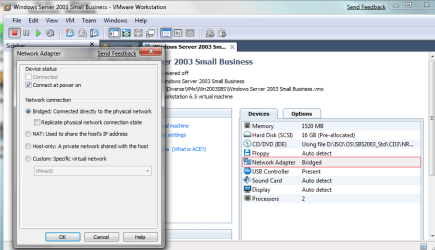
I just select Bridge in VMware control panel, and then I enter IP-info manually on the guest.
My System SpecsSystem Spec
05-01-2009   #5


W7 X-64 RTM,SUSE 11.1, XP PRO SP3 as a VM, VMware ESXi


Quote   Quote: Originally Posted by Enridis View Post
I am using VMWare Server 2 on my Windows 7 Workstation.

Guest OS is FreeBSD, but it is not important.

I could not connect to any host (except master IP) from Guest OS when I am using NAT. But I can ping any host. I have not problems when I use bridget network.

I have tried to disable Windows Firewall - no changes.

This configuration has worked in Windows Vista ideal. I have submited feedback to MS.

May be anybody have any idea?

Hi there
VMWARE has a problem with NAT in Windows 7. You'll have to use "Bridged".

Will be fixed later. (Both vmware server and workstation)

Her's the answer to a question I posted on the vmware site.
VMware Communities: Windows 7 - both X-64 and X-86 NAT Broken

Cheers
jimbo
My System SpecsSystem Spec
05-01-2009   #6


Quote   Quote: Originally Posted by Forman View Post
I just select Bridge in VMware control panel, and then I enter IP-info manually on the guest.
you mean Bridge in VMWare, do you mean double click the little green adapter then select Host Only?

and another problem is, i know it's not under network anymore, i can't uninstall the vmware anymore, whenever i uninstall it, it said cannot connect to host sth like that....
My System SpecsSystem Spec
05-01-2009   #7


Windows 7 7000 64bit


Quote   Quote: Originally Posted by chluk2425 View Post
you mean Bridge in VMWare, do you mean double click the little green adapter then select Host Only?

and another problem is, i know it's not under network anymore, i can't uninstall the vmware anymore, whenever i uninstall it, it said cannot connect to host sth like that....
Here you go

Not sure whats up with it not letting you uninstall tho. Should be easy from the "Add/Remove programs" in Control Panel.
Attached Thumbnails
VMWare Server NAT problem-wmv_nat.png  
My System SpecsSystem Spec
05-01-2009   #8


but then did you change any settings in vmware and inside your guest machine?
My System SpecsSystem Spec
05-01-2009   #9


Windows 7 7000 64bit


Quote   Quote: Originally Posted by chluk2425 View Post
but then did you change any settings in vmware and inside your guest machine?
Im not sure what you mean. The picured I attached is VMware settings. But on the guest I only entered the IPs manually. IE. static IP.
My System SpecsSystem Spec
05-02-2009   #10


W7 X-64 RTM,SUSE 11.1, XP PRO SP3 as a VM, VMware ESXi


Hi there
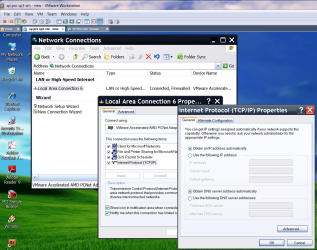
just leave the VM's network setting as "Obtain automatically via DHCP".

VMWare's virtual DHCP will manage all the network conversions to a real IP address

for example for a windows XP virtual machine here's an image of it's "virtual" network setting. (See attachment).

BTW no probs in runnimg VMWARE virtual machines and "Windows 7 in XP compatability mode" with virtual PC concurrently -- so long as your Real machine has enough RAM -- that's normally the problem resource in running a lot of VM's --CPU power is more than adequate usually.

Cheers
jimbo
Attached Thumbnails
VMWare Server NAT problem-vm1.png  
My System SpecsSystem Spec
Reply

VMWare Server NAT problem problems?


Thread Tools


Similar Threads for: VMWare Server NAT problem
Thread Forum
Problem with Vmware server 1.0.10 Virtualization
Vmware server -- How to set up VM's and use Virtualization
VMware Player? VMware Server? Virtualization
VMWARE Server - anybody here use it Virtualization
vmware server vs vbox vs vmware workstation Virtualization


All times are GMT -5. The time now is 10:11 PM.


Windows 7 Forums is an independent web site and has not been authorized,
sponsored, or otherwise approved by Microsoft Corporation.
"Windows 7" and related materials are trademarks of Microsoft Corp.
© Designer Media Ltd
  

1 2 3 4 5 6 7 8 9 10 11 12 13 14 15 16 17 18 19 20 21 22 23 24 25 26 27 28 29 30