| Windows 7: How can I Share PST file with XP-Mode |
28 Feb 2010
|
#1 | | Windows 7 Ultimate 64 and Ubuntu 9.10 Southern Calif, USA |
How can I Share PST file with XP-Mode OK. so maybe I'm an idiot or something, but Since Outlook 2007 doesn't support ani-Gifs, I'd rather run Outlook 2003 inside my xp-mode VM. However I want all my messages stored in the same place, so when I'm in Windows 7 Ultimate, I can run Outlook 2007 if I ever want to.
The problem is after running Outlook 2003 for a few minutes inside the XP-Mode VM, I get this error: see attached file.
It keeps losing rights to the PST file. I would like to give XPMuser admin rights to the Windows 7 machine, but can't seem to be able to.
How can I give xpmuser admin rights to Windows 7?
Thanks for your help.
Geekster2
Last edited by Geekster2; 28 Feb 2010 at 08:10 PM..
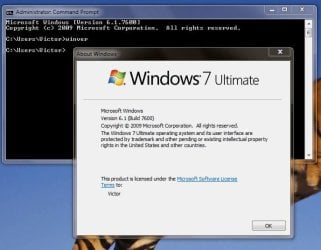
Reason: Added a Winver output attachment to prove license
| My System Specs |
| System Manufacturer/Model Number Self built OS Windows 7 Ultimate 64 and Ubuntu 9.10 CPU Core2 Quad core Motherboard Asus P5N-EM HDMI board Memory 4 GB Graphics Card GeForce 9500GT Sound Card onboard Monitor(s) Displays Envision 21 PSU 350 watt Case dont know. Cooling 2 case fans Hard Drives Western Digital 1 TB. |
01 Mar 2010
|
#2 | | Windows 7 Ultimate 64 and Ubuntu 9.10 Southern Calif, USA |
OK, so I figured out a WORK AROUND, (which is NOT a solution). It would still be nice to see a REAL solution.
You see, the path to documents that did NOT work was: "C:\Libraries\documents\documents\email\Outlook.PST"
When I moved the PST file to: "C:\Libraries\documents\PUBLIC documents\email\Outlook.pst" the disconnects from inside XP-Mode went away.
NOW, (all you Windows 7 gurus out there) WHY IS THAT?
Why can't I put the PST file in the private documents directory?
I can map the "My Documents" settings in XP-Mode to the private directory just fine.
WHY NOT THE PST file? What makes Outlook any different?
And further, WHY does Outlook have the rights when first opened, and then looses them a little while later?
What's up with the inconsistency?
.
.
. | My System Specs | | System Manufacturer/Model Number Self built OS Windows 7 Ultimate 64 and Ubuntu 9.10 CPU Core2 Quad core Motherboard Asus P5N-EM HDMI board Memory 4 GB Graphics Card GeForce 9500GT Sound Card onboard Monitor(s) Displays Envision 21 PSU 350 watt Case dont know. Cooling 2 case fans Hard Drives Western Digital 1 TB. |
01 Mar 2010
|
#3 | | Windows 7 Home Premium x64 |
Once a PST is locked it cannot be accessed until you close Outlook and the outlook.exe process ends. A PST file cannot be accessed by more than one Outlook client at a time.
Regarding permissions, I assume that your XPM user account is not Victor with the same password as your host account? That's sort of standard for a workstation environment. Accounts cannot access files in other user profile folders. These are also basically separate computers. Stick the PST in another folder, C:\Mail for example. Give "Everyone" full control. See if that works. | My System Specs | | OS Windows 7 Home Premium x64 CPU Intel Core 2 Quad Q9450 @ 3.2GHz Motherboard Asus P5Q PRO Turbo Memory 4GB DDR2-800 Graphics Card MSI Radeon HD 5850 Sound Card Creative Labs Audigy2 ZS Monitor(s) Displays Samsung 225BW PSU Corsair HX650 Case Antec Nine Hundred Hard Drives (2) 1TB Samsung F1, (2) 1.5TB Samsung F2, 1TB Samsung F2, 2TB Samsung F3 |
01 Mar 2010
|
#4 | | Windows 7 Ultimate 64 and Ubuntu 9.10 Southern Calif, USA |
JonM33:
Thanks for the reply. Well the PST is not locked open because Outlook is not running in the Windows 7 session. Even if it were, I doubt that Outlook 2003 (running in the VM) would be able to open it for even the few minutes that I've explained it works for.
You have basically described to me what my post previous to yours said. That moving it to another directory will make it work (IE Public documents). Yes it does, but I'd still like to know how to assign rights to the PST file to everyone no matter where it is on the drive. I can do it with XP, I can do it with Linux. Why not Windows 7?  Or better yet, How can I assign rights to a user that resides inside the Virtual Machine? I haven't been able to call up a user list of the XP-mode virtual machine when viewed from the Windows 7 session. And yes, I have the VM running and minimized. You'd think somehow I could grant rights to user accounts that reside inside the XP-Mode session to files in the Windows 7 session just as you can for any remote session. But you can't! That really gripes me. How could Microsoft not anticipate that need? | My System Specs | | System Manufacturer/Model Number Self built OS Windows 7 Ultimate 64 and Ubuntu 9.10 CPU Core2 Quad core Motherboard Asus P5N-EM HDMI board Memory 4 GB Graphics Card GeForce 9500GT Sound Card onboard Monitor(s) Displays Envision 21 PSU 350 watt Case dont know. Cooling 2 case fans Hard Drives Western Digital 1 TB. |
24 Jul 2010
|
#5 | | |
How I share my PST files between XP and Windows 7 Home Premium I have multiple computers, one of which runs Windows XP (sp 3) and the other two are laptops that run Windows 7. I found that it was easier to copy the .pst files from the containing folder on the desktop...
For XP to Windows 7
1. In Shared Documents (usually accessed from XP by clicking on Computer) create a folder (such as E-mail files).
2. Go to C:\Documents and Settings\[your user name]\Application Data\Microsoft\Outlook
3. Select all the files in the folder, then go to your folder (created in step 1) and paste all files there.
4. Open MS Outlook, click on Data Management, click Add, then browse to the folder you created in Step 1 and click on Outlook.pst.
5. Click Tools>E-mail Accounts
6. Select View or change existing e-mail accounts, click Next.
7. Select the e-mail accounts you want to transfer to the new folder and select the new folder under "Deliver new e-mail to the following location:"
8. On the other computer (again, I use a laptop running Windows 7) click on Computer, right click on the window that opens up, select "Add a network location".
9. Type in the network location of the pst file (usually formatted as \\[ComputerName]\SharedDocs\[foldername]" remember to remove the quotes...)
10. Open MS Outlook, click on Data Management, click Add, then browse to the Network Location listed under the Computer and click on Outlook.pst.
11. Do steps 5-7 ADVISOR: Only one instance of Outlook can access the .pst file at one time, if it is already in use, it will give you an error message when you try to open the second instance of Outlook. | My System Specs | | |
25 Jul 2010
|
#6 | | Windows 7 x64 Ultimate A Finnish immigrant in Leipzig, Germany |

Quote: Originally Posted by crine312 ADVISOR: Only one instance of Outlook can access the .pst file at one time, if it is already in use, it will give you an error message when you try to open the second instance of Outlook. Welcome to the Seven Forums, Crine. Very good and informative post you have there, worth some rep. (Third time for me, to rep new members first post. Is this going to be a habit?  )
The quoted statement is exactly why I have another approach to this issue. I have Outlook 2010 installed on 3 computers (netbook, laptop and desktop), starting automatically in each of them when booted. All set up with the same email accounts, all accounts leaving the messages on the server for 30 days, all rigs storing and using their individual locally stored PST-files.
This way, leaving the messages on server long enough for all rigs to be able to read them, all rigs get the new messages and store them locally, so whichever rig and Outlook I'm running, I'm always OK and receive my mails.
Kari | My System Specs | | Computer type Laptop System Manufacturer/Model Number HP ENVY 17-1150eg OS Windows 7 x64 Ultimate CPU 1.6 GHz Intel Core i7-720QM Processor Memory 6 GB Graphics Card ATI Mobility Radeon HD 5850 Graphics Sound Card Beats sound system with integrated subwoofer Monitor(s) Displays 17" laptop display, 22" LCD and 32" Full HD TV through HDMI Screen Resolution 1600*900, 1680*1050 and 1920*1080 Keyboard Logitech diNovo Media Desktop Laser (bluetooth) Mouse Logitech MX1000 Laser (Bluetooth) Hard Drives Internal: 2 x 500 GB SATA Hard Disk Drive 7200 rpm
External: 2TB for backups, 3TB USB3 network drive for media Internet Speed 50/10 Mbps VDSL Antivirus MSE, Windows Defender Browser Maxthon 3.5.2. Other Info Windows 7 Ultimate Retail Full in English, additional Guest-user accounts in Finnish, German and Swedish (Working languages English & Swedish, Family language German, my own language, mother tongue, Finnish. I really need Ultimate to get to use Language Packs!) How can I Share PST file with XP-Mode problems? All times are GMT -5. The time now is 07:00 PM. | |