XP Mode Bug w/ CD Drive on Dual Partition

knoxbury

New member
I just got a new Dell Inspiron laptop with a Dual Partition creating a C: drive for the Windows 7 Professional OS and a D: drive for user files. First, I wish Dell wouldn't have done this!

But second, I found that when I use Windows XP mode, the CD drive is not available because Windows XP assigns the letter D: to the CD drive. But our CD drive is actually assigned the letter E: because the non-OS partition is D:

So, when I go into XP mode and click on the CD drive (letter D) it doesn't work . . . again because the D volume is already assigned to a hard drive partition.

So unless I can change the CD drive assignment in Windows XP to letter E, it won't work.
 

My Computer

OS
Windows 7 Professional
Actually, I just went in and changed the CD drive letter to E: on the XP virtual machine, but it still doesn't allow me to access the CD drive on the laptop.
 

My Computer

OS
Windows 7 Professional
Hello Knoxbury, welcome to the Seven Forums.

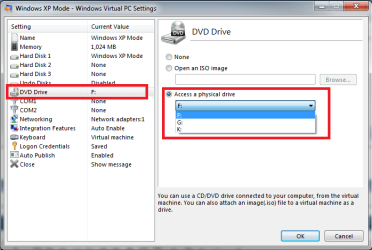
The CD/DVD drive in XP Mode is a virtual drive. You can mount an ISO image to that, or access one of your host's internal or external CD/DVD drives through it. Changing the drive letter does nothing.

To mount an ISO image or access one of the host drives, you have to go to XP Mode's settings. Choose DVD Drive on the right pane and the drive or ISO you want to access on the left:

XPM_CD.png

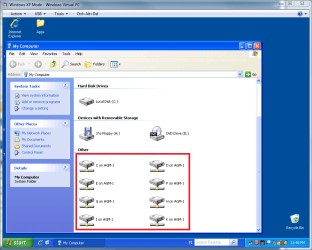
If you have integration features installed and enabled, you can access all drives on host machine (HD's & CD/DVD's) simply from Explorer:

XPM_access_host_drives.png

Read this to learn how to install and enable integration features.

Hope this helps!

Kari
 

My Computer

Computer type
Laptop
Computer Manufacturer/Model Number
HP ENVY 17-1150eg
OS
Windows 10 Pro x64 EN-GB
CPU
1.6 GHz Intel Core i7-720QM Processor
Memory
6 GB
Graphics Card(s)
ATI Mobility Radeon HD 5850 Graphics
Sound Card
Beats sound system with integrated subwoofer
Monitor(s) Displays
17" laptop display, 22" LED and 32" Full HD TV through HDMI
Screen Resolution
1600*900 (1), 1920*1080 (2&3)
Hard Drives
Internal: 2 x 500 GB SATA Hard Disk Drive 7200 rpm
External: 2TB for backups, 3TB USB3 network drive for media
Cooling
As Envy runs a bit warm, I have it on a Cooler Master pad
Keyboard
Logitech diNovo Media Desktop Laser (bluetooth)
Mouse
Logitech Performance Mouse MX
Internet Speed
50/10 Mbps VDSL
Antivirus
Windows Defender 4.3.9431.0
Browser
Maxthon 3.5.2., IE11
Actually, I tried to mount the DVD drive using the Virtual XP settings, but it wouldn't let me. It claimed it was already in use.
 

My Computer

OS
Windows 7 Professional
Actually, I just went in and changed the CD drive letter to E: on the XP virtual machine, but it still doesn't allow me to access the CD drive on the laptop.

Change the XP Mode CD drive letter back to default D. It should not be changed. It has absolutely nothing to do with what letter your CD drive on your host has.

Remove disk from the host CD drive you want to mount to XP Mode, and try again, only inserting disk after the drive is mounted to XP Mode.

This works 100 % sure. If not, you have some other issues with the XP Mode.

Kari
 

My Computer

Computer type
Laptop
Computer Manufacturer/Model Number
HP ENVY 17-1150eg
OS
Windows 10 Pro x64 EN-GB
CPU
1.6 GHz Intel Core i7-720QM Processor
Memory
6 GB
Graphics Card(s)
ATI Mobility Radeon HD 5850 Graphics
Sound Card
Beats sound system with integrated subwoofer
Monitor(s) Displays
17" laptop display, 22" LED and 32" Full HD TV through HDMI
Screen Resolution
1600*900 (1), 1920*1080 (2&3)
Hard Drives
Internal: 2 x 500 GB SATA Hard Disk Drive 7200 rpm
External: 2TB for backups, 3TB USB3 network drive for media
Cooling
As Envy runs a bit warm, I have it on a Cooler Master pad
Keyboard
Logitech diNovo Media Desktop Laser (bluetooth)
Mouse
Logitech Performance Mouse MX
Internet Speed
50/10 Mbps VDSL
Antivirus
Windows Defender 4.3.9431.0
Browser
Maxthon 3.5.2., IE11
Back
Top