| Windows 7: Share Network Adapter working under XP Mode !? |
05 Apr 2010
|
#1 | | |
Share Network Adapter working under XP Mode !? Hello guys,
hope you can help me figure the following out:
I have a (USB) network adapter running properly under XP mode.
How do I share or bridge it so that the connection can be used under Windows 7?
The reason I am using it under XP Mode is that the adapter is not supported by Win 7.
My initial idea was to install it under XP Mode (which did work) and use the connection with Win 7.
I tried sharing the connection as well as bridging to the existing und the XP network connection adapter but it did not help...
Thank you in advance!! | My System Specs |
| |
07 Apr 2010
|
#3 | | Windows 7 x64 Ultimate A Finnish immigrant in Leipzig, Germany |
I haven't thought this kind of scenario. It can be a tricky issue to solve.
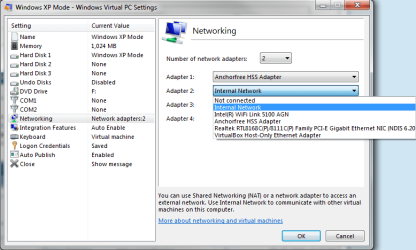
First of all, I think you might need to set up an AD HOC network between the host and XP Mode. For AD HOC, you need to use two NIC's on XP Mode (settings > networking): this USB adapter of yours, and your host's NIC, shared NAT or Internal Network.
Then you have to bridge the XP Mode network connections and allow ICS (Internet Connection Sharing).
Some reading: Set up a computer-to-computer (ad hoc) network Using ICS (Internet Connection Sharing) How to enable Internet Connection Sharing on a home or a small office network connection in Windows XP.
Kari | My System Specs | | Computer type Laptop System Manufacturer/Model Number HP ENVY 17-1150eg OS Windows 7 x64 Ultimate CPU 1.6 GHz Intel Core i7-720QM Processor Memory 6 GB Graphics Card ATI Mobility Radeon HD 5850 Graphics Sound Card Beats sound system with integrated subwoofer Monitor(s) Displays 17" laptop display, 22" LCD and 32" Full HD TV through HDMI Screen Resolution 1600*900, 1680*1050 and 1920*1080 Keyboard Logitech diNovo Media Desktop Laser (bluetooth) Mouse Logitech MX1000 Laser (Bluetooth) Hard Drives Internal: 2 x 500 GB SATA Hard Disk Drive 7200 rpm
External: 2TB for backups, 3TB USB3 network drive for media Internet Speed 50/10 Mbps VDSL Antivirus MSE, Windows Defender Browser Maxthon 3.5.2. Other Info Windows 7 Ultimate Retail Full in English, additional Guest-user accounts in Finnish, German and Swedish (Working languages English & Swedish, Family language German, my own language, mother tongue, Finnish. I really need Ultimate to get to use Language Packs!) |
07 Apr 2010
|
#4 | | |
Don't think that's gonna be possible, if the main OS can't recognize the hardware, there's no way to translate it to the virtual machine. You may have gotten the drivers installed, but that doesn't mean the hardware is properly working. | My System Specs | | |
07 Apr 2010
|
#5 | | Windows 7 x64 Ultimate A Finnish immigrant in Leipzig, Germany |
It might be possible using two NIC's on XP Mode, setting it to use a shared NAT or host's NIC as Adapter 2 in settings, then creating AD HOC between the host and XP Mode (using this second adapter) and bridging connections on XP Mode.
I doubt that a bit, but wouldn't be too surprised if it worked.
Kari | My System Specs | | Computer type Laptop System Manufacturer/Model Number HP ENVY 17-1150eg OS Windows 7 x64 Ultimate CPU 1.6 GHz Intel Core i7-720QM Processor Memory 6 GB Graphics Card ATI Mobility Radeon HD 5850 Graphics Sound Card Beats sound system with integrated subwoofer Monitor(s) Displays 17" laptop display, 22" LCD and 32" Full HD TV through HDMI Screen Resolution 1600*900, 1680*1050 and 1920*1080 Keyboard Logitech diNovo Media Desktop Laser (bluetooth) Mouse Logitech MX1000 Laser (Bluetooth) Hard Drives Internal: 2 x 500 GB SATA Hard Disk Drive 7200 rpm
External: 2TB for backups, 3TB USB3 network drive for media Internet Speed 50/10 Mbps VDSL Antivirus MSE, Windows Defender Browser Maxthon 3.5.2. Other Info Windows 7 Ultimate Retail Full in English, additional Guest-user accounts in Finnish, German and Swedish (Working languages English & Swedish, Family language German, my own language, mother tongue, Finnish. I really need Ultimate to get to use Language Packs!) |
08 Apr 2010
|
#6 | | |

Quote: Originally Posted by copernicus Don't think that's gonna be possible, if the main OS can't recognize the hardware, there's no way to translate it to the virtual machine. You may have gotten the drivers installed, but that doesn't mean the hardware is properly working. As I already wrote, the hardware DOES work under XP! The Host does recognize it but can't install as the drivers are not supporting 7. This isn't an issue under the XP.
The question is how to use the existing under XP connection with the host.
I did try sharing it, but it did not help. I think the problem is that Virtual PC does not add any virtual adapters to the Host.
If VMware is used, 1 or more additional virtual adapters are added to the host as well. I still haven't had time to play that way, but I wish there was an easy way to make it work under Virtual PC...!? | My System Specs | | |
08 Apr 2010
|
#7 | | |
What is the device exactly?
There's no way for hardware to translate into a guest machine without first being read properly on the physical host. | My System Specs | | |
09 Apr 2010
|
#8 | | |

Quote: Originally Posted by copernicus What is the device exactly?
There's no way for hardware to translate into a guest machine without first being read properly on the physical host. You are wrong  The device is a Belkin F5D6050 WLAN adapter. It is recognized as an "Unknown USB Device" within Win 7, as the drivers are not compatible with Win 7. Once "attached" to the Virtual XP, the device is being installed properly using the original drivers. It also works properly
I don't really see a reason why it is so hard for you to believe. Win 7 knows there is an USB device attached but doesn't have the information (driver) to get to know what exactly it is. XP on the other hand does have this information and runs it smoothly.
Isn't this the whole point of running a virtual machine anyway  To use applications and hardware not supported by the host OS | My System Specs | | |
09 Apr 2010
|
#9 | | Windows 7 x64 Ultimate A Finnish immigrant in Leipzig, Germany |
Gracy, you are right and Copernicus is wrong, that's clear. Host OS does not need to recognize a device in order that you can use it on virtual machine.
I still think your best bet would be to create ad hoc connection between your host and XP Mode, and then bridge that connection with XP Mode's net connection. I have no time to test it now but I will do that tomorrow and report my findings here.
Kari | My System Specs | | Computer type Laptop System Manufacturer/Model Number HP ENVY 17-1150eg OS Windows 7 x64 Ultimate CPU 1.6 GHz Intel Core i7-720QM Processor Memory 6 GB Graphics Card ATI Mobility Radeon HD 5850 Graphics Sound Card Beats sound system with integrated subwoofer Monitor(s) Displays 17" laptop display, 22" LCD and 32" Full HD TV through HDMI Screen Resolution 1600*900, 1680*1050 and 1920*1080 Keyboard Logitech diNovo Media Desktop Laser (bluetooth) Mouse Logitech MX1000 Laser (Bluetooth) Hard Drives Internal: 2 x 500 GB SATA Hard Disk Drive 7200 rpm
External: 2TB for backups, 3TB USB3 network drive for media Internet Speed 50/10 Mbps VDSL Antivirus MSE, Windows Defender Browser Maxthon 3.5.2. Other Info Windows 7 Ultimate Retail Full in English, additional Guest-user accounts in Finnish, German and Swedish (Working languages English & Swedish, Family language German, my own language, mother tongue, Finnish. I really need Ultimate to get to use Language Packs!) |
09 Apr 2010
|
#10 | | |

Quote: Originally Posted by Gracy123 
Quote: Originally Posted by copernicus What is the device exactly?
There's no way for hardware to translate into a guest machine without first being read properly on the physical host. You are wrong  The device is a Belkin F5D6050 WLAN adapter. It is recognized as an "Unknown USB Device" within Win 7, as the drivers are not compatible with Win 7. Once "attached" to the Virtual XP, the device is being installed properly using the original drivers. It also works properly
I don't really see a reason why it is so hard for you to believe. Win 7 knows there is an USB device attached but doesn't have the information (driver) to get to know what exactly it is. XP on the other hand does have this information and runs it smoothly.
Isn't this the whole point of running a virtual machine anyway  To use applications and hardware not supported by the host OS  Interesting, this setup this not work for me when I was trying to do something similar. There must have been changed right before release. I had a random usb device with no driver support for 7 or vista at the time. If the host 7 didn't recognize, xp mode didn't pull it either.
Good to know. | My System Specs | | Share Network Adapter working under XP Mode !? problems? All times are GMT -5. The time now is 04:12 AM. | |