| Windows 7: So, no WinXP Mode for me in the future. |
03 May 2009
|
#1 | | Windows 7 Home Premium x64 SP1 QC, Canada |
So, no WinXP Mode for me in the future. Hi guys. I just tried XPM on my Windows 7 install. I had big hopes. Well, everything worked really good except the program I wanted to run in XPM : Adobe Audition 1.5.
The bug I had directly in Windows 7 is obviously gone coz it's running in WinXP. But the thing that made me go "No, XPM is banned for me" is the fact that the software LAGS LIKE HELL. The playing cursor does not follow correctly the waveform and when I click "Stop", it stops around 5 seconds later.
I know that Virtual Machines are limited in 3D application and such but this software barely needs 2D graphics that every Virtual Machine has right?
Don't blame my specs, coz my machine is really enough to run XPM. | My System Specs |
| Computer type PC/Desktop System Manufacturer/Model Number Custom build OS Windows 7 Home Premium x64 SP1 CPU Core i7 950 3.06 GHz Motherboard Gigabyte X58A-UD3R Memory Corsair XSM3 6GB 1333MHz DDR3 9-9-9-24 Graphics Card Asus nVidia GeForce GTX460 Factory Overclocked Sound Card HT-Omega Claro 7.1 Monitor(s) Displays Asus VW246H 24" Screen Resolution 1920x1080 Keyboard Logitech K350 Mouse Logitech M510 PSU Xigmatek NRP-PC702 700W (cable hell) Case Lian-Li Lancool PC-K62 Cooling Stock fans for PC case, Cooler Master Hyper N520 for CPU Hard Drives 1x90GB OCZ Vertex 2 SSD (System, internal)
1x1TB Western Digital Green (Internal)
1x1TB Samsung/Seagate 7200RPM (Internal)
1x500GB Hitachi 7200RPM (Internal) Internet Speed 30Mbits dl - 10Mbits up Browser Firefox v20 Other Info Sound system : Eagle Arion ET-AR504LR-BK 35 Watts RMS 2.1
Printer : Samsung ML-2010 Mono
Scanner : Canon Canoscan LiDE 200 |
04 May 2009
|
#2 | | Windows 7 Ultimate x64 RC1 (7100), Vista Ultimate x64 SP1 |
Sorry you've experienced a let down. Spec wise yes, you're fine, but you are running the bare minimum for RAM (2GB) to use XPM and it is not the speediest set out there running at a fairly low clock (for today's standards.) The CPU is almost 3 years old now as well. I'm not denigrating your machine specs as they are very likely in the average window for the most common machines out there right now and are well within Windows 7 minimum specs (but we know the specs are higher for XPM of course.)
However, I would wonder more about the Adobe application you were using. How does it run in XP? Is it somewhat slow there as well? My experience with a number of Adobe applications (Reader, Acrobat, Photoshop, Premiere, After Effects) is that they are somewhat piggish as they are needing gobs of RAM and CPU in stand alone installs, much less a virtualized environment. They are also not known for their immediate compatibility with non-standard scenarios and I think XPM qualifies. How do other applications run in XPM on your machine?
I imagine that tweaks will be made to XPM to speed things up as it has just been released to the masses. The test base will be a bit smaller and may take more time but they've done a great job with Windows 7 so far so I have high hopes they'll do more here as well. This post sheds some light on the subject as well... | My System Specs | | System Manufacturer/Model Number Custom Built OS Windows 7 Ultimate x64 RC1 (7100), Vista Ultimate x64 SP1 CPU Intel Core i7 920 Motherboard EVGA X58 3x SLI Memory Corsair Dominator 6GB DDR3 1600 8-8-8-24 T1 Graphics Card Dual EVGA GTX280 SLI Sound Card On board Realtek HD Audio Monitor(s) Displays BenQ V2400W 24" LCD Panel Screen Resolution 1920x1200 Keyboard Microsoft Natural Ergo 4000 Mouse Logitech LX7 Cordless Optical Mouse PSU Corsair 750TX Case Antec P182 Gun Metal finish Cooling Noctua NH-U12P SE1366 Hard Drives WD Velociraptor 300GB 10k RPM Sata
WD Caviar Black 1TB 7200 RPM Sata Internet Speed 10MB Cable |
04 May 2009
|
#3 | | Windows 7 Home Premium x64 SP1 QC, Canada |
Thx for replying. Gonna give you rep.
Adobe Audition (including the ancestor, Cool Edit Pro) is working like a dream on XP : every audio professionals or amateur prefers by far XP for audio needs because Microsoft ditched the audio in Vista (and Seven isn't great either) mainly because you can both Stereo Mix and Record from a Mic at the same time on XP and you cannot on Vista and Seven.
Perfs wise, it's not lagging at all except v2 and up where you need those to make it not lag :
- old 2D graphic card
- HUGE amount of RAM.
That's why I still use 1.5. Anyway.
Also, I've try it with 768MB of RAM on XPM and it still lag. I will try to put it to the max I can put : 1500MB of RAM on XPM at home this evening.
I haven't tried anything else on XPM but I may try Nero 6 on it (simply the best Nero EVER). | My System Specs | | Computer type PC/Desktop System Manufacturer/Model Number Custom build OS Windows 7 Home Premium x64 SP1 CPU Core i7 950 3.06 GHz Motherboard Gigabyte X58A-UD3R Memory Corsair XSM3 6GB 1333MHz DDR3 9-9-9-24 Graphics Card Asus nVidia GeForce GTX460 Factory Overclocked Sound Card HT-Omega Claro 7.1 Monitor(s) Displays Asus VW246H 24" Screen Resolution 1920x1080 Keyboard Logitech K350 Mouse Logitech M510 PSU Xigmatek NRP-PC702 700W (cable hell) Case Lian-Li Lancool PC-K62 Cooling Stock fans for PC case, Cooler Master Hyper N520 for CPU Hard Drives 1x90GB OCZ Vertex 2 SSD (System, internal)
1x1TB Western Digital Green (Internal)
1x1TB Samsung/Seagate 7200RPM (Internal)
1x500GB Hitachi 7200RPM (Internal) Internet Speed 30Mbits dl - 10Mbits up Browser Firefox v20 Other Info Sound system : Eagle Arion ET-AR504LR-BK 35 Watts RMS 2.1
Printer : Samsung ML-2010 Mono
Scanner : Canon Canoscan LiDE 200 |
04 May 2009
|
#4 | | Windows 7 Ultimate x64 RC1 (7100), Vista Ultimate x64 SP1 |
Ah, thanks!
I hope that adding more RAM to the VM will help. It should but it may not be enough until you upgrade the hardware in the future. It will be interesting to see how Nero works.
I've not taken the XPM plunge yet but I will soon. It's a pretty cool concept. | My System Specs | | System Manufacturer/Model Number Custom Built OS Windows 7 Ultimate x64 RC1 (7100), Vista Ultimate x64 SP1 CPU Intel Core i7 920 Motherboard EVGA X58 3x SLI Memory Corsair Dominator 6GB DDR3 1600 8-8-8-24 T1 Graphics Card Dual EVGA GTX280 SLI Sound Card On board Realtek HD Audio Monitor(s) Displays BenQ V2400W 24" LCD Panel Screen Resolution 1920x1200 Keyboard Microsoft Natural Ergo 4000 Mouse Logitech LX7 Cordless Optical Mouse PSU Corsair 750TX Case Antec P182 Gun Metal finish Cooling Noctua NH-U12P SE1366 Hard Drives WD Velociraptor 300GB 10k RPM Sata
WD Caviar Black 1TB 7200 RPM Sata Internet Speed 10MB Cable |
05 May 2009
|
#5 | | Windows 7 Ult x64(x2), HomePrem x32(x4), Server 08 (+VM), 08 R2 (VM) , SuSe 11.2 (VM), XP 32 (VM) In a ∞ Portal |
um at this point its not the 3d thats giving you the lag but the emulated sound card
(sound blaster 16 if i remember correctly)...
all the DSP processing (which happens in the Sound chip) is now happening on the CPU which is very inefficient...
hell even playback of a sound file takes about 35% of Cpu power in the least...
imagine running a DAW?
also i believe you installed Asio drivers (have less lantency than the regular driver)
and with all VM software all audio emulated is not useful for DAW usage... | My System Specs | | System Manufacturer/Model Number Tx2500z Tablet Pc/Homemade Server OS Windows 7 Ult x64(x2), HomePrem x32(x4), Server 08 (+VM), 08 R2 (VM) , SuSe 11.2 (VM), XP 32 (VM) CPU Turion X2 ultra (oh well came with laptop)/P4 @3.2 (yes P4) Motherboard IDK HP Motherboard / Intel DG965SS Memory OCZ Dual Channel 4GB kit/ 1gb Dual Channel Graphics Card HD 3200 graphics /GMA x3100 (yay for intergrated!!) Sound Card Realtek HD Audio(mic working, well sort of)/Siig IC-70012 Monitor(s) Displays built-in Hp 12" laptop screen/ Acer 19" Screen Resolution 1280x800 /1440x900 Mouse Logi MX Rev. /MS Wheel Optical 1.1A /Logitech Optical Mouse Cooling All Air Cooled Internet Speed College baby but its still routed through vpn to 1536k... Other Info love my wacom pen and pressure sensitivity...
wished it worked in 7, SUSE for that matter though |
05 May 2009
|
#6 | | Windows 7 Home Premium x64 SP1 QC, Canada |
Asio drivers? I have an on-board Realtek. I didn't check if the XP drivers were installed. I'll check this up. I'll keep you informed tonight. | My System Specs | | Computer type PC/Desktop System Manufacturer/Model Number Custom build OS Windows 7 Home Premium x64 SP1 CPU Core i7 950 3.06 GHz Motherboard Gigabyte X58A-UD3R Memory Corsair XSM3 6GB 1333MHz DDR3 9-9-9-24 Graphics Card Asus nVidia GeForce GTX460 Factory Overclocked Sound Card HT-Omega Claro 7.1 Monitor(s) Displays Asus VW246H 24" Screen Resolution 1920x1080 Keyboard Logitech K350 Mouse Logitech M510 PSU Xigmatek NRP-PC702 700W (cable hell) Case Lian-Li Lancool PC-K62 Cooling Stock fans for PC case, Cooler Master Hyper N520 for CPU Hard Drives 1x90GB OCZ Vertex 2 SSD (System, internal)
1x1TB Western Digital Green (Internal)
1x1TB Samsung/Seagate 7200RPM (Internal)
1x500GB Hitachi 7200RPM (Internal) Internet Speed 30Mbits dl - 10Mbits up Browser Firefox v20 Other Info Sound system : Eagle Arion ET-AR504LR-BK 35 Watts RMS 2.1
Printer : Samsung ML-2010 Mono
Scanner : Canon Canoscan LiDE 200 |
06 May 2009
|
#7 | | Windows 7 Ultimate x64 RC1 (7100), Vista Ultimate x64 SP1 |
I read this in the installation document that Microsoft released which may or may not be related to your issue but it sounds like it could be: Quote: Business productivity applications that run on Windows XP are appropriate for this testing this scenario. However, Windows Virtual PC does not support applications that require bidirectional sound or 3D graphics, which means that consumer applications such as games are not appropriate for this scenario. I wonder if installing a PCI sound card and making it the default card for the VPC is something that can be done to help in this case... worth looking into. | My System Specs | | System Manufacturer/Model Number Custom Built OS Windows 7 Ultimate x64 RC1 (7100), Vista Ultimate x64 SP1 CPU Intel Core i7 920 Motherboard EVGA X58 3x SLI Memory Corsair Dominator 6GB DDR3 1600 8-8-8-24 T1 Graphics Card Dual EVGA GTX280 SLI Sound Card On board Realtek HD Audio Monitor(s) Displays BenQ V2400W 24" LCD Panel Screen Resolution 1920x1200 Keyboard Microsoft Natural Ergo 4000 Mouse Logitech LX7 Cordless Optical Mouse PSU Corsair 750TX Case Antec P182 Gun Metal finish Cooling Noctua NH-U12P SE1366 Hard Drives WD Velociraptor 300GB 10k RPM Sata
WD Caviar Black 1TB 7200 RPM Sata Internet Speed 10MB Cable |
06 May 2009
|
#8 | | Windows 7 Ult x64(x2), HomePrem x32(x4), Server 08 (+VM), 08 R2 (VM) , SuSe 11.2 (VM), XP 32 (VM) In a ∞ Portal |
sorry but at this point all vm software all emulate HW execpt maybe usb (hybrid emulation since VPC installs a generic driver when you insert a usb into the VM...)
if you had a low latency usb sound card then maybe it might work..
but apart from the rest is emulated....
and thus cannot be changed... | My System Specs | | System Manufacturer/Model Number Tx2500z Tablet Pc/Homemade Server OS Windows 7 Ult x64(x2), HomePrem x32(x4), Server 08 (+VM), 08 R2 (VM) , SuSe 11.2 (VM), XP 32 (VM) CPU Turion X2 ultra (oh well came with laptop)/P4 @3.2 (yes P4) Motherboard IDK HP Motherboard / Intel DG965SS Memory OCZ Dual Channel 4GB kit/ 1gb Dual Channel Graphics Card HD 3200 graphics /GMA x3100 (yay for intergrated!!) Sound Card Realtek HD Audio(mic working, well sort of)/Siig IC-70012 Monitor(s) Displays built-in Hp 12" laptop screen/ Acer 19" Screen Resolution 1280x800 /1440x900 Mouse Logi MX Rev. /MS Wheel Optical 1.1A /Logitech Optical Mouse Cooling All Air Cooled Internet Speed College baby but its still routed through vpn to 1536k... Other Info love my wacom pen and pressure sensitivity...
wished it worked in 7, SUSE for that matter though |
06 May 2009
|
#9 | | Windows 7 Home Premium x64 SP1 QC, Canada |

Quote: Originally Posted by HKeleher I read this in the installation document that Microsoft released which may or may not be related to your issue but it sounds like it could be: Quote: Business productivity applications that run on Windows XP are appropriate for this testing this scenario. However, Windows Virtual PC does not support applications that require bidirectional sound or 3D graphics, which means that consumer applications such as games are not appropriate for this scenario. I wonder if installing a PCI sound card and making it the default card for the VPC is something that can be done to help in this case... worth looking into. OW... I thought I could run Adobe Audition 1.5 without losing Aero or having that pointing problem anymore with XPM  . BUT! I'll try Nero 6 on it  It needs some audio stuff but it's nothing to be afraid of. I only want to create Data and audio CDs. | My System Specs | | Computer type PC/Desktop System Manufacturer/Model Number Custom build OS Windows 7 Home Premium x64 SP1 CPU Core i7 950 3.06 GHz Motherboard Gigabyte X58A-UD3R Memory Corsair XSM3 6GB 1333MHz DDR3 9-9-9-24 Graphics Card Asus nVidia GeForce GTX460 Factory Overclocked Sound Card HT-Omega Claro 7.1 Monitor(s) Displays Asus VW246H 24" Screen Resolution 1920x1080 Keyboard Logitech K350 Mouse Logitech M510 PSU Xigmatek NRP-PC702 700W (cable hell) Case Lian-Li Lancool PC-K62 Cooling Stock fans for PC case, Cooler Master Hyper N520 for CPU Hard Drives 1x90GB OCZ Vertex 2 SSD (System, internal)
1x1TB Western Digital Green (Internal)
1x1TB Samsung/Seagate 7200RPM (Internal)
1x500GB Hitachi 7200RPM (Internal) Internet Speed 30Mbits dl - 10Mbits up Browser Firefox v20 Other Info Sound system : Eagle Arion ET-AR504LR-BK 35 Watts RMS 2.1
Printer : Samsung ML-2010 Mono
Scanner : Canon Canoscan LiDE 200 |
06 May 2009
|
#10 | | Vista Professionnel x64 Roberval |

Quote: Originally Posted by Lebon14 OW... I thought I could run Adobe Audition 1.5 without losing Aero or having that pointing problem anymore with XPM  . BUT! I'll try Nero 6 on it  It needs some audio stuff but it's nothing to be afraid of. I only want to create Data and audio CDs. Do sound editing and capturing in Virtual Machine is not very good idea.
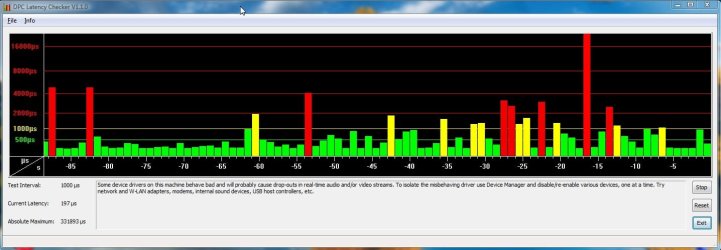
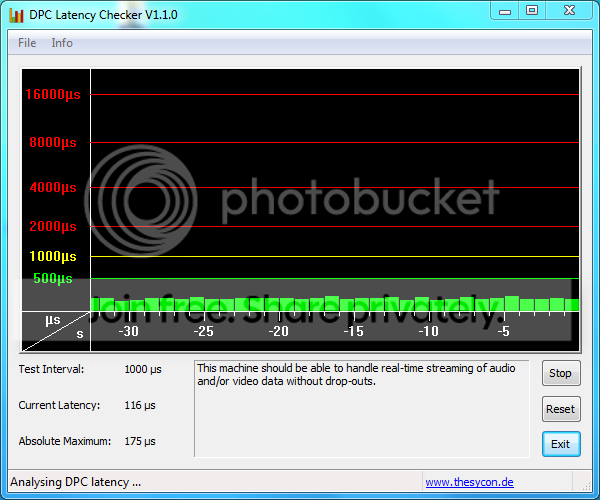
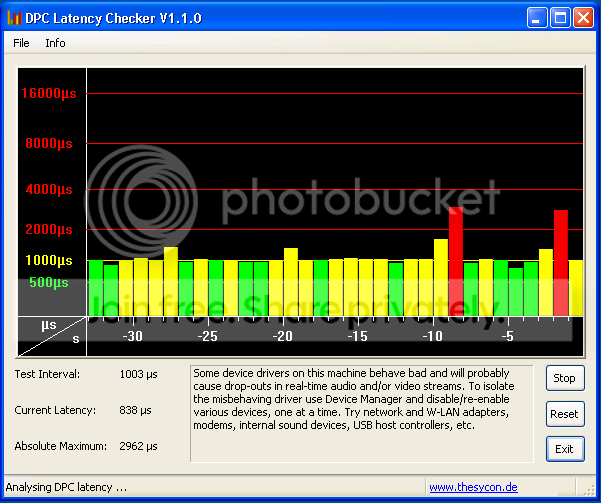
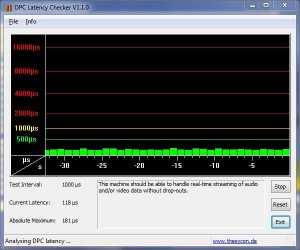
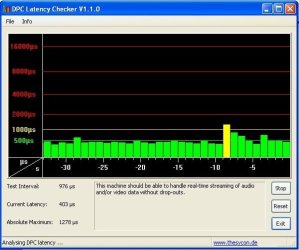
It simply because a virtual machine have high DPC lentancy. Whatever the power of the host machine is.
DPC is the ability to make or play in real time multimedia stuff.
In the fac DPC lentendy vary from hardware.
You can see DPC lentancy of my computer in first picture and from my virtual machine on second.
And you can download DPC lantancy checker on this link : http://www.thesycon.de/dpclat/dpclat.exe | My System Specs | | System Manufacturer/Model Number Dell Precision M4400 OS Vista Professionnel x64 CPU T9400 Memory 4Go DDR2 800 Graphics Card Quadro M770 Screen Resolution 1440x900 Hard Drives Seagate 320Go 7200.3 So, no WinXP Mode for me in the future. problems? All times are GMT -5. The time now is 10:37 AM. | |