Windows 7 Forums Search
Welcome to Windows 7 Forums. Our forum is dedicated to helping you find solutions with any problems, errors or issues you are experiencing with Windows 7. The Windows 7 forum also covers news and updates and has an extensive Windows 7 tutorial section that covers a wide range of tips and tricks.


Windows 7 - Can I run XP inside of Windows 7 with "Virtualbox"?


07-19-2010   #1


Windows 7 Home


Can I run XP inside of Windows 7 with "Virtualbox"?

I asked the 'Dual Boot' question a while ago. I am not sure whether I have Raid or Sata so did not proceed.
However I have just discovered "Virtualbox" which claims to allow me to run XP inside of Windows 7.
Anybody know about this? Does it work? Is is better or easier than a true dual-boot?

Just William

My System SpecsSystem Spec
07-19-2010   #2


windows 7


you need to install our plugin, VMLite XP Mode Plugin for virtualbox, otherwise XP Mode won't keep activated, i.e., you will be able to only use about 30 days of xp mode if you use only VirtualBox.

VMLite XP Mode Plugin for VirtualBox released - VMLite
My System SpecsSystem Spec
07-19-2010   #3


Windows 7 Home Premium x64


Quote   Quote: Originally Posted by Just William View Post
I asked the 'Dual Boot' question a while ago. I am not sure whether I have Raid or Sata so did not proceed.
However I have just discovered "Virtualbox" which claims to allow me to run XP inside of Windows 7.
Anybody know about this? Does it work? Is is better or easier than a true dual-boot?

Just William
Yes, it will work without a problem. It also has Fullscreen Mode so that it displays full screen. VirtualBox is one of the most useful (and free) programs I have ever used.
My System SpecsSystem Spec
.


07-19-2010   #4


Quote   Quote: Originally Posted by JonM33 View Post
Yes, it will work without a problem. It also has Fullscreen Mode so that it displays full screen. VirtualBox is one of the most useful (and free) programs I have ever used.
+1. You have no problems installing and using XP in VirtualBox, as far as you have valid installation media.


Quote   Quote: Originally Posted by huisinro View Post
you need to install our plugin, VMLite XP Mode Plugin for virtualbox, otherwise XP Mode won't keep activated, i.e., you will be able to only use about 30 days of xp mode if you use only VirtualBox.
To my knowledge Microsoft does allow use of the XP Mode only in its own Virtual PC platform. If the user wants to install XP to any other platform, he / she needs to have a valid XP license.

Could you please tell me does VMLite have Microsoft's official permission to use XP Mode vhd the way this VirtualBox plugin does? If yes, where and how can I verify this?

Kari
My System SpecsSystem Spec
07-19-2010   #5


windows 7


Microsoft does not state that you can only use XP mode with VPC, so as long as users use it on Windows 7 Professional and above, it's legal.
My System SpecsSystem Spec
07-19-2010   #6


Win 7 Home Premium (64-bit), Win 7 Pro (32-bit)


Not only can you use VirtualBox to run XP from Win 7 but I have also used it to run Win 7 from XP, Win 7 from Win 2003 Server and Win 7 from Mac OS X. I haven't tried it but you should also be able to use VirtualBox to run Win 7 from a Linux distro like Ubuntu.
My System SpecsSystem Spec
07-19-2010   #7


Windows 7 Ultimate 64bit, MS XP Mode, VBox, VMLite Workstation, VM Player 4.0


Let's see One custom install of XP Home edition, Vista, ubuntu, Mint 9, Puppy 5.0, SUSe 32bit/64bit 7 RCs since last year as well as recently on the new build in the Oracle Virtual Box.

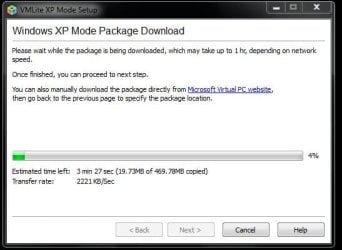
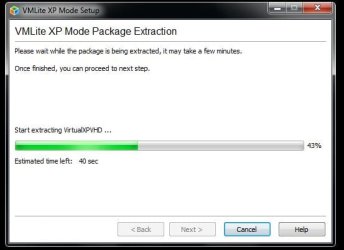
The VM Lite Workstation will allow you to run the XP Mode when your hardwares lack support for the MS Virtual PC. In fact that will automatically download and install the XP Mode for you if you don't already have the XP Mode's VHD present on the system to select when browsing for it.
My System SpecsSystem Spec
07-19-2010   #8


Windows 7 Ultimate x64


Quote   Quote: Originally Posted by huisinro View Post
you need to install our plugin, VMLite XP Mode Plugin for virtualbox, otherwise XP Mode won't keep activated, i.e., you will be able to only use about 30 days of xp mode if you use only VirtualBox.

VMLite XP Mode Plugin for VirtualBox released - VMLite

The other option is to use VMWare Player 3.0...which will allow you to convert Windows XP Mode and keep it activated. That's the product that I use.
My System SpecsSystem Spec
07-19-2010   #9


Windows 7 Ultimate 64bit, MS XP Mode, VBox, VMLite Workstation, VM Player 4.0


The download for that is the free trial version you sign up for at https://www.vmware.com/tryvmware/?p=player&lp=1

The free VM Lite Workstation is available at Download - VMLite Products

I'm presently giving both a run on an old Socket A single core XP build with only 1gb of memory installed where I have been running some compatibily tests for the temp 32bit 7 install. Have to see how this one goes.

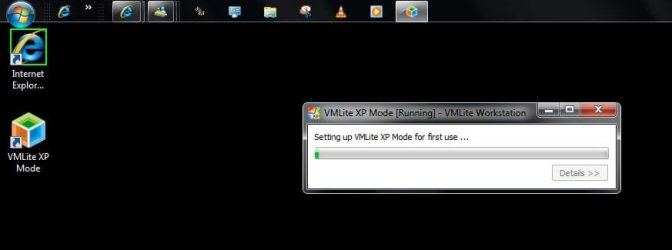
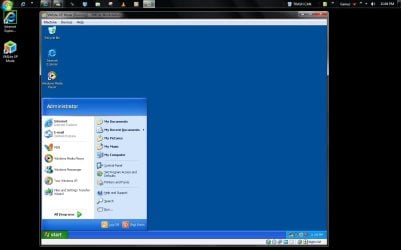
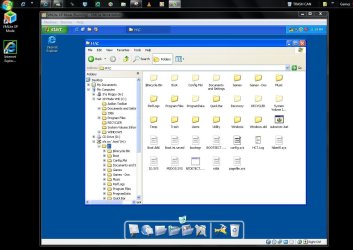
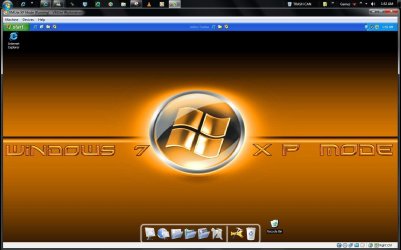
Well there you have it! The VM Lite Workstation has successfully downloaded, initialized, mounted, and is running the XP Mode on the following hardwares.

cpu = AMD XP3000+ 2.067ghz
memory= 2x 512mb PC2700 DDR333
main board = Asus A7V600-X
Storage = 80gb WD ide hard drive
Optical(dvd previously installed failed - install of 7 by usb key) = cd-r/rw 12x(until replaced?)

The last screen shows the advantage of the XP Mode's one item integrated components having direct access to the host's main drive.
Attached Thumbnails
Can I run XP inside of Windows 7 with "Virtualbox"?-xp-mode-downlowded-wm-lite-ws.jpg   Can I run XP inside of Windows 7 with "Virtualbox"?-xp-mode-extracted-vm-lite-ws.jpg   Can I run XP inside of Windows 7 with "Virtualbox"?-xp-mode-initialized-vhd-mounted.jpg   Can I run XP inside of Windows 7 with "Virtualbox"?-xp-mode-license-agreement.jpg   Can I run XP inside of Windows 7 with "Virtualbox"?-xp-mode-running-old-clunker.jpg  

Can I run XP inside of Windows 7 with "Virtualbox"?-xp-mode-access-host-drive.jpg   Can I run XP inside of Windows 7 with "Virtualbox"?-xp-mode-dragged-almost-full-screen-display.jpg  

Last edited by Night Hawk; 07-20-2010 at 01:00 AM.. Reason: Additional screens and information
My System SpecsSystem Spec
07-20-2010   #10


windows 7


Thanks. We will release a new version soon for VMLite.

Here are the main new features:

1) USB Device Support

Add native support for USB devices, such as USB Flash drives, USB Printer and scanners, USB webcams, iPhone, etc.
Support OHCI and EHCI, USB 1.0, 1.1 and 2.0

(2) Single Virtual Application Mode - taskbar and system tray integration

When a user starts vm applications from host Start menu, the applications will be put into this mode. Only these applications
are displayed on the screen, and seamlessly integrated with host taskbar and system tray. This is very similar to Microsoft's virtual application
mode.

(3) Allow two or more people to share the same physical computer by running separate virtual machines on separate monitors,
USB keyboards and USB mouses.

(4) VMLite Portable - runs from USB flash drives or external hard disks. We will offer a paid version installed on 16-G flash drives, along with a VBoot Linux.

More can be found here:

Changes for upcoming VMLite Version - VMLite

Last edited by huisinro; 07-20-2010 at 06:17 PM.. Reason: typo
My System SpecsSystem Spec
Reply

Can I run XP inside of Windows 7 with "Virtualbox"? problems?


Thread Tools


Similar Threads for: Can I run XP inside of Windows 7 with "Virtualbox"?
Thread Forum
Change "Downloads" to open libraries instead of explorer. *Pic inside* Customization
Laptop speakers emit a "pop" sound after "Starting Windows" Sound & Audio
Hardware "hash" within virtualbox Virtualization
Remaking "My Music", "My Pictures", "My Videos" folders Customization
BSOD "DRIVER_IRQL_NOT_LESS_OR_EQUAL" [dmp inside] Crashes and Debugging


All times are GMT -5. The time now is 06:31 AM.


Windows 7 Forums is an independent web site and has not been authorized,
sponsored, or otherwise approved by Microsoft Corporation.
"Windows 7" and related materials are trademarks of Microsoft Corp.
© Designer Media Ltd
  

1 2 3 4 5 6 7 8 9 10 11 12 13 14 15 16 17 18 19 20 21 22 23 24 25 26 27 28 29 30