Windows 7 Forums Search
Welcome to Windows 7 Forums. Our forum is dedicated to helping you find solutions with any problems, errors or issues you are experiencing with Windows 7. The Windows 7 forum also covers news and updates and has an extensive Windows 7 tutorial section that covers a wide range of tips and tricks.


Windows 7 - Windows can't update anymore

 
10-04-2010   #1


Windows 7 Home Premium 64bit


Windows can't update anymore

I'm using a brandnew ASUS PRO64JQ laptop, received it 3 days ago. It has Windows 7 Home Premium 64bit and it says it has been activated in the System control panel. I did not do that, the shop I bought it from did that so I don't have my key.

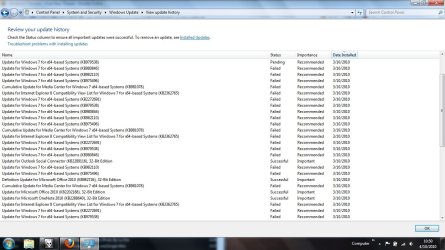
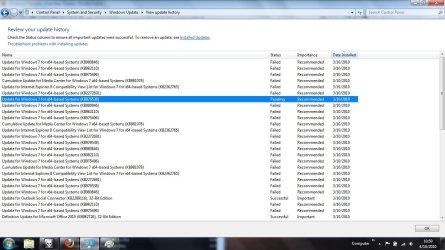
Yesterday and today everytime I shut down it needed to install updates. The shutting down goes quite fast, but when I boot up it just gets stuck at 0% for a few minutes, and then goes further with the message "Failure configuring Windows Updates, reverting changes".

I've checked the update history, and you can view it in the attachments. As you can see it first worked perfectly, but after a day or so it just stopped working.....

Attached Thumbnails
Windows can't update anymore-first-part.jpg   Windows can't update anymore-second-part.jpg  
My System SpecsSystem Spec
10-04-2010   #2


Win7 Ultimate SP1 x64 / Windows 8 CP / Android


Reset windows update: Windows Update - Reset
My System SpecsSystem Spec
10-04-2010   #3


Windows 7 Home Premium 64bit


Quote   Quote: Originally Posted by yowanvista View Post
Reset windows update: Windows Update - Reset
Thanks, it has been reset now. Should I click Check for Updates now?
My System SpecsSystem Spec
.


10-04-2010   #4


Win7 Ultimate SP1 x64 / Windows 8 CP / Android


Quote   Quote: Originally Posted by Satangel View Post
Quote   Quote: Originally Posted by yowanvista View Post
Reset windows update: Windows Update - Reset
Thanks, it has been reset now. Should I click Check for Updates now?
Yes
My System SpecsSystem Spec
10-04-2010   #5


Windows 7 Home Premium 64bit


Quote   Quote: Originally Posted by yowanvista View Post
Quote   Quote: Originally Posted by Satangel View Post
Quote   Quote: Originally Posted by yowanvista View Post
Reset windows update: Windows Update - Reset
Thanks, it has been reset now. Should I click Check for Updates now?
Yes
I've done it, it found 8 important updates, should I reboot and let it install now?
Thanks for the help so far mate, if you tell me how to rep you I will do it
My System SpecsSystem Spec
10-04-2010   #6


Win7 Ultimate SP1 x64 / Windows 8 CP / Android


Install them
My System SpecsSystem Spec
10-04-2010   #7


Windows 7 Home Premium 64bit


Quote   Quote: Originally Posted by yowanvista View Post
Install them
Haha, it worked mate! He installed them just fine, and it were indeed those updates that failed earlier. Glad that's done, thanks! How can I rep you on this forum?

Also, this is in the wrong section but I don't want to make another topic, so:

Does anybody know how to change the font color of a partition? Because I have 2 partitions, and in one all the letters are black, and in the other they are all blue. It's annoying the hell out of me, I want to change it.
In the attachments you can see what it looks like.
Attached Images
 
My System SpecsSystem Spec
10-04-2010   #8


Win7 Ultimate SP1 x64 / Windows 8 CP / Android


Quote   Quote: Originally Posted by Satangel View Post
Quote   Quote: Originally Posted by yowanvista View Post
Install them
Haha, it worked mate! He installed them just fine, and it were indeed those updates that failed earlier. Glad that's done, thanks! How can I rep you on this forum?

Also, this is in the wrong section but I don't want to make another topic, so:

Does anybody know how to change the font color of a partition? Because I have 2 partitions, and in one all the letters are black, and in the other they are all blue. It's annoying the hell out of me, I want to change it.
In the attachments you can see what it looks like.
Nice to see your problem was fixed

For the second one just enter Control Panel>Appearance and Personalization>Folder options>View

Then uncheck "Show encrypted or compressed NTFS files in color"
My System SpecsSystem Spec
10-04-2010   #9


Windows 7 Home Premium 64bit


Quote   Quote: Originally Posted by yowanvista View Post
Quote   Quote: Originally Posted by Satangel View Post
Quote   Quote: Originally Posted by yowanvista View Post
Install them
Haha, it worked mate! He installed them just fine, and it were indeed those updates that failed earlier. Glad that's done, thanks! How can I rep you on this forum?

Also, this is in the wrong section but I don't want to make another topic, so:

Does anybody know how to change the font color of a partition? Because I have 2 partitions, and in one all the letters are black, and in the other they are all blue. It's annoying the hell out of me, I want to change it.
In the attachments you can see what it looks like.
Nice to see your problem was fixed

For the second one just enter Control Panel>Appearance and Personalization>Folder options>View

Then uncheck "Show encrypted or compressed NTFS files in color"
Awesome sauce, that's done now too Thanks! I don't have any other questions, this topic may be closed.
My System SpecsSystem Spec
10-04-2010   #10


Win7 Ultimate SP1 x64 / Windows 8 CP / Android


To rep any member on this forum just click on this icon located on the upper left of the post
Attached Images
 
My System SpecsSystem Spec
Reply

 Windows can't update anymore problems?


Thread Tools


Similar Threads for: Windows can't update anymore
Thread Forum
Windows Update don't work anymore since Dec 16 ? Windows Updates & Activation
Windows Update not working anymore Windows Updates & Activation
Nothing will Update anymore Windows Updates & Activation
Windows Not Seeing DVD Drive Anymore Drivers
Windows 7 won't load anymore General Discussion


All times are GMT -5. The time now is 03:16 AM.


Windows 7 Forums is an independent web site and has not been authorized,
sponsored, or otherwise approved by Microsoft Corporation.
"Windows 7" and related materials are trademarks of Microsoft Corp.
© Designer Media Ltd
  

1 2 3 4 5 6 7 8 9 10 11 12 13 14 15 16 17 18 19 20 21 22 23 24 25 26 27 28 29 30