Windows 7 Forums


Windows 7: Evalution Copy Win 7 ??

21 Nov 2010   #1

Win7 32 bit
 
 
Evalution Copy Win 7 ??

after a new reinstal of Windows 7 i see on the bottum right corner

"Windows 7 evaluation copy.build 7601"
when i go to Start/computer/properties i see Windows is activated

how do i get rid of this message .

My System SpecsSystem Spec

21 Nov 2010   #2

Windows 7 Home Premium SP1, clean install, upgrade disc
CT


Where did you get that copy of Windows?
Go to computer icon on desktop
right click
properties
then on the lower right do you see the Authentic Insignia.
My System SpecsSystem Spec
21 Nov 2010   #3

Windows 7 Ultimate x64 Service Pack 1
Doncaster, UK


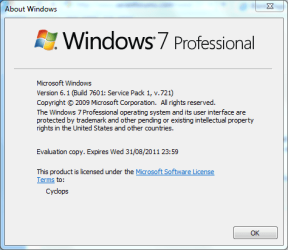
The original RTM version of Windows 7 is Build 7600. What you have with it showing Build 7601 is SP1. As SP1 is still in Beta and therefore still being tested and evaluated, you will see the watermark at the bottom right of the desktop. Just to verify this, click Start and type winver and press enter/return. Do you see this?

Evalution Copy Win 7 ??-capture.png

There is one thing that is puzzling me though. You said that this was a new reinstallation. As of yet, I am not aware of any versions of Windows 7 with SP1 pre-integrated. Have you installed SP1 (Service Pack 1) separately?
My System SpecsSystem Spec
.


21 Nov 2010   #4

Windows 7 x64 Ultimate
A Finnish immigrant in Leipzig, Germany


Isn't that the watermark telling you have installed Windows 7 Service Pack 1 beta? I mean build 7601 is SP1. If so, it's harmless, can be removed by changing the register value in HKEY_Current_User\Control Panel\Desktop\PaintDesktopVersion to 0 and rebooting.

Kari
My System SpecsSystem Spec
21 Nov 2010   #5

Windows 7 Ultimate x64 Service Pack 1
Doncaster, UK


Normally you can toggle the Build display on/off like that (I prefer it on myself), but not with the Beta/RC builds, as the relevant file(s) is/are coded differently to make this always appear on the desktop. It is to serve as reminder that you are using evaluation software. When SP1 is finally finished and released as RTM, then it should be possible to toggle this on/off as you prefer.
My System SpecsSystem Spec
21 Nov 2010   #6

Win7 32 bit


i dit what u ask and yes i see that picture. and yes i instald Service pack1 after i instald Windows 7
My System SpecsSystem Spec
21 Nov 2010   #7

Windows 7 Ultimate x64 Service Pack 1
Doncaster, UK


Don't worry about it. As I said previously, this is to remind you that you are running Beta/evaluation software.
My System SpecsSystem Spec
21 Nov 2010   #8

Win7 32 bit


Ok and thanks fore the help
My System SpecsSystem Spec
21 Nov 2010   #9

Windows 7 Ultimate x64 Service Pack 1
Doncaster, UK


You're welcome.
My System SpecsSystem Spec
21 Nov 2010   #10

Win7 32 bit


Quote   Quote: Originally Posted by Kari View Post
Isn't that the watermark telling you have installed Windows 7 Service Pack 1 beta? I mean build 7601 is SP1. If so, it's harmless, can be removed by changing the register value in HKEY_Current_User\Control Panel\Desktop\PaintDesktopVersion to 0 and rebooting.

Kari
i lookt at it and its already on 0
My System SpecsSystem Spec
Reply

 Evalution Copy Win 7 ?? problems?


Thread Tools


Similar help and support threads for: Evalution Copy Win 7 ??
Thread Forum
New HP laptop, want to add a copy of 7 pro while keeping stock copy? General Discussion
transfer data through windows 7 by copy and paste perfect copy? Hardware & Devices
Can I install a new, legal copy of Seven over my 'evaluation' copy... General Discussion
backup needed for evalution copy Backup and Restore
win7 evaluation copy to a retail copy install Installation & Setup


All times are GMT -5. The time now is 01:23 AM.


Windows 7 Forums is an independent web site and has not been authorized,
sponsored, or otherwise approved by Microsoft Corporation.
"Windows 7" and related materials are trademarks of Microsoft Corp.
© Designer Media Ltd