

- Local time
- 3:16 AM
- Messages
- 715
For the past few days when I try to update Windows 7 32 bit, (I am usings Microsoft Security Essentials as my AV) I get the following:
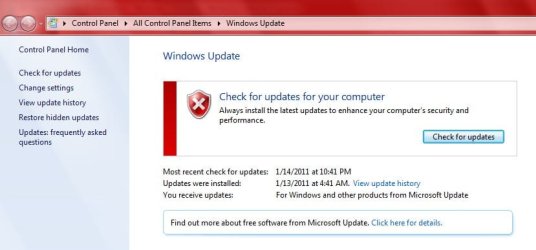
This is not normally what I see, normally the updates are listed and I can just install them.
When I click on "Check for Updates" then I get the following:
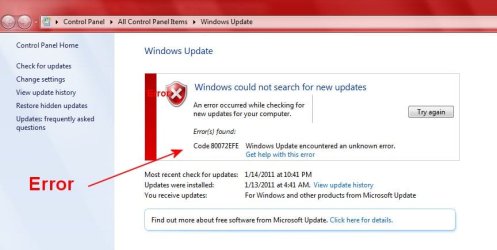
Note the error
So then I click on "Get Help with this error" and get the following:
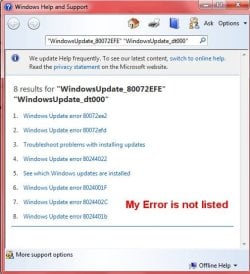
Note that my error is NOT listed.
I have done extensive Google searches to solve the issue. There were several suggestions including some downloads One in particular (ParetoLogic PC Health Advisor) I downloaded and tried to install. After a half hour waiting for it to install I stopped the install. It really played hell with my PC. I ended up restoring my PC with an Acronis Image made 1/15/2011. I had hoped this would also fix my update error, which it did NOT.
Does anyone a freaking idea how to fix this issue? I am assuming even if I do a clean install the same issue will be there.
BTW I have run "Full Scans" twice with Malwarebytes and Microsoft Security Essentials and nothing was found.
Any help is greatly appreciated.
This is not normally what I see, normally the updates are listed and I can just install them.
When I click on "Check for Updates" then I get the following:
Note the error
So then I click on "Get Help with this error" and get the following:
Note that my error is NOT listed.
I have done extensive Google searches to solve the issue. There were several suggestions including some downloads One in particular (ParetoLogic PC Health Advisor) I downloaded and tried to install. After a half hour waiting for it to install I stopped the install. It really played hell with my PC. I ended up restoring my PC with an Acronis Image made 1/15/2011. I had hoped this would also fix my update error, which it did NOT.
Does anyone a freaking idea how to fix this issue? I am assuming even if I do a clean install the same issue will be there.
BTW I have run "Full Scans" twice with Malwarebytes and Microsoft Security Essentials and nothing was found.
Any help is greatly appreciated.
My Computer
At a glance
Windows 7 ProIntel(R) Pentium(R) Duel CPU E2200 2.20 Ghz4 gb 2.96 UsableOnboard
- OS
- Windows 7 Pro
- CPU
- Intel(R) Pentium(R) Duel CPU E2200 2.20 Ghz
- Motherboard
- GA-G41M-ES2L
- Memory
- 4 gb 2.96 Usable
- Graphics Card(s)
- Onboard
- Sound Card
- Onboard
- Hard Drives
- 2 - 1TB WD Sata Drives


