Windows 7 Forums Search
Welcome to Windows 7 Forums. Our forum is dedicated to helping you find solutions with any problems, errors or issues you are experiencing with Windows 7. The Windows 7 forum also covers news and updates and has an extensive Windows 7 tutorial section that covers a wide range of tips and tricks.


Windows 7 - RT Seven Lite questions

 
02-28-2011   #1


Windows 7 Pro


RT Seven Lite questions

The tutorial for RT Seven Lite assumes that I have the SP1 as an iso file.

Does it give the option to use the windows6.1-KB976932-X86.exe to integrate sp1 for my install disk?

Also (and I may have missed it) it never asks for my Win 7 Pro install disk? I assume it has to have it in order to do the integration?

Help is greatly appreciated.

My System SpecsSystem Spec
02-28-2011   #2


Windows 7 Ultimate x64 SP1


Hello Huffman,


Yes, you will have to do the tutorial below exactly in the order it is written for it to work.

You would add your retail Windows 7 Pro installation disk at step 4 in the tutorial.

You would integrate this SP1 exe file at step 8 in the tutorial.

Slipstream Windows 7 SP1 into a Installation DVD or ISO File

Hope this helps,
Shawn
My System SpecsSystem Spec
03-01-2011   #3


Windows 7 Pro


Thanks Brink

I used Imgburn to create an iso file. It also created an mds file which I am not sure why.

Anyway with the iso file I should be able to slipstream sp1 to my Win 7 Pro.

Thank you
My System SpecsSystem Spec
.


03-01-2011   #4


Windows 7 Ultimate x64 SP1


You're most welcome Huffman.

Yep, you should have no problem with the ISO.
My System SpecsSystem Spec
03-02-2011   #5


Windows 7 Pro


This old man is freaking frustrated.

I am not so sure that having Win 7 with SP1 integrated is worth all the time and effort.

I followed the instructions in the tutorial until I got Step 14.

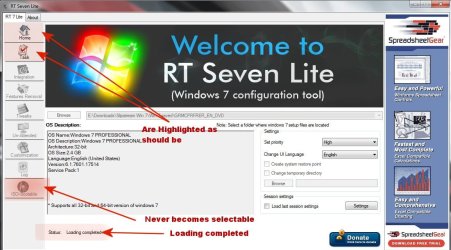
RT Seven Lite questions-step-14.jpg

With Task Selected and Loading Completed, the ISO-Bootable Box never became active.

It had taken at least 1.5 hours to reach this point and it was completely wasted.

I have no idea why I could not proceed past this point.
My System SpecsSystem Spec
03-02-2011   #6


Windows 7 Ultimate x64 SP1


Huffman,

From your screenshot, it looks like you are at step 9 instead. Here you would click on the Task tab and check the ISO Bootable "box" option first before the ISO Bootable "tab" will become available.


9. When finished, click on the Task tab in the left pane.
My System SpecsSystem Spec
03-03-2011   #7


Windows 7 Pro


No I was well past step 9. It had already done the preparing, integrating and saving in step 11.

I had clicked the "Proceed" button in step 12 and loading started and loading completed as shown in Step14.

That is where it came to a halt. I clicked the "Task" tab and the next screen did NOT come up.

I waited 15-20 minutes to make sure it was NOT doing something. The "ISO-Bootable" never activated. That is when I shut RT Seven Lite down.

I have no clue why it stopped at that point.

BTW I ran RT Seven Lite (beta 2.6.0) as recommended.


Thank you
My System SpecsSystem Spec
03-03-2011   #8


Windows 7 Ultimate x64 SP1


Double check the steps in the tutorial below to help make sure that we are on the same page. I think you may have a old copy of them since the step numbers you mention do not match with the actions in the tutorial. The tutorial has since been updated to add more options.

I show that you should be at step 9 now when it has finished after you clicked on Proceed in step 8H.

Slipstream Windows 7 SP1 into a Installation DVD or ISO File
My System SpecsSystem Spec
03-04-2011   #9


Windows 7 Pro


YEAH !!!!!!!!!!!

Got it done and it only took 1 hour and 31 minutes.

I did NOT use any iso files to create the Install Disk with SP1 or that time may have been shorter.

After createing the iso file, I burned the install disk with Imgburn and it seems to work fine.

I also for safe keeping burned both the ISO file and SP1 to another DVD.

Life is Good NOW.

Thank you Brink for all the help
My System SpecsSystem Spec
03-04-2011   #10


Windows 7 Ultimate x64 SP1


You're welcome. That's great news.
My System SpecsSystem Spec
Reply

 RT Seven Lite questions problems?


Thread Tools


Similar Threads for: RT Seven Lite questions
Thread Forum
RT Se7en Lite Installation & Setup
Help For Fix In K-lite Play Avi Software
Autocad Lite help Software
V-Lite Help! Software
K-Lite Codec Software


All times are GMT -5. The time now is 03:18 AM.


Windows 7 Forums is an independent web site and has not been authorized,
sponsored, or otherwise approved by Microsoft Corporation.
"Windows 7" and related materials are trademarks of Microsoft Corp.
© Designer Media Ltd
  

1 2 3 4 5 6 7 8 9 10 11 12 13 14 15 16 17 18 19 20 21 22 23 24 25 26 27 28 29 30