
Solved windows update notification icon

MrBear

New member
Hello All - This is my first post to this forum - please forgive any protocol errors.

My problem is that when Windows Updates are available, the notification icon does not appear in either the notification area or the overflow area. All I see is an exclamation point by the shutdown tab that tells me updates have been downloaded and are ready to be installed.

In the notification overflow area, if I click on customize, I can sometimes see the icon there with a gray description "downloading x% complete. It's never at 100%, and it doesn't change, even after many hours. Sometimes the gray description is there without any icon above or to the left of it.

I've read about the notification icon area reset, but that appears to flush out obsolete icons, I do not know if it is still applicable to my issue. Just to clarify again, the Windows Update Icon "may be visible" when I click on "Customize", but it is never visible in the notification area or the overflow area. I also have it set to show icon and notification. customize notifications.jpg
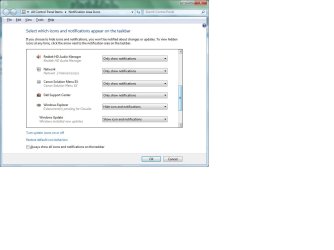
I've tried to attach a screenshot to give some example.

Any help will be much appreciated.

Thank you.
 

My Computer

Computer Manufacturer/Model Number
Dell Inspiron 580
OS
Windows 7 Home Premium 64 bit
CPU
Intel Core i5-760 @ 2.80 ghz
Motherboard
Dell OC2KJT / Intel PCH H57
Memory
8 GB - DDR3-SERAM (1333mhz)
Graphics Card(s)
ATI Radeon HD 5450 - 1 GB
Sound Card
Realtek HD Audio / Intel Display Audio / ATI HI Audio Device
Monitor(s) Displays
Acer AL1916
Hard Drives
Samsung HD103SJ ATA Device
Internet Speed
Comcast Max Blast (150mb)
Antivirus
Norton Security
Browser
Firefox
Other Info
Malwarebytes
Control Panel\System and Security\Windows Update\Change settings and select "Check for updates but let me choose whether to download and install them" :)
 

My Computer

Computer type
PC/Desktop
OS
The 8.1 OS made by Billy Microsoft
Thank you Cata - I've just done that, but I'm not sure it's getting me to my desired result.

Yes, once I did what you suggested, the Windows Update immediately showed up in the Notification area. When I hover over it, it tells me "New Updates Are Available".

I viewed them and saw the only important update is the SP1 - which I'm somewhat reluctant to do at this point - considering some of the negative comments I've read about it on this forum.

Now the issue is, will that Icon always remain there. If so, then I'd have to periodically check to see if "newer" updates are available. I don't know if changing the display option from "Show Icon and Notifications" to "Only show notifications" would be the answer.

Basically, I'm looking for things to work like they do on my older XP SP3 computer. I'd like to "see" the icon only when new updates are available - and not be caught by surprise when I go to shutdown my PC.

Will "hiding" that update do the trick? Then perhaps the icon will only show up when "newer" updates are available, instead of staying there all the time.

Please let me know what you think - and thank you for your help. It is much appreciated.
 

My Computer

Computer Manufacturer/Model Number
Dell Inspiron 580
OS
Windows 7 Home Premium 64 bit
CPU
Intel Core i5-760 @ 2.80 ghz
Motherboard
Dell OC2KJT / Intel PCH H57
Memory
8 GB - DDR3-SERAM (1333mhz)
Graphics Card(s)
ATI Radeon HD 5450 - 1 GB
Sound Card
Realtek HD Audio / Intel Display Audio / ATI HI Audio Device
Monitor(s) Displays
Acer AL1916
Hard Drives
Samsung HD103SJ ATA Device
Internet Speed
Comcast Max Blast (150mb)
Antivirus
Norton Security
Browser
Firefox
Other Info
Malwarebytes
Will "hiding" that update do the trick? Then perhaps the icon will only show up when "newer" updates are available, instead of staying there all the time.

Correct:p
 

My Computer

Computer type
PC/Desktop
OS
The 8.1 OS made by Billy Microsoft
Worked like a charm! Strange that the "automatically download" option seems to create the issue - a Windows 7 quirk?

Thank you again.
 

My Computer

Computer Manufacturer/Model Number
Dell Inspiron 580
OS
Windows 7 Home Premium 64 bit
CPU
Intel Core i5-760 @ 2.80 ghz
Motherboard
Dell OC2KJT / Intel PCH H57
Memory
8 GB - DDR3-SERAM (1333mhz)
Graphics Card(s)
ATI Radeon HD 5450 - 1 GB
Sound Card
Realtek HD Audio / Intel Display Audio / ATI HI Audio Device
Monitor(s) Displays
Acer AL1916
Hard Drives
Samsung HD103SJ ATA Device
Internet Speed
Comcast Max Blast (150mb)
Antivirus
Norton Security
Browser
Firefox
Other Info
Malwarebytes
You are welcome! :)
 

My Computer

Computer type
PC/Desktop
OS
The 8.1 OS made by Billy Microsoft
I have the same issue as of recently, don't know why it disappeared. But I already have it on the "check for updates but let me choose whether to download and install them" option from the start. Haven't installed any updates for a month, but the icon disappeared a week ago.
 

My Computer

Computer Manufacturer/Model Number
Custom/DIY
OS
Windows 7 Ultimate x64
CPU
Intel C2D E8400@4Ghz OC
Motherboard
ASUS P5Q-E, bios 2101
Memory
4x2GB Kingston HyperX 8500@1066Mhz
Graphics Card(s)
Nvidia GTS450 OC
Sound Card
Onboard SoundMax
Monitor(s) Displays
Samsung Syncmaster 17"
Screen Resolution
1280x1024
Hard Drives
WD6402AAEX-640GB(system), WD10EALX-1TB(storage), other external disks & docking stations
PSU
Corsair TX-750 V2
Case
Custom Tower
Cooling
Air: Arctic Cooling 2xF8 & F12; Akasa AK-968, 2xAK-HD-BL
Mouse
Gigabyte M6900
Internet Speed
10M/1M
Back
Top