Windows Update Error

Allexx

New member
Local time
9:17 AM
Messages
3
Location
United Kingdom
Hello people I'm new to this site so just want to say helloo to everyone firstly :)

Anyway I have recently installed Windows 7 Proffesional 64bit and I am having problems with Windows update, The update worked for about the first 3 times then after that i keep getting error messages and when i load windows update it either takes ages to load up or it crashes my computer, This is the same for when i click "Computer", My computer will randomly freeze up and crash resulting in restarting the computer.

I do not know what is wrong with either my computer or Windows 7 which is why I have come to this forum for help. I need help URGENTLY as i need the updates.


HERES A SCREENSHOT:
http://i163.photobucket.com/albums/t293/Squirrel-Boi/WINDOWS1.png

Thanks for your time and help :)
 

My Computer My Computer

At a glance

Windows 7 Professional 64bitIntel Core 2 Quad Q82003.00 GBNVIDIA GeForce 9500 GT
OS
Windows 7 Professional 64bit
CPU
Intel Core 2 Quad Q8200
Motherboard
AsRock P45TS
Memory
3.00 GB
Graphics Card(s)
NVIDIA GeForce 9500 GT
Sound Card
High Definition Audio Device
Monitor(s) Displays
Hitachi Widescreen 22" HD
Hard Drives
250GB
PSU
500W Standard PSU
Case
Multi-Media Computer System
Cooling
Air Cooled 4 Installed Fans
Mouse
Microsoft STONE
Internet Speed
2mb
Hello there. The error is saying that your service that's needed for Windows Update is not running. You can start it by this way:
Start->Control Panel->Administrative Tools->Services.
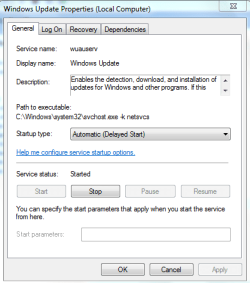
Open Services and scroll down to find a service called Windows Update. Double click on it and you'll see this window
update.PNG
In StartUp type select Automatic. In service status click on button Start.
Restart your pc and should be working.
 

My Computer My Computer

At a glance

Windows 10 Pro x64Intel Core i5 4440 @Stock4 x 4GB HyperX Fury DDR3Gigabyte GTX 1050Ti O4G
Computer type
PC/Desktop
Computer Manufacturer/Model Number
Custom Build
OS
Windows 10 Pro x64
CPU
Intel Core i5 4440 @Stock
Motherboard
Gigabyte Z97 D3H
Memory
4 x 4GB HyperX Fury DDR3
Graphics Card(s)
Gigabyte GTX 1050Ti O4G
Sound Card
Integrated
Monitor(s) Displays
Dell P2417H
Screen Resolution
1920 x 1080
Hard Drives
Samsung EVO 850 120GB / Toshiba DT01ACA050 1TB 7200prm 32MB
PSU
Riotoro Onyx 750W
Case
NZXT H500 Black-Red
Cooling
Stock CPU + NZXT 120mm + 2x120mm red fans
Keyboard
Modecom Volcano Lanparty
Mouse
Asus ROG Gladius / DeepCool E-Pad Plus
Internet Speed
DOCSIS 50/3 Mbit
Browser
Google Chrome
Other Info
Asus K55VJ(i5 3210M, GT635M / 2GB, 8GB DDR3, 500GB HDD)
Hello there. The error is saying that your service that's needed for Windows Update is not running. You can start it by this way:
Start->Control Panel->Administrative Tools->Services.
Open Services and scroll down to find a service called Windows Update. Double click on it and you'll see this window

In StartUp type select Automatic. In service status click on button Start.
Restart your pc and should be working.


Thanks for the reply, I tryed that and it never worked i still get the same error come up when i try to update :(
 

My Computer My Computer

At a glance

Windows 7 Professional 64bitIntel Core 2 Quad Q82003.00 GBNVIDIA GeForce 9500 GT
OS
Windows 7 Professional 64bit
CPU
Intel Core 2 Quad Q8200
Motherboard
AsRock P45TS
Memory
3.00 GB
Graphics Card(s)
NVIDIA GeForce 9500 GT
Sound Card
High Definition Audio Device
Monitor(s) Displays
Hitachi Widescreen 22" HD
Hard Drives
250GB
PSU
500W Standard PSU
Case
Multi-Media Computer System
Cooling
Air Cooled 4 Installed Fans
Mouse
Microsoft STONE
Internet Speed
2mb

My Computer My Computer

At a glance

Windows 10 Pro x64Intel Core i5 4440 @Stock4 x 4GB HyperX Fury DDR3Gigabyte GTX 1050Ti O4G
Computer type
PC/Desktop
Computer Manufacturer/Model Number
Custom Build
OS
Windows 10 Pro x64
CPU
Intel Core i5 4440 @Stock
Motherboard
Gigabyte Z97 D3H
Memory
4 x 4GB HyperX Fury DDR3
Graphics Card(s)
Gigabyte GTX 1050Ti O4G
Sound Card
Integrated
Monitor(s) Displays
Dell P2417H
Screen Resolution
1920 x 1080
Hard Drives
Samsung EVO 850 120GB / Toshiba DT01ACA050 1TB 7200prm 32MB
PSU
Riotoro Onyx 750W
Case
NZXT H500 Black-Red
Cooling
Stock CPU + NZXT 120mm + 2x120mm red fans
Keyboard
Modecom Volcano Lanparty
Mouse
Asus ROG Gladius / DeepCool E-Pad Plus
Internet Speed
DOCSIS 50/3 Mbit
Browser
Google Chrome
Other Info
Asus K55VJ(i5 3210M, GT635M / 2GB, 8GB DDR3, 500GB HDD)

My Computer My Computer

At a glance

Windows 10 Pro x64Intel Core i7 4790K @ 4.5GHz32GB DDR3Nvidia GeForce GTX970
Computer type
PC/Desktop
Computer Manufacturer/Model Number
Custom
OS
Windows 10 Pro x64
CPU
Intel Core i7 4790K @ 4.5GHz
Motherboard
Asus Maximus Hero VII
Memory
32GB DDR3
Graphics Card(s)
Nvidia GeForce GTX970
Sound Card
Realtek HD Audio
Screen Resolution
1920x1200
Hard Drives
1x Samsung 250GB SSD
4x WD RE 2TB (RAIDZ)
PSU
Corsair AX760i
Case
Fractal Design Define R4
Cooling
Noctua NH-D15
What Anti-virus program are you running?
 

My Computer My Computer

At a glance

Windows 7 Ultimate 32bit SP1Intel(R) Core(TM)2 Quad CPU @ 2.40GHz, 2400 MHz4 GBATI Radeon HD 2600 Pro
Computer type
PC/Desktop
Computer Manufacturer/Model Number
Bruce ... somewhere in his 40's
OS
Windows 7 Ultimate 32bit SP1
CPU
Intel(R) Core(TM)2 Quad CPU @ 2.40GHz, 2400 MHz
Motherboard
INTEL/D975XBX2
Memory
4 GB
Graphics Card(s)
ATI Radeon HD 2600 Pro
Monitor(s) Displays
Samsung SyncMaster 914v
Screen Resolution
1280 x 1024
Hard Drives
2/500GB each ... ST3500630AS ATA Device.
One is not connected
PSU
Rocketfish 700 W
Case
G.Skill Gigabyte Chassis
Keyboard
Standard PS/2 Keyboard
Mouse
Microsoft PS/2 Mouse
Internet Speed
DSL
Antivirus
Avira Internet Security
Browser
IE 11
Other Info
ATI HDMI Audio
try this i had an issue once with not being able to install some updates (they would always fail) disable antivirus (temporarily) and then download the auslogics registry cleaner and run that a few times (set up the advanced options to check every thing including for broken links and associations) and then run that a few times and see if that helps, i did that with mine and that seemed to resolve my update issue. make sure you turn on antivirus as that shouldn't be much of a factor...
 

My Computer My Computer

At a glance

Windows 10 64bit UltimateIntel Core i7-4770K @3.50GHz8192 Mo, Type: DDR3, @669.7MHzSapphire 7990 6GB DDR3 PCIe 3.0
Computer type
PC/Desktop
Computer Manufacturer/Model Number
Custom Build
OS
Windows 10 64bit Ultimate
CPU
Intel Core i7-4770K @3.50GHz
Motherboard
GA-MA785GT-UD3H
Memory
8192 Mo, Type: DDR3, @669.7MHz
Graphics Card(s)
Sapphire 7990 6GB DDR3 PCIe 3.0
Sound Card
On board
Monitor(s) Displays
Monitor: 22'' Samsung, 2x 15" Touch screen (stored)
Screen Resolution
1600x1900 (Samsung)
Hard Drives
Kingston SSD, 120GB "SSD Now 300"
ADATA SP550
Samsung HM321HI
PSU
1000 Watt
Case
Antec Sonata III
Cooling
200MM side fan, 1 intake front
Keyboard
Naga Chroma Mechanical
Mouse
Razer Naga
Internet Speed
10 megs
Antivirus
Windows Defender
Browser
Chrome
Other Info
Optical drive (main): SONY DVD RW AW-G170S 1.72

My Computer My Computer

At a glance

Windows 10 Pro x64Intel Core i5 4440 @Stock4 x 4GB HyperX Fury DDR3Gigabyte GTX 1050Ti O4G
Computer type
PC/Desktop
Computer Manufacturer/Model Number
Custom Build
OS
Windows 10 Pro x64
CPU
Intel Core i5 4440 @Stock
Motherboard
Gigabyte Z97 D3H
Memory
4 x 4GB HyperX Fury DDR3
Graphics Card(s)
Gigabyte GTX 1050Ti O4G
Sound Card
Integrated
Monitor(s) Displays
Dell P2417H
Screen Resolution
1920 x 1080
Hard Drives
Samsung EVO 850 120GB / Toshiba DT01ACA050 1TB 7200prm 32MB
PSU
Riotoro Onyx 750W
Case
NZXT H500 Black-Red
Cooling
Stock CPU + NZXT 120mm + 2x120mm red fans
Keyboard
Modecom Volcano Lanparty
Mouse
Asus ROG Gladius / DeepCool E-Pad Plus
Internet Speed
DOCSIS 50/3 Mbit
Browser
Google Chrome
Other Info
Asus K55VJ(i5 3210M, GT635M / 2GB, 8GB DDR3, 500GB HDD)
Thanks for the help guys ill give all your suggestions a try and get back to you :)

EDIT:
So far Stalkers secound suggestion is working and updates are downloading, But will i be able to download more in the future or will they finish downloading? I dont no have to wait and see ;) Thank you stalker ill give you REP :)

And Im using, at the moment, Avast AVG Free version and i also dowloaded "Microsoft Security Esstentials"
 

My Computer My Computer

At a glance

Windows 7 Professional 64bitIntel Core 2 Quad Q82003.00 GBNVIDIA GeForce 9500 GT
OS
Windows 7 Professional 64bit
CPU
Intel Core 2 Quad Q8200
Motherboard
AsRock P45TS
Memory
3.00 GB
Graphics Card(s)
NVIDIA GeForce 9500 GT
Sound Card
High Definition Audio Device
Monitor(s) Displays
Hitachi Widescreen 22" HD
Hard Drives
250GB
PSU
500W Standard PSU
Case
Multi-Media Computer System
Cooling
Air Cooled 4 Installed Fans
Mouse
Microsoft STONE
Internet Speed
2mb
You're welcome! Glad to helps you! ;)
 

My Computer My Computer

At a glance

Windows 10 Pro x64Intel Core i5 4440 @Stock4 x 4GB HyperX Fury DDR3Gigabyte GTX 1050Ti O4G
Computer type
PC/Desktop
Computer Manufacturer/Model Number
Custom Build
OS
Windows 10 Pro x64
CPU
Intel Core i5 4440 @Stock
Motherboard
Gigabyte Z97 D3H
Memory
4 x 4GB HyperX Fury DDR3
Graphics Card(s)
Gigabyte GTX 1050Ti O4G
Sound Card
Integrated
Monitor(s) Displays
Dell P2417H
Screen Resolution
1920 x 1080
Hard Drives
Samsung EVO 850 120GB / Toshiba DT01ACA050 1TB 7200prm 32MB
PSU
Riotoro Onyx 750W
Case
NZXT H500 Black-Red
Cooling
Stock CPU + NZXT 120mm + 2x120mm red fans
Keyboard
Modecom Volcano Lanparty
Mouse
Asus ROG Gladius / DeepCool E-Pad Plus
Internet Speed
DOCSIS 50/3 Mbit
Browser
Google Chrome
Other Info
Asus K55VJ(i5 3210M, GT635M / 2GB, 8GB DDR3, 500GB HDD)
Back
Top