Windows 7 Forums


Windows 7: Disable Windows 7 Ultimate Updates administrator issues

11 May 2011   #1

windows 7 x64
 
 
Disable Windows 7 Ultimate Updates administrator issues

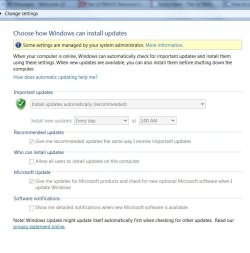
It's my computer. How do I get access? Cannot left click anything on the panel. I need to turn the updates off.

Attached Thumbnails
Disable Windows 7 Ultimate Updates administrator issues-turn-off-updates.jpg  
My System SpecsSystem Spec

11 May 2011   #2

Windows 7 x64 pro/ Windows 7 x86 Pro/ XP SP3 x86


Click Start button, type gpedit.msc and press enter.


Navigate to Computer Configuration-> Administrative Templates -> Windows Component -> Windows Update. Make sure the state of each setting is "Not Configured".


Navigate to Computer Configuration-> Administrative Templates-> System-> Internet Communication Management-> Internet Communication settings. Make sure the state of “Turn off access to all Windows Update features” is "Not Configured".

My System SpecsSystem Spec
11 May 2011   #3

Windows 7 Ultimate SP1 64-Bit
Peterborough, England


Try using the hidden administrator account seeing as you are the only user.

To activate this account you'll need to run a command prompt with elevated privileges thus:

Start/cmd/right-click cmd/run as administrator then type: net user administrator /active:yes

To hide this account you need to type: net user administrator /active:no

Just remember that your computer is at a higher risk of infection if you use this account.
My System SpecsSystem Spec
.


11 May 2011   #4

windows 7 x64


Bill2

confirmed no change in the control panel
My System SpecsSystem Spec
11 May 2011   #5

windows 7 x64


seavixen32

sorry i do not understand the point of your instructions. not technically inclined. will it allow me to change the control panel? and turn off updates?
My System SpecsSystem Spec
11 May 2011   #6

Windows 7 Ultimate SP1 64-Bit
Peterborough, England


Quote   Quote: Originally Posted by oohansel View Post
seavixen32

sorry i do not understand the point of your instructions. not technically inclined. will it allow me to change the control panel? and turn off updates?
Yes. It will give you access to the Administrator Account that runs with full privileges.

After you run the command line you just restart your computer, and then you'll see two account buttons on your desktop: one will be for your user account and the other will be for the "real" administrator account.
My System SpecsSystem Spec
Reply

 Disable Windows 7 Ultimate Updates administrator issues problems?


Thread Tools


Similar help and support threads for: Disable Windows 7 Ultimate Updates administrator issues
Thread Forum
windows 7 administrator software issues General Discussion
Solved Forgot Windows 7 Ultimate x64 Administrator Password System Security
Unable to install Windows 7 Updates as Administrator Windows Updates & Activation
Windows 7 Ultimate 32bit issues with desktop freezing/ other issues General Discussion
VISTA Ultimate to Windows 7 ultimate issues.. wit gamin Gaming


All times are GMT -5. The time now is 11:50 PM.


Seven Forums Android App Seven Forums IOS App Follow us on Facebook

Windows 7 Forums is an independent web site and has not been authorized,
sponsored, or otherwise approved by Microsoft Corporation.
"Windows 7" and related materials are trademarks of Microsoft Corp.
© Designer Media Ltd
  

1 2 3 4 5 6 7 8 9 10 11 12 13 14 15 16 17 18 19 20 21 22 23 24 25 26 27 28 29 30 31 32