In a non-lucid senior moment and in yet another state of inattentiveness, I have unintentionally managed to move or copythe Windows Update from the Start Menu < All Programs List, over to sit under the Favourites Folder.
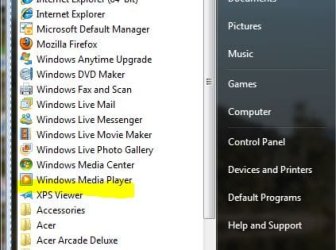
The bright yellow highlighter in the All Programs list indicates where the WindowsUpdate program icon was previously, before my act of silliness...here:
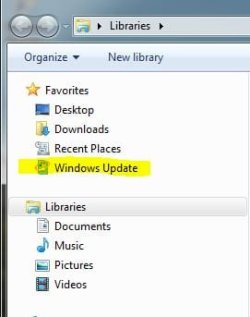
And this is where it has ended up, ...here:
Now I'd like to restore the full link program icon back to it's proper place - amongst all of it's other friends....
Just as a matter of interest, is there a Folder that contains all of the programs etc. that are listed at Start Menu < Programs List?
My Computer
At a glance
Windows 7 Home Premium x64 - SP1Intel Core i5 @ 2.67GHz Arrandale 32nm Techno...8 GB RAM [2 x 4 GB DDR3]AMD Radeon HD 6650M, Intel (R) HD Graphics
Computer Manufacturer/Model Number
Acer Aspire Timeline X Laptop - Model 5820TG - V1.23
Notebook - 733GB Western Digital WDC WD7500BPVT- 22HXZT1 Sata.
External HDs [4];Maxtor One Touch4 - 500GB External HD [Drive M:\].Western Digital WDXMS1200TA - 120GB External HD. WD My Book 'Elite' 1TB External HD [Windows 7 dedicated - Partitioned
Mouse
Logitech Wireless V320 for Notebooks
Other Info
Brother MFC-465CN; PC to Fax/Scan/Copy/Photo Multi Function Centre. Epson Perfection V300 Photo Scanner.
Siemens Speedstream 6520 Router.
Wacom 'Bamboo Fun' CTE-650 PC Tablet, Stylus and Mouse. Logitech X-230 Notebook Stereo Speakers and Sub-woofer.
UAC - On. Internet - FireFox v13.0.1 & IE8.
Hon.RSM to the 4th [Assault Pioneer] Troop Pune Sepoys , and 3rd Troop Jodhpur Bengali Lancers
Global: "C:\ProgramData\Microsoft\Windows\Start Menu"
Your own account: "C:\Users\Richard\AppData\Roaming\Microsoft\Windows\Start Menu"
To fix your Windows Update issue, extract the included shortcut to the global folder ("C:\ProgramData\Microsoft\Windows\Start Menu")
And then try to delete the incorrect one.
Good luck!
Richard
P.S. Although most programs will be inside a subdirectory called Programs, the Windows Update shortcut will not be, as it is a special Windows one.
Attachments
Windows Update.zip
644 bytes
· Views: 285
My Computer
At a glance
Vista Home Premium x86 SP2Intel Core 2 Quad Q9300 2.50GHz4 gb (DDR2 800) 400MHzATI Radeon HD 3870 (512 MBytes)
Computer Manufacturer/Model Number
Dell XPS 420
OS
Vista Home Premium x86 SP2
CPU
Intel Core 2 Quad Q9300 2.50GHz
Motherboard
Stock Dell 0TP406
Memory
4 gb (DDR2 800) 400MHz
Graphics Card(s)
ATI Radeon HD 3870 (512 MBytes)
Monitor(s) Displays
1 x Dell 2007FP and 1 x (old) Sonic flat screen
Screen Resolution
1600 x 1200 and 1280 x 1204
Hard Drives
1 x 640Gb (SATA 300) Western Digital: WDC WD6400AAKS-75A7B0 1 x 1Tb (SATA 600) Western Digital: Caviar Black, SATA 6GB/S, 64Mb cache, 8ms Western Digital: WDC WD1002FAEX-00Z3A0 ATA Device
Case
Dell XPS 420
Cooling
Stock Fan
Keyboard
Dell Bluetooth
Mouse
Advent Optical ADE-WG01 (colour change light up)
Internet Speed
Varies from 10kb/s to 170kb/s. So unreliable it is not funny
Other Info
ASUS USB 3.0 5Gbps/SATA 6Gbps - PCI-Express Combo Controller Card (U3S6)
Thank you Richard for the simple solution, clearly and simply outlined and delivered.
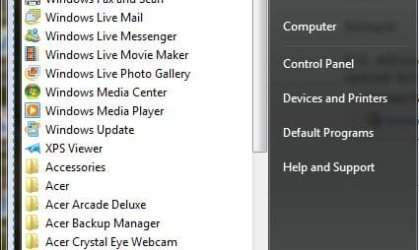
The vacillations of my senior and somewhat feeble mind have been quieted and restored to stable insanity with a successful outcome, after I worked through the solution you provided above. See here;
Windows Update is now back where it once was, and where it belongs amongst all of it's other Mates in All Programs . It has been placed into indefinite confinement.....
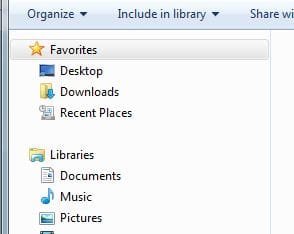
Likewise, Favourites no longer plays host to Windows Update where it was for a short time, an inadvertent and unwelcome guest - it has been dragged away, kicking and screaming back to it's former location, as above. See here:
And thanks too for the Windows Update Shortcut - it will be treated with due respect and constant attention, and fed often...
Cheers Mate, Tony.
My Computer
At a glance
Windows 7 Home Premium x64 - SP1Intel Core i5 @ 2.67GHz Arrandale 32nm Techno...8 GB RAM [2 x 4 GB DDR3]AMD Radeon HD 6650M, Intel (R) HD Graphics
Computer Manufacturer/Model Number
Acer Aspire Timeline X Laptop - Model 5820TG - V1.23
Notebook - 733GB Western Digital WDC WD7500BPVT- 22HXZT1 Sata.
External HDs [4];Maxtor One Touch4 - 500GB External HD [Drive M:\].Western Digital WDXMS1200TA - 120GB External HD. WD My Book 'Elite' 1TB External HD [Windows 7 dedicated - Partitioned
Mouse
Logitech Wireless V320 for Notebooks
Other Info
Brother MFC-465CN; PC to Fax/Scan/Copy/Photo Multi Function Centre. Epson Perfection V300 Photo Scanner.
Siemens Speedstream 6520 Router.
Wacom 'Bamboo Fun' CTE-650 PC Tablet, Stylus and Mouse. Logitech X-230 Notebook Stereo Speakers and Sub-woofer.
UAC - On. Internet - FireFox v13.0.1 & IE8.
Hon.RSM to the 4th [Assault Pioneer] Troop Pune Sepoys , and 3rd Troop Jodhpur Bengali Lancers
Really glad to have been of assistance! Have a great day, Tony!
My Computer
At a glance
Vista Home Premium x86 SP2Intel Core 2 Quad Q9300 2.50GHz4 gb (DDR2 800) 400MHzATI Radeon HD 3870 (512 MBytes)
Computer Manufacturer/Model Number
Dell XPS 420
OS
Vista Home Premium x86 SP2
CPU
Intel Core 2 Quad Q9300 2.50GHz
Motherboard
Stock Dell 0TP406
Memory
4 gb (DDR2 800) 400MHz
Graphics Card(s)
ATI Radeon HD 3870 (512 MBytes)
Monitor(s) Displays
1 x Dell 2007FP and 1 x (old) Sonic flat screen
Screen Resolution
1600 x 1200 and 1280 x 1204
Hard Drives
1 x 640Gb (SATA 300) Western Digital: WDC WD6400AAKS-75A7B0 1 x 1Tb (SATA 600) Western Digital: Caviar Black, SATA 6GB/S, 64Mb cache, 8ms Western Digital: WDC WD1002FAEX-00Z3A0 ATA Device
Case
Dell XPS 420
Cooling
Stock Fan
Keyboard
Dell Bluetooth
Mouse
Advent Optical ADE-WG01 (colour change light up)
Internet Speed
Varies from 10kb/s to 170kb/s. So unreliable it is not funny
Other Info
ASUS USB 3.0 5Gbps/SATA 6Gbps - PCI-Express Combo Controller Card (U3S6)