Windows 7 Forums


Windows 7: windows7 home premium

20 Jul 2011   #1

windows xp professional
 
 
windows7 home premium

hi im new too this forum last week i installed windows 7 home premium 32 bit on my desktop pc it keeps asking me too install updates please restart pc ive got it set too install updates automatically is this normally what happen with new OS thank you

My System SpecsSystem Spec

20 Jul 2011   #2

Windows 7 Ultimate SP1 64-Bit
Peterborough, England


Yes, it is.

Some updates can only be configured by restarting your computer and it's best to do so when prompted.

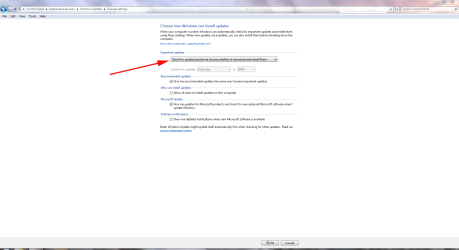
If you find it bothersome you can disable automatic updating and choose when and how you download them

windows7 home premium-wup.png
My System SpecsSystem Spec
20 Jul 2011   #3

Windows 7 Home Premium 64-bit, SP1


Quote   Quote: Originally Posted by jimjo16 View Post
hi im new too this forum last week i installed windows 7 home premium 32 bit on my desktop pc it keeps asking me too install updates please restart pc ive got it set too install updates automatically is this normally what happen with new OS thank you
It was asking you to update and it was asking you to restart.
Did you do either of the above ?
If yes ......
were there any updates needed to be installed ?
what happened after you had restarted ? Was the screen telling you it was configuring ?

Have you double checked if the computer is set to do auto update ?
P.S. It is better to set it to do manual update.... better control.

If you don't mind, kindly reply with punctuation marks. I have trouble reading your way.
My System SpecsSystem Spec
.


20 Jul 2011   #4

windows xp professional


hi thanks for reply when restarted pc. yes the screen tells me its configuring.yes i installed the updates when it asked me too.i have a green tick with the words saying install updates automatically[recommended].the other 3 boxes below that are check marked is this correct settings
My System SpecsSystem Spec
20 Jul 2011   #5

Windows 7 Home Premium 64-bit, SP1


Quote   Quote: Originally Posted by jimjo16 View Post
hi thanks for reply when restarted pc. yes the screen tells me its configuring.yes i installed the updates when it asked me too.i have a green tick with the words saying install updates automatically[recommended].the other 3 boxes below that are check marked is this correct settings
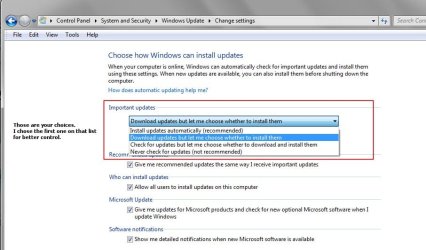
If you want " automatic udating " option, yes it is correct.

The only topic we brought up is the choice of ...
auto updating as you are doing, or
manual updating for better control of what you want to install, without letting the update center jam them down our throat ( figure of speech ).

The choice ( auto or manual updating ) is entirely up to you.

Other than that, you have done everything right. I don't see anything you should be concerned of.

windows7 home premium-image-28.jpg
My System SpecsSystem Spec
20 Jul 2011   #6

Windows 7 Home Premium 64-bit, SP1


Pardon me, I forgot to answer this question of yours .....

Re : asking you to restart the computer

Only a few updates will require you to restart in order to complete the installation, hence the configuring screen you saw.
Majority of the updates will not need to do that.
My System SpecsSystem Spec
20 Jul 2011   #7

windows xp professional


thank you for help much appreciated
My System SpecsSystem Spec
20 Jul 2011   #8

Windows 7 Home Premium 64-bit, SP1


Quote   Quote: Originally Posted by jimjo16 View Post
thank you for help much appreciated
You are welcome.

If your questions have been answered satisfactorily, please click the " Mark this thread as solved " button.
My System SpecsSystem Spec
Reply

 windows7 home premium problems?


Thread Tools


Similar help and support threads for: windows7 home premium
Thread Forum
Start up & Windows7 home premium update problems General Discussion
Solved RAM issue on Windows7 Home Premium Hardware & Devices
BSOD on Windows7 Home Premium 64 bit, dump file url provided,Thanks BSOD Help and Support
Solved windows7 home premium 64bit desktop sound does not work Sound & Audio
student download vista home premium to 7 home premium Installation & Setup


All times are GMT -5. The time now is 03:29 PM.


Seven Forums Android App Seven Forums IOS App Follow us on Facebook

Windows 7 Forums is an independent web site and has not been authorized,
sponsored, or otherwise approved by Microsoft Corporation.
"Windows 7" and related materials are trademarks of Microsoft Corp.
© Designer Media Ltd
  

1 2 3 4 5 6 7 8 9 10 11 12 13 14 15 16 17 18 19 20 21 22 23 24 25 26 27 28 29 30 31 32