Solved Windows 7 Home hangs while applying update

999spock

New member
I have windows update set so it downloads updates but doesn't apply them automatically.

For the last couple of nights, there has been an update to apply when I log off. In both cases, the update seemed to hang and I left the computer switched on overnight with the monitor switched off.

On the first occasion it was still hung in the morning so I reset the computer. All seemed to be OK during the day but when I came to close down there was an update to apply. I guess it was the same one. It hung again and I left the computer overnight again. This time it had switched off but when I switched it on again it came up with a temporary profile.

A message appeared telling me to look in the event viewer but that is a waste of time as there are several hundred million entries which don't mean anything to me.

Where do I go from here? I guess I can do a system restore but that is likely to lead me back here after a day or two as the system tries to keep itself up to date.
Any advice greatly appreciated.
 
Last edited:

My Computer

OS
Windows 7 Home 64 bit

My Computer

Computer Manufacturer/Model Number
HP Pavilion Elite 495UK
OS
Windows 7 Ultimate SP1 64-Bit
CPU
Intel Core i7 870 @ 2.93GHz
Motherboard
MSI 2A9C (CPU1)
Memory
8Gb Dual-Channel DDR3 @ 664MHz
Graphics Card(s)
nVidia GeForce GTX 460 1024MB dedicated RAM
Sound Card
Realtek HD Audio
Monitor(s) Displays
HP2310i
Screen Resolution
1920 x 1080
Hard Drives
1x1954GB Hitachi HDS22020ALA 330 (RAID), 1x1954GB Hitachi External for backup and storage
PSU
460W
Case
HP Elite
Cooling
Air cooled
Keyboard
Logitech K750 solar-powered keyboard
Mouse
Logitech Wireless M180 mouse
Internet Speed
2Mb
Other Info
Pure Avanti Flow Internet Radio with iPod Dock, 64Gb iPod, HP USB Speakers, Sony MDR-V500 Headphones, Sony Vaio F-Series Laptop
The simple answer is that I don't know which update it was. Windows doesn't tell me!

I know its not a good idea to switch off the computer during an update but after 8 hours what should you do?

Thanks for the link I will try it.
 

My Computer

OS
Windows 7 Home 64 bit
I'll agree, 8 hours is an awful long time.

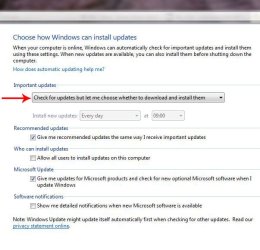
You might also want to change your update settings, which will give you the chance to select each one first and check its purpose before you decide whether to download it.

UpdateSet.JPG

If there are any you don't want, just right-click the update in question and choose Hide.
 

My Computer

Computer Manufacturer/Model Number
HP Pavilion Elite 495UK
OS
Windows 7 Ultimate SP1 64-Bit
CPU
Intel Core i7 870 @ 2.93GHz
Motherboard
MSI 2A9C (CPU1)
Memory
8Gb Dual-Channel DDR3 @ 664MHz
Graphics Card(s)
nVidia GeForce GTX 460 1024MB dedicated RAM
Sound Card
Realtek HD Audio
Monitor(s) Displays
HP2310i
Screen Resolution
1920 x 1080
Hard Drives
1x1954GB Hitachi HDS22020ALA 330 (RAID), 1x1954GB Hitachi External for backup and storage
PSU
460W
Case
HP Elite
Cooling
Air cooled
Keyboard
Logitech K750 solar-powered keyboard
Mouse
Logitech Wireless M180 mouse
Internet Speed
2Mb
Other Info
Pure Avanti Flow Internet Radio with iPod Dock, 64Gb iPod, HP USB Speakers, Sony MDR-V500 Headphones, Sony Vaio F-Series Laptop
I have it set to "download updates but let me choose whether to install them". In practice it doesn't tell me anything about them just lets me know they are there.

I have no problem with applying all of the updates and would do it automatically apart from its tendency to grab control of the computer and restart when it wants rather than when it is convenient to you.

If this is a major update which is going to take some time shouldn't it make you aware of what is happening so you know that it is a bit out of the ordinary?
 
Last edited:

My Computer

OS
Windows 7 Home 64 bit
Well, often it's not a single update that's being offered, but a whole bunch of them.

Then there are the big updates such as the Windows and Microsoft Office service packs, so you could always choose the option to download but not install, which would give you a fighting chance of knowing what they're for.

Anyway, give the Update Readiness Tool a whirl and see if that fixes the problem.
 

My Computer

Computer Manufacturer/Model Number
HP Pavilion Elite 495UK
OS
Windows 7 Ultimate SP1 64-Bit
CPU
Intel Core i7 870 @ 2.93GHz
Motherboard
MSI 2A9C (CPU1)
Memory
8Gb Dual-Channel DDR3 @ 664MHz
Graphics Card(s)
nVidia GeForce GTX 460 1024MB dedicated RAM
Sound Card
Realtek HD Audio
Monitor(s) Displays
HP2310i
Screen Resolution
1920 x 1080
Hard Drives
1x1954GB Hitachi HDS22020ALA 330 (RAID), 1x1954GB Hitachi External for backup and storage
PSU
460W
Case
HP Elite
Cooling
Air cooled
Keyboard
Logitech K750 solar-powered keyboard
Mouse
Logitech Wireless M180 mouse
Internet Speed
2Mb
Other Info
Pure Avanti Flow Internet Radio with iPod Dock, 64Gb iPod, HP USB Speakers, Sony MDR-V500 Headphones, Sony Vaio F-Series Laptop
Well I installed the tool. Switched off for a couple of minutes and rebooted.

No Change.

I would guess that I need to restore to before Sunday night and take it from there
 
Last edited:

My Computer

OS
Windows 7 Home 64 bit
Investigating the possibility of System Restore, it looks like the update that caused the problem was Net framework update KB2468871.
 

My Computer

OS
Windows 7 Home 64 bit
So I have restored to last Sunday and regained my system. Phew!!

I have changed my update settings so I can vet what is downloaded and all that is outstanding is the KB2468871 which seemed to cause the original problem. Apart from something called Silverlight that is.

I already have 5 Net Framework updates installed KB2518870, KB2478663, KB2446708, KB2539636 & KB2533523.

How can I check whether the sytem has an underlying problem which is affecting this update?
 

My Computer

OS
Windows 7 Home 64 bit
Silverlight is a Microsoft app similar to Adobe Flash as far as I'm aware.

As for checking the system I'm not sure on that one.

Microsoft has a support page where you get help with updates that are not playing ball.

http://support.microsoft.com/ph/6527
 

My Computer

Computer Manufacturer/Model Number
HP Pavilion Elite 495UK
OS
Windows 7 Ultimate SP1 64-Bit
CPU
Intel Core i7 870 @ 2.93GHz
Motherboard
MSI 2A9C (CPU1)
Memory
8Gb Dual-Channel DDR3 @ 664MHz
Graphics Card(s)
nVidia GeForce GTX 460 1024MB dedicated RAM
Sound Card
Realtek HD Audio
Monitor(s) Displays
HP2310i
Screen Resolution
1920 x 1080
Hard Drives
1x1954GB Hitachi HDS22020ALA 330 (RAID), 1x1954GB Hitachi External for backup and storage
PSU
460W
Case
HP Elite
Cooling
Air cooled
Keyboard
Logitech K750 solar-powered keyboard
Mouse
Logitech Wireless M180 mouse
Internet Speed
2Mb
Other Info
Pure Avanti Flow Internet Radio with iPod Dock, 64Gb iPod, HP USB Speakers, Sony MDR-V500 Headphones, Sony Vaio F-Series Laptop
Well I gritted my teeth and initiated the update. It seems to have worked and is shown as installed in the "Installed Updates".

Just watch how it behaves over the next day or two. Thank you for your help.
 

My Computer

OS
Windows 7 Home 64 bit
You're very welcome and thanks for keeping us up-to-date.
 

My Computer

Computer Manufacturer/Model Number
HP Pavilion Elite 495UK
OS
Windows 7 Ultimate SP1 64-Bit
CPU
Intel Core i7 870 @ 2.93GHz
Motherboard
MSI 2A9C (CPU1)
Memory
8Gb Dual-Channel DDR3 @ 664MHz
Graphics Card(s)
nVidia GeForce GTX 460 1024MB dedicated RAM
Sound Card
Realtek HD Audio
Monitor(s) Displays
HP2310i
Screen Resolution
1920 x 1080
Hard Drives
1x1954GB Hitachi HDS22020ALA 330 (RAID), 1x1954GB Hitachi External for backup and storage
PSU
460W
Case
HP Elite
Cooling
Air cooled
Keyboard
Logitech K750 solar-powered keyboard
Mouse
Logitech Wireless M180 mouse
Internet Speed
2Mb
Other Info
Pure Avanti Flow Internet Radio with iPod Dock, 64Gb iPod, HP USB Speakers, Sony MDR-V500 Headphones, Sony Vaio F-Series Laptop
Back
Top