Windows 7 Forums


Windows 7: Home Premium x64: Can't change new updates time and date

24 Dec 2011   #1

Windows Home Premium 64Bit
 
 
Home Premium x64: Can't change new updates time and date

The pull-down menu to the right of "Install new updates" and the one to the right of "at" are both greyed out.

I'm tempted to just turn off Automatic Updates altogether if I can't change these to a more amenable time of day for myself and others who may use this machine from time to time.

I hope someone can help with this matter.

B
ZT

My System SpecsSystem Spec

24 Dec 2011   #2

Windows 7 x64 Ultimate
A Finnish immigrant in Leipzig, Germany


Hello, welcome to the Seven forums.

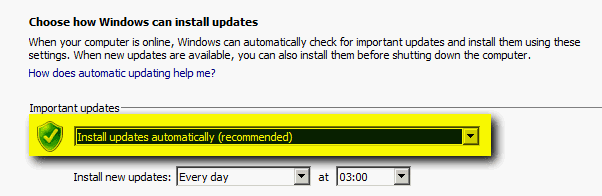
It is possible to select the time when automatically downloaded updates are installed only when the option Install updates automatically is selected:

Home Premium x64: Can't change new updates time and date-install_updates.png

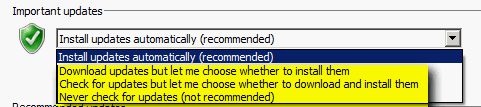
If any other option is selected (the ones highlighted with yellow in screenshot below) the option to choose install time is not available:

Home Premium x64: Can't change new updates time and date-install_updates_2.png

This, of course, is only logical because you have selected not to install updates automatically.

Kari
My System SpecsSystem Spec
Reply

 Home Premium x64: Can't change new updates time and date problems?


Thread Tools


Similar help and support threads for: Home Premium x64: Can't change new updates time and date
Thread Forum
Time and Date issue - BIOS time and date reset after change in Win7 General Discussion
Can't change date and time General Discussion
Date and time functions in Win 7 Home Premium 64-bit General Discussion
Random date/time change in Windows 7 Performance & Maintenance
Date and Time - Change Tutorials


All times are GMT -5. The time now is 01:02 AM.


Windows 7 Forums is an independent web site and has not been authorized,
sponsored, or otherwise approved by Microsoft Corporation.
"Windows 7" and related materials are trademarks of Microsoft Corp.
© Designer Media Ltd