| Windows 7: Recent updates are unchecked in Windows Update. Why? |
03 Jan 2012
|
#1 | | windows 7 professional 64 bit |
Recent updates are unchecked in Windows Update. Why? Windows Update is showing that I need two "Important" updates. These are KB2656356 and KB2656351. No other updates are shown. Usually "Important" updates such as these are already check by windows update but these show up as unchecked updates. This is a little confusing. Does anyone know why these are not checked?
Windows 7 64bit Pro. | My System Specs |
| OS windows 7 professional 64 bit CPU i7-870 Motherboard Gigabyte GA-P55-USB3 (rev 2) Memory G.Skill F3-10666CL8D-4GBHK; (4GB) Graphics Card Radeon HD4670 Sound Card on board Monitor(s) Displays Dell U2311H Screen Resolution 1080P PSU Antec EA-500D Earthwatts Case Antec Sonata III 500 Hard Drives VelociRaptor WD1500HLFS 150GB (system)
2TB Samsung spinpoint (data)
WD caviar blue (data) Internet Speed very fast Other Info Also have hauppauge TV Card HVR-1600 |
03 Jan 2012
|
#2 | | Windows 7 x64 Ultimate San Diego |
Those updates seem to be problematic on some machines. They may have tried to install and failed.
Try checking them and updating and see if they work. If they fail, look here: My Win 7 Ultimate Windows Update KB2656356 continues to fail - Microsoft Answers
I had to manually install those on my work machine but not on my home machines. I didn't have to do anything too fancy, just DLed the stand alone installer and installed it fine. | My System Specs | | System Manufacturer/Model Number Scratch built OS Windows 7 x64 Ultimate CPU i7 960 Motherboard Asus P6X58D Memory 12 Gig Corsair Dominator Graphics Card Nvidia 480 Sound Card Maudio Delta 44 + breakout box Monitor(s) Displays Dell UltraSharp U2410 24in and Samsung 21 dual monitors Screen Resolution 1920x1200 and 1280x1024 Keyboard Logitech G15 + N52 game pad Mouse Logitech MX518 PSU Corasair TX850 Case Cooler Master HAF Cooling Corsair H50 Hard Drives Primary: Intel X-25M G2 160G SSD
Secondary: Segate baracuda 1.0 TB
HDs in AHCI mode. Internet Speed 15kbs down 4.5kbps up Other Info WEI 7.6
CPU & RAM 7.6
Graphics 7.9
Hard disk 7.7 |
03 Jan 2012
|
#3 | | Windows 7 Ultimate SP1 64-Bit Peterborough, England |
It seems there are certain issues with these two updates in particular.
Have a look at this Microsoft article and click the link for each update for further information. MS11-100: Vulnerability in the .NET Framework could allow elevation of privilege: December 29, 2011 | My System Specs | | System Manufacturer/Model Number HP Pavilion Elite 495UK OS Windows 7 Ultimate SP1 64-Bit CPU Intel Core i7 870 @ 2.93GHz Motherboard MSI 2A9C (CPU1) Memory 8Gb Dual-Channel DDR3 @ 664MHz Graphics Card nVidia GeForce GTX 460 1024MB dedicated RAM Sound Card Realtek HD Audio Monitor(s) Displays HP2310i Screen Resolution 1920 x 1080 Keyboard Logitech K750 solar-powered keyboard Mouse Logitech Wireless M180 mouse PSU 460W Case HP Elite Cooling Air cooled Hard Drives 1x1954GB Hitachi HDS22020ALA 330 (RAID), 1x1954GB Hitachi External for backup and storage Internet Speed 2Mb Other Info Pure Avanti Flow Internet Radio with iPod Dock, 64Gb iPod, HP USB Speakers, Sony MDR-V500 Headphones, Sony Vaio F-Series Laptop |
04 Jan 2012
|
#4 | | win 7 home premium 64 bit |
@Seavixen32:
I also see these two updates unchecked (I have manually selected win updates)
I have a home system, and have not chosen to install SP1 .
Do you think I will have an issue installing those without SP1?
Maybe you can cull the information down a bit in the MS11-100 bulletin into layman's terms if possible.Thanks. | My System Specs | | System Manufacturer/Model Number hp pavilion 6680t OS win 7 home premium 64 bit CPU core i5 760 Motherboard iona (from MSI) Memory 6 gb Graphics Card ati 5450 Sound Card real tek 888 |
05 Jan 2012
|
#5 | | Win 7 Home Premium 64bit Ver 6.1.7600 Build 7601 - SP1 Central Pa. |
With apologies to Seavixen, and to you also legacy: 
Quote: Originally Posted by legacy7955 @Seavixen32: I also see these two updates unchecked (I have manually selected win updates)
I have a home system, and have not chosen to install SP1 .
Do you think I will have an issue installing those without SP1? I seem to recall, but it escapes me now, that there was an update to Windows 7 that would facilitate future updates. Back around last Summer. (Northern Hemisphere) But that was with SP1 installed. There have been others.
Some developers at MS have enough foresight to realize that some future updates may compromise some machines, so in the next campaign they trot out a compatibility update that hopefully will not harm certain system configurations. 
Quote: Originally Posted by legacy7955 @Maybe you can cull the information down a bit in the MS11-100 bulletin into layman's terms if possible.Thanks. To be blunt.....
If you have any form of .NET Framework installed on your machine, and do not install these updates, you are leaving your machine wide open to future infections of malware especially since these vulnerabilities are now known.
A set of previous updates that were thought to of fixed the problem, did not.
This set is supposed to take care of that. | My System Specs | | Computer type PC/Desktop System Manufacturer/Model Number Gateway DX4831e (Mid-Tower Desktop) OS Win 7 Home Premium 64bit Ver 6.1.7600 Build 7601 - SP1 CPU Intel i3 530 2.93GHz, 2933MHz 2 Cores 4 Logical Processors Motherboard Gateway H57M01 133 megahertz Memory 6GB of 1,333MHz DDR3 SDRAM Graphics Card 32MB Intel Graphics Media Accelerator HD IGChip Sound Card Realtek High Definition Audio Monitor(s) Displays Gateway HX2000 20inch TFT active matrix TN Screen Resolution 1600 x 900 x 59 hertz Keyboard MS 'Natural' Standard PS/2 Enhanced 101-102 Key Mouse Gateway USB wired optical PSU 300watts. Case Mid-Tower Desktop Cooling Stock from Gateway Hard Drives WDC WD10EADS-00M2B0 [HDD] (1000.20 GB) -- drive 0,
HL-DT-ST DVDRAM GH41N [CD-ROM dr]
HP Photosmart Plus B210a e_series AIO Printer
Four card readers, and Four USB 2.0 Internet Speed Verizon FIOS 24.57Mbps Down - 5.68Mbps up Antivirus MSE Browser IE9.0.8112.16421-Upd ver 9.0.13, FireFox 19.2, Opera 12.14 Other Info BIOS: American Megatrends Inc. P01-A0 11/17/2009
System Specs by Belarc.
Join Date March 27th 2010 at 10:44:15 AM. |
05 Jan 2012
|
#6 | | |
Not sure if its related, but after selecting these two updates and installing them on my laptop (Sony Vaio Z 47G/D {HK}), I kept getting the BSoD. Finally decided to uninstall it and now waiting to see if that was the cause or not. | My System Specs | | OS Windows 7 Ultimate x64 |
05 Jan 2012
|
#7 | | win 7 home premium 64 bit |

Quote: Originally Posted by Anak With apologies to Seavixen, and to you also legacy: 
Quote: Originally Posted by legacy7955 @Seavixen32: I also see these two updates unchecked (I have manually selected win updates)
I have a home system, and have not chosen to install SP1 .
Do you think I will have an issue installing those without SP1? I seem to recall, but it escapes me now, that there was an update to Windows 7 that would facilitate future updates. Back around last Summer. (Northern Hemisphere) But that was with SP1 installed. There have been others.
Some developers at MS have enough foresight to realize that some future updates may compromise some machines, so in the next campaign they trot out a compatibility update that hopefully will not harm certain system configurations. 
Quote: Originally Posted by legacy7955 @Maybe you can cull the information down a bit in the MS11-100 bulletin into layman's terms if possible.Thanks. To be blunt.....
If you have any form of .NET Framework installed on your machine, and do not install these updates, you are leaving your machine wide open to future infections of malware especially since these vulnerabilities are now known.
A set of previous updates that were thought to of fixed the problem, did not.
This set is supposed to take care of that.
Anak:
By all means thank you for your directness. While I know quite a bit about Windows OS I am by no means an expert and thus for very complicated involved issues I have as much clue as the typical consumer.
I reread the MS11-100 Bulletin and I did gather that the patch from these two .net updates were very serious and critical ...but the only thing holding me back from trying to install them was that they were unchecked. I will attempt to install them and see how it goes. Worst case I uninstall them if they cause serious operating issues. At least I have MSE constantly updating automatically. | My System Specs | | System Manufacturer/Model Number hp pavilion 6680t OS win 7 home premium 64 bit CPU core i5 760 Motherboard iona (from MSI) Memory 6 gb Graphics Card ati 5450 Sound Card real tek 888 |
05 Jan 2012
|
#8 | | Win 7 Home Premium 64bit Ver 6.1.7600 Build 7601 - SP1 Central Pa. |
Your welcome!
It is an interesting conundrum, with no pun intended. Tweakit has asked an excellent question!
I found this buried in the Windows Update Applet in Control Panel under Help and Support. Control Panel\All Control Panel Items\Windows Update\Change settings: To me, that statement would imply that under Microsoft's determination they are sure the user needs the checked ones, and not sure about the ones that are unchecked, but we are going to send you all the ones we have for this "Patch Campaign". We leave those up to you to install or not.
The patch Tuesday coming up next week is supposed to have 1 critical, and 6 important updates for a total of 7. It would be interesting for all of us to come back here next week and post how they were presented.
I would expect 1 would be checked, and the other 6 not.
If you go here Microsoft Security Bulletin Advance Notification for January 2012
Then click on Affected Software under Bulletin Information.
Then >Windows Operating System and Components.
Scroll down to Windows 7.
There it shows only 6 updates/bulletins 2 are not applicable, and nothing critical, only important.
I have seen here in posts made by members, recent campaigns were a user will receive the right total of updates, some have received less, and even some, more that what was listed.
So I might only get 4 updates, maybe none checked, only time will tell. | My System Specs | | Computer type PC/Desktop System Manufacturer/Model Number Gateway DX4831e (Mid-Tower Desktop) OS Win 7 Home Premium 64bit Ver 6.1.7600 Build 7601 - SP1 CPU Intel i3 530 2.93GHz, 2933MHz 2 Cores 4 Logical Processors Motherboard Gateway H57M01 133 megahertz Memory 6GB of 1,333MHz DDR3 SDRAM Graphics Card 32MB Intel Graphics Media Accelerator HD IGChip Sound Card Realtek High Definition Audio Monitor(s) Displays Gateway HX2000 20inch TFT active matrix TN Screen Resolution 1600 x 900 x 59 hertz Keyboard MS 'Natural' Standard PS/2 Enhanced 101-102 Key Mouse Gateway USB wired optical PSU 300watts. Case Mid-Tower Desktop Cooling Stock from Gateway Hard Drives WDC WD10EADS-00M2B0 [HDD] (1000.20 GB) -- drive 0,
HL-DT-ST DVDRAM GH41N [CD-ROM dr]
HP Photosmart Plus B210a e_series AIO Printer
Four card readers, and Four USB 2.0 Internet Speed Verizon FIOS 24.57Mbps Down - 5.68Mbps up Antivirus MSE Browser IE9.0.8112.16421-Upd ver 9.0.13, FireFox 19.2, Opera 12.14 Other Info BIOS: American Megatrends Inc. P01-A0 11/17/2009
System Specs by Belarc.
Join Date March 27th 2010 at 10:44:15 AM. |
07 Jan 2012
|
#9 | | Vista Home Premium x86 SP2 |

Quote: Originally Posted by Anak 
Quote: Originally Posted by legacy7955 @Seavixen32: I also see these two updates unchecked (I have manually selected win updates)
I have a home system, and have not chosen to install SP1 .
Do you think I will have an issue installing those without SP1? I seem to recall, but it escapes me now, that there was an update to Windows 7 that would facilitate future updates. Back around last Summer. (Northern Hemisphere) But that was with SP1 installed. There have been others.
Some developers at MS have enough foresight to realize that some future updates may compromise some machines, so in the next campaign they trot out a compatibility update that hopefully will not harm certain system configurations. Just a random snippet of information
Those updates update the Servicing Stack. Simplistically, those updates tell Windows the version numbers of a new Service Pack. Microsoft cannot predict the future, and so Windows cannot recognise something newer than itself when it was last built. For this reason, those updates just let Windows recognise a new milestone or service pack, and so work better with that Service Pack.
I think that you were talking about An update that prevents a "0xC0000034" error message when you try to install Windows 7 SP1 or Windows Server 2008 R2 SP1 is available, which was soon replaced by An update that prevents a "0xC0000034" error message when you try to install Windows 7 SP1 or Windows Server 2008 R2 SP1 is available
@Tweakit: As far as I know, and I am confident in my answer here, Microsoft can directly control which updates will be automatically selected, and which ones won't be. Quite how they decide, I don't know!
Just because an update doesn't mean that it doesn't apply to your computer (it will apply), or that it is likely to fail (it isn't).
Richard | My System Specs | | System Manufacturer/Model Number Dell XPS 420 OS Vista Home Premium x86 SP2 CPU Intel Core 2 Quad Q9300 2.50GHz Motherboard Stock Dell 0TP406 Memory 4 gb (DDR2 800) 400MHz Graphics Card ATI Radeon HD 3870 (512 MBytes) Monitor(s) Displays 1 x Dell 2007FP and 1 x (old) Sonic flat screen Screen Resolution 1600 x 1200 and 1280 x 1204 Keyboard Dell Bluetooth Mouse Advent Optical ADE-WG01 (colour change light up) Case Dell XPS 420 Cooling Stock Fan Hard Drives 1 x 640Gb (SATA 300) Western Digital: WDC WD6400AAKS-75A7B0 1 x 1Tb (SATA 600) Western Digital: Caviar Black, SATA 6GB/S, 64Mb cache, 8ms Western Digital: WDC WD1002FAEX-00Z3A0 ATA Device Internet Speed Varies from 10kb/s to 170kb/s. So unreliable it is not funny Other Info ASUS USB 3.0 5Gbps/SATA 6Gbps - PCI-Express Combo Controller Card (U3S6) |
11 Jan 2012
|
#10 | | Win 7 Home Premium 64bit Ver 6.1.7600 Build 7601 - SP1 Central Pa. |
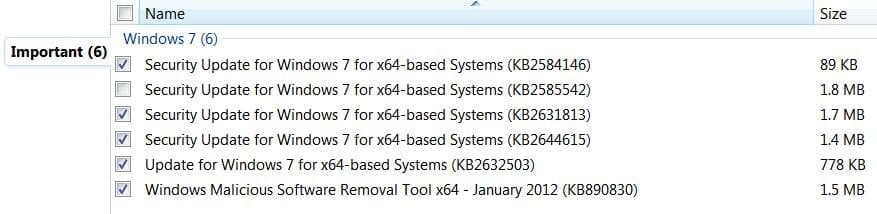
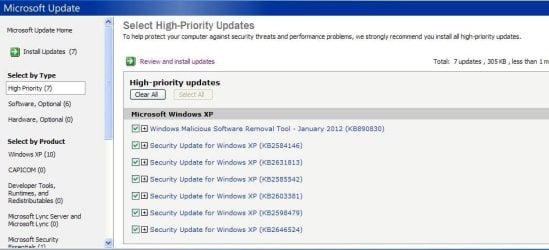
Well here is how my patches were presented. The first is a snip of our 7box (6), and the second is the XPbox (7). 
I did select, and install KB2585542 | My System Specs | | Computer type PC/Desktop System Manufacturer/Model Number Gateway DX4831e (Mid-Tower Desktop) OS Win 7 Home Premium 64bit Ver 6.1.7600 Build 7601 - SP1 CPU Intel i3 530 2.93GHz, 2933MHz 2 Cores 4 Logical Processors Motherboard Gateway H57M01 133 megahertz Memory 6GB of 1,333MHz DDR3 SDRAM Graphics Card 32MB Intel Graphics Media Accelerator HD IGChip Sound Card Realtek High Definition Audio Monitor(s) Displays Gateway HX2000 20inch TFT active matrix TN Screen Resolution 1600 x 900 x 59 hertz Keyboard MS 'Natural' Standard PS/2 Enhanced 101-102 Key Mouse Gateway USB wired optical PSU 300watts. Case Mid-Tower Desktop Cooling Stock from Gateway Hard Drives WDC WD10EADS-00M2B0 [HDD] (1000.20 GB) -- drive 0,
HL-DT-ST DVDRAM GH41N [CD-ROM dr]
HP Photosmart Plus B210a e_series AIO Printer
Four card readers, and Four USB 2.0 Internet Speed Verizon FIOS 24.57Mbps Down - 5.68Mbps up Antivirus MSE Browser IE9.0.8112.16421-Upd ver 9.0.13, FireFox 19.2, Opera 12.14 Other Info BIOS: American Megatrends Inc. P01-A0 11/17/2009
System Specs by Belarc.
Join Date March 27th 2010 at 10:44:15 AM. Recent updates are unchecked in Windows Update. Why? problems? All times are GMT -5. The time now is 10:59 AM. | |