Windows 7 Forums


Windows 7: How to shutdown and apply updates via DOS command

30 Jan 2012   #1

Windows 7
FEMA Region 6
 
 
How to shutdown and apply updates via DOS command

I am having a hard time finding an answer to this on the forums and the net in general. If I goto Start/Shutdown, and there is the exclamation mark on it, it will apply any updates and shutdown the computer. Simple Enough right?

Well, I want to know what are the DOS commands to do such a thing in Windows 7? I have tried the shutdown.exe /s command and that shuts down the computer, but doesn't apply any pending updates.

I do not have a GPO that is overriding this. I've looked and it's not configured.


Any help is appreciated.
My System SpecsSystem Spec

30 Jan 2012   #2

Windows 7
FEMA Region 6


anyone?
My System SpecsSystem Spec
30 Jan 2012   #3

Windows 7 Ultimate SP1 64-Bit
Peterborough, England


Open a command prompt with elevated privileges then type help at the prompt for a list of commands available.

As for doing exactly what you are suggesting I just don't know - perhaps a DOS expert may come up with a solution.

You might find this useful: http://pcsupport.about.com/od/comman...s-commands.htm

More info here: http://en.wikipedia.org/wiki/List_of_MS-DOS_commands
My System SpecsSystem Spec
.


30 Jan 2012   #4

Windows 7
FEMA Region 6


Quote   Quote: Originally Posted by seavixen32 View Post
Open a command prompt with elevated privileges then type help at the prompt for a list of commands available.

As for doing exactly what you are suggesting I just don't know - perhaps a DOS expert may come up with a solution.

You might find this useful: Complete List of DOS Commands (MS-DOS Commands)

More info here: List of MS-DOS commands - Wikipedia, the free encyclopedia
Sorry but I have typed in that help command in DOS and when I try to follow the syntax, it's still not working.
My System SpecsSystem Spec
30 Jan 2012   #5

Windows 7 Ultimate SP1 64-Bit
Peterborough, England


You need to open the command prompt window with elevated privileges first.

Click Start, type cmd in the Search field, and then right-click cmd under Programs and choose Run as Administrator.
My System SpecsSystem Spec
30 Jan 2012   #6

Windows 7
FEMA Region 6


Quote   Quote: Originally Posted by seavixen32 View Post
You need to open the command prompt window with elevated privileges first.

Click Start, type cmd in the Search field, and then right-click cmd under Programs and choose Run as Administrator.
I am the domain administrator on my domain admin machine.
My System SpecsSystem Spec
30 Jan 2012   #7

Windows 7 Ultimate SP1 64-Bit
Peterborough, England


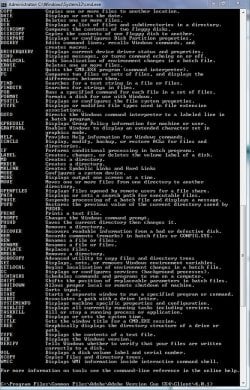
When I type in Help, I get this:

How to shutdown and apply updates via DOS command-help.jpg

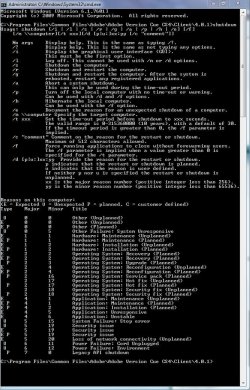
When I type in Shutdown I get this:

How to shutdown and apply updates via DOS command-help2.jpg

That's about the limit of my expertise on this one, so I'm hoping someone else will chip in.
My System SpecsSystem Spec
30 Jan 2012   #8
TJG

Windows 7 Home Premium 32bits
S.E. Okla.


When Windows 7 updates during start/shutdown, it is NOT in DOS but still in windows enviroment with most things shut down.

TJG
My System SpecsSystem Spec
31 Jan 2012   #9

Windows 7 Ultimate AMD64
Sydney, Nova Scotia


This may sound nit picky, but it is NOT DOS, its a command shell. Windows 98 was the last version of Windows based on MS DOS. Sorry, its just one of my pet peeves.
My System SpecsSystem Spec
31 Jan 2012   #10

Windows 7 Ultimate SP1 64-Bit
Peterborough, England


Quote   Quote: Originally Posted by alphanumeric View Post
This may sound nit picky, but it is NOT DOS, its a command shell. Windows 98 was the last version of Windows based on MS DOS. Sorry, its just one of my pet peeves.
You're quite right of course.

As for being nit picky, I'm just the same myself, so thanks for pointing this out.
My System SpecsSystem Spec
Reply

 How to shutdown and apply updates via DOS command problems?


Thread Tools


Similar help and support threads for: How to shutdown and apply updates via DOS command
Thread Forum
How do you apply a folder's view settings and apply it to ALL others Customization
Command Prompt Shutdown problem Network & Sharing
Shutdown command problem General Discussion
Apply updates Installation & Setup
Pinning from other drive? Command on shutdown? Software


All times are GMT -5. The time now is 04:51 PM.


Windows 7 Forums is an independent web site and has not been authorized,
sponsored, or otherwise approved by Microsoft Corporation.
"Windows 7" and related materials are trademarks of Microsoft Corp.
© Designer Media Ltd