
You are using an out of date browser. It may not display this or other websites correctly.
You should upgrade or use an alternative browser.
You should upgrade or use an alternative browser.
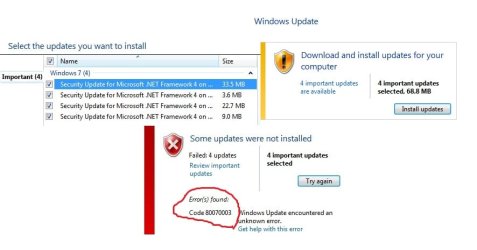
Solved Windows update error code:80070003
- Thread starter merrmo
- Start date

JMH
Banned
merrmo
Three links below for you to peruse.
BTW with .Net Frameworks updates I suggest you do one at a time commencing with the oldest.
Reboot after each has been installed.
http://www.sevenforums.com/tutorials/91738-windows-update-reset.html
You receive a "0x80070002" or "0x80070003" error code after you download an update from Windows Update, from Microsoft Update, or from Windows Server Update Services
Windows Update error 80070003
Three links below for you to peruse.
BTW with .Net Frameworks updates I suggest you do one at a time commencing with the oldest.
Reboot after each has been installed.
http://www.sevenforums.com/tutorials/91738-windows-update-reset.html
You receive a "0x80070002" or "0x80070003" error code after you download an update from Windows Update, from Microsoft Update, or from Windows Server Update Services
Windows Update error 80070003
My Computer
- Computer Manufacturer/Model Number
- LAPTOP. HP Pavilion dv7-4010TX .
- OS
- Win 7 Ultimate 64-bit. SP1.
- CPU
- Intel i7 -720QM.[1.6GHz Turbo Boost 2.8GHz. 6MB Cache.]
- Memory
- 8 DDR 3 RAM. 1066MHZ
- Graphics Card(s)
- ATI 1024 MB. DDR3. Radeon HD5650
- Monitor(s) Displays
- 17.3" High Definition Brightview LCD. LED Backlit.
- Screen Resolution
- 1600 x 900.
- Hard Drives
- 640GB
- Case
- Laptop / notebook.
- Mouse
- Logitech Anywhere mouse. MX.
- Internet Speed
- ADSL [ but too slow ]
JMH
Banned
You are most welcome.
Have you successfully installed all of the .NET Framework updates?
Have you successfully installed all of the .NET Framework updates?
My Computer
- Computer Manufacturer/Model Number
- LAPTOP. HP Pavilion dv7-4010TX .
- OS
- Win 7 Ultimate 64-bit. SP1.
- CPU
- Intel i7 -720QM.[1.6GHz Turbo Boost 2.8GHz. 6MB Cache.]
- Memory
- 8 DDR 3 RAM. 1066MHZ
- Graphics Card(s)
- ATI 1024 MB. DDR3. Radeon HD5650
- Monitor(s) Displays
- 17.3" High Definition Brightview LCD. LED Backlit.
- Screen Resolution
- 1600 x 900.
- Hard Drives
- 640GB
- Case
- Laptop / notebook.
- Mouse
- Logitech Anywhere mouse. MX.
- Internet Speed
- ADSL [ but too slow ]
You are most welcome.
Have you successfully installed all of the .NET Framework updates?
Yes..I have already installed 4 updates regarding .NET! Thanks again you make my life easier

My Computer
- OS
- Windows 7 Home Premium 64bit
JMH
Banned
I am so pleased for you.
Just remember re future .NET Framework updates...
> Do them on their own, NOT with any others.
> Reboot on completion.
> Then everything SHOULD be ok.
Just remember re future .NET Framework updates...
> Do them on their own, NOT with any others.
> Reboot on completion.
> Then everything SHOULD be ok.
My Computer
- Computer Manufacturer/Model Number
- LAPTOP. HP Pavilion dv7-4010TX .
- OS
- Win 7 Ultimate 64-bit. SP1.
- CPU
- Intel i7 -720QM.[1.6GHz Turbo Boost 2.8GHz. 6MB Cache.]
- Memory
- 8 DDR 3 RAM. 1066MHZ
- Graphics Card(s)
- ATI 1024 MB. DDR3. Radeon HD5650
- Monitor(s) Displays
- 17.3" High Definition Brightview LCD. LED Backlit.
- Screen Resolution
- 1600 x 900.
- Hard Drives
- 640GB
- Case
- Laptop / notebook.
- Mouse
- Logitech Anywhere mouse. MX.
- Internet Speed
- ADSL [ but too slow ]
JMH
Banned
merrmo,
This Sir is actually of the female gender...
Please refer to the links below to assist you with your latest "problem."
Good luck!
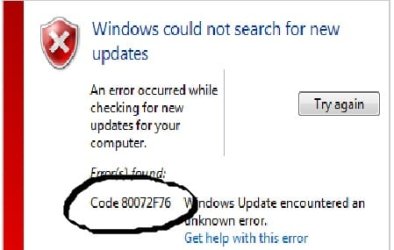
Windows Update error 80072efe or 80072f76
You may encounter temporary connection-related errors when you use Windows Update or Microsoft Update to install updates
Windows Update errors – A troubleshooting guide - 4sysops
This Sir is actually of the female gender...
Please refer to the links below to assist you with your latest "problem."
Good luck!
Windows Update error 80072efe or 80072f76
You may encounter temporary connection-related errors when you use Windows Update or Microsoft Update to install updates
Windows Update errors – A troubleshooting guide - 4sysops
My Computer
- Computer Manufacturer/Model Number
- LAPTOP. HP Pavilion dv7-4010TX .
- OS
- Win 7 Ultimate 64-bit. SP1.
- CPU
- Intel i7 -720QM.[1.6GHz Turbo Boost 2.8GHz. 6MB Cache.]
- Memory
- 8 DDR 3 RAM. 1066MHZ
- Graphics Card(s)
- ATI 1024 MB. DDR3. Radeon HD5650
- Monitor(s) Displays
- 17.3" High Definition Brightview LCD. LED Backlit.
- Screen Resolution
- 1600 x 900.
- Hard Drives
- 640GB
- Case
- Laptop / notebook.
- Mouse
- Logitech Anywhere mouse. MX.
- Internet Speed
- ADSL [ but too slow ]

JMH
Banned
Pleased to hear all is well.... for the second time!
Safe surfing!
Safe surfing!
My Computer
- Computer Manufacturer/Model Number
- LAPTOP. HP Pavilion dv7-4010TX .
- OS
- Win 7 Ultimate 64-bit. SP1.
- CPU
- Intel i7 -720QM.[1.6GHz Turbo Boost 2.8GHz. 6MB Cache.]
- Memory
- 8 DDR 3 RAM. 1066MHZ
- Graphics Card(s)
- ATI 1024 MB. DDR3. Radeon HD5650
- Monitor(s) Displays
- 17.3" High Definition Brightview LCD. LED Backlit.
- Screen Resolution
- 1600 x 900.
- Hard Drives
- 640GB
- Case
- Laptop / notebook.
- Mouse
- Logitech Anywhere mouse. MX.
- Internet Speed
- ADSL [ but too slow ]
Hi ma'am does this latest problem i shared to you had a connection with my internet? I'm using using this broadband stick and availing a free net which i get from a forum. Before i used this "free net" to get windows update and its working but lately until now the error keeps popping up! Do I need to change my connection or I just have to use a regular loading using my broadband stick!! 
My Computer
- OS
- Windows 7 Home Premium 64bit
JMH
Banned
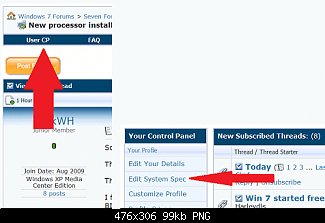
It would be a good idea to include your System Specs.
This would better enable us to help you.
See snip below.
Regarding your latest question...
This MAY help.
Please refer the link below.
You receive a "0x80070002" or "0x80070003" error code after you download an update from Windows Update, from Microsoft Update, or from Windows Server Update Services
This would better enable us to help you.
See snip below.
Regarding your latest question...
This MAY help.
Please refer the link below.
You receive a "0x80070002" or "0x80070003" error code after you download an update from Windows Update, from Microsoft Update, or from Windows Server Update Services
My Computer
- Computer Manufacturer/Model Number
- LAPTOP. HP Pavilion dv7-4010TX .
- OS
- Win 7 Ultimate 64-bit. SP1.
- CPU
- Intel i7 -720QM.[1.6GHz Turbo Boost 2.8GHz. 6MB Cache.]
- Memory
- 8 DDR 3 RAM. 1066MHZ
- Graphics Card(s)
- ATI 1024 MB. DDR3. Radeon HD5650
- Monitor(s) Displays
- 17.3" High Definition Brightview LCD. LED Backlit.
- Screen Resolution
- 1600 x 900.
- Hard Drives
- 640GB
- Case
- Laptop / notebook.
- Mouse
- Logitech Anywhere mouse. MX.
- Internet Speed
- ADSL [ but too slow ]

RoloDman
HWIC
i had the same issue but I searched for the updates on the Microsoft site and downloaded them each and installed them. They no longer show needing update in WindowsUpdate window
My Computer
- Computer Manufacturer/Model Number
- Sager NP2096
- OS
- 7 Ultimate 64 bit Service Pack 1
- CPU
- Intel Core 2 Duo P9500 @ 2.53GHz (lower wattage chip)
- Motherboard
- JHL 90 (U2E1)
- Memory
- 4.0GB Dual-Channel DDR 2 @ 398MHz (5-5-5-18)
- Graphics Card(s)
- 512MB GeForce 9600M GT
- Sound Card
- Realtek High Definition Audio
- Monitor(s) Displays
- Generic PnP Monitor
- Screen Resolution
- 1680x1050
- Hard Drives
- Hitachi 244GB @ 7200rpm (IDE)
- Cooling
- nature
- Keyboard
- generic
- Mouse
- Microsoft Wireless Mobile Mouse 3500
- Internet Speed
- 30 megabits down, 5 megabits up
- Other Info
- 1.)Staples 4-Port USB 2.0 Mobile Hub
2.)WNDR3700 - NETGEAR RangeMax Dual Band Wireless-N Gigabit Router
3.)Logitech Webcam C250
4.)Logitech M570
I ran the Windows Update Troubleshooter
http://go.microsoft.com/?linkid=9830262
It fixed some, but not all problems found. At one point, my update list was empty! But the next time I rebooted and retried to update, I had to wait a long time, but it finally installed. Hope this helps someone.
http://go.microsoft.com/?linkid=9830262
It fixed some, but not all problems found. At one point, my update list was empty! But the next time I rebooted and retried to update, I had to wait a long time, but it finally installed. Hope this helps someone.
My Computer
- Computer Manufacturer/Model Number
- HP Pavilion DV7-2157ca
- OS
- Windows 7 Home Premium 64bit
- CPU
- P7350
- Memory
- 4 GB
- Graphics Card(s)
- ATI Mobility Radeon HD 4530
- Sound Card
- Altec Lansing
- Monitor(s) Displays
- 1600x900 LED
- Hard Drives
- 500 GB