|
Welcome to Windows 7 Forums. Our forum is dedicated to helping you find solutions with any problems, errors or issues you are experiencing with Windows 7. The Windows 7 forum also covers news and updates and has an extensive Windows 7 tutorial section that covers a wide range of tips and tricks.
Windows 7 - start menu search broken after windows updates |
02-20-2012
|
#1 | | |
start menu search broken after windows updates please help me, I'm stuck on this problem:
After these updates:
Updates :
---------
KB:
2416472
2468871
2487367
2533523
2656351
2446708
2468871
2473228
2478663
2518870
2533523
2539636
2572078
2633870
2656351
Silverlight 4.1.10111.0
2584146
2585542
2588516
2603229
2618451
2619339
2620704
2620712
2631813
2633873
2633952
2640148
2641690
2644615
2645640
2647516
2654428
2656356
2660075
my search function in the start menu is broken.
So when I enter a search term in the "Search programs and files"
field nothing happens.
Also when i double click on explorer.exe, it gives me this error:
"This file does not have a program associated with it for performing
this action. Please install a program or, if one is already
installed, create an association in the Default Programs control
panel."
All userprofiles , also the newly generated ones, are affected by
this error.
I tried all kinds of registry fixes but nothing helps.
I'm pretty sure it has something to do with these updates
because when I restore my system to a point before these updates,
there are no errors. Then auto-update installs these updates and the
error comes up.
So the cause of this problem has to be one of the updates mentioned above.
At least I think...
please help
liquid | My System Specs | | OS Windows 7 home premiumm |
02-20-2012
|
#2 | | Windows 7 Ultimate SP1 64-Bit |
Welcome to Windows Seven Forums.
The only practical solution I can think of other than a system restore is to go to your Control Panel and check the View Installed Updates list under Uninstall a Program.
You should be able to see the order they were installed by the date if nothing else, and then uninstall them one at a time, checking each time whether your Search function has returned to normal.
Make a note of which update is causing the problem, and then choose the Hide option when Windows Updates again offers the update in question.
Your problem is one of the reasons I always install updates one at a time. It is more time-consuming, but it does give you the chance to isolate any update that's giving you a problem. | My System Specs | | System Manufacturer/Model Number HP Pavilion Elite 495UK OS Windows 7 Ultimate SP1 64-Bit CPU Intel Core i7 870 @ 2.93GHz Motherboard MSI 2A9C (CPU1) Memory 8Gb Dual-Channel DDR3 @ 664MHz Graphics Card nVidia GeForce GTX 460 1024MB dedicated RAM Sound Card Realtek HD Audio Monitor(s) Displays HP2310i Screen Resolution 1920 x 1080 Keyboard Logitech K750 solar-powered keyboard Mouse Logitech Wireless M180 mouse PSU 460W Case HP Elite Cooling Air cooled Hard Drives 1x1954GB Hitachi HDS22020ALA 330 (RAID), 1x1954GB Hitachi External for backup and storage Internet Speed 2Mb Other Info Pure Avanti Flow Internet Radio with iPod Dock, 64Gb iPod, HP USB Speakers, Sony MDR-V500 Headphones, Sony Vaio F-Series Laptop |
02-20-2012
|
#3 | | |
Ok,
Thanks for your help. Do I have to restart after each update turned off?
Iow are changes immediately noticeable?
There has to be some MS-person around who "KNOWS'' what update is causing
these problems, right? | My System Specs | | OS Windows 7 home premiumm |
02-20-2012
|
#4 | | Windows 7 Ultimate SP1 64-Bit |
A restart would be good after each one you uninstall.
Try a search after each restart and as soon as the Search function starts to work normally, you'll at least have isolated which update is giving you trouble.
I'm sorry I don't KNOW which update is causing the problem no more than any MS-person as you put it would KNOW which update is causing the problem. If they did, I'm sure Microsoft wouldn't be offering the update.
You might also want to download and run the System Updates Readiness Tool, which can solve problems with Windows Updates.
You haven't said whether you are using the 32-bit version of Windows or the 64-bit version so I'll give you the link for both versions of SURT.
32-bit version of SURT: http://www.microsoft.com/download/en...ang=en&id=3132
64-bit version of SURT: http://www.microsoft.com/download/en...ng=en&id=20858 | My System Specs | | System Manufacturer/Model Number HP Pavilion Elite 495UK OS Windows 7 Ultimate SP1 64-Bit CPU Intel Core i7 870 @ 2.93GHz Motherboard MSI 2A9C (CPU1) Memory 8Gb Dual-Channel DDR3 @ 664MHz Graphics Card nVidia GeForce GTX 460 1024MB dedicated RAM Sound Card Realtek HD Audio Monitor(s) Displays HP2310i Screen Resolution 1920 x 1080 Keyboard Logitech K750 solar-powered keyboard Mouse Logitech Wireless M180 mouse PSU 460W Case HP Elite Cooling Air cooled Hard Drives 1x1954GB Hitachi HDS22020ALA 330 (RAID), 1x1954GB Hitachi External for backup and storage Internet Speed 2Mb Other Info Pure Avanti Flow Internet Radio with iPod Dock, 64Gb iPod, HP USB Speakers, Sony MDR-V500 Headphones, Sony Vaio F-Series Laptop |
02-20-2012
|
#5 | | |

Quote: Originally Posted by liquid98 There has to be some MS-person around who "KNOWS'' what update is causing these problems, right? Even if there was, without your system specifications for whatever hardware you're running, it'd be pretty difficult to speculate...
Please complete your system spec's and you might get additional support... | My System Specs | | System Manufacturer/Model Number Custom built machine OS W7 x64 CPU Intel Q9300 2.5Ghz Quad LGA775 (Would like Q9650) Motherboard Gigabyte GA-EP45T-UD3R (F6 Bios) Memory 4Gb OCZ Gold 1,333Mhz Graphics Card Palit HD4850 O/C Sonic 512Mb DDR3, Dual DViD's Sound Card Azalia to twin Samson 50w Studio Monitors Monitor(s) Displays Twin Dell (E-IPS) U2311H 23.6" Screens Screen Resolution 1920 x 1080 @ 60Hz Keyboard Cherry PS/2 custom model Mouse Logitech M500 Laser Mouse PSU OCZ 600w Case Lian-Li PC8 acoustifoamed' aluminium tower Cooling Scythe 140mm Zipang Hard Drives Twin 1Tb Barracuda archivage, Twin TV/PVR 2Tb Samsungs, (80Gb Barracuda for the OS, but SSD envisaged...) Internet Speed ADSL2+ @14Mbps downstream & Cat6 Gigabit Ethernet Other Info Silicon Dust HD Homerun Dual FTA (Ethernet) TV Tuner, Billion BiPac 7800N router & ZyXEL 8x Gigabit Switch. Lian-Li CR26 Card Reader, Samsung SCX4300 AiO laser printer/scanner. NOD32 Anti-Virus. |
02-20-2012
|
#6 | | |
Thanx, I'll try that first then. | My System Specs | | OS Windows 7 home premiumm |
02-20-2012
|
#7 | | Windows 7 Ultimate x64 SP1, LinuxMint 9 LTS x64, Debian 6, Ubuntu 10.04 LTS x64 |

Quote: Originally Posted by seavixen32 The only practical solution I can think of other than a system restore is to go to your Control Panel and check the View Installed Updates list under Uninstall a Program.
You should be able to see the order they were installed by the date if nothing else, and then uninstall them one at a time, checking each time whether your Search function has returned to normal. Hi Liquid,
Andrews suggestion above, whilst time-consuming, is an excellent troubleshooter for this problem. Unfortunately there are far too many updates in there for us (volunteers here), let alone Microsoft, to be able to pinpoint the exact one causing the problems.
Regards,
Golden | My System Specs | | System Manufacturer/Model Number Golden Mk. I.3 OS Windows 7 Ultimate x64 SP1, LinuxMint 9 LTS x64, Debian 6, Ubuntu 10.04 LTS x64 CPU Intel i7 860 @ 2.80 GHz Motherboard Gigabyte P55A-UD3R Rev.1. Award BIOS F13 Memory 16GB Corsair Vengance DDR3 @ 661 MHz Dual Channel (9-9-9-24) Graphics Card EVGA NVidia GTX 560 1024MB Sound Card Realtek Integrated Monitor(s) Displays Dual Samsung SyncMaster 2494HS Screen Resolution 1920*1080 and 1920*1080 Keyboard Logitech G110 Mouse Logitech MX518 PSU Thermaltake ToughPower QFan 750W Case Thermaltake Element S VK60001W2Z Cooling Corsair H60 Water Cooling, 2*230mm and 2*80mm case fans Hard Drives 1*OCZ Vertex 2 60GB SSD;
2*Samsung F3 SpinPoint 1TB in RAID0;
2*Samsung F1 SpinPoint 1TB in RAID1;
1*Western Digital WD10EARS 1TB
1*Western Digital 500GB External USB 3.0
1*Seagate 500GB External USB 2.0 Internet Speed Not fast enough!!! |
02-20-2012
|
#8 | | |
Yes I fully understand that,
And well I was just hoping for a known update to cause this problem...
seavixen32: It might be a good idea to roll back and work the other way round by
installing updates one by one. How do I install updates one by one? | My System Specs | | OS Windows 7 home premiumm |
02-20-2012
|
#9 | | Windows 7 Ultimate SP1 64-Bit |

Quote: Originally Posted by liquid98 Yes I fully understand that,
And well I was just hoping for a known update to cause this problem...
seavixen32: It might be a good idea to roll back and work the other way round by
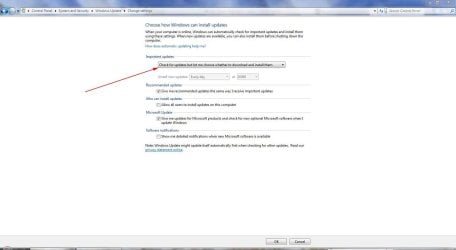
installing updates one by one. How do I install updates one by one? Go into Windows Updates and change your settings, as this screenshot shows. | My System Specs | | System Manufacturer/Model Number HP Pavilion Elite 495UK OS Windows 7 Ultimate SP1 64-Bit CPU Intel Core i7 870 @ 2.93GHz Motherboard MSI 2A9C (CPU1) Memory 8Gb Dual-Channel DDR3 @ 664MHz Graphics Card nVidia GeForce GTX 460 1024MB dedicated RAM Sound Card Realtek HD Audio Monitor(s) Displays HP2310i Screen Resolution 1920 x 1080 Keyboard Logitech K750 solar-powered keyboard Mouse Logitech Wireless M180 mouse PSU 460W Case HP Elite Cooling Air cooled Hard Drives 1x1954GB Hitachi HDS22020ALA 330 (RAID), 1x1954GB Hitachi External for backup and storage Internet Speed 2Mb Other Info Pure Avanti Flow Internet Radio with iPod Dock, 64Gb iPod, HP USB Speakers, Sony MDR-V500 Headphones, Sony Vaio F-Series Laptop OS Windows 7 home premiumm start menu search broken after windows updates problems? All times are GMT -5. The time now is 03:39 AM. |  |