Windows 7: How to control when updates are applied?
30 Mar 2012
PeterPSA
Windows 7 Ultimate x64
14 posts
How to control when updates are applied?
How can I take more control over how Windows Updates updates my computer? Right now, I see a symbol on the shutdown option indicating that there are updates. That means that when I shutdown my computer, I'm going to have to wait for all the updates to be installed. How can I, instead, tell it to do the updates when I choose? Thanks.
Computer type Laptop System Manufacturer/Model Number ACER ASPIRE 5742G OS Microsoft Windows 7 Home Premium 64-bits 7601 Multiprocessor Free Service Pack 1 CPU Intel(R) Core(TM) i3 CPU M 370 @ 2.40GHz Motherboard Acer Aspire 5742G Memory 4,00 GB Graphics Card ATI Mobility Radeon HD 5400 Series Sound Card (1) AMD High Definition Audio Device (2) Realtek High Defi Screen Resolution 1366 x 768 x 32 bits (4294967296 colors) @ 60 Hz
Hard Drives WDC WD5000BEVT-22ZAT0
30 Mar 2012
Kaktussoft
Microsoft Windows 7 Home Premium 64-bits 7601 Multiprocessor Free Service Pack 1
6,941 posts
SecretCity
Quote: Originally Posted by PeterPSA
How can I take more control over how Windows Updates updates my computer? Right now, I see a symbol on the shutdown option indicating that there are updates. That means that when I shutdown my computer, I'm going to have to wait for all the updates to be installed. How can I, instead, tell it to do the updates when I choose? Thanks.
Are you very sure???!! I think the updates have already been installed, this is more or less a configuration phase
Computer type Laptop System Manufacturer/Model Number ACER ASPIRE 5742G OS Microsoft Windows 7 Home Premium 64-bits 7601 Multiprocessor Free Service Pack 1 CPU Intel(R) Core(TM) i3 CPU M 370 @ 2.40GHz Motherboard Acer Aspire 5742G Memory 4,00 GB Graphics Card ATI Mobility Radeon HD 5400 Series Sound Card (1) AMD High Definition Audio Device (2) Realtek High Defi Screen Resolution 1366 x 768 x 32 bits (4294967296 colors) @ 60 Hz
Hard Drives WDC WD5000BEVT-22ZAT0
.
30 Mar 2012
seavixen32
Windows 7 Ultimate SP1 64-Bit
446 posts
Peterborough, England
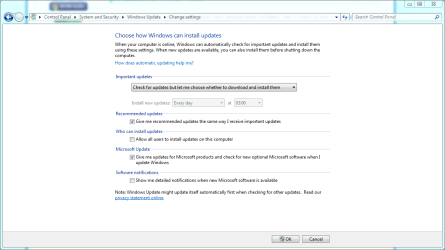
If you want total control over updates, this is the setting you need.
System Manufacturer/Model Number HP Pavilion Elite 495UK OS Windows 7 Ultimate SP1 64-Bit CPU Intel Core i7 870 @ 2.93GHz Motherboard MSI 2A9C (CPU1) Memory 8Gb Dual-Channel DDR3 @ 664MHz Graphics Card nVidia GeForce GTX 460 1024MB dedicated RAM Sound Card Realtek HD Audio Monitor(s) Displays HP2310i Screen Resolution 1920 x 1080
Keyboard Logitech K750 solar-powered keyboard Mouse Logitech Wireless M180 mouse PSU 460W Case HP Elite Cooling Air cooled Hard Drives 1x1954GB Hitachi HDS22020ALA 330 (RAID), 1x1954GB Hitachi External for backup and storage Internet Speed 2Mb Other Info Pure Avanti Flow Internet Radio with iPod Dock, 64Gb iPod, HP USB Speakers, Sony MDR-V500 Headphones, Sony Vaio F-Series Laptop
31 Mar 2012
PeterPSA
Windows 7 Ultimate x64
14 posts
Thanks Seavixen. That is the setting I have. Unfortunately, it doesn't mean what it says. The behavior is still as I described in my original posting.