| Windows 7: Error installing SP1 on Home Premium |
19 Jul 2012
|
#1 | | Windows 7 Ultimate x64 SP1 Philadelphia, PA |
Error installing SP1 on Home Premium I'm working on a laptop for my CEO, and after doing a bunch of malware removal and start menu restores, I'm left with an issue when installing SP1. The setup fails with the error described here: Windows 7/2008 R2 Service Pack 1 fails with 0x800f0a12 - The Windows Servicing Guy - Site Home - TechNet Blogs
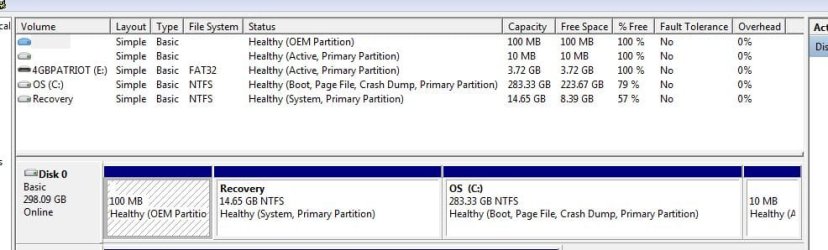
I see the problem can be related to the active partition, so I take a look in Disk Management. There's a small 10 MB partition at the end of the drive marked active. This is a gray area for me, so how to I best get the proper partition listed as active? See below for the Disk Management screen, and ignore the 4 GB Patriot flash drive. I plugged that in just to save the screenie. | My System Specs |
| OS Windows 7 Ultimate x64 SP1 CPU Intel Core i7-2600 Motherboard Gigabyte GA-P67A-UD3P-B3 Memory 12 GB Patriot Extreme DDR3-1333 Graphics Card Nvidia GTX 470 Monitor(s) Displays Dell UltraSharp 2209WA PSU OCZ ModStream 700W Case CoolerMaster HAF 912 Advanced Cooling CoolerMaster Hyper 212 Plus Hard Drives OCZ Agility3 240 GB, WD5001AALS, WD7501AALS |
19 Jul 2012
|
#2 | | Win 7 x64 Home Premium (and x86 VirtualBox VM) Wales - probably in the pub |
Don't mess with teh Active parttion - it's likely to be purely a boot-manager.
Is the E: drive an external one? | My System Specs | | Computer type Laptop System Manufacturer/Model Number Asus K52F OS Win 7 x64 Home Premium (and x86 VirtualBox VM) CPU i3 370M Motherboard Asus Memory 8GB - finally :) Graphics Card it's an i3, dude! Sound Card onboard Monitor(s) Displays 15.6" built-in Screen Resolution 1366x768 PSU n/a Hard Drives 750GB Seagate internal
Sundry external drives attached to other computers on the local network Internet Speed as much as I can get - usually on a dongle, so <1Mb/s Antivirus MSE Browser IE10/Chrome/FF(if I must) |
19 Jul 2012
|
#3 | | Win 7 Pro 64-bit South Central Texas |
The 10MB active partition is showing 100% free space so it probably doesn't contain any boot manager/MBR or anything else. Likewise, the 100MB partition is usually the System Reserved partition which normally does contain the MBR. But it also is showing 100% free space. The C: partition is showing it contains the boot data.
So assuming the computer is booting normally with the way the partitions are currently set up, I think the 10MB partition could be formatted to unallocated space and the C: partition expanded to swallow it up. The 100MB partition could also probably be changed to unallocated space and then something like MiniTool Partition Wizard could be used to merge the 100MB partition into the C: partition since it's physically separated by the Recovery Partition from the C: partition.
I'd make a system image and then play around with the partitions. But I like to live dangerously. | My System Specs | | Computer type Laptop System Manufacturer/Model Number Sony Vaio VPCEB47GM Laptop OS Win 7 Pro 64-bit CPU Intel i5 2.4 Ghz Memory 8GB DDR3 Graphics Card Intel HD 3000 Sound Card IDT High Definition Monitor(s) Displays 15.6 WGXA Anti-Glare LED Screen Resolution 1280x800 Hard Drives 640Gb 7200rpm Antivirus MSE Browser Opera (primary) with IE9 backup |
20 Jul 2012
|
#4 | | Win 7 x64 Home Premium (and x86 VirtualBox VM) Wales - probably in the pub |
The reason both those partitions show as empty is that they are not ones readable by Windows - they aren't the standard FAT32 or NTFS format, but Windows can see they're there.
The machine is booting to the 10MB partition, which is them passing control to the C: partition. | My System Specs | | Computer type Laptop System Manufacturer/Model Number Asus K52F OS Win 7 x64 Home Premium (and x86 VirtualBox VM) CPU i3 370M Motherboard Asus Memory 8GB - finally :) Graphics Card it's an i3, dude! Sound Card onboard Monitor(s) Displays 15.6" built-in Screen Resolution 1366x768 PSU n/a Hard Drives 750GB Seagate internal
Sundry external drives attached to other computers on the local network Internet Speed as much as I can get - usually on a dongle, so <1Mb/s Antivirus MSE Browser IE10/Chrome/FF(if I must) |
20 Jul 2012
|
#5 | | Windows 7 Ultimate x64 SP1 Philadelphia, PA |
I'll try the bootable Partition Wizard disc. It looks as though C should be the active one, but I can try others, or set it back, if need be. | My System Specs | | OS Windows 7 Ultimate x64 SP1 CPU Intel Core i7-2600 Motherboard Gigabyte GA-P67A-UD3P-B3 Memory 12 GB Patriot Extreme DDR3-1333 Graphics Card Nvidia GTX 470 Monitor(s) Displays Dell UltraSharp 2209WA PSU OCZ ModStream 700W Case CoolerMaster HAF 912 Advanced Cooling CoolerMaster Hyper 212 Plus Hard Drives OCZ Agility3 240 GB, WD5001AALS, WD7501AALS |
20 Jul 2012
|
#6 | | Windows 7 Ultimate x64 SP1 Philadelphia, PA |
I set C as active, and rebooted. That went fine, so I gave SP1 a shot. This time, it looked to be going through the entire install process, and even rebooted on it's own when finished. However, upon boot, I was given an error message saying SP1 did not install successfully, with a code of 0x800f0826.
I'm searching for that online, but I'm finding many different possible causes.
I might be getting close to just wiping the system and starting over. | My System Specs | | OS Windows 7 Ultimate x64 SP1 CPU Intel Core i7-2600 Motherboard Gigabyte GA-P67A-UD3P-B3 Memory 12 GB Patriot Extreme DDR3-1333 Graphics Card Nvidia GTX 470 Monitor(s) Displays Dell UltraSharp 2209WA PSU OCZ ModStream 700W Case CoolerMaster HAF 912 Advanced Cooling CoolerMaster Hyper 212 Plus Hard Drives OCZ Agility3 240 GB, WD5001AALS, WD7501AALS |
23 Jul 2012
|
#7 | | Windows 7 Ultimate x64 SP1 Philadelphia, PA |
Exciting (sarcasm) update. I thought I was well on the way to having the system fixed, but now I can't run Windows Update at all. it immediately fails and gives me an error code of 800B0001. The linked solutions are to run the Update Readiness Tool and then Microsoft's automatic Fix-It tool, which reported errors, claims to have fixed them, but did not.
Has anyone else come across this error? | My System Specs | | OS Windows 7 Ultimate x64 SP1 CPU Intel Core i7-2600 Motherboard Gigabyte GA-P67A-UD3P-B3 Memory 12 GB Patriot Extreme DDR3-1333 Graphics Card Nvidia GTX 470 Monitor(s) Displays Dell UltraSharp 2209WA PSU OCZ ModStream 700W Case CoolerMaster HAF 912 Advanced Cooling CoolerMaster Hyper 212 Plus Hard Drives OCZ Agility3 240 GB, WD5001AALS, WD7501AALS |
23 Jul 2012
|
#8 | | Win 7 x64 Home Premium (and x86 VirtualBox VM) Wales - probably in the pub |
That error is often associated with Crypto Service problems.
run the following commands and post teh results. NET START CRYPTSVC SC QC CRYPTSVC SC QUERYEX CRYTPSVC | My System Specs | | Computer type Laptop System Manufacturer/Model Number Asus K52F OS Win 7 x64 Home Premium (and x86 VirtualBox VM) CPU i3 370M Motherboard Asus Memory 8GB - finally :) Graphics Card it's an i3, dude! Sound Card onboard Monitor(s) Displays 15.6" built-in Screen Resolution 1366x768 PSU n/a Hard Drives 750GB Seagate internal
Sundry external drives attached to other computers on the local network Internet Speed as much as I can get - usually on a dongle, so <1Mb/s Antivirus MSE Browser IE10/Chrome/FF(if I must) |
23 Jul 2012
|
#9 | | Windows 7 Ultimate x64 SP1 Philadelphia, PA |
Here you go:
C:\Windows\system32>net start cryptsvc
The requested service has already been started.
More help is available by typing NET HELPMSG 2182.
C:\Windows\system32>sc qc cryptsvc
[SC] QueryServiceConfig SUCCESS
SERVICE_NAME: cryptsvc
TYPE : 20 WIN32_SHARE_PROCESS
START_TYPE : 2 AUTO_START
ERROR_CONTROL : 1 NORMAL
BINARY_PATH_NAME : C:\Windows\system32\svchost.exe -k NetworkService
LOAD_ORDER_GROUP :
TAG : 0
DISPLAY_NAME : Cryptographic Services
DEPENDENCIES : RpcSs
SERVICE_START_NAME : NT Authority\NetworkService
C:\Windows\system32>sc queryex cryptsvc
SERVICE_NAME: cryptsvc
TYPE : 20 WIN32_SHARE_PROCESS
STATE : 4 RUNNING
(STOPPABLE, NOT_PAUSABLE, ACCEPTS_SHUTDOWN)
WIN32_EXIT_CODE : 0 (0x0)
SERVICE_EXIT_CODE : 0 (0x0)
CHECKPOINT : 0x0
WAIT_HINT : 0x0
PID : 1220
FLAGS : | My System Specs | | OS Windows 7 Ultimate x64 SP1 CPU Intel Core i7-2600 Motherboard Gigabyte GA-P67A-UD3P-B3 Memory 12 GB Patriot Extreme DDR3-1333 Graphics Card Nvidia GTX 470 Monitor(s) Displays Dell UltraSharp 2209WA PSU OCZ ModStream 700W Case CoolerMaster HAF 912 Advanced Cooling CoolerMaster Hyper 212 Plus Hard Drives OCZ Agility3 240 GB, WD5001AALS, WD7501AALS |
23 Jul 2012
|
#10 | | Win 7 x64 Home Premium (and x86 VirtualBox VM) Wales - probably in the pub |
That looks normal enough.
Please post your CheckSUR.log and CheckSUR.persist.log files | My System Specs | | Computer type Laptop System Manufacturer/Model Number Asus K52F OS Win 7 x64 Home Premium (and x86 VirtualBox VM) CPU i3 370M Motherboard Asus Memory 8GB - finally :) Graphics Card it's an i3, dude! Sound Card onboard Monitor(s) Displays 15.6" built-in Screen Resolution 1366x768 PSU n/a Hard Drives 750GB Seagate internal
Sundry external drives attached to other computers on the local network Internet Speed as much as I can get - usually on a dongle, so <1Mb/s Antivirus MSE Browser IE10/Chrome/FF(if I must) Error installing SP1 on Home Premium problems? All times are GMT -5. The time now is 07:36 PM. | |