Windows 7 Forums


Windows 7: Update errors Code 64C, 8004FF84 & 66A.

21 Jul 2012   #1

Windows 7 Home Premium 64 bit
 
 
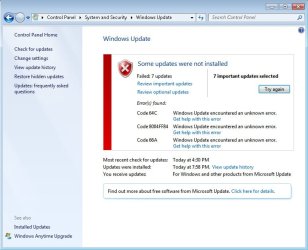
Update errors Code 64C, 8004FF84 & 66A.

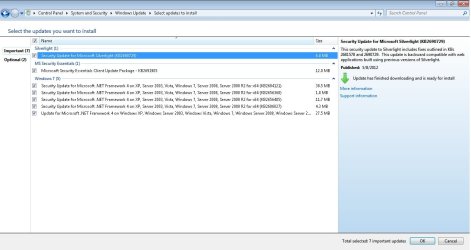
It says I need to 7 important updates to install and it fails every time. When I shut the computed down and it updates, it still fails. I've tried installing the updates one by one but it didn't help. My internet connection is working fine.

I've included a screenshot.

Windows 7 Home Premium 64bit.

Attached Thumbnails
Update errors Code 64C, 8004FF84 & 66A.-update.jpg  
My System SpecsSystem Spec

24 Jul 2012   #2

Windows 7 Home Premium 64 bit


bump.

anyone?
My System SpecsSystem Spec
25 Jul 2012   #3

Windows® 7 Home Premium SP-1


Hi gabby02

Please do what this link says and post back when you're done for further suggestions.

What is the System Update Readiness Tool?
My System SpecsSystem Spec
.


10 Aug 2012   #4

Windows 7 Home Premium 64 bit


Sorry if I took too long to reply. We've had some network connection problems so I haven't been able to go online.

Anyways, I'm still getting the errors. System Update Readiness Tool didn't work. :\
My System SpecsSystem Spec
10 Aug 2012   #5

Windows® 7 Home Premium SP-1


No problem.

*What antivirus are you using?
*Do you use any registry cleaning programs?
*Do a SFC scannow and reboot if violations are found
SFC /SCANNOW Command - System File Checker
My System SpecsSystem Spec
10 Aug 2012   #6

Windows 7 Home Premium 64 bit


Scanned and rebooted. Still unable to update. :/

I'm using BitDefender, MSE & Malwarebytes. No registry cleaning programs installed.
My System SpecsSystem Spec
10 Aug 2012   #7

Windows® 7 Home Premium SP-1


Uninstall BitDefender and try updating.

Please be patient I have called for more help.
My System SpecsSystem Spec
10 Aug 2012   #8

Windows 7 Ultimate x64 SP1
England


Quote   Quote: Originally Posted by gabby02 View Post
Sorry if I took too long to reply. We've had some network connection problems so I haven't been able to go online.

Anyways, I'm still getting the errors. System Update Readiness Tool didn't work. :\
The System Update Readiness Tool (or more commonly abbreviated to SURT) is only effective to a certain extent, luckily it writes any files that it can't fix to a log which can then be used to identify remaining issues. If you could provide me with this log, I'll be able to help you sort through the rest of the issues Please copy and paste the contents of this file into your next post:
C:\Windows\Logs\CBS\CheckSUR.persist.log

Tom
My System SpecsSystem Spec
10 Aug 2012   #9

Windows 7 Home Premium 64 bit


Quote   Quote: Originally Posted by koolkat77 View Post
Uninstall BitDefender and try updating.

Please be patient I have called for more help.
Uninstalled.

Hey, no worries. And thank you.


Quote   Quote: Originally Posted by tom982 View Post
The System Update Readiness Tool (or more commonly abbreviated to SURT) is only effective to a certain extent, luckily it writes any files that it can't fix to a log which can then be used to identify remaining issues. If you could provide me with this log, I'll be able to help you sort through the rest of the issues Please copy and paste the contents of this file into your next post:

C:\Windows\Logs\CBS\CheckSUR.persist.log

Tom
Here you go.


Quote:
=================================
Checking System Update Readiness.
Binary Version 6.1.7601.21645
Package Version 15.0
2012-06-09 11:55

Checking Windows Servicing Packages

Checking Package Manifests and Catalogs

Checking Package Watchlist

Checking Component Watchlist

Checking Packages

Checking Component Store

Summary:
Seconds executed: 1169
No errors detected
(w) Unable to open Event Log 0x000006B5 Application OpenEventLog failed: 0x000006B5 - The interface is unknown.
.
(w) Unable to open Event Log 0x000006B5 System OpenEventLog failed: 0x000006B5 - The interface is unknown.
.


=================================
Checking System Update Readiness.
Binary Version 6.1.7601.21645
Package Version 15.0
2012-06-09 12:19

Checking Windows Servicing Packages

Checking Package Manifests and Catalogs

Checking Package Watchlist

Checking Component Watchlist

Checking Packages

Checking Component Store

Summary:
Seconds executed: 541
No errors detected
(w) Unable to open Event Log 0x000006B5 Application OpenEventLog failed: 0x000006B5 - The interface is unknown.
.
(w) Unable to open Event Log 0x000006B5 System OpenEventLog failed: 0x000006B5 - The interface is unknown.
.


=================================
Checking System Update Readiness.
Binary Version 6.1.7601.21645
Package Version 15.0
2012-08-10 18:55

Checking Windows Servicing Packages

Checking Package Manifests and Catalogs

Checking Package Watchlist

Checking Component Watchlist

Checking Packages

Checking Component Store

Summary:
Seconds executed: 1196
No errors detected
My System SpecsSystem Spec
12 Aug 2012   #10

Windows 7 Ultimate x64 SP1
England


Hi Gabby,

That SURT log is fine The only errors that are present are for the event log, and these are perfectly normal.

What are the numbers of the updates that you are trying to install? Those error codes have given me a few clues

Tom
My System SpecsSystem Spec
Reply

 Update errors Code 64C, 8004FF84 & 66A. problems?


Thread Tools


Similar help and support threads for: Update errors Code 64C, 8004FF84 & 66A.
Thread Forum
Avid Mbox and other (Code 28) errors Drivers
Windows Update fails in Update Check. Error code C80003FA. Windows Updates & Activation
Solved Security Update (KB2709715) - Failed to Update, Code 8020000E Windows Updates & Activation
Windows Update errors Code 800B0100 and Code 8007065E, tried everythin Windows Updates & Activation
9700 pro errors installing. (code 49) Graphic Cards


All times are GMT -5. The time now is 11:22 PM.


Seven Forums Android App Seven Forums IOS App Follow us on Facebook

Windows 7 Forums is an independent web site and has not been authorized,
sponsored, or otherwise approved by Microsoft Corporation.
"Windows 7" and related materials are trademarks of Microsoft Corp.
© Designer Media Ltd
  

1 2 3 4 5 6 7 8 9 10 11 12 13 14 15 16 17 18 19 20 21 22 23 24 25 26 27 28 29 30 31 32