| Windows 7: Windows update problem |
21 Aug 2012
|
#1 | | |
Windows update problem I'm using Windows 7 Ultimate SP1. For some reason, windows update stopped working. There's a big red X icon and when I press on "check for updates" button, it says: "Windows Update cannot check for updates, because the service is not running. You may need to restart your computer." I know, I'm not the only one having this, but others fixed it by turning off the updates, then turning it on again. That didn't work for me. Any other idea would be appreciated! | My System Specs |
| OS Windows 7 Ultimate x64 |
21 Aug 2012
|
#2 | | Windows® 7 Home Premium SP-1 |
| My System Specs | | Computer type PC/Desktop OS Windows® 7 Home Premium SP-1 CPU Intel Pentium(R) E5200 @ 2.50GHz Motherboard Intel Corporation DG41WV (PROCESSOR) Memory 4096 MBytes Dual-Channel DDR3 @ 398MHz Graphics Card ATI Radeon HD 5450 (ASUStek Computer Inc) Sound Card Realtek High Definition Audio Monitor(s) Displays DELL E170S on ATI Radeon HD 5450 Screen Resolution 1280x1024 pixels Keyboard Logitech PS/2 Keyboard Mouse A4 Tech Co Ltd/Logitech PSU 400W Case Nothing Fancy Cooling Fans Hard Drives 466GB Western Digital WDC Internet Speed 512 Kbps Antivirus Microsoft Security Essentials & Malwarebytes Browser Chrome & Internet Explorer 9 Other Info Imation 8 GB USB, 6 GB Seagate External Hard drive, ASUS DVD-E818A7T ATA Device |
21 Aug 2012
|
#3 | | |

Quote: Originally Posted by koolkat77 Wow! That was easy, I mean it fixed the problem, thank you very much! Before I mark this as solved, can the same thing happen by any chance? | My System Specs | | OS Windows 7 Ultimate x64 |
21 Aug 2012
|
#4 | | Windows® 7 Home Premium SP-1 |

Quote: Originally Posted by Deasteroid Wow! That was easy, I mean it fixed the problem, thank you very much! Before I mark this as solved, can the same thing happen by any chance? Glad to know and Thanks for posting back.
And well it depends. If it does, just post on this thread or create a new one.
There are other things we could try to solve the problem. | My System Specs | | Computer type PC/Desktop OS Windows® 7 Home Premium SP-1 CPU Intel Pentium(R) E5200 @ 2.50GHz Motherboard Intel Corporation DG41WV (PROCESSOR) Memory 4096 MBytes Dual-Channel DDR3 @ 398MHz Graphics Card ATI Radeon HD 5450 (ASUStek Computer Inc) Sound Card Realtek High Definition Audio Monitor(s) Displays DELL E170S on ATI Radeon HD 5450 Screen Resolution 1280x1024 pixels Keyboard Logitech PS/2 Keyboard Mouse A4 Tech Co Ltd/Logitech PSU 400W Case Nothing Fancy Cooling Fans Hard Drives 466GB Western Digital WDC Internet Speed 512 Kbps Antivirus Microsoft Security Essentials & Malwarebytes Browser Chrome & Internet Explorer 9 Other Info Imation 8 GB USB, 6 GB Seagate External Hard drive, ASUS DVD-E818A7T ATA Device |
21 Aug 2012
|
#5 | | |
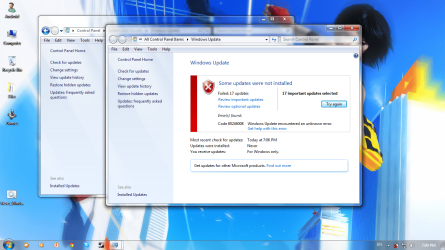
Well, seems like it didn't fix the issue at all... For a moment, it became active and I was able to check for updates, but when I did it, this thing happened (I'll attach the image) I'm still very thankful for your help, hoping to hear some other suggestions. (I'm sorry, my English isn't that good) | My System Specs | | OS Windows 7 Ultimate x64 |
21 Aug 2012
|
#6 | | Windows® 7 Home Premium SP-1 |

Quote: Originally Posted by Deasteroid Well, seems like it didn't fix the issue at all... For a moment, it became active and I was able to check for updates, but when I did it, this thing happened (I'll attach the image) I'm still very thankful for your help, hoping to hear some other suggestions. (I'm sorry, my English isn't that good)
Try installing one by one I will look up the error code and get back to you. | My System Specs | | Computer type PC/Desktop OS Windows® 7 Home Premium SP-1 CPU Intel Pentium(R) E5200 @ 2.50GHz Motherboard Intel Corporation DG41WV (PROCESSOR) Memory 4096 MBytes Dual-Channel DDR3 @ 398MHz Graphics Card ATI Radeon HD 5450 (ASUStek Computer Inc) Sound Card Realtek High Definition Audio Monitor(s) Displays DELL E170S on ATI Radeon HD 5450 Screen Resolution 1280x1024 pixels Keyboard Logitech PS/2 Keyboard Mouse A4 Tech Co Ltd/Logitech PSU 400W Case Nothing Fancy Cooling Fans Hard Drives 466GB Western Digital WDC Internet Speed 512 Kbps Antivirus Microsoft Security Essentials & Malwarebytes Browser Chrome & Internet Explorer 9 Other Info Imation 8 GB USB, 6 GB Seagate External Hard drive, ASUS DVD-E818A7T ATA Device |
21 Aug 2012
|
#7 | | Windows 7 Ultimate X64 SP1 Mt. Crumpit/Whoville |
Click on the link here and fine the error number, it should take you to a possible solution. That is the link when you run Updates. | My System Specs | | Computer type PC/Desktop System Manufacturer/Model Number Home Built Desktop By DataTech OS Windows 7 Ultimate X64 SP1 CPU Intel i5-2550K, Differing ~4.4-4.8GHz No built in GPU Motherboard ASUS P8Z68-V PRO/GEN3 Memory 16GB G.Skill Sniper 2133MHz 4x4GB Graphics Card ASUS ENGTX460 DirectCU/2DI/1GD5 GeForce GTX 460 Sound Card Onboard Realtek 5-1 Monitor(s) Displays Samsung P2570HD Screen Resolution 1920x1080 Keyboard Old, beat-up Dell USB From 10 yrs Ago Mouse Gigabyte m6900 wired PSU Corsair HX650W Case Inwin Dragon Rider Cooling Hyper 212 EVO w/two Noctua fans, push-pull, @1300 RPM Hard Drives Crucial M4 128GB for OS, 750GB Seagate MomentusXT for data, 500GB Seagate Constellation for storage Internet Speed 8-19 Mbs down, 3-4 Mbs up Comcast Cable Antivirus Norton Internet Security Browser IE 9, Opera when needed Other Info 4 case fans, LG BluRay-RE, ASUS DVD-RW, Mr. Fusion power generator with flux capacitor, 1.21 gigawatts. |
21 Aug 2012
|
#8 | | Windows® 7 Home Premium SP-1 |

Quote: Originally Posted by Britton30 Click on the link here and fine the error number, it should take you to a possible solution. Attachment 227545 Thanks Gary.
Also take a look at this link Windows Update error 80246008 once you're done. | My System Specs | | Computer type PC/Desktop OS Windows® 7 Home Premium SP-1 CPU Intel Pentium(R) E5200 @ 2.50GHz Motherboard Intel Corporation DG41WV (PROCESSOR) Memory 4096 MBytes Dual-Channel DDR3 @ 398MHz Graphics Card ATI Radeon HD 5450 (ASUStek Computer Inc) Sound Card Realtek High Definition Audio Monitor(s) Displays DELL E170S on ATI Radeon HD 5450 Screen Resolution 1280x1024 pixels Keyboard Logitech PS/2 Keyboard Mouse A4 Tech Co Ltd/Logitech PSU 400W Case Nothing Fancy Cooling Fans Hard Drives 466GB Western Digital WDC Internet Speed 512 Kbps Antivirus Microsoft Security Essentials & Malwarebytes Browser Chrome & Internet Explorer 9 Other Info Imation 8 GB USB, 6 GB Seagate External Hard drive, ASUS DVD-E818A7T ATA Device |
21 Aug 2012
|
#9 | | |

Quote: Originally Posted by Britton30 Click on the link here and fine the error number, it should take you to a possible solution. That is the link when you run Updates. Attachment 227545 Thank you, I've tried this, didn't help at all. 
Quote: Originally Posted by koolkat77 
Quote: Originally Posted by Britton30 Click on the link here and fine the error number, it should take you to a possible solution. Attachment 227545 Thanks Gary.
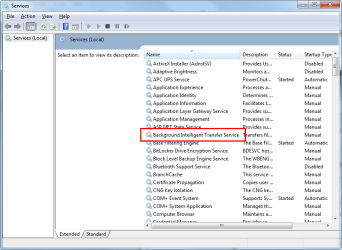
Also take a look at this link Windows Update error 80246008 once you're done. This looks like a solution, but there's one thing I don't get... it says to enter services from Administrative Tools, then "Right-click the Background Intelligent Transfer Service (BITS) service, and then click Properties." But there's no Background Intelligent Transfer Service. I'm kind of confused now, but once again, thank you for the time you've wasted. Trying to find the solution atm, if I do so, I'll post it here as well. | My System Specs | | OS Windows 7 Ultimate x64 |
21 Aug 2012
|
#10 | | Windows 7 Ultimate X64 SP1 Mt. Crumpit/Whoville |
Not in here? | My System Specs | | Computer type PC/Desktop System Manufacturer/Model Number Home Built Desktop By DataTech OS Windows 7 Ultimate X64 SP1 CPU Intel i5-2550K, Differing ~4.4-4.8GHz No built in GPU Motherboard ASUS P8Z68-V PRO/GEN3 Memory 16GB G.Skill Sniper 2133MHz 4x4GB Graphics Card ASUS ENGTX460 DirectCU/2DI/1GD5 GeForce GTX 460 Sound Card Onboard Realtek 5-1 Monitor(s) Displays Samsung P2570HD Screen Resolution 1920x1080 Keyboard Old, beat-up Dell USB From 10 yrs Ago Mouse Gigabyte m6900 wired PSU Corsair HX650W Case Inwin Dragon Rider Cooling Hyper 212 EVO w/two Noctua fans, push-pull, @1300 RPM Hard Drives Crucial M4 128GB for OS, 750GB Seagate MomentusXT for data, 500GB Seagate Constellation for storage Internet Speed 8-19 Mbs down, 3-4 Mbs up Comcast Cable Antivirus Norton Internet Security Browser IE 9, Opera when needed Other Info 4 case fans, LG BluRay-RE, ASUS DVD-RW, Mr. Fusion power generator with flux capacitor, 1.21 gigawatts. Windows update problem problems? All times are GMT -5. The time now is 09:51 AM. | |