On Aug 27, 2012 my system first indicated it had a problem because it could not install updates. The update history is completely gone even though it had installed many updates since first being activated.
I've done searches and completed all the usual steps with no success. These include
Microsoft automated "Fixit"
Clearing the update history folder.
Memory tests - run all weekend with no errors.
Chkdsk with surface scan - no errors.
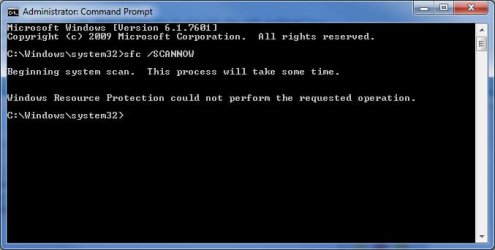
Admin Cmd Prompt-> SFC /SCANNOW (exits after a few seconds with "Windows Resource Protection could not perform the requested operation.")
Windows Repair Install (Fails with "Windows cannot copy files ... 80070241"). I've tried it using the genuine original installation DVD and also tried it using the "flat" install method with no luck.
MS Security Essentials and MalwareBytes both say there are no threats. I'm all out of spit and bailing wire. Any suggestions?
First try this. Open Windows Explorer and navigate to the C:\Windows\System32 folder. find the Catroot2 folder there, and right-click on it - select Properties.
In the General tab, clear the box beside 'Read-only (Only.....' by clicking in it until it's empty (it cycles around three values)
Click Apply. Accept any warnings that come up - if you get a 'Ignore/Ignore All/Try again' option, pick 'Ignore all'
Computer type Laptop System Manufacturer/Model Number Asus K52F OS Win 7 x64 Home Premium (and x86 VirtualBox VM) CPU i3 370M Motherboard Asus Memory 8GB - finally :) Graphics Card it's an i3, dude! Sound Card onboard Monitor(s) Displays 15.6" built-in Screen Resolution 1366x768
PSU n/a Hard Drives 750GB Seagate internal
Sundry external drives attached to other computers on the local network Internet Speed as much as I can get - usually on a dongle, so <1Mb/s Antivirus MSE Browser IE10/Chrome/FF(if I must)
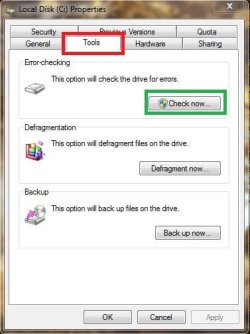
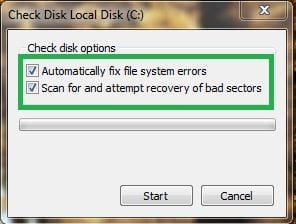
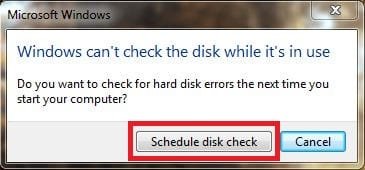
Make sure both options are checked, the error-checking may take some time, and will need to schedule a error-check for the next reboot of your computer.
Computer type Laptop System Manufacturer/Model Number HP Pavilion dm1 Notebook PC OS Windows 7 Home Premium x86 Service Pack 1 - Linux Mint Mate 14 x64 CPU AMD E-450 APU (64-Bit) @ 1.65GHz Dual-Core Motherboard HP 3387 36.0A (Socket FT1) Memory 4GB DDR3 @ 676MHz Graphics Card AMD Radeon HD 6320 Graphics Sound Card Beats Audio - IDT High Definition Audio CODEC Monitor(s) Displays LCD HP Monitor Screen Resolution 1366 x 768 @ 60Hz
Keyboard Standard PS/2 Keyboard Mouse Synaptics TouchPad V 7.5/Logitech USB Wireless PSU Microsoft Composite Battery - ACPI Case HP Cooling HP Cool Sense Hard Drives 500GB - SATA Hitachi HTS547550A9E384 Internet Speed 24.0 Mbps Antivirus Microsoft Security Essentials Browser Opera 12.15; Firefox 21 Other Info NIC - Broadcom 4313GN 802.11b/g/n Wi-Fi Adapter
Belkin Black Laptop Cooling Stand
beat me to it - but it may need a more heavy-duty approach.....
Click on Start > All Programs > Accessories Right-click on the Command Prompt entry Select Run as Administrator and accept the UAC prompt - the Elevated Command Prompt window should pop up.
At the Command prompt, type CHKDSK C: /R and hit the Enter key.
You will be told that the drive is locked, and the CHKDSK will run at he next boot - hit the Y key, and then reboot. The chkdsk will take a few hours depending on the size of the drive, so be patient! After the CHKDSK has run, Windows should boot normally (possibly after a second auto-reboot) - then run the SFC.
Computer type Laptop System Manufacturer/Model Number Asus K52F OS Win 7 x64 Home Premium (and x86 VirtualBox VM) CPU i3 370M Motherboard Asus Memory 8GB - finally :) Graphics Card it's an i3, dude! Sound Card onboard Monitor(s) Displays 15.6" built-in Screen Resolution 1366x768
PSU n/a Hard Drives 750GB Seagate internal
Sundry external drives attached to other computers on the local network Internet Speed as much as I can get - usually on a dongle, so <1Mb/s Antivirus MSE Browser IE10/Chrome/FF(if I must)
Fellas, I mentioned in the OP that I'd tried doing a CHKDSK with surface scan, but I'll give it another go later this afternoon. I'm using the computer in question at the moment for work stuff and can't shut down for the rest of the day just yet.
Thanks again for the feedback. I'd rather not have to reinstall as it will be a PITA at this point. System seems to be healthy apart from the fact that it cannot install updates.
Computer type Laptop System Manufacturer/Model Number Asus K52F OS Win 7 x64 Home Premium (and x86 VirtualBox VM) CPU i3 370M Motherboard Asus Memory 8GB - finally :) Graphics Card it's an i3, dude! Sound Card onboard Monitor(s) Displays 15.6" built-in Screen Resolution 1366x768
PSU n/a Hard Drives 750GB Seagate internal
Sundry external drives attached to other computers on the local network Internet Speed as much as I can get - usually on a dongle, so <1Mb/s Antivirus MSE Browser IE10/Chrome/FF(if I must)
To run the System Update Readiness Tool manually. If you are offered the System Update Readiness Tool, but you encounter a problem using Windows Update, you can manually download and run the tool. You'll need to know the version of Windows and system type you are using.
Go to the System Update Readiness Tool webpage. In the Information for advanced users section, find the version of Windows and system type of your computer, and then click the link to download the System Update Readiness Tool. If you don't know which version of Windows you have, see View your computer information.
System Manufacturer/Model Number HP Laptop: Pavilion dv6-6c10us OS x64 (6.1.7601) Win7_SP1 HomePrem CPU AMD A6-3420M APU with Radeon(tm) HD Graphics Motherboard Hewlett-Packard 1805 Memory 6.00 GB Graphics Card AMD Radeon(TM) HD 6520G Sound Card (1) AMD High Definition Audio Device (2) IDT High Definiti Monitor(s) Displays HP W2072a 20" LCD (1600 x 900) @ 60 Hz Screen Resolution 1366 x 768 x 32 bits (4294967296 colors) @ 60 Hz
Hard Drives ST640LM0 00 HM641JI SATA Disk Device Internet Speed 15/5 | 54 MB Wireless 'n' Antivirus Realtime: Avast | On-demand: Malwarebytes, ESET Browser IE9 Other Info Media..........| Gimp | Audacity | VLC |
Comm..........| WEmail 2012 | Skype |
Productivity..| OpenOffice | Textpad |
Utils............| MS: Sysinternals | Piriform: cCleaner, Speccy, Defraggler |
Computer type Laptop System Manufacturer/Model Number HP Pavilion dm1 Notebook PC OS Windows 7 Home Premium x86 Service Pack 1 - Linux Mint Mate 14 x64 CPU AMD E-450 APU (64-Bit) @ 1.65GHz Dual-Core Motherboard HP 3387 36.0A (Socket FT1) Memory 4GB DDR3 @ 676MHz Graphics Card AMD Radeon HD 6320 Graphics Sound Card Beats Audio - IDT High Definition Audio CODEC Monitor(s) Displays LCD HP Monitor Screen Resolution 1366 x 768 @ 60Hz
Keyboard Standard PS/2 Keyboard Mouse Synaptics TouchPad V 7.5/Logitech USB Wireless PSU Microsoft Composite Battery - ACPI Case HP Cooling HP Cool Sense Hard Drives 500GB - SATA Hitachi HTS547550A9E384 Internet Speed 24.0 Mbps Antivirus Microsoft Security Essentials Browser Opera 12.15; Firefox 21 Other Info NIC - Broadcom 4313GN 802.11b/g/n Wi-Fi Adapter
Belkin Black Laptop Cooling Stand