Windows 7 Forums Search
Welcome to Windows 7 Forums. Our forum is dedicated to helping you find solutions with any problems, errors or issues you are experiencing with Windows 7. The Windows 7 forum also covers news and updates and has an extensive Windows 7 tutorial section that covers a wide range of tips and tricks.


Windows 7 - Eliminate Action Center message about Windows Update?

 
08-29-2010   #11


Windows 7 Home Premium 64 bit


Quote   Quote: Originally Posted by Pusspa View Post
Quote   Quote: Originally Posted by selvan777 View Post
Does that mean you'll never be notified of updates if it's set to check for but do not download or install?
no it just means you wont get annoyed by the security center, but windows update will still tell you when there are updates.
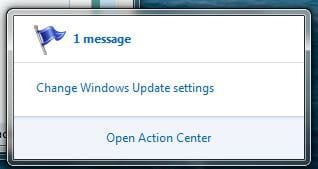
Thank you! I was concerned that I wouldn't be notified of available updates if I turned that off. I don't understand the point of always having the Action Center saying I have 1 message:
Name:  action center message.JPG
Views: 241
Size:  15.8 KB

just because I have my Windows Update set to notify me first:

Eliminate Action Center message about Windows Update?-windows-update-message.jpg

I'm happy to be able to turn that off and still be properly notified when there are new updates to download.

My System SpecsSystem Spec
08-29-2010   #12


Windows 7 Home Premium 64 bit


It's too bad the icon isn't hidden when there's no message(s).
My System SpecsSystem Spec
08-29-2010   #13


Windows Seven Familiale Premium 64


Hi,
If you right click o the taskbar, click on propriety and you can choose if you don't want to see the icon, or just see if there is a message.
My System SpecsSystem Spec
.


08-29-2010   #14


Windows 7 Home Premium 64 bit


But that replaces the flag with an arrow for 'Show hidden icons'. It's silly, if I chose to hide an icon why would I want an icon to ask me to show it again...
My System SpecsSystem Spec
08-30-2010   #15


Quote   Quote: Originally Posted by selvan777 View Post
But that replaces the flag with an arrow for 'Show hidden icons'. It's silly, if I chose to hide an icon why would I want an icon to ask me to show it again...
So you have some access to hidden SysTray controls.

The best setting for Action Center is Hidden unless Notification, then tell it over time not to notify you about things you don't want to be bothered with.

However problem reports should be sent, received gladly and dealt with, as it is pro-active free tech support.

Last edited by gregrocker; 08-31-2010 at 12:38 AM.. Reason: spellling
My System SpecsSystem Spec
08-31-2010   #16


Windows 7 Home Premium 64 bit


Agreed, but I'd rather see the flag over the arrow though. So I'll leave it as is with just Windows updates (I still get notified) and Back ups (I do my own) off.

Thanks for the support,
Selvan
My System SpecsSystem Spec
09-28-2010   #17


Windows 7 32 bit Home Premium


Not really fixed.

The original issue was that the systray icon seems to think that setting upgrade to a user decision is in some way inherently problematic.

It seems to be a legitimate option so why does it still flag up the systray icon as an issue, and can this SPECIFIC issue be resolved without resorting to more drastic action?

I`d love to know if anbody can REALLY solve this.

None-the-less, thanks for the other options :-)

Stoo.
My System SpecsSystem Spec
Reply

 Eliminate Action Center message about Windows Update? problems?


Thread Tools


Similar Threads for: Eliminate Action Center message about Windows Update?
Thread Forum
Action Center - Change Message Settings Tutorials
Solved Reset Action Center Message Performance & Maintenance
Action Center message Windows Updates & Activation
Message on start up to turn on Action Center?? General Discussion
Action Center - Find a AV message System Security


All times are GMT -5. The time now is 03:39 AM.


Windows 7 Forums is an independent web site and has not been authorized,
sponsored, or otherwise approved by Microsoft Corporation.
"Windows 7" and related materials are trademarks of Microsoft Corp.
© Designer Media Ltd
  

1 2 3 4 5 6 7 8 9 10 11 12 13 14 15 16 17 18 19 20 21 22 23 24 25 26 27 28 29 30