
Windows 7 Forums


Windows 7: Windows Update, important update not selected

03 Nov 2009   #1

Windows 7 Home Premium x64
Utrecht
 
 
Windows Update, important update not selected

Hello all

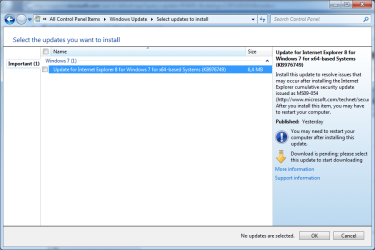
When executing Windows Update, I experienced that one important update is not automatically selected to download and install.
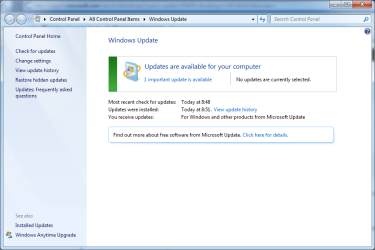
Windows Update, important update not selected-update-not-selected-screen1.png

Windows Update, important update not selected-update-important-not-selected1.png
I like to understand why this is?

Also I like to understand if I should always install all important updates, even the ones not by default selected?

In this example, the not selected update refers to MS09-054 security update. Is this a manual installed security update?
Does it not apply to me?

Thanks a lot in advance!

zx81

My System SpecsSystem Spec

03 Nov 2009   #2


Not all users experience the issue that this update resolves. MS is providing you the oportunity to use the "If it ain't broke, don't fix it" logic.

I applied the update even though I have no evidence that I need it. Yet.

Some updates will adversely affect some users. Not applying updates may adversely affect you.

What can you do? My advice - apply all updates. Unless you have a good reason not to.
My System SpecsSystem Spec
03 Nov 2009   #3

Windows 7 SP1, Home Premium, 64-bit


ZX:

I just experienced the same issue with the exact same update you refer to.

That update is listed, but I couldn't figure out how to actually install it.

I thought maybe it was because I had gone to Window Update with Firefox and this is an IE update. So I went to Windows Update with IE and had the same experience. Not sure what is going on here.

Maybe it will be different the next time I get a notification.

I have Windows set to notify me, but not install. You have to be careful about blindly accepting everything marked "critical" or "important"--you can end up with a change you might not want--such as a new browser.
My System SpecsSystem Spec
.


03 Nov 2009   #4

Windows 7 Home Premium x64
Utrecht


Quote   Quote: Originally Posted by Antman View Post
Not all users experience the issue that this update resolves. MS is providing you the opportunity to use the "If it ain't broke, don't fix it" logic.

I applied the update even though I have no evidence that I need it. Yet.

Some updates will adversely affect some users. Not applying updates may adversely affect you.

What can you do? My advice - apply all updates. Unless you have a good reason not to.
Antman,

Thank you very much for your answer.

Was this specific update (KB976749) also unselected at your Windows Update?

zx81
My System SpecsSystem Spec
03 Nov 2009   #5

Windows 7 Home Premium x64
Utrecht


Quote   Quote: Originally Posted by ignatzatsonic View Post
ZX:

I just experienced the same issue with the exact same update you refer to.

That update is listed, but I couldn't figure out how to actually install it.

I thought maybe it was because I had gone to Window Update with Firefox and this is an IE update. So I went to Windows Update with IE and had the same experience. Not sure what is going on here.

Maybe it will be different the next time I get a notification.

I have Windows set to notify me, but not install. You have to be careful about blindly accepting everything marked "critical" or "important"--you can end up with a change you might not want--such as a new browser.
ignatzatsonic,

Thank you very much for your answer.

One question, do you mean this update, KB976749, could not be installed?
Because in my case, the update is shown in Windows Update, but not selected automatically to be installed.
If I select to install it, I think it will be installed. (not yet tried).

zx81
My System SpecsSystem Spec
03 Nov 2009   #6

Windows 7 SP1, Home Premium, 64-bit


Yes, I am referring to the exact same update.

I can select it, but I can't install it.
My System SpecsSystem Spec
03 Nov 2009   #7

Windows 7 Home Premium x64
Utrecht


ignatzatsonic,

What happens when you select and install the (KB976749) update?

Best regards,

zx81
My System SpecsSystem Spec
03 Nov 2009   #8

Windows 7 SP1, Home Premium, 64-bit


I got it installed.

I thought I could install it by simply highlighting the update and selecting OK.

That doesn't work.

You have to also check the box next to the update.
My System SpecsSystem Spec
Reply

 Windows Update, important update not selected problems?


Thread Tools


Similar help and support threads for: Windows Update, important update not selected
Thread Forum
can't update important files and services while the system is using Windows Updates & Activation
Important Update for Windows 7 keeps failing Windows Updates & Activation
Action Center Avast update important? System Security
Important Update Regarding Windows Live Movie Maker Bet News
First Important Update for RC KB970789 *x86* News


All times are GMT -5. The time now is 07:00 PM.


Seven Forums Android App Seven Forums IOS App Follow us on Facebook

Windows 7 Forums is an independent web site and has not been authorized,
sponsored, or otherwise approved by Microsoft Corporation.
"Windows 7" and related materials are trademarks of Microsoft Corp.
© Designer Media Ltd
  

1 2 3 4 5 6 7 8 9 10 11 12 13 14 15 16 17 18 19 20 21 22 23 24 25 26 27 28 29 30 31 32