Beware KB3139929

I think you need KB3123862 installed in addition to KB3146449 via the IE11 security update to get the banner to pop up when opening a new tab. I'm guessing Woody's problem in replicating the behavior is not having W10-related KB3123862 installed, which appeared sometime last week, and what I assume was consequently hidden.

So, even if you downloaded the IE11 cumulative update it won't trigger the banner when opening a new tab.

Thanks for the suggestion! I've been looking high and low for a screenshot of this phenomenon. Lots of people have sent me pictures of msn.com throwing up (I use the term intentionally) a "Microsoft recommends upgrading to Windows 10" ad. But msn.com has been running those forever.

I tried installing KB 3123862, as you recommend, and haven't seen an ad on a new tab yet. :cry:

I asked Microsoft about it and got the usual "we have nothing further to say" response. Not unexpected.

I'm still looking! Please, if any of you see a "Get Windows 10" ad on a new tab, shoot a picture.

I'm wondering if the sequence of installing KB3123862 and IE11 Cumulative Security update with the attached KB3146449 may have something to do whether users get this mysterious blue banner.

Perhaps when initiating Window Update, it scans and checks to see if KB3123862 is already installed, and if present it selectively includes KB3146449 as part of the IE11 Cumulative update.

I guess the only way of testing this theory would be to uninstall this month's IE11 Cumulative update and then manually check again for Windows Update with KB3123862 already installed.

P.S. Thanks for taking on the role of guinea pig on behalf of all of us who are not ready to upgrade to W10.
 

My Computer My Computer

At a glance

Windows 7 Home 64-bit
Computer type
PC/Desktop
OS
Windows 7 Home 64-bit
I think you need KB3123862 installed in addition to KB3146449 via the IE11 security update to get the banner to pop up when opening a new tab. I'm guessing Woody's problem in replicating the behavior is not having W10-related KB3123862 installed, which appeared sometime last week, and what I assume was consequently hidden.

So, even if you downloaded the IE11 cumulative update it won't trigger the banner when opening a new tab.

Thanks for the suggestion! I've been looking high and low for a screenshot of this phenomenon. Lots of people have sent me pictures of msn.com throwing up (I use the term intentionally) a "Microsoft recommends upgrading to Windows 10" ad. But msn.com has been running those forever.

I tried installing KB 3123862, as you recommend, and haven't seen an ad on a new tab yet. :cry:

I asked Microsoft about it and got the usual "we have nothing further to say" response. Not unexpected.

I'm still looking! Please, if any of you see a "Get Windows 10" ad on a new tab, shoot a picture.

I'm wondering if the sequence of installing KB3123862 and IE11 Cumulative Security update with the attached KB3146449 may have something to do whether users get this mysterious blue banner.

Perhaps when initiating Window Update, it scans and checks to see if KB3123862 is already installed, and if present it selectively includes KB3146449 as part of the IE11 Cumulative update.

I guess the only way of testing this theory would be to uninstall this month's IE11 Cumulative update and then manually check again for Windows Update with KB3123862 already installed.

P.S. Thanks for taking on the role of guinea pig on behalf of all of us who are not ready to upgrade to W10.

This might be actually true since I haven't installed KB3123862 and there's no trace of KB3146449 in my system either. Looks like IE11 cumulative didn't trigger KB3146449 adware here.
 

My Computer My Computer

At a glance

Windows 7 Ultimate x64 SP1Intel Core i5-3570K @ 4GHzCorsair Vengeance DDR3 8 GB Dual ChannelAsus Radeon RX 570 Strix OC 4GB
Computer type
PC/Desktop
Computer Manufacturer/Model Number
built by myself
OS
Windows 7 Ultimate x64 SP1
CPU
Intel Core i5-3570K @ 4GHz
Motherboard
Asus P8Z77-V Deluxe
Memory
Corsair Vengeance DDR3 8 GB Dual Channel
Graphics Card(s)
Asus Radeon RX 570 Strix OC 4GB
Monitor(s) Displays
LG 24BK550Y-B IPS
Screen Resolution
1920x1080
Hard Drives
SSD SAMSUNG 860 EVO SATA III 2.5'' 500GB
SSD CRUCIAL MX500 SATA III 2.5'' 250GB
Seagate ST1000DM003 SATA III
TOSHIBA HDWD110 SATA III
PSU
Corsair HX750i
Case
Corsair Carbide 400R
Cooling
CPU Cooler Master Hyper 412 Slim
Keyboard
Logitech K200
Mouse
Logitech G400
Antivirus
Norton Security
Browser
Firefox
Having read this Thread, I decided to check whether I had the GWX folder back in my System 32 section in Windows & sure enough it is there again.

The worrying part this time is that you can't delete it as it's locked & "You need permission to perform this action."

I have deleted the GWX settings in the Registry & have run the 10 Forum suggestion as well & the GWX folder still can't be deleted.

It was installed on the 24 Feb & is the latest KB3035583. I will uninstall that again & hide it when it comes back.

Update.

After installing KB3035583, rebooting & then checking for Updates again it reappeared so I have hidden it again & lo & behold the GWX folder in Windows, System 32 has disappeared.
 

My Computer My Computer

At a glance

Windows 7 Home Premium 64 bit sp1Intel i5 3570 3.4Ghz Ivy Bridge SKT 1155 quad...G-Skill Rip Jaws 16Gb (8x2) DDR3 -1600 PC3 12...Gigabyte NVIDIA GT610 1Gb DDR3 810/1200 PCI-E...
Computer type
PC/Desktop
Computer Manufacturer/Model Number
Self built using existing case
OS
Windows 7 Home Premium 64 bit sp1
CPU
Intel i5 3570 3.4Ghz Ivy Bridge SKT 1155 quad core
Motherboard
Gigabyte Z77-HD3 SKT 1155 2xSata 3, 4x USB 3.0
Memory
G-Skill Rip Jaws 16Gb (8x2) DDR3 -1600 PC3 12800 CL 10 red
Graphics Card(s)
Gigabyte NVIDIA GT610 1Gb DDR3 810/1200 PCI-E 2.0 Silent
Sound Card
NVIDIA High Definition & Realtech High Definition Audio
Monitor(s) Displays
2 x Philips 226V4L 16:9 aspect ratio
Screen Resolution
1920 x 1080 HD
Hard Drives
Samsung 840 Pro 256gb SSD, SATA 3.
Hitachi Touro Portable 1tb, USB 3.0 HDD used for image b/ups.
PSU
Corsair VS450
Case
Codeng
Cooling
PSU fan & CPU fan
Keyboard
Logitech
Mouse
Logitech Wireless trackball M570
Internet Speed
Wireless 3G. 3mg down & 550kb up.
Antivirus
Bitdefender Internet Security 2020
Browser
Opera (Current Version) & Firefox
Other Info
MS Office 2013 Pro. Davis weather station software. MGE Nova 600 avr UPS.
I'm beginning to think the culprit of this is KB3123862. The files it replaces are things like explorerframe.dll and shell32.dll. There has been no clear explanation on what it actually does and nobody seems to know.
I've installed all the latest updates including the IE11 updates and used IE (for the first time in years) and I don't see any Windows 10 banner. But I have skipped KB3123862.
Anyone else have that update installed? /QUOTE]

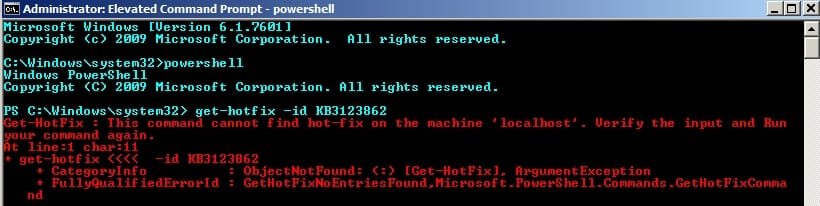
I don't have KB3123862

3123862.jpg

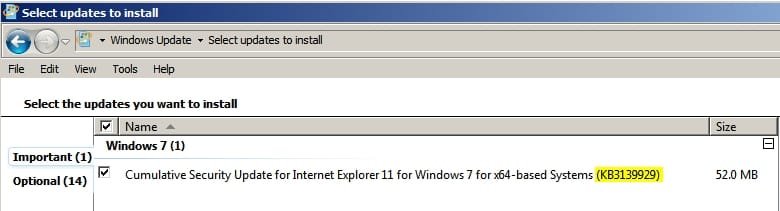
However I'm still offered KB3139929 although I did not install it.

3139929.jpg
 

My Computer My Computer

At a glance

Microsoft Windows 7 Home Premium 64-bit 7601 ...AMD C-60 APU with Radeon(tm) HD Graphics4.00 GBAMD Radeon HD 6290 Graphics
Computer type
Laptop
Computer Manufacturer/Model Number
ASUS
OS
Microsoft Windows 7 Home Premium 64-bit 7601 Multiprocessor Free Service Pack 1
CPU
AMD C-60 APU with Radeon(tm) HD Graphics
Motherboard
ASUSTeK COMPUTER INC. X501U
Memory
4.00 GB
Graphics Card(s)
AMD Radeon HD 6290 Graphics
Sound Card
(1) AMD High Definition Audio Device (2) Realtek High Defi
Screen Resolution
1366 x 768 x 32 bits (4294967296 colors) @ 60 Hz
Hard Drives
Hitachi HTS545050A7E380 SATA Disk Device
Antivirus
Comodo CIS & FW, SecureAplus App Whitelisting, Threatfire
Browser
Cyberfox 64bit, Opera 64bit, Airfox
Other Info
Spy-The-Spy, HitmanPro.Alert, Norton Connect Safe, MJRegWatcher, BitDefender TrafficLight, Voodoo Shield, Zemana AntiMalware
Callendar, I don't believe the theory is that you'll only have KB3139929 offered if you already have KB3123862 installed, rather that KB3139929 will only activate the W10 banner if you also have KB3123862 installed.
 

My Computer My Computer

At a glance

Windows 7 Home Premium 64AMD Phenom II X4 9558GB Corsair XMS3 DDR3Gigabyte Geforce GTX 960 2GB
Computer type
PC/Desktop
Computer Manufacturer/Model Number
Custom build by PC Specialist
OS
Windows 7 Home Premium 64
CPU
AMD Phenom II X4 955
Motherboard
Asus M4A78T-E
Memory
8GB Corsair XMS3 DDR3
Graphics Card(s)
Gigabyte Geforce GTX 960 2GB
Sound Card
SB Audigy
Monitor(s) Displays
BenQ 24"
Screen Resolution
1920 x 1080
Hard Drives
500GB Serial ATA
PSU
1010W Quiet Quad Rail
Case
Antec 900
Cooling
Fenrir
Keyboard
Corsair
Mouse
Logitech
Internet Speed
20mbps
Antivirus
MSE plus MBAM 2.x Free
Browser
Chrome
Other Info
Second desktop different spec but similar level.
Callendar, I don't believe the theory is that you'll only have KB3139929 offered if you already have KB3123862 installed, rather that KB3139929 will only activate the W10 banner if you also have KB3123862 installed.

Thanks for the explanation. I don't see that banner. There's some mention of it here:

Ultimate Outsider: GWX Control Panel Troubleshooting Guide

(Scroll down the page)

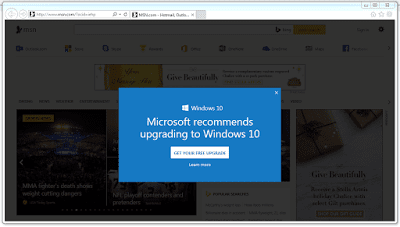
Some Microsoft sites (most notably MSN.com) have been displaying some very annoying advertisements for Windows 10 inside desktop web browsers for some time. I've seen the ads take two forms: A banner at the top of the browser window, and an even more annoying blue pop-over ad that you have to dismiss in order to see the web page underneath. Both ads say "Microsoft recommends upgrading to Windows 10."
 
Last edited:

My Computer My Computer

At a glance

Microsoft Windows 7 Home Premium 64-bit 7601 ...AMD C-60 APU with Radeon(tm) HD Graphics4.00 GBAMD Radeon HD 6290 Graphics
Computer type
Laptop
Computer Manufacturer/Model Number
ASUS
OS
Microsoft Windows 7 Home Premium 64-bit 7601 Multiprocessor Free Service Pack 1
CPU
AMD C-60 APU with Radeon(tm) HD Graphics
Motherboard
ASUSTeK COMPUTER INC. X501U
Memory
4.00 GB
Graphics Card(s)
AMD Radeon HD 6290 Graphics
Sound Card
(1) AMD High Definition Audio Device (2) Realtek High Defi
Screen Resolution
1366 x 768 x 32 bits (4294967296 colors) @ 60 Hz
Hard Drives
Hitachi HTS545050A7E380 SATA Disk Device
Antivirus
Comodo CIS & FW, SecureAplus App Whitelisting, Threatfire
Browser
Cyberfox 64bit, Opera 64bit, Airfox
Other Info
Spy-The-Spy, HitmanPro.Alert, Norton Connect Safe, MJRegWatcher, BitDefender TrafficLight, Voodoo Shield, Zemana AntiMalware
Callendar, I don't believe the theory is that you'll only have KB3139929 offered if you already have KB3123862 installed, rather that KB3139929 will only activate the W10 banner if you also have KB3123862 installed.

Thanks for the explanation. I don't see that banner. There's some mention of it here:

Ultimate Outsider: GWX Control Panel Troubleshooting Guide

(Scroll down the page)

Some Microsoft sites (most notably MSN.com) have been displaying some very annoying advertisements for Windows 10 inside desktop web browsers for some time. I've seen the ads take two forms: A banner at the top of the browser window, and an even more annoying blue pop-over ad that you have to dismiss in order to see the web page underneath. Both ads say "Microsoft recommends upgrading to Windows 10."

Could you quote that? I couldn't find it.
 

My Computer My Computer

At a glance

Win 7 Ultimate 64 bitIntel i7-3930KKingston HyperX Genesis 32GB Kit (8x4GB Modul...MSI R7850 Twin Frozr 2GD5/OC Radeon HD 7850 2...
Computer type
PC/Desktop
Computer Manufacturer/Model Number
Custom Build
OS
Win 7 Ultimate 64 bit
CPU
Intel i7-3930K
Motherboard
ASUS P9X79 WS
Memory
Kingston HyperX Genesis 32GB Kit (8x4GB Modules) 1600MHz DDR
Graphics Card(s)
MSI R7850 Twin Frozr 2GD5/OC Radeon HD 7850 2GB 256-bit GDDR
Sound Card
Asus Xonar Essence STX
Monitor(s) Displays
3x Asus VG248QE 24", Vizio 32" TV
Screen Resolution
1920 x 1080, ?
Hard Drives
Samsung 128GB 840 Pro SSD (1),
Samsung 4TB 850 EVO SSDs (4)
Samsung 4TB 850 EVO SSDs (16) external backup drives used in 2.5" hot swap bays in the computer.
PSU
Corsair HX750w
Case
Antec Two Hundred v2 (modified)
Cooling
Cooler Master GeminII S524 120mm (fan replaced with a 140mm)
Keyboard
Logitech G510s
Mouse
Logitech M525 (two in use)
Internet Speed
=< 32Mbps down, 8Mbps up
Antivirus
AVAST!, MBAM, SAS, Spybot S&D (all but MBAM free) Glary Util
Browser
IE11
Other Info
LSI 9211-8i HBA card (8 SATA III ports), 2.5" & 3.5" Hot Swap Bays, HooToo HT-CR001 PCI-E to USB 3.0 Internal Hub + 6 Slot Card Reader, and LG Model CH12LS28 BD-ROM Optical Drive. Also, ScanSnap S1500 ADF duplexing scanner, Canon 9000F flat bed scanner, Corsair SP2500 2.1 speakers, Samsung CLP 415nw laser color printer, Cyberpower PP2200SW UPS
If you visit that link and use Ctrl+F in your browser to open the find dialog box you can probably find it by pasting the text:

Some Microsoft sites

Into the dialog box.

I'll quote it anyway!

From the article: Ultimate Outsider: GWX Control Panel Troubleshooting Guide

I USED GWX CONTROL PANEL BUT I'M STILL SEEING ADS FOR WINDOWS 10 IN MY WEB BROWSER
Some Microsoft sites (most notably MSN.com) have been displaying some very annoying advertisements for Windows 10 inside desktop web browsers for some time. I've seen the ads take two forms: A banner at the top of the browser window, and an even more annoying blue pop-over ad that you have to dismiss in order to see the web page underneath. Both ads say "Microsoft recommends upgrading to Windows 10."

As of version 1.7, GWX Control Panel does not yet have a way to prevent this, since the program focuses on system-wide Windows settings, not content delivered to your web browser. I am currently investigating whether there's a safe, non-invasive way to stop these ads, but I don't know yet whether it will be possible to fix with GWX Control Panel. For now, I recommend just avoiding MSN or any other Microsoft site that delivers the ads. (Change your browser start page if you're currently defaulting to MSN.)

Here are both types of ads I've seen at MSN:

Internet%2BExplorer%2BUpgrade%2BBanner.png

GWX Control Panel is not yet able to inhibit the "Microsoft recommends upgrading to Windows 10" banner ads in Internet Explorer, Firefox, Chrome, etc. but this ability might appear in a future release.

Internet%2BExplorer%2BHijack.png

This is another example of the annoying MSN "Microsoft recommends upgrading to Windows 10" ads that GWX Control Panel does not (yet) fix. Investigation on how to stop this behavior is ongoing.
 

My Computer My Computer

At a glance

Microsoft Windows 7 Home Premium 64-bit 7601 ...AMD C-60 APU with Radeon(tm) HD Graphics4.00 GBAMD Radeon HD 6290 Graphics
Computer type
Laptop
Computer Manufacturer/Model Number
ASUS
OS
Microsoft Windows 7 Home Premium 64-bit 7601 Multiprocessor Free Service Pack 1
CPU
AMD C-60 APU with Radeon(tm) HD Graphics
Motherboard
ASUSTeK COMPUTER INC. X501U
Memory
4.00 GB
Graphics Card(s)
AMD Radeon HD 6290 Graphics
Sound Card
(1) AMD High Definition Audio Device (2) Realtek High Defi
Screen Resolution
1366 x 768 x 32 bits (4294967296 colors) @ 60 Hz
Hard Drives
Hitachi HTS545050A7E380 SATA Disk Device
Antivirus
Comodo CIS & FW, SecureAplus App Whitelisting, Threatfire
Browser
Cyberfox 64bit, Opera 64bit, Airfox
Other Info
Spy-The-Spy, HitmanPro.Alert, Norton Connect Safe, MJRegWatcher, BitDefender TrafficLight, Voodoo Shield, Zemana AntiMalware
If you visit that link and use Ctrl+F in your browser to open the find dialog box you can probably find it by pasting the text:

Some Microsoft sites

Into the dialog box.

I'll quote it anyway!

From the article: Ultimate Outsider: GWX Control Panel Troubleshooting Guide

I USED GWX CONTROL PANEL BUT I'M STILL SEEING ADS FOR WINDOWS 10 IN MY WEB BROWSER
Some Microsoft sites (most notably MSN.com) have been displaying some very annoying advertisements for Windows 10 inside desktop web browsers for some time. I've seen the ads take two forms: A banner at the top of the browser window, and an even more annoying blue pop-over ad that you have to dismiss in order to see the web page underneath. Both ads say "Microsoft recommends upgrading to Windows 10."

As of version 1.7, GWX Control Panel does not yet have a way to prevent this, since the program focuses on system-wide Windows settings, not content delivered to your web browser. I am currently investigating whether there's a safe, non-invasive way to stop these ads, but I don't know yet whether it will be possible to fix with GWX Control Panel. For now, I recommend just avoiding MSN or any other Microsoft site that delivers the ads. (Change your browser start page if you're currently defaulting to MSN.)

Here are both types of ads I've seen at MSN:
Internet%2BExplorer%2BUpgrade%2BBanner.png

GWX Control Panel is not yet able to inhibit the "Microsoft recommends upgrading to Windows 10" banner ads in Internet Explorer, Firefox, Chrome, etc. but this ability might appear in a future release.
Internet%2BExplorer%2BHijack.png

This is another example of the annoying MSN "Microsoft recommends upgrading to Windows 10" ads that GWX Control Panel does not (yet) fix. Investigation on how to stop this behavior is ongoing.

Thank you!
 

My Computer My Computer

At a glance

Win 7 Ultimate 64 bitIntel i7-3930KKingston HyperX Genesis 32GB Kit (8x4GB Modul...MSI R7850 Twin Frozr 2GD5/OC Radeon HD 7850 2...
Computer type
PC/Desktop
Computer Manufacturer/Model Number
Custom Build
OS
Win 7 Ultimate 64 bit
CPU
Intel i7-3930K
Motherboard
ASUS P9X79 WS
Memory
Kingston HyperX Genesis 32GB Kit (8x4GB Modules) 1600MHz DDR
Graphics Card(s)
MSI R7850 Twin Frozr 2GD5/OC Radeon HD 7850 2GB 256-bit GDDR
Sound Card
Asus Xonar Essence STX
Monitor(s) Displays
3x Asus VG248QE 24", Vizio 32" TV
Screen Resolution
1920 x 1080, ?
Hard Drives
Samsung 128GB 840 Pro SSD (1),
Samsung 4TB 850 EVO SSDs (4)
Samsung 4TB 850 EVO SSDs (16) external backup drives used in 2.5" hot swap bays in the computer.
PSU
Corsair HX750w
Case
Antec Two Hundred v2 (modified)
Cooling
Cooler Master GeminII S524 120mm (fan replaced with a 140mm)
Keyboard
Logitech G510s
Mouse
Logitech M525 (two in use)
Internet Speed
=< 32Mbps down, 8Mbps up
Antivirus
AVAST!, MBAM, SAS, Spybot S&D (all but MBAM free) Glary Util
Browser
IE11
Other Info
LSI 9211-8i HBA card (8 SATA III ports), 2.5" & 3.5" Hot Swap Bays, HooToo HT-CR001 PCI-E to USB 3.0 Internal Hub + 6 Slot Card Reader, and LG Model CH12LS28 BD-ROM Optical Drive. Also, ScanSnap S1500 ADF duplexing scanner, Canon 9000F flat bed scanner, Corsair SP2500 2.1 speakers, Samsung CLP 415nw laser color printer, Cyberpower PP2200SW UPS

My Computer My Computer

At a glance

Win 7 Ultimate 64 bitIntel i7-3930KKingston HyperX Genesis 32GB Kit (8x4GB Modul...MSI R7850 Twin Frozr 2GD5/OC Radeon HD 7850 2...
Computer type
PC/Desktop
Computer Manufacturer/Model Number
Custom Build
OS
Win 7 Ultimate 64 bit
CPU
Intel i7-3930K
Motherboard
ASUS P9X79 WS
Memory
Kingston HyperX Genesis 32GB Kit (8x4GB Modules) 1600MHz DDR
Graphics Card(s)
MSI R7850 Twin Frozr 2GD5/OC Radeon HD 7850 2GB 256-bit GDDR
Sound Card
Asus Xonar Essence STX
Monitor(s) Displays
3x Asus VG248QE 24", Vizio 32" TV
Screen Resolution
1920 x 1080, ?
Hard Drives
Samsung 128GB 840 Pro SSD (1),
Samsung 4TB 850 EVO SSDs (4)
Samsung 4TB 850 EVO SSDs (16) external backup drives used in 2.5" hot swap bays in the computer.
PSU
Corsair HX750w
Case
Antec Two Hundred v2 (modified)
Cooling
Cooler Master GeminII S524 120mm (fan replaced with a 140mm)
Keyboard
Logitech G510s
Mouse
Logitech M525 (two in use)
Internet Speed
=< 32Mbps down, 8Mbps up
Antivirus
AVAST!, MBAM, SAS, Spybot S&D (all but MBAM free) Glary Util
Browser
IE11
Other Info
LSI 9211-8i HBA card (8 SATA III ports), 2.5" & 3.5" Hot Swap Bays, HooToo HT-CR001 PCI-E to USB 3.0 Internal Hub + 6 Slot Card Reader, and LG Model CH12LS28 BD-ROM Optical Drive. Also, ScanSnap S1500 ADF duplexing scanner, Canon 9000F flat bed scanner, Corsair SP2500 2.1 speakers, Samsung CLP 415nw laser color printer, Cyberpower PP2200SW UPS
Haven't seen any Windows 10 ads on MSN in Firefox yet. Just had a look now.

Probably blocked by my combination of NoScript and AdBlock Plus. Good.

(Of course I don't have any of the W10 nag or telemetry updates installed, that probably helps as well).
 

My Computer My Computer

At a glance

Win 7 Professional 64 (Main PC)/Win 7 Home Pr...Intel Core i3 4160 @ 3.60GHz8.00GB Dual-Channel DDR3 @ 799MHz2047MB NVIDIA GeForce GT 610 (Gigabyte)
Computer type
PC/Desktop
Computer Manufacturer/Model Number
Custom Build
OS
Win 7 Professional 64 (Main PC)/Win 7 Home Premium 32 (Laptop)
CPU
Intel Core i3 4160 @ 3.60GHz
Motherboard
ASUSTeK COMPUTER INC. H81M-PLUS (SOCKET 1150)
Memory
8.00GB Dual-Channel DDR3 @ 799MHz
Graphics Card(s)
2047MB NVIDIA GeForce GT 610 (Gigabyte)
Monitor(s) Displays
BenQ GL2460
Screen Resolution
1920x1080
Hard Drives
232GB Samsung SSD 840 EVO 250GB ATA Device (SSD) x3
2 external spinners - 4TB and 2TB
Antivirus
MSE
Browser
Pale Moon
Haven't seen any Windows 10 ads on MSN in Firefox yet. Just had a look now.

Probably blocked by my combination of NoScript and AdBlock Plus. Good.

(Of course I don't have any of the W10 nag or telemetry updates installed, that probably helps as well).

I don't think you'll see those when using Firefox. These seem exclusive to IE after the patches were pushed out.
I'm glad I stopped using IE a few years ago, and I haven't browsed MSN in years. Another annoying and obnoxious tactic pushed by Microsoft to try and get people to upgrade.
 

My Computer My Computer

At a glance

Win 7 Ultimate, Win 8.1 Pro, Linux Mint 19 Ci...Intel i5 4690KCorsair Vengeance LP 32GB DDR3MSI GTX 1060 GAMING X 6GB
Computer type
PC/Desktop
Computer Manufacturer/Model Number
Custom Build
OS
Win 7 Ultimate, Win 8.1 Pro, Linux Mint 19 Cinnamon (All 64-Bit)
CPU
Intel i5 4690K
Motherboard
Gigabyte Z97X-UD3H
Memory
Corsair Vengeance LP 32GB DDR3
Graphics Card(s)
MSI GTX 1060 GAMING X 6GB
Sound Card
Onboard
Hard Drives
Samsung 850 EVO 250GB SSD (x2)
Samsung 860 EVO 1TB SSD (x2)
Crucial MX300 525GB SSD
WD Blue 2TB 5400rpm Intellipark Disabled (x2)
PSU
Corsair HX750i
Case
Phanteks Enthoo Pro
Cooling
CM Hyper 212 EVO on CPU, Noctua Redux NF-P14S 1500rpm (x6)
Keyboard
Corsair K70 RGB LUX
Mouse
Corsair Sabre RGB
Antivirus
Avast Free, MalwareBytes, SAS & CryptoPrevent
Browser
Chrome
Other Info
StarTech PEXESAT322I 2 Port PCI-E SATA Card
ASUS PCE-AC56 Dual-band AC1300 Wireless Card
Akasa FC.Six Manual Fan Controller
And a Partridge in a Pear Tree!
Okay my last comment was only partially correct. I did browse to MSN using Chrome with Adblock disabled and the popup did appear. Both AdBlock in Chrome and the IE popup blocker seem to stop the popup from appearing though.
It seems it's only the banner ad that is exclusive to the IE patch.
 

My Computer My Computer

At a glance

Win 7 Ultimate, Win 8.1 Pro, Linux Mint 19 Ci...Intel i5 4690KCorsair Vengeance LP 32GB DDR3MSI GTX 1060 GAMING X 6GB
Computer type
PC/Desktop
Computer Manufacturer/Model Number
Custom Build
OS
Win 7 Ultimate, Win 8.1 Pro, Linux Mint 19 Cinnamon (All 64-Bit)
CPU
Intel i5 4690K
Motherboard
Gigabyte Z97X-UD3H
Memory
Corsair Vengeance LP 32GB DDR3
Graphics Card(s)
MSI GTX 1060 GAMING X 6GB
Sound Card
Onboard
Hard Drives
Samsung 850 EVO 250GB SSD (x2)
Samsung 860 EVO 1TB SSD (x2)
Crucial MX300 525GB SSD
WD Blue 2TB 5400rpm Intellipark Disabled (x2)
PSU
Corsair HX750i
Case
Phanteks Enthoo Pro
Cooling
CM Hyper 212 EVO on CPU, Noctua Redux NF-P14S 1500rpm (x6)
Keyboard
Corsair K70 RGB LUX
Mouse
Corsair Sabre RGB
Antivirus
Avast Free, MalwareBytes, SAS & CryptoPrevent
Browser
Chrome
Other Info
StarTech PEXESAT322I 2 Port PCI-E SATA Card
ASUS PCE-AC56 Dual-band AC1300 Wireless Card
Akasa FC.Six Manual Fan Controller
And a Partridge in a Pear Tree!
I pretty much knew it would by hiding kb3112343
Yes Mike but I don't think hiding updates works for very long because I have been "hiding" Silverlight and Skype ones now for the last year because I don't want them and also 3035533 often puts in an appearance getting in under the radar of "hiding" and yet the next time I check there is Silverlight and Skype again hence me giving up updating anything apart from my security etc

I know from the last list you have that you mentioned a while ago that there are far more updates than we actually realise are out there and just what do you trust anymore and to research each and every one that comes out is so tedious and time consuming. I take my hat off tho those who do that - must have the patience of Job.
 

My Computer My Computer

At a glance

Desk1 7 Home Prem / Desk2 10 Pro / Main lap A...Desk1 i5 3750K / Laptop i7 GTX 860M / Desk2 i...Desk1 8GB (1866) / Desk2 16GB (1333) / Laptop...Desk 1& 2NVidia GTX 650 & Laptops on board Intel
Computer type
PC/Desktop
Computer Manufacturer/Model Number
Own build (new) Desk1 / Asus ROG Win 7 / Desk2 1st build
OS
Desk1 7 Home Prem / Desk2 10 Pro / Main lap Asus ROG 10 Pro 2 laptop Toshiba 7 Pro Asus P2520 7 & 10
CPU
Desk1 i5 3750K / Laptop i7 GTX 860M / Desk2 i5 2500
Motherboard
Desk1 Asus P877-V / Desk2 Gigabyte H67 UD3H / Laptop ?
Memory
Desk1 8GB (1866) / Desk2 16GB (1333) / Laptop 8Gb DDR3
Graphics Card(s)
Desk 1& 2NVidia GTX 650 & Laptops on board Intel
Sound Card
Desk 1 & 2 -XONAR DG Realtek High Def audio Laptop
Monitor(s) Displays
Desk 1 Benq HD 2450 / Desk2 Philips 24" / Laptop 17.5"
Screen Resolution
1920x1080 D1 & D2 & Laptop 1
Hard Drives
Desk1 Samsung 120GB 830 SSD
Asus ROG 256GB 850 Pro SSD
Desk2 Samsung 840 256 SSD
Toshiba 120GB EVO
PSU
Desk 1 Corsair HX 1050/ Laptop ? / Desk 2 Corsair HX 650
Case
Desk 1 Cooler HAF XM ? Toshiba laptop / Desk2 Coolermaster
Cooling
Fans on all Desk1 -2 Desk2 - all Coolermasters 5 Laptop ?
Keyboard
Desk 1 MS Sidewinder X6 Desk 2 MS Sidewinder X 4
Mouse
Desk 1&2 - Gigabyte MS 900 gamer - laptop - Logitec wireless
Internet Speed
ADSL2+
Other Info
One other Desktop (tester) and spare Toshba laptop both with SSD's
Running Kaspersky 2016 ISS on all machines config'd identically
Logitec audio stereo systems on each machine (x3)
Canon MG5250MFC
Router/modem TP-Link running WPA2SK
The banner ad on msn.com (actually, there are two, as shown in Josh's GWX Control Panel shot) has been around for a long time - since last August, if memory serves.

This is a completely different, fully documented banner ad that's supposed to appear at the top of new IE tabs.

I still haven't seen it. Perhaps Microsoft saw the overwhelmingly negative response to sticking an ad generator inside a security patch, and decided they wouldn't activate it.
 

My Computer My Computer

At a glance

Many OSs on multiple platforms
Computer type
PC/Desktop
OS
Many OSs on multiple platforms
All I can get to appear is this popup:

Internet Explorer Hijack.png

That only appears when turning off any browser popup blocker. I'm thinking both the IE security patch and KB3123862 need to be installed for the upper banner to appear. Can't say for certain though as I have no intention of installing that KB. Will try in a VM later and see if I can get it to appear.
The way MS is aggressively pushing 10, I'd be very surprised if they didn't choose to activate the banner ad.
 

My Computer My Computer

At a glance

Win 7 Ultimate, Win 8.1 Pro, Linux Mint 19 Ci...Intel i5 4690KCorsair Vengeance LP 32GB DDR3MSI GTX 1060 GAMING X 6GB
Computer type
PC/Desktop
Computer Manufacturer/Model Number
Custom Build
OS
Win 7 Ultimate, Win 8.1 Pro, Linux Mint 19 Cinnamon (All 64-Bit)
CPU
Intel i5 4690K
Motherboard
Gigabyte Z97X-UD3H
Memory
Corsair Vengeance LP 32GB DDR3
Graphics Card(s)
MSI GTX 1060 GAMING X 6GB
Sound Card
Onboard
Hard Drives
Samsung 850 EVO 250GB SSD (x2)
Samsung 860 EVO 1TB SSD (x2)
Crucial MX300 525GB SSD
WD Blue 2TB 5400rpm Intellipark Disabled (x2)
PSU
Corsair HX750i
Case
Phanteks Enthoo Pro
Cooling
CM Hyper 212 EVO on CPU, Noctua Redux NF-P14S 1500rpm (x6)
Keyboard
Corsair K70 RGB LUX
Mouse
Corsair Sabre RGB
Antivirus
Avast Free, MalwareBytes, SAS & CryptoPrevent
Browser
Chrome
Other Info
StarTech PEXESAT322I 2 Port PCI-E SATA Card
ASUS PCE-AC56 Dual-band AC1300 Wireless Card
Akasa FC.Six Manual Fan Controller
And a Partridge in a Pear Tree!
Pretty easy to change a home page and where a new tab opens too,
Internet explorer has always redirected to msn.com... after a new version is installed in another tab when you first start it.
That goes for Any Microsoft website too which again is not all that new.

If there is a new banner like the Favorites bar eventually just go to View and uncheck it :/
But like in outlook.com it might have just a "X" on the right end to click all the time to get rid of the adds :p
 

My Computer My Computer

At a glance

Win-7-Pro64bit 7-H-Prem-64biti7-5930K 2nd i9-9940x both water blocked VRM'...Trident-z 3200C14 2nd Trident-z 3600C16EVGA 1080ti ftw3 2nd Titan Xp both water blocked
Computer type
PC/Desktop
Computer Manufacturer/Model Number
Custom assembled by me :}
OS
Win-7-Pro64bit 7-H-Prem-64bit
CPU
i7-5930K 2nd i9-9940x both water blocked VRM's too
Motherboard
ASUS SABERTOOTH X99 2nd ASUS x299 Apex
Memory
Trident-z 3200C14 2nd Trident-z 3600C16
Graphics Card(s)
EVGA 1080ti ftw3 2nd Titan Xp both water blocked
Sound Card
Built-in Realtek
Monitor(s) Displays
1-AOC G2460PG 24"G-Sync 144Hz/ 2nd 1-ASUS VG248QE 24" 144Hz
Screen Resolution
1920 x 1080 144Hz
Hard Drives
2-Samsung M.2 Evo & Evo Plus
2-Samsung 850 EVO 500GB SSD's/ 3-2.5 W.D. Black 1tb-&3-1tb/3-3.5 WD Black 1tb hdd's
PSU
EVGA SuperNOVA 1000-P2 2nd 1200-P2
Case
2-Corsair Obsidian Series 450D Black ATX Mid Tower
Cooling
Custom water loops
Keyboard
Logitech G710+/ 2nd Logitech G910
Mouse
2-RedDragon M901 Perdition 16400 dpi Gaming mouse = wired
Internet Speed
Comcast Ping 19ms 89.31mbps download speed 6.12mbps upload
Antivirus
Malwarebytes Pro/ Superantispyware Pro
Browser
FireFox & Pale moon
Other Info
2nd ASUS X299 Apex/Intel i9-9940x with Custom water loop/7H-Prem-x64/Corsair 450D case/Ram Trident-z 3600C16 4x8gb / Samsung970Evo plus 500gb SSD/Dual ssd EZ swap evo/PSU EVGA SuperNova 1200w-P2 80+Platinum/GPU Titan Xp /8-ML-140 on push-pull on 2-280GTX rads
So I flashed up an old PC that had a clean load of a retail Win 7 Home DVD. Video drivers and .NET 4.6.1 were the only other things installed.

I updated it until it wouldn't update any more, including GWX, telemetry, interstellar currency/timezone updates, and whatever other junk Microsoft thinks we should have. No anti-Win 10 measures were implemented.

I confirmed IE was up to KB3139929, reset it to defaults, and changed the homepage to something neutral, aka non-Microsoft. New tabs opened with Bing search but no blue banner. I changed new tabs to open with a blank page - still no banner.

Interestingly, GWX told me that the machine could not be upgraded to Win 10 due to the video card and lack of RAM. I didn't disagree with that conclusion, although there had been a Win 10 preview installed at one time. I then uninstalled GWX and retried IE - still no banner.

Very strange that it seems impossible to make this banner appear!

Kevin
 

My Computer My Computer

At a glance

Windows 7
Computer type
PC/Desktop
Computer Manufacturer/Model Number
Gateway DX4850
OS
Windows 7
Methinks this phantom blue W10 banner when opening new tabs in Internet Explorer is a red herring. What started out as speculation somehow ended up turning into fact causing my paranoia getting the better of me. :o
 

My Computer My Computer

At a glance

Windows 7 Home 64-bit
Computer type
PC/Desktop
OS
Windows 7 Home 64-bit

My Computer My Computer

At a glance

Microsoft Windows 7 Home Premium 64-bit 7601 ...AMD C-60 APU with Radeon(tm) HD Graphics4.00 GBAMD Radeon HD 6290 Graphics
Computer type
Laptop
Computer Manufacturer/Model Number
ASUS
OS
Microsoft Windows 7 Home Premium 64-bit 7601 Multiprocessor Free Service Pack 1
CPU
AMD C-60 APU with Radeon(tm) HD Graphics
Motherboard
ASUSTeK COMPUTER INC. X501U
Memory
4.00 GB
Graphics Card(s)
AMD Radeon HD 6290 Graphics
Sound Card
(1) AMD High Definition Audio Device (2) Realtek High Defi
Screen Resolution
1366 x 768 x 32 bits (4294967296 colors) @ 60 Hz
Hard Drives
Hitachi HTS545050A7E380 SATA Disk Device
Antivirus
Comodo CIS & FW, SecureAplus App Whitelisting, Threatfire
Browser
Cyberfox 64bit, Opera 64bit, Airfox
Other Info
Spy-The-Spy, HitmanPro.Alert, Norton Connect Safe, MJRegWatcher, BitDefender TrafficLight, Voodoo Shield, Zemana AntiMalware
Back
Top