
Windows 7 Forums


Windows 7: Windows updates notification keeps flashing

02 Feb 2010   #1

Windows 7 64 bit Enterprise Edition
 
 
Windows updates notification keeps flashing

Hi,

In XP if we reject some update(Malicious Software Tool), then there was a dialog box saying do not notify about this updates later.

But in windows 7 I am not observing any of this dialog box and the rejected updates keep flashing daily.


Is there any solution to stop this?

Thanks.
My System SpecsSystem Spec

02 Feb 2010   #2

Windows 7 Professional x64
The Wild West


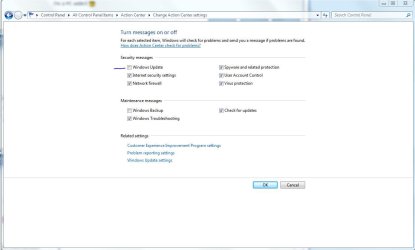
You can go to Action Center and change the way Windows notifies you of just about everything including WU. In the Action Center I believe it's in the upper left of the window.

Hope this helps
My System SpecsSystem Spec
02 Feb 2010   #3

Windows 7 64 bit Enterprise Edition


No it is not there.
There is only "Give me detailed notification when updates are available" and I uncheck that.

Nothing saying "Don't notify about those updates" like in XP.
My System SpecsSystem Spec
.


02 Feb 2010   #4

win7 ultimate / virtual box
weston super mare, UK


Quote   Quote: Originally Posted by ssd532 View Post
Hi,

In XP if we reject some update(Malicious Software Tool), then there was a dialog box saying do not notify about this updates later.

But in windows 7 I am not observing any of this dialog box and the rejected updates keep flashing daily.

Is there any solution to stop this?

Thanks.
right click the update and select "hide"
My System SpecsSystem Spec
02 Feb 2010   #5

Windows 7 Ultimate x64 SP1


Quote   Quote: Originally Posted by ssd532 View Post
No it is not there.
There is only "Give me detailed notification when updates are available" and I uncheck that.

Nothing saying "Don't notify about those updates" like in XP.

I believe nate42nd is talking about this setting in the Action Center, not in Windows Update.

Windows updates notification keeps flashing-capture.jpg
My System SpecsSystem Spec
02 Feb 2010   #6

win7 ultimate / virtual box
weston super mare, UK


Quote   Quote: Originally Posted by Airbot View Post
Quote   Quote: Originally Posted by ssd532 View Post
No it is not there.
There is only "Give me detailed notification when updates are available" and I uncheck that.

Nothing saying "Don't notify about those updates" like in XP.

I believe nate42nd is talking about this setting in the Action Center, not in Windows Update.

Attachment 51660
this was his origonal question
Quote   Quote: Originally Posted by ssd532 View Post
Hi,

In XP if we reject some update(Malicious Software Tool), then there was a dialog box saying do not notify about this updates later.

But in windows 7 I am not observing any of this dialog box and the rejected updates keep flashing daily.

Is there any solution to stop this?

Thanks.
so i think he was talking about specific update notification not all , but hey now he knows both
My System SpecsSystem Spec
02 Feb 2010   #7

Windows 7 64 bit Enterprise Edition


Quote   Quote: Originally Posted by Airbot View Post
Quote   Quote: Originally Posted by ssd532 View Post
No it is not there.
There is only "Give me detailed notification when updates are available" and I uncheck that.

Nothing saying "Don't notify about those updates" like in XP.

I believe nate42nd is talking about this setting in the Action Center, not in Windows Update.

Attachment 51660
This will affect all the updates.

I need to hide the updates that I rejected to download and install.
Like Malicious Software Removal tool. I don't select it to download, but still it is flashing every time. This is irritating.
My System SpecsSystem Spec
02 Feb 2010   #8

Windows 7 Professional x64
Trinidad and Tobago


Quote   Quote: Originally Posted by ickymay View Post

right click the update and select "hide"

^^^
My System SpecsSystem Spec
02 Feb 2010   #9

Windows 7 64 bit Enterprise Edition


Lets take it this way: Suppose I don't want to download Malicious Software removal tool, So I unchecked it in the list of updates and downloaded rest of updates. Now how can I permanently remove the notification of that update. because it stays in the list. It also applies on that language packages. they are still in the notification list.
I always uncheck those.
My System SpecsSystem Spec
02 Feb 2010   #10

Windows 7 Professional x64
Trinidad and Tobago


Quote   Quote: Originally Posted by TGSoldier View Post
Quote   Quote: Originally Posted by ickymay View Post

right click the update and select "hide"

^^^
Wtf..

^^^^^
My System SpecsSystem Spec
Reply

 Windows updates notification keeps flashing problems?


Thread Tools


Similar help and support threads for: Windows updates notification keeps flashing
Thread Forum
Windows 7 updates same for updates every time it checks for updates Windows Updates & Activation
Solved Flashing taskbar/windows General Discussion
Solved updates notification Windows Updates & Activation
windows flashing.... ???? General Discussion


All times are GMT -5. The time now is 09:19 PM.


Seven Forums Android App Seven Forums IOS App Follow us on Facebook

Windows 7 Forums is an independent web site and has not been authorized,
sponsored, or otherwise approved by Microsoft Corporation.
"Windows 7" and related materials are trademarks of Microsoft Corp.
© Designer Media Ltd
  

1 2 3 4 5 6 7 8 9 10 11 12 13 14 15 16 17 18 19 20 21 22 23 24 25 26 27 28 29 30 31 32