
Splatercash
New member
- Local time
- 12:56 PM
- Messages
- 4
Ok, this might take some explaining as I'm not that technically minded.
I bought an all singing all dancing computer in Nov 09 complete with Windows 7 Professional 64-bit. A week after I got my computer Windows Update intalled some essential updates. Immediately after the restart I noticed that my Logitech G15 keyboard display was cycling through the functions for no obvious reason. Over the next few days more and more strange activity occurred until it got to the point that Window 7 locked up and didn't work at all. Even Task Manger would freeze, yet programs that were open (word, mozilla, games, etc) would still run fine.
A friend who is technically minded spent ages trying to roll back drivers, etc to figure out what was wrong. System restore failed as did all other attempts. In the end, as the comp was only a week old, I cut my loses and reinstalled Windows 7 onto a freshly formatted drive.
Fast forward trouble free computing until today....
So, I get up and windows wants to install another update. I've updated several times over the last few months with no problems so I tell it to install the essential stuff. I'm so paranoid that I never let it install things without my permission and never install optional stuff. After the restart the G15 display is playing up....and I already know!
Sure enough, the first thing to die is Karspersky which thinks all of it's databases are obsolete and turns itself off. Rather than waiting for Windows to slowly die like the last time I tried a system restore. This failed to fix the problem.
Eventually I resorted to my back up plan which I put in place after the first failure in November. Basically I have 3 hard drives: an SSD c:drive and two 1TB data drives. I use one of those drives solely as a back up of the other two and it takes a complete back up and system image every week.
I booted from my Windows 7 disk formatted the other two drives and installed the computer back to exactly how it was when it last backed up at the weekend. This resolved the problem.
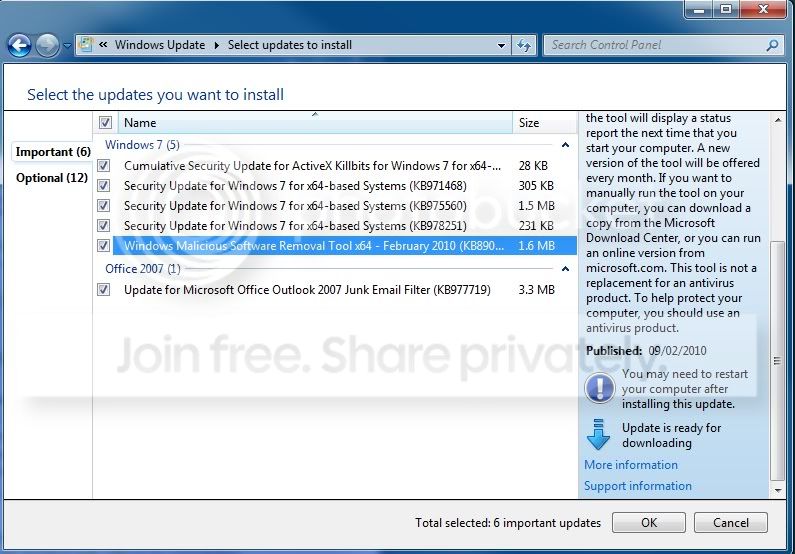
However, windows update is now pestering me to install the updates shown in the picture below. I obviously don't want to do that because it absolutely kills my computer (I can't stress how utterly unusable it became that last time around. Strangest crash I've ever seen....it even got the point that 'safe mode' wouldn't work!!). However, I've paid good money for a genuine copy of Win 7 despite a perfect cracked copy being available to me at the time. It seems crazy to have done that and to not use the update facilities?
Does anyone have any clue what is doing on? Also, why do MS release essential updates that do so much damange?
FWIW I was fairly certain it was the malicious software removal tool that caused the problems in November and is comes as little surprise that the Feb edition of that tool was in this mornings updates.....is it the cause?
I bought an all singing all dancing computer in Nov 09 complete with Windows 7 Professional 64-bit. A week after I got my computer Windows Update intalled some essential updates. Immediately after the restart I noticed that my Logitech G15 keyboard display was cycling through the functions for no obvious reason. Over the next few days more and more strange activity occurred until it got to the point that Window 7 locked up and didn't work at all. Even Task Manger would freeze, yet programs that were open (word, mozilla, games, etc) would still run fine.
A friend who is technically minded spent ages trying to roll back drivers, etc to figure out what was wrong. System restore failed as did all other attempts. In the end, as the comp was only a week old, I cut my loses and reinstalled Windows 7 onto a freshly formatted drive.
Fast forward trouble free computing until today....
So, I get up and windows wants to install another update. I've updated several times over the last few months with no problems so I tell it to install the essential stuff. I'm so paranoid that I never let it install things without my permission and never install optional stuff. After the restart the G15 display is playing up....and I already know!
Sure enough, the first thing to die is Karspersky which thinks all of it's databases are obsolete and turns itself off. Rather than waiting for Windows to slowly die like the last time I tried a system restore. This failed to fix the problem.
Eventually I resorted to my back up plan which I put in place after the first failure in November. Basically I have 3 hard drives: an SSD c:drive and two 1TB data drives. I use one of those drives solely as a back up of the other two and it takes a complete back up and system image every week.
I booted from my Windows 7 disk formatted the other two drives and installed the computer back to exactly how it was when it last backed up at the weekend. This resolved the problem.
However, windows update is now pestering me to install the updates shown in the picture below. I obviously don't want to do that because it absolutely kills my computer (I can't stress how utterly unusable it became that last time around. Strangest crash I've ever seen....it even got the point that 'safe mode' wouldn't work!!). However, I've paid good money for a genuine copy of Win 7 despite a perfect cracked copy being available to me at the time. It seems crazy to have done that and to not use the update facilities?
Does anyone have any clue what is doing on? Also, why do MS release essential updates that do so much damange?
FWIW I was fairly certain it was the malicious software removal tool that caused the problems in November and is comes as little surprise that the Feb edition of that tool was in this mornings updates.....is it the cause?
My Computer
At a glance
Windows 7 Professional
- OS
- Windows 7 Professional


 though even this may be a false positive).


