Windows 7 Forums Search
Welcome to Windows 7 Forums. Our forum is dedicated to helping you find solutions with any problems, errors or issues you are experiencing with Windows 7. The Windows 7 forum also covers news and updates and has an extensive Windows 7 tutorial section that covers a wide range of tips and tricks.


Windows 7 - Two new updates aren't installing ?

 
04-05-2010   #1


Windows 7 x64


Two new updates aren't installing ?

Hi fellows,

I have Windows 7 x64 build 7600.
Today it notifies that there are two new updates for Windows 7.


I pressed Install Updates .
The updates installed successfully, but I receive the notification yet!


What should I have done to fix it ?
Thanks

My System SpecsSystem Spec
04-05-2010   #2


Windows 7 Pro 64 SP1


Do they show up in " Installed Updates" ? Try the check for updates button.
Maybe a restart will clear that up.
My System SpecsSystem Spec
04-05-2010   #3


Windows 7 x64


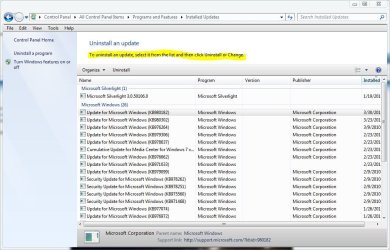
As you can see in the below image they're installed several times !!!


Also, I restart my laptop several times, but the problem haven't solved yet !
Any ideas ?
My System SpecsSystem Spec
.


04-05-2010   #4


Windows 7 Pro 64 SP1


Here's something I found that's worth looking at,
Update Keep auto downloading and installing the same update.
You could also right click on those and choose "Hide Update".

Do they show up in programs and features too?
My System SpecsSystem Spec
04-05-2010   #5


Windows 7 x64


I've tried `Update Keep auto downloading and installing the same update.`

It doesn't work.
I'm using "Hide Update" for the nonce
My System SpecsSystem Spec
04-05-2010   #6


Windows 7 Pro 64 SP1


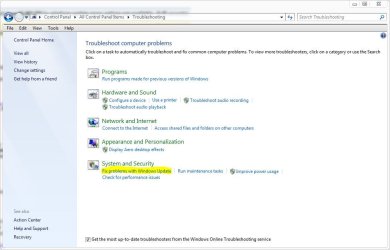
This might be worth a try, See if the troubleshooter in the control panel can fix this.
Attached Thumbnails
Two new updates aren't installing ?-update.jpg  
My System SpecsSystem Spec
04-05-2010   #7


Windows 7 x64


I've done it according to the instructions.
At last the result was : Troubleshooting couldn't identify the problem
My System SpecsSystem Spec
04-05-2010   #8


Windows 7 x64 pro/ Windows 7 x86 Pro/ XP SP3 x86


Hello mdsoft,

This seems to be a known problem. The solution seems to be to uninstall all the instances of these updates from Add/remove programs, then download the standalone package installers for each and manually install the updates.
My System SpecsSystem Spec
04-05-2010   #9


Windows 7 Pro 64 SP1


Well I'm trying to understand this one because it says it's for 2000-vista,
Download details: MSXML 4.0 Service Pack 2 (KB954430)

This one does say it's for 7 along with a few others,
Download details: MSXML 4.0 Service Pack 2 (KB973688)

but I can't seem to find out why they want to keep installing if they are already there, I'll keep looking though.

Edit: Thanks Bill2, That helps.
@mdsoft- These are the direct download links I posted so you can follow Bill2's suggestion.

Last edited by derekimo; 04-05-2010 at 02:16 PM.. Reason: saw Bill2's post above
My System SpecsSystem Spec
04-05-2010   #10


Windows 7 x64


Quote   Quote: Originally Posted by Bill2 View Post
Hello mdsoft,

This seems to be a known problem. The solution seems to be to uninstall all the instances of these updates from Add/remove programs, then download the standalone package installers for each and manually install the updates.
Thanks a lot Bill2.
I couldn't find the updates to uninstall them.
How should I find them in Add/Remove programs ?
My System SpecsSystem Spec
Reply

 Two new updates aren't installing ? problems?


Thread Tools


Similar Threads for: Two new updates aren't installing ?
Thread Forum
Installing Updates and Installing features part of windows setup menu Installation & Setup
issues after installing updates Windows Updates & Activation
updates not installing Windows Updates & Activation
windows updates not installing Drivers
Why aren't we getting some important Updates General Discussion


All times are GMT -5. The time now is 02:52 AM.


Windows 7 Forums is an independent web site and has not been authorized,
sponsored, or otherwise approved by Microsoft Corporation.
"Windows 7" and related materials are trademarks of Microsoft Corp.
© Designer Media Ltd
  

1 2 3 4 5 6 7 8 9 10 11 12 13 14 15 16 17 18 19 20 21 22 23 24 25 26 27 28 29 30